
The Logitech G PRO Flight Yoke System is my best overall flight simulator yoke pick for PC pilots who want a yoke and separate throttle quadrant. For broader platform support and an integrated control setup, the Turtle Beach VelocityOne Flight stands out, while the Honeycomb Alpha Flight Controls Yoke & Switch Panel suits buyers who want cockpit-style switches alongside the yoke. The main tradeoffs are platform compatibility, included controls, desk space, and how closely the layout matches the aircraft you fly. Some options bundle pedals or a game code, while others focus on the yoke and leave room to choose accessories separately. Continue reading for the full breakdown and a guide to matching a yoke to your simulator, platform, and flying style.

Get the latest gadgets delivered free with Prime
- Fast, free delivery on millions of items
- Prime Video, Amazon Music and more included
- Member-only deals all year
Complete the kit



Key Takeaways
- Logitech G PRO earns the overall pick for pairing a dedicated yoke with a throttle quadrant and extensive programmable controls; its PC focus and larger setup may not suit every desk or platform.
- Turtle Beach VelocityOne Flight is the standout for buyers seeking broad Xbox and PC compatibility in one control system, rather than assembling a setup from separate peripherals.
- Honeycomb Alpha Flight Controls Yoke & Switch Panel emphasizes cockpit-style switches, while the Alpha LITE offers a more focused yoke option; choosing between them depends on how much panel control matters.
- Thrustmaster’s Boeing Edition options fit buyers drawn to Boeing-style controls, but the Flight Pack and the yoke-plus-game bundle serve different needs: bundled hardware versus a bundled simulator code.
- Bundles do not all solve the same problem: Logitech’s rudder pedal bundle adds directional control hardware, while single-yoke options can make more sense when a buyer already owns pedals or wants to choose them separately.



More Details on Our Top Picks
Logitech G PRO Flight Yoke System, Professional Simulation Yoke and Throttle Quadrant, 3 Modes, 75 Programmable Controls, Configurable Throttle Knobs, Steel Shaft, USB, PC – Black (Renewed)
The renewed Logitech G PRO Flight Yoke System suits PC sim pilots who want a broad set of assignable controls without moving to a more elaborate system. Its steel shaft, 14 physical buttons, POV hat, and three-position mode switch support a range of cockpit commands, while the product listing cites 75 programmable control options. Compared with the Honeycomb Alpha LITE, this Logitech setup puts more emphasis on button access and configuration than on a compact, entry-level approach. The included clamp helps secure it to a desk, but the yoke and throttle quadrant still need room for setup. The main compromise is its renewed condition: buyers may face less certainty about long-term durability or warranty coverage than with a new unit. It is also limited to PC.
Pros:- Steel-shaft yoke provides a substantial control feel for flight simulation.
- 14 physical buttons, a POV hat, and a three-position mode switch offer flexible assignments.
- Throttle quadrant adds engine controls without requiring a separate purchase.
- Flexible mounting clamp supports secure desk placement.
Cons:- Renewed condition can mean less certainty about warranty coverage and long-term durability.
- Yoke and throttle quadrant require dedicated setup space.
- PC-only compatibility excludes Xbox users.
Best for: PC flight-sim players who want many programmable controls, a throttle quadrant, and a desk-mounted yoke in one system.
Not ideal for: Xbox or console pilots, buyers who need a new-product warranty, and anyone short on desk space.
- Controller type:Yoke
- Compatibility:PC
- Connectivity:USB
- Physical buttons:14
- Programmable controls:75 options listed
- Mode switch:3-position
- Power source:Corded electric
- Color:Black
Our verdict“Choose this renewed Logitech system if you fly on PC and value programmable controls more than a new-unit warranty or a compact setup.”
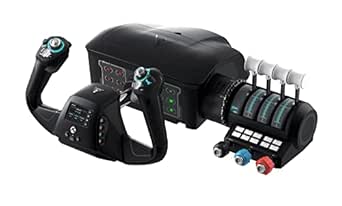
Turtle Beach VelocityOne Flight Universal Control System for Xbox & PC
The Turtle Beach VelocityOne Flight is the most self-contained choice here for pilots who want one control system across Xbox and Windows PC. Its 180° yoke is paired with a modular throttle quadrant, rudder and brake controls, and a full-color flight management display, reducing the need to assemble a cockpit from separate components. Compared with the Logitech G PRO Flight Yoke System, its standout advantage is broad platform support and more integrated flight controls; Logitech is a simpler PC-focused alternative. The extra functions also bring more setup and configuration work, which can be a hurdle for newcomers who mainly want basic yoke input. This system makes the most sense for committed sim pilots who will use its display, customizable levers, and integrated controls, rather than casual players seeking a minimal desk setup.
Pros:- Works with Xbox Series X|S, Xbox One, and Windows 10 and 11 PCs.
- Combines a 180° yoke with a modular throttle quadrant.
- Integrated rudder and brake controls reduce the need for separate peripherals.
- Full-color flight management display and status panel provide onboard configuration information.
Cons:- The many controls and configuration options can make setup challenging for beginners.
- Its all-in-one feature set may be unnecessary for casual or basic yoke use.
- Integrated design offers less reason to mix and match separate cockpit components.
Best for: Xbox Series X|S, Xbox One, or Windows PC pilots who want an integrated yoke, throttle, rudder, brake controls, and configuration display.
Not ideal for: Casual beginners who want simple plug-in controls, or PC-only buyers who do not need the added display and integrated control features.
- Compatibility:Xbox Series X|S, Xbox One, Windows 10 and 11 PCs
- Yoke rotation:180°
- Analog axes:12
- Switches:2 POV switches and 2 four-way HAT switches
- Throttle quadrant:Modular, with customizable levers and buttons
- Integrated controls:Rudder and brake controls
- Display:Full-color flight management display
- Additional connection:Headset audio jack
Our verdict“Pick the VelocityOne if you want a feature-rich flight control system that works across Xbox and PC and are willing to spend time configuring it.”
Honeycomb Alpha LITE Flight Yoke Controller
The Honeycomb Alpha LITE is the straightforward pick for a new flight-sim pilot who wants a dedicated yoke without starting with a large suite of cockpit controls. Its 180° rotation provides a broad range of movement, while four programmable buttons leave room for useful assignments without the control density of the Logitech G PRO system. That simpler layout makes it easier to approach, though it also means fewer built-in commands and no throttle quadrant listed in the supplied details. Compared with the Turtle Beach VelocityOne Flight, the Alpha LITE is a more focused yoke rather than an all-in-one setup with integrated rudder, brakes, and a display. It is listed as compatible with Microsoft Flight Simulator 2020 and 2024, so buyers using other platforms or looking for advanced cockpit controls should check compatibility and consider a more expandable system.
Pros:- 180° yoke rotation supports a wide range of steering input.
- Four programmable buttons allow basic customization without an extensive control layout.
- Listed compatibility covers Microsoft Flight Simulator 2020 and 2024.
- Sturdy construction is suited to a dedicated desk setup.
Cons:- Four programmable buttons offer fewer direct control assignments than the Logitech G PRO system.
- No throttle quadrant is listed, so buyers may need separate throttle hardware.
- Compatibility details are limited to Microsoft Flight Simulator 2020 and 2024.
Best for: New Microsoft Flight Simulator 2020 or 2024 players who want a sturdy, focused yoke with a manageable number of programmable buttons.
Not ideal for: Experienced sim pilots who need a throttle quadrant or extensive onboard controls, and players using platforms not listed as compatible.
- Yoke rotation:180°
- Programmable buttons:4
- Dimensions:16.34 × 11.14 × 7.8 inches
- Weight:9.92 pounds
- Compatibility:Microsoft Flight Simulator 2020 and 2024
- Material:High-quality materials and precision components
Our verdict“Choose the Alpha LITE for a focused first yoke in Microsoft Flight Simulator, but look elsewhere if you need a bundled throttle or wider platform support.”
Thrustmaster TCA Yoke Boeing Edition + Microsoft Flight Simulator 2024 Standard [Digital Code]
” image=”https://m.media-amazon.com/images/I/415k6oWLuRL._SX342_SY445_QL70_FMwebp_.jpg” link=”0″]Best Boeing-Themed Simulator Bundle
View on AmazonThis Thrustmaster TCA Yoke Boeing Edition bundle pairs a Boeing 787-inspired yoke with Microsoft Flight Simulator 2024 Standard, making it a convenient starting point for buyers who need both controls and software. Its pendular mechanism and adjustable springs are intended to shape the yoke’s resistance, while the metal internal structure gives the control unit a more substantial build than an entry-level, yoke-only option such as the Honeycomb Alpha LITE. The bundled simulator also supplies a broad selection of aircraft and handcrafted airports, so buyers do not need to source a flight sim separately. The tradeoff is a more specific Boeing-style design and a setup that requires calibration; it is less flexible as a simple universal control purchase. Compatibility is listed for Xbox Series X|S and Windows PC, not other platforms.
Pros:- Boeing 787-inspired yoke design offers a focused aircraft-style control layout.
- Pendular mechanism with adjustable springs lets buyers tune resistance.
- Metal internal structure supports a more substantial yoke build.
- Includes Microsoft Flight Simulator 2024 Standard with over 65 aircraft and 150 handcrafted airports.
Cons:- Setup and calibration may take extra work before the yoke feels right.
- The included simulator adds little value to buyers who already own it.
- Listed platform support is limited to Xbox Series X|S and Windows PC.
Best for: Xbox Series X|S or Windows PC buyers who want a Boeing-inspired yoke and Microsoft Flight Simulator 2024 in one bundle.
Not ideal for: Pilots who already own Microsoft Flight Simulator 2024, use another platform, or prefer a simpler yoke without a bundled simulator.
- Platforms:Xbox Series X|S and Windows PC
- Included hardware:Thrustmaster TCA Yoke Boeing Edition
- Included software:Microsoft Flight Simulator 2024 Standard digital code
- Yoke mechanism:Pendular mechanism with adjustable springs
- Internal structure:100% metal
- Aircraft included:Over 65
- Handcrafted airports:150
- Product type:Flight simulator bundle
Our verdict“Choose this bundle if you want a Boeing-inspired yoke and the 2024 simulator together on Xbox Series X|S or Windows PC.”
Logitech G Pro Flight Yoke System + Pro Flight Rudder Pedals Bundle
For buyers who want coordinated foot and hand inputs, this Logitech G Pro Flight bundle adds rudder pedals to a yoke and throttle quadrant rather than asking pilots to build that setup piece by piece. The pedals’ self-centering motion and adjustable toe brakes support rudder steering and braking, giving this package a more complete control scheme than the renewed Logitech yoke system listed separately. Its programmable controls and USB connection suit desktop flight simulation, though the supplied compatibility details specify Windows rather than the wider Xbox support of the Turtle Beach VelocityOne Flight. The tradeoff is space: pedals need room on the floor as well as desk space for the yoke and quadrant. Buyers should also expect some configuration work to make full use of the programmable controls and axes.
Pros:- Bundle includes yoke, throttle quadrant, and rudder pedals for coordinated flight input.
- Pedals provide self-centering motion and adjustable toe brakes.
- Programmable controls and axes allow assignment to individual simulator functions.
- Modular design is listed as compatible with other Saitek flight-sim hardware.
Cons:- Pedals and yoke require both floor and desk space.
- USB setup and control customization can add work for new sim pilots.
- Compatibility details list Windows rather than Xbox support.
Best for: Windows desktop pilots ready to use separate rudder pedals and toe brakes alongside a yoke and throttle quadrant.
Not ideal for: Console pilots, users with limited floor or desk space, and beginners who want a simpler control setup with little configuration.
- Compatible devices:Windows
- Included controller types:Pedals, throttle quadrant, and yoke
- Connectivity:USB
- Physical buttons:14
- Pedal features:Self-centering motion and adjustable toe brakes
- Hardware platform:Desktop
- Package quantity:1
- Additional feature:Ergonomic controls
Our verdict“Pick this Logitech bundle if you fly on Windows and want rudder pedals and toe brakes included with your yoke and throttle controls.”
Thrustmaster TCA Sky Yoke – Yoke & Throttle for PS5, PC, iOS, Android
I’d pick the TCA Sky Yoke for a buyer who wants a yoke setup that can work across supported platforms, rather than a Windows-only system. Its 7 axes, throttle, trim wheel, rudder controls, and 24 action buttons put many core flight inputs in one setup, while magnetic movement is intended to deliver smooth control. Compared with the Logitech G PRO Flight Yoke System, this model’s standout is its stated broader platform support and integrated controls, not a larger programmable-button setup. Dual-control support also gives it a useful role for instruction or co-piloting. The tradeoff is that the controls may feel like a lot for a first-time simmer, and the optional TCA SKY QUADRANT is a separate purchase. Check game and device compatibility before choosing it, since support varies by platform.
Pros:- Combines yoke, throttle, trim wheel, rudder controls, and 24 action buttons
- Magnetic technology is designed for smooth, precise movement
- Supports dual control for teaching or co-piloting
- Listed for use with multiple platform types
Cons:- The optional TCA SKY QUADRANT requires a separate purchase
- The range of controls may be complicated for new flight sim users
- Compatibility depends on the specific platform and simulator
Best for: Flight sim buyers who want an all-in-one yoke and throttle setup with support for compatible PS5, PC, iOS, or Android configurations.
Not ideal for: Beginners seeking a simple entry-level control, or buyers who need guaranteed compatibility with a specific simulator or device without checking its support.
- Controller type:Joystick
- Connectivity:USB
- Compatible devices:PC, PlayStation 5
- Hardware platform:Desktop, gaming console
- Controls:7 axes, throttle, trim wheel, rudder controls, 24 action buttons
- Color:Black
Our verdict“Choose this if you want a feature-rich yoke setup with broad stated platform support, and are comfortable checking compatibility and learning a larger control set.”
Thrustmaster TCA Yoke & Quadrant Boeing Edition Flight Pack – Xbox & PC
The Boeing Edition Flight Pack is the more purpose-built choice for simmers drawn to the feel and layout of a Boeing 787 cockpit. Its officially licensed replica yoke and throttle quadrant, pendular motion, and 35 buttons make it a substantial control setup for compatible Xbox and Windows systems. Compared with the Thrustmaster TCA Sky Yoke, this pack centers on Boeing-style hardware and a dedicated quadrant, while the Sky Yoke emphasizes a wider range of listed platform types and integrated controls. The robust metal construction suits a permanent or frequent setup, but the listed dimensions and 5.4-pound weight call for desk space and mounting thought. Rudder pedals are sold separately, so buyers seeking full coordinated aircraft control need to budget for another component; the control layout may also be demanding for casual newcomers.
Pros:- Officially licensed Boeing 787 replica yoke and throttle quadrant
- Pendular yoke motion is designed to provide realistic control movement
- 35 buttons offer a broad set of cockpit inputs
- Metal construction is suited to a durable, dedicated setup
Cons:- Rudder pedals are sold separately
- Its size and weight require room for setup and storage
- The extensive controls may be challenging for beginners
Best for: Xbox Series X|S or Windows simmers who specifically want a Boeing-inspired yoke and throttle quadrant for a dedicated flight-sim setup.
Not ideal for: Casual players who want a compact, simple controller or buyers who need rudder pedals included in the same pack.
- Compatible devices:Windows, Xbox Series S, Xbox Series X
- Connectivity:USB
- Additional controls:35 buttons
- Dimensions:19 x 15 x 19 inches
- Weight:5.4 pounds
- Hardware platform:Desktop, gaming console, laptop
- Color:Black
Our verdict“Pick this pack if Boeing-style controls and a dedicated quadrant matter more to you than a compact setup or included rudder pedals.”
Logitech G PRO Flight Yoke System Professional Simulation – Black
I’d choose the Logitech G PRO Flight Yoke System when configurable controls matter more than a distinctive aircraft replica or broad platform support. Its 14 buttons, three modes, and configurable knobs give Windows users ways to map frequently used simulator functions to the yoke, while its modular design leaves room to tailor the setup. Compared with the Honeycomb Aeronautical Alpha Flight Controls, the Logitech emphasizes programmable inputs and modularity; the Honeycomb instead stands out for its integrated switch panel and stated PC and Mac compatibility. This Logitech system is listed for Windows only, and its full functionality requires a software download, so it is a less direct fit for Mac users or anyone seeking plug-and-play simplicity. At 6.2 pounds, it also calls for a sturdy, reasonably spacious mounting spot.
Pros:- 14 buttons, three modes, and configurable knobs support customized controls
- Modular design allows a tailored flight-sim setup
- Designed for precise yoke control
- Two-year warranty is listed in the product data
Cons:- Compatible devices are limited to Windows
- A software download is required for full functionality
- At 6.2 pounds, it is relatively heavy and needs a stable mounting surface
Best for: Windows flight sim users who want programmable buttons and configurable knobs to assign frequently used cockpit functions.
Not ideal for: Mac users, buyers who want an integrated switch panel, or anyone who prefers a lighter yoke with minimal software setup.
- Controller type:Yoke
- Connectivity:USB
- Compatible devices:Windows
- Controls:14 buttons, 3 modes, configurable knobs
- Power source:Corded electric
- Weight:6.2 pounds
- Dimensions:18.9 x 15.8 x 9.1 inches
- Warranty:2 years
Our verdict“Choose the Logitech if you use Windows and value configurable inputs more than Mac support or an integrated switch panel.”
Honeycomb Aeronautical Alpha Flight Controls Yoke & Switch Panel
The Honeycomb Aeronautical Alpha is a strong fit for buyers who want a more complete cockpit feel from the yoke itself, especially on PC or Mac. Its 180-degree rotation, steel shaft, and dual linear ball bearings are designed for smooth movement, while the integrated switch panel adds master, alternator, avionics, and ignition controls without requiring a separate panel. That makes it a different proposition from the Logitech G PRO Flight Yoke System, which focuses more on configurable knobs and modes and is listed for Windows. Honeycomb also offers clamp or suction-pad mounting options, but its 4.9 kg weight means the desk still needs to support a substantial device. It connects by USB-C rather than wirelessly, so buyers should check their available ports and plan for a wired setup.
Pros:- 180-degree rotation with a steel shaft and dual linear ball bearings
- Integrated switch panel includes key aircraft power and ignition controls
- Listed compatibility includes PC, Windows, and macOS
- Offers heavy-duty clamps or a high-strength suction-pad mounting option
Cons:- Its 4.9 kg weight calls for sturdy desk support
- USB-C wired connection does not offer wireless operation
- The integrated panel may be less useful to buyers seeking a simpler yoke-only setup
Best for: PC or Mac simmers who want a yoke with cockpit-style switches and a choice of clamp or suction-pad mounting.
Not ideal for: Buyers with a lightweight desk, no suitable USB-C connection, or a preference for wireless controls.
- Controller type:Yoke
- Connectivity:USB-C
- Compatibility:PC, Windows, macOS
- Rotation:180 degrees
- Buttons:28
- Weight:4.9 kg
- Dimensions:18.5 x 13.3 x 10.1 inches
- Power source:Corded electric
Our verdict“Choose the Honeycomb Alpha if an integrated cockpit switch panel and PC or Mac support are higher priorities than a lighter or wireless yoke.”

How We Picked
I compared these nine options as flight simulator yokes, not as general gaming controllers. The main criteria were stated platform compatibility, control layout, included throttle or switch hardware, expansion needs, and how naturally each product could fit a typical desk-based simulator setup. I also weighed whether a bundle adds useful controls or simply adds items a buyer may not need.
The ranking favors versatility and a clear role for the intended buyer. The Logitech G PRO leads for its yoke-and-quadrant combination and configurable controls; the VelocityOne ranks highly for its Xbox and PC reach, while Honeycomb and Thrustmaster options rise for particular cockpit layouts and platform needs. Bundles and renewed listings rank according to their specific tradeoffs, not on the assumption that more included items always make a better choice. Buyers should confirm current platform support, included accessories, and software requirements before ordering.
Factors to Consider When Choosing Flight Simulator Yoke
A yoke purchase affects more than how you steer: it shapes your desk layout, accessory plan, and choice of aircraft. I’d settle the compatibility and control-layout questions before comparing individual feature lists.
Match the yoke to your platform and simulator
Compatibility is the first filter because a familiar-looking connector does not guarantee support across PC, Xbox, or PlayStation. Check the exact product version and the simulator you plan to use, including whether a feature depends on specific software or a console-compatible edition. A PC-oriented yoke may offer flexible configuration but still be the wrong purchase for a console-only setup. Bundles with digital game codes can also have regional or platform conditions that differ from the hardware. Avoid choosing based on a product family name alone; verify the listing’s precise model and supported systems.
Decide how much of the cockpit you want in one purchase
A yoke-only setup leaves you free to select a throttle quadrant, pedals, or switch panel later. An integrated system or hardware bundle can reduce the number of separate purchases, but may duplicate controls you already own. Before paying for a bundle, list the controls your simulator sessions actually use and compare that list with what is included. A throttle quadrant is not the same as rudder pedals: they serve different aircraft-control tasks. Buyers new to flight simulation may benefit from a coordinated set, while experienced sim pilots often gain more from choosing each component deliberately.
Choose a layout that fits the aircraft you fly
Control shape and switch placement can influence how natural an aircraft feels to operate. Boeing-themed layouts may appeal to pilots who primarily fly Boeing aircraft, while a more general yoke can suit a varied virtual hangar. A switch panel adds cockpit functions within reach, but only helps if its controls fit your simulator and preferred workflow. Do not assume that a branded aircraft layout will automatically improve every flying session. If you switch between aircraft types often, prioritize adaptable controls over a layout chosen for one favorite plane.
Measure your desk and plan how the controls will mount
Yokes, quadrants, panels, and pedals each claim space, and a complete setup can crowd a desk quickly. Measure the usable surface and check how the unit attaches before ordering, especially if you share the desk or need to store controls between sessions. Also plan for where the throttle quadrant and any switch panel will sit relative to the yoke. A large control system can improve reach and organization when it has a dedicated home, but become inconvenient when it must be moved every time. Compactness is a practical feature, not just a matter of appearance.
Think ahead about pedals and control expansion
Rudder pedals add a separate axis for ground steering and coordinated turns, while a yoke’s twist or other built-in input may cover basic control for some setups. Decide whether you want to start with the core yoke and expand later or buy a pedal bundle from the outset. Check that planned accessories work with the same platform and simulator, rather than assuming every USB peripheral will cooperate on every system. Buyers who fly aircraft that rely heavily on rudder input may value pedals sooner than casual users. Leaving room in the budget and desk plan for later additions can prevent a mismatched setup.
Compare value by useful controls, not bundle size
A large number of buttons or included accessories only adds value when those controls match your flying habits. Programmable inputs can reduce keyboard reach, but they also take time to map and maintain across aircraft or simulators. A bundled game code may be helpful for a new pilot and irrelevant to someone who already owns the simulator. Renewed hardware calls for extra attention to the listing’s condition, included parts, and applicable return terms. Compare the complete setup you would actually use, rather than treating the longest feature list as the strongest choice.
Frequently Asked Questions
Can I use the same flight simulator yoke on PC and Xbox?
Some models are marketed for both PC and Xbox, but support varies by product and simulator. The Turtle Beach VelocityOne and certain Thrustmaster Boeing bundles are specifically positioned for Xbox and PC, while other options in this roundup are primarily PC-focused. Check the exact model’s compatibility details and the game’s supported peripherals before buying. Also confirm whether every included control works on both platforms; support for the yoke does not always mean identical support for a quadrant or panel. If you plan to switch platforms, prioritize a model that names both systems explicitly.
Should I buy a yoke bundle with rudder pedals or add pedals later?
Choose a pedal bundle if you want a more complete control set from the start and have room to use it. Pedals provide rudder input and can make ground handling and coordinated control more natural, but they are a separate purchase commitment and need floor space. If you are unsure how often you will fly or already own compatible pedals, buying the yoke first keeps the setup simpler. Check compatibility for the full set rather than only the yoke. The Logitech bundle is relevant for buyers who want its yoke paired with pedals, while standalone models leave more choice over accessories.
Is a Boeing-style yoke a good choice if I fly several aircraft types?
It can be a good fit if Boeing aircraft make up most of your flying, since a themed control layout may feel more familiar for those sessions. If you regularly switch between Boeing, Airbus, general aviation, and other aircraft, a broadly configurable yoke may be easier to adapt. The surrounding controls matter too: a Boeing-themed quadrant or switch arrangement may be less useful if your preferred aircraft use a different workflow. Think about the aircraft you fly most, not only the one you want to try next. A specialized layout is most rewarding when it matches a sustained preference.
Do I need a throttle quadrant if my yoke already has throttle controls?
Not always. A yoke with integrated throttle controls can cover basic engine input, while a separate quadrant may provide a more dedicated layout and additional physical controls. The right choice depends on the aircraft you fly, how many engine controls you want to operate, and how much desk space you have. Buyers who want a detailed cockpit setup may appreciate a separate quadrant; casual pilots may prefer fewer components. Check which controls are physically included rather than assuming a product name that mentions throttle means it has a separate quadrant.
What should I check before buying a renewed flight simulator yoke?
Read the condition description and confirm that essential parts are included, particularly mounting hardware, cables, and any separate quadrant. A renewed listing may differ from a new package in what arrives, so compare its contents with the manufacturer’s standard configuration. Review the seller’s return and warranty terms, and check that the exact model supports your platform. If the unit depends on software or drivers, confirm those are still available for your operating system. A renewed option makes sense only when its condition and package contents suit your setup.
Conclusion
For the broadest balance of yoke control and configurable inputs, I recommend the Logitech G PRO Flight Yoke System as the best overall pick, especially for PC pilots who want a separate throttle quadrant. The Honeycomb Alpha LITE is a value-minded choice for buyers who want a focused yoke without prioritizing an expanded panel, while the Logitech G PRO bundle with rudder pedals is better for pilots building a more complete control setup. Beginners seeking one system with broad platform reach should look first at the Turtle Beach VelocityOne Flight, after confirming support for their console and simulator. For Boeing-focused flying, choose a Thrustmaster TCA Boeing Edition package based on whether you need a full hardware pack or a game code; for cockpit switches, the Honeycomb Alpha with Switch Panel is the more specific fit. My final choice would come down to platform compatibility first, then the controls and desk space I actually need.
Halloween Picks
halloween
As an affiliate, we earn on qualifying purchases.