

Portable external SSDs have replaced spinning hard drives for anyone who needs fast, pocketable storage, but the right pick depends on whether you prioritize raw speed, rugged durability, or price per gigabyte. The Samsung T9 1TB takes the top spot thanks to its USB 3.2 Gen 2×2 interface, which roughly doubles real-world transfer speeds compared with everything else here. The Samsung T7 Shield 2TB is the better choice if you need more capacity plus drop protection, while the SSK 1TB Portable SSD and Amazon Basics 1TB prove you can pay far less without giving up the 1,050MB/s speed class. The main tradeoffs in this category are speed versus compatibility (Gen 2×2 needs a matching port), capacity versus cost at the smaller SSK sizes, and rubberized rugged builds versus slimmer, cheaper shells. Read on for the full breakdown of all 14 drives.

Get the latest gadgets delivered free with Prime
- Fast, free delivery on millions of items
- Prime Video, Amazon Music and more included
- Member-only deals all year
Complete the kit



Key Takeaways
- The amazon.com/dp/B0874XN4D8?tag=lookatworth-20&ascsubtag=dc-674074″ target=”_blank” rel=”nofollow sponsored noopener”>Samsung T9 was the only Gen 2×2 drive in the lineup, and that alone put it in a different performance tier — but only for buyers whose computers actually have a compatible port.
- SSK dominates the budget end, yet its 128GB and 250GB models carry a poor price-per-gigabyte ratio; the SSK 1TB is where the brand’s value argument actually holds up.
- SanDisk‘s Extreme line and the Samsung T7 Shield are the picks for rough handling — IP65 or rubberized protection — while the slimmer SanDisk 800MB/s models trade durability for a lower price and lighter weight.
- Capacity doubling matters more than headline speed for most buyers: the jump from the Samsung T7 1TB to the T7 Shield 2TB changes how you use the drive, while the difference between 1,050MB/s and 800MB/s rarely does.
- The Amazon Basics 1TB undercut nearly every brand-name drive while matching the 1,050MB/s spec and adding IP65 sealing, making it the surprise value pick over better-known rivals.
| SanDisk 1TB Extreme Portable SSD |  | Best Overall | Capacity: 1TB | Transfer Speed: Up to 2000MB/s | Protection: IP65 water/dust resistance, 3m drop protection | VIEW LATEST PRICE | See Our Full Breakdown |
| SanDisk 2TB Extreme Portable SSD |  | Best for Capacity-Hungry Creators | Capacity: 2TB | Read Speed: 1050MB/s | Write Speed: 1000MB/s | VIEW LATEST PRICE | See Our Full Breakdown |
| Samsung T7 Portable SSD 1TB Titan Gray |  | Best Everyday Pick | Capacity: 1TB | Interface: USB 3.2 Gen 2 | Max Speed: 1050MB/s | VIEW LATEST PRICE | See Our Full Breakdown |
| SSK Portable SSD 500GB |  | Best Budget Entry Point | Capacity: 500GB (~465GB visible on Windows) | Max Read Speed: 1050MB/s | Max Write Speed: 1000MB/s | VIEW LATEST PRICE | See Our Full Breakdown |
| SanDisk 1TB Portable SSD, Black |  | Best for Gamers and Casual Use | Capacity: 1TB | Interface: USB 3.2 Gen 2, USB Type C | Read Speed: 800MB/s | VIEW LATEST PRICE | See Our Full Breakdown |
| Lexar ES3 1TB Portable SSD Silver |  | Best for Smartphone Creators | Capacity: 1TB | Interface: USB 3.2 Gen 2 | Read Speed: up to 1050MB/s | VIEW LATEST PRICE | See Our Full Breakdown |
| Samsung T9 Portable SSD 1TB |  | Best for Speed Demons | Capacity: 1TB | Transfer Speeds: up to 2,000 MB/s | Interface: USB 3.2 Gen 2×2 | VIEW LATEST PRICE | See Our Full Breakdown |
| SSK Portable SSD 250GB |  | Best Value for Light Storage | Capacity: 250GB (approx. 232GB on Windows) | Max Read Speed: 1,050MB/s | Max Write Speed: 1,000MB/s | VIEW LATEST PRICE | See Our Full Breakdown |
| SSK 128GB Portable SSD |  | Best Ultra-Budget Entry | Capacity: 128GB | Max Speed: 550MB/s | Interface: USB 3.2 Gen 2 | VIEW LATEST PRICE | See Our Full Breakdown |
| SanDisk 500GB Extreme Portable SSD | | Best for Rugged Outdoor Use | Capacity: 500GB | Transfer Speed: up to 2000MB/s | Protection: IP65 water/dust resistance, 3m drop protection | VIEW LATEST PRICE | See Our Full Breakdown |
| SSK Portable SSD 1TB External Solid State Drive USB-C Up to 1050MB/s |  | Best Budget Speed Pick | Capacity: 1TB | Max Read Speed: 1050MB/s | Max Write Speed: 1000MB/s | VIEW LATEST PRICE | See Our Full Breakdown |
| SanDisk 1TB Portable SSD Lavender, Up to 800MB/s, USB-C, USB 3.2 Gen 2 | 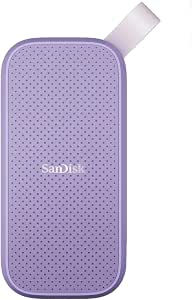 | Best for Everyday Carry | Capacity: 1TB | Read Speed: 800 MB/s | Interface: USB 3.2 Gen 2, USB Type C | VIEW LATEST PRICE | See Our Full Breakdown |
| Amazon Basics Portable External SSD, 1TB, USB 3.2 Gen 2, IP65 Water & Dust Resistant |  | Best Value Rugged Pick | Storage Capacity: 1TB | Transfer Speed: 2000MB/s | Interface: USB 3.2 Gen 2 | VIEW LATEST PRICE | See Our Full Breakdown |
| Samsung T7 Shield Portable SSD 2TB, USB 3.2 Gen 2, Up to 1,050 MB/s |  | Best Premium Pick | Capacity: 2TB | Transfer Speed: Up to 1,050 MB/s | USB Version: USB 3.2 Gen 2 | VIEW LATEST PRICE | See Our Full Breakdown |
| portable external SSD | Capacity | Interface |
|---|---|---|
| SanDisk 1TB Extreme Portable S | 1TB | — |
| SanDisk 2TB Extreme Portable S | 2TB | — |
| Samsung T7 Portable SSD 1TB Ti | 1TB | USB 3.2 Gen 2 |
| SSK Portable SSD 500GB | 500GB (~465GB visible on Windows) | — |
| SanDisk 1TB Portable SSD | 1TB | USB 3.2 Gen 2, USB Type C |
| Lexar ES3 1TB Portable SSD Sil | 1TB | USB 3.2 Gen 2 |
| Samsung T9 Portable SSD 1TB | 1TB | USB 3.2 Gen 2×2 |
| SSK Portable SSD 250GB | 250GB (approx. 232GB on Windows) | — |
| SSK 128GB Portable SSD | 128GB | USB 3.2 Gen 2 |
| SanDisk 500GB Extreme Portable | 500GB | — |
| SSK Portable SSD 1TB External | 1TB | USB-C, USB-A |
| SanDisk 1TB Portable SSD Laven | 1TB | USB 3.2 Gen 2, USB Type C |
| Amazon Basics Portable Externa | — | USB 3.2 Gen 2 |
| Samsung T7 Shield Portable SSD | 2TB | — |
More Details on Our Top Picks
SanDisk 1TB Extreme Portable SSD
The 2000MB/s transfer ceiling is what separates this model from the rest of the lineup. Most drives here — including the Samsung T7 and the SSK 500GB — top out around 1050MB/s, so this is the pick for anyone whose workflow involves moving massive video files or full project folders on a regular basis. The IP65 rating and 3-meter drop protection mean it shrugs off field conditions that would sideline a standard drive. That said, the speed advantage only materializes on a USB 3.2 Gen 2×2 port — plug it into an older laptop and it performs like the slower SanDisk 800MB/s model below. Write speeds also trail read speeds, and the encryption software requires a separate download rather than shipping on the drive.
Pros:- Class-leading transfer speeds up to 2000MB/s
- IP65 water and dust resistance plus 3m drop protection
- 256-bit AES encryption for sensitive files
- Compact enough for a camera bag pocket
Cons:- Full speed requires a USB 3.2 Gen 2×2 host port
- Write speeds lag behind the advertised read figure
- Encryption requires a software download
Best for: Photographers and video editors with modern USB 3.2 Gen 2×2 hardware who move large 4K or RAW files daily
Not ideal for: Owners of older laptops limited to USB 3.2 Gen 2 — they’d pay a premium for speed they can’t access and would be better served by the Samsung T7
- Capacity:1TB
- Transfer Speed:Up to 2000MB/s
- Protection:IP65 water/dust resistance, 3m drop protection
- Encryption:256-bit AES
- Connectivity:USB-C
- Ideal For:USB 3.2 Gen 2×2 hosts
Our verdict“The best pick if your computer can actually feed it — otherwise you’re buying speed you’ll never see.”
SanDisk 2TB Extreme Portable SSD
This is the workhorse choice of the roundup: double the storage of the 1TB Extreme with the same rugged build. Where the SanDisk 800MB/s Portable SSD asks you to trade speed for affordability, this model keeps 1050MB/s reads and 1000MB/s writes — a nearly symmetrical pairing that matters when you’re backing up a shoot, not just downloading files. The carabiner loop is a small detail that pays off for anyone clipping a drive to a backpack on location. Compared with the Samsung T7 Shield 2TB, the specs are close, but the SanDisk’s IP65 rating and wide operating temperature range give it the edge for outdoor work. The tradeoff is price per terabyte: smaller drives in this guide cost noticeably less, and reaching full speed still demands a compatible port.
Pros:- Balanced 1050MB/s read and 1000MB/s write speeds
- 2TB capacity for large media libraries
- IP65 sealing with 3m drop protection and wide temperature tolerance
- Carabiner loop for attachment on the go
Cons:- Premium price per terabyte compared with smaller drives
- Requires a USB 3.2 Gen 2 port for maximum throughput
Best for: Working professionals who need 2TB of dependable, weather-sealed storage for client work and offsite backups
Not ideal for: Casual users storing documents and photos — 2TB is overkill and a 500GB or 1TB drive does the job for less
- Capacity:2TB
- Read Speed:1050MB/s
- Write Speed:1000MB/s
- Drop Protection:3 meters
- Water and Dust Resistance:IP65
- Encryption:256-bit AES hardware encryption
- Operating Temperature:-20°C to 85°C
Our verdict“The drive to buy when your library has outgrown 1TB and your work takes you outdoors.”
Samsung T7 Portable SSD 1TB Titan Gray
The Samsung T7 earns its place by being the drive most people actually need: 1050MB/s over USB 3.2 Gen 2, a slim aluminum unibody, and broad compatibility that spans PCs, Android phones, and the iPhone 15 Pro. Unlike the SanDisk Extreme, it skips the IP65 sealing, so it’s better suited to a laptop bag than a hiking trail — but that simpler build keeps it slim and quiet. Compared with the SSK 500GB, the T7 doubles the capacity at a similar speed class and adds the reassurance of a major-brand track record. The aluminum shell handles 6-foot drops, which covers typical desk-and-commute mishaps. Buyers chasing higher capacity will face a steeper price curve, and Gen 1 ports will bottleneck the drive to a fraction of its potential.
Pros:- Consistent 1050MB/s read/write performance
- Premium aluminum unibody with shock resistance
- Works across PC, Android, and iPhone 15 Pro
- Slim profile slips into any pocket
Cons:- No water or dust resistance rating
- Higher capacities carry a premium price
- Limited to USB 3.2 Gen 2 speeds — no 2×2 headroom
Best for: Students, office workers, and everyday users who want a fast, dependable 1TB drive for backups and file transfers between devices
Not ideal for: Adventure photographers and field workers — no water or dust resistance means the SanDisk Extreme lineup is the safer bet
- Capacity:1TB
- Interface:USB 3.2 Gen 2
- Max Speed:1050MB/s
- Shock Resistance:Up to 6 feet
- Compatibility:PC, mobile phones, iPhone 15 Pro
- Design:Aluminum unibody, Titan Gray
Our verdict“The sensible default choice: fast, polished, and versatile, as long as your adventures stay indoors.”
SSK Portable SSD 500GB
This SSK model proves you don’t need a big-brand budget for 1050MB/s transfers — the same speed class as the Samsung T7 at a friendlier price and half the storage. The dual USB-C and USB-A connectivity is a genuine convenience the T7 doesn’t offer, letting you plug into older desktops without hunting for an adapter. Its aluminum casing doubles as a heatsink, keeping the drive from throttling during sustained transfers — something plastic-bodied budget drives struggle with. The compromises are real, though. Windows users will see roughly 465GB of usable space, durability ratings are undocumented compared with the SanDisk Extreme’s IP65 certification, and warranty details are thin. This is a drive for speed on a budget, not for rugged duty or critical archives.
Pros:- 1050MB/s read and 1000MB/s write at a budget price
- Both USB-C and USB-A cables supported for older devices
- Lightweight aluminum body with effective heat dissipation
- Tiny footprint at 2.6 x 1.5 inches and 36.6g
Cons:- Only about 465GB usable capacity on Windows
- No official drop, water, or dust resistance ratings
- Limited warranty and durability documentation
Best for: Budget-conscious users and students who want near-flagship transfer speeds for under a terabyte of storage
Not ideal for: Anyone storing irreplaceable data — unclear warranty terms and no durability certification make the Samsung T7 a safer long-term choice
- Capacity:500GB (~465GB visible on Windows)
- Max Read Speed:1050MB/s
- Max Write Speed:1000MB/s
- Connection:USB-C & USB-A, USB 3.2 Gen 2
- Weight:36.6g
- Dimensions:2.6 x 1.5 x 0.5 inches
- Material:Aluminum alloy
Our verdict“The smart money pick if you prioritize speed per dollar over capacity guarantees and brand backing.”
SanDisk 1TB Portable SSD, Black
At 800MB/s, this SanDisk sits at the bottom of the speed ladder here, but that’s not the whole story. Its standout trait is console compatibility — it’s rated for the PS5, Xbox Series X, and Series S, making it a practical expansion drive for game libraries where load-time gains over a hard drive are still dramatic. Against the faster SSK 500GB or Samsung T7, it gives up roughly a quarter of the transfer speed, which matters for big video projects but barely registers when copying games or documents. The rubber hook and 2-meter drop resistance add travel-friendly durability, and the price typically undercuts the faster models. Just know that write speeds fall well short of the read figure, so sustained backups of large folders will feel slower than the box suggests.
Pros:- Compatible with PS5, Xbox Series X, and Series S
- 2-meter drop resistance with rubber attachment hook
- Lower price than the faster drives in this lineup
- Full 1TB capacity for growing game libraries
Cons:- Slower 800MB/s ceiling than every other drive here
- Write speeds noticeably trail read speeds
- Performance varies with host device
Best for: Console gamers and everyday users who want affordable, durable 1TB expansion for a PS5 or Xbox
Not ideal for: Video editors and photographers moving multi-gigabyte files regularly — the 800MB/s ceiling and weaker write speeds make the T7 or Extreme worth the extra spend
- Capacity:1TB
- Interface:USB 3.2 Gen 2, USB Type C
- Read Speed:800MB/s
- Drop Resistance:Up to 2 meters
- Console Compatibility:PS5, Xbox Series X, Xbox Series S
- Design:Compact 2.5-inch form with rubber hook
Our verdict“A solid value pick for gaming and general storage when top-tier transfer speeds aren’t the priority.”
Lexar ES3 1TB Portable SSD Silver
The Lexar ES3 stands out for buyers who live off their phones as much as their laptop. At 42g and 10.5mm thick, it slips into a pocket, and its 1TB capacity at a mid-range price undercuts the Samsung T9 while still delivering the same 1050MB/s read ceiling over USB 3.2 Gen 2. Add 256-bit AES encryption built in, and it handles both creative work and sensitive files without extra software hassle. Compared with the SSK 250GB, the capacity jump alone justifies the price difference for anyone shooting 4K video. The tradeoffs are real, though: this version skips MagSafe, and iPhone 14 or older owners are simply out of luck. Speeds also depend heavily on the host device, so older laptops won’t see the full 1050MB/s.
Pros:- 1TB capacity at a competitive price point
- 256-bit AES hardware encryption included
- Works across phones, laptops, cameras, and consoles
- Light 42g build that genuinely disappears in a pocket
Cons:- No MagSafe support in this version
- Not compatible with iPhone 14 or older models
- Real-world speeds depend heavily on host hardware
Best for: iPhone 15/16/17 and Android users who want a full terabyte of pocketable, encrypted storage for photos and video
Not ideal for: iPhone 14 and older owners, since compatibility stops at newer models; MagSafe users will want a different version
- Capacity:1TB
- Interface:USB 3.2 Gen 2
- Read Speed:up to 1050MB/s
- Write Speed:up to 1000MB/s
- Weight:42g
- Thickness:10.5mm
- Compatibility:iPhone 17, Android, laptops, cameras, gaming consoles
Our verdict“A smart pick for smartphone-first creators who need a full terabyte with encryption, provided their device is new enough to support it.”
Samsung T9 Portable SSD 1TB
If raw throughput is the deciding factor, the Samsung T9 is the clear performance leader of this batch, doubling the Lexar ES3 with up to 2,000MB/s over USB 3.2 Gen 2×2. That bandwidth matters for video editors moving multi-gigabyte timelines between machines — a transfer that takes the Lexar thirty seconds can finish here in half the time. Dynamic Thermal Guard keeps sustained writes from throttling, which cheaper drives like the SSK 128GB can’t manage, and Samsung’s in-house components plus the Magician software suite give it a reliability edge most rivals can’t match. The catch: those speeds only appear on hosts that support Gen 2×2, and you must use the right cable. On a standard USB 3.2 Gen 2 port, it runs no faster than a T7 — at a noticeably higher price.
Pros:- Doubles the throughput of Gen 2 rivals at up to 2,000MB/s
- Effective thermal management sustains long transfers
- Samsung Magician software with firmware updates and encryption
- Broad compatibility including iPhone 15 Pro ProRes 4K capture
Cons:- Top speeds require a Gen 2×2 host and the correct cable
- Pricier than 1,050MB/s alternatives like the Lexar ES3
Best for: Video editors and creators with Gen 2×2-capable desktops or laptops who regularly move huge project files
Not ideal for: Buyers with older USB ports — without Gen 2×2 support, you’re paying a premium for speed you can’t access
- Capacity:1TB
- Transfer Speeds:up to 2,000 MB/s
- Interface:USB 3.2 Gen 2×2
- Compatibility:Desktop, camera, gaming console, iPhone 15 Pro Res 4K
- Thermal Management:Dynamic Thermal Guard
- Software:Samsung Magician, encryption support
Our verdict“The fastest drive here, but only worth the premium if your computer actually supports USB 3.2 Gen 2×2.”
SSK Portable SSD 250GB
The SSK 250GB makes sense for buyers who need speed but not volume. Its 1,050MB/s read rate matches the bigger Lexar ES3, yet it costs far less, and the aluminum chassis kept case temperatures around 105°F in testing conditions — noticeably cooler than plastic-bodied rivals. Dual USB-C and USB-A connectivity is a genuine convenience the SanDisk Extreme line lacks, letting it plug into older laptops without a dongle. Where it falls short is capacity and security: 250GB fills fast if you shoot 4K, Windows reports closer to 232GB, and there’s no encryption at all. Compared with the step-up SSK 500GB, the savings only pay off if your storage needs are genuinely modest.
Pros:- Full 1,050MB/s speed at a budget-friendly price
- Both USB-C and USB-A connectors included
- Aluminum case dissipates heat effectively
- Very light at 36.6g and genuinely pocket-sized
Cons:- 250GB fills quickly for media-heavy users (232GB usable on Windows)
- No encryption or security software of any kind
Best for: Students and casual users who want fast, dual-connector storage for documents, photos, and light video without paying for unused capacity
Not ideal for: Anyone storing sensitive files — there’s no encryption — or 4K video shooters who will outgrow 250GB quickly
- Capacity:250GB (approx. 232GB on Windows)
- Max Read Speed:1,050MB/s
- Max Write Speed:1,000MB/s
- Connection:USB-C & USB-A, USB 3.2 Gen 2
- Weight:36.6g
- Dimensions:2.6 x 1.5 x 0.5 inches
- Material:Aluminum alloy
- Power Consumption:Under 2.4 Watts
Our verdict“A great deal for light-duty, fast storage — just don’t expect room to grow or any data protection.”
SSK 128GB Portable SSD
For the absolute lowest cost of entry into SSD speed, the SSK 128GB gets the nod. At 550MB/s it’s roughly half the pace of its 250GB sibling, but that’s still several times faster than a mechanical portable hard drive, and the dual USB-C/USB-A connectors plus S.M.A.R.T. monitoring give it more polish than most drives at this price. The LED activity indicator is a small but practical touch during long file moves. The honest tradeoff is capacity: with Windows showing around 116GB, this is a rescue-drive or utility-drive purchase, not a media library. If you can stretch the budget, the SSK 250GB doubles storage and speed for a modest price increase — this one is for buyers where every dollar counts.
Pros:- Lowest-cost way to get true SSD speeds
- Dual USB-C and USB-A connectivity
- S.M.A.R.T. monitoring, TRIM, and SLC caching support
- LED activity indicator shows transfer status at a glance
Cons:- Only 128GB (about 116GB usable on Windows)
- 550MB/s is half the speed of similarly compact rivals
- Real-world performance varies with host device and OS
Best for: Budget-conscious buyers who need a fast bootable rescue drive, utility stick replacement, or small working drive for under the price of most SSDs
Not ideal for: Anyone backing up a laptop or storing a photo library — 116GB usable space runs out fast
- Capacity:128GB
- Max Speed:550MB/s
- Interface:USB 3.2 Gen 2
- Connectivity:USB-C and USB-A
- Technology:S.M.A.R.T., TRIM, SLC caching
Our verdict“A cheap, competent utility drive for small jobs — buy it for speed on a shoestring, not for capacity.”
SanDisk 500GB Extreme Portable SSD
Where the Samsung T9 prioritizes speed, the SanDisk Extreme 500GB prioritizes survival. Its IP65 water and dust resistance plus 3-meter drop protection make it the pick for photographers working beaches, trails, and job sites — none of the other drives in this batch can shrug off rain and drops like this. It still hits up to 2,000MB/s, so you’re not sacrificing much pace for durability, and 256-bit AES encryption protects client work on the road. Compared with the Lexar ES3, you trade a third of the capacity at a similar tier for far better physical resilience. Be aware the encryption requires a software download, write speeds trail read speeds, and the rated 2,000MB/s only materializes on Gen 2×2 hosts.
Pros:- IP65 water and dust resistance with 3m drop protection
- Up to 2,000MB/s transfer speeds
- 256-bit AES encryption for securing client files
- Compact pocket-sized form factor
Cons:- Encryption requires a separate software download
- Write speeds lag behind headline read speeds
- Top speed only achievable on Gen 2×2 host devices
Best for: Outdoor photographers and travel creators who need water-, dust-, and drop-resistant storage for high-resolution work in rough conditions
Not ideal for: Desk-bound users — the ruggedized build costs money that indoor-only buyers could spend on more capacity, like the Samsung T7
- Capacity:500GB
- Transfer Speed:up to 2000MB/s
- Protection:IP65 water/dust resistance, 3m drop protection
- Encryption:256-bit AES
- Connectivity:USB-C
Our verdict“The most physically durable fast SSD in this lineup — ideal if your storage goes where the weather does.”
SSK Portable SSD 1TB External Solid State Drive USB-C Up to 1050MB/s
Shoppers on a tight budget usually face a choice between slow drives and expensive name brands, but this SSK 1TB model splits the difference. At 1050MB/s read and 1000MB/s write, it matches the Samsung T7 Portable SSD 1TB on paper while typically costing less, and its 36.6g aluminum body stays cool during long transfer sessions thanks to decent heat dissipation. The dual USB-C and USB-A support is a practical touch the SanDisk 1TB Lavender lacks, since older laptops without USB-C still work out of the box.
The tradeoffs are predictable for the price tier: no water or dust resistance, so it can’t compete with the IP65-rated Amazon Basics drive for outdoor durability, and Windows users will see roughly 931GB of usable space. There’s also no bundled software or hardware encryption.
Pros:- Read/write speeds of 1050MB/s and 1000MB/s rival pricier name-brand drives
- Featherweight 36.6g aluminum build with effective heat dissipation
- Both USB-C and USB-A connectivity works with older hardware
- Solid value per gigabyte at the 1TB tier
Cons:- No water, dust, or drop resistance rating
- No bundled encryption or backup software
Best for: Students and budget-conscious professionals who want flagship-level speeds without paying Samsung or SanDisk prices
Not ideal for: Outdoor photographers or adventurers who need water and drop resistance — this drive has neither
- Capacity:1TB
- Max Read Speed:1050MB/s
- Max Write Speed:1000MB/s
- Interface:USB-C, USB-A
- Dimensions:2.6 x 1.5 x 0.5 inches
- Weight:36.6g
- Material:Aluminum alloy
- Power Consumption:Under 2.4 Watts
Our verdict“This drive makes the most sense for buyers who prioritize raw transfer speed per dollar and keep their gear indoors.”
SanDisk 1TB Portable SSD Lavender, Up to 800MB/s, USB-C, USB 3.2 Gen 2
This lavender SanDisk 1TB is built for people who toss a drive into a bag daily and forget about it. The rubberized shell and drop resistance give it more survivability than the SSK 1TB, and the integrated rubber hook clips onto a backpack strap or keychain, something no other drive in this lineup offers. Compared with the SanDisk 1TB Extreme Portable SSD, it’s slower at 800MB/s versus 1050MB/s, but it undercuts that model on price while keeping the same trusted brand reliability and phone-friendly integration.
The speed gap matters if you regularly move 4K video — a 100GB transfer takes noticeably longer than on the Samsung T7 Shield. SanDisk also skips any mention of encryption software here, which the Samsung drives include, so privacy-focused buyers should look elsewhere.
Pros:- Drop-resistant rubberized body survives daily bag abuse
- Built-in rubber hook for clipping to bags and straps
- Reliable SanDisk brand with seamless mobile device integration
- Typically cheaper than the SanDisk Extreme line
Cons:- 800MB/s read speed trails the 1050MB/s competition by a wide margin
- No encryption or backup software included
- USB-C only, with no USB-A fallback
Best for: Mobile professionals and style-conscious users who want a durable, clip-on drive for documents and everyday backups
Not ideal for: Video editors moving large 4K footage regularly — 800MB/s adds real waiting time versus 1050MB/s rivals
- Capacity:1TB
- Read Speed:800 MB/s
- Interface:USB 3.2 Gen 2, USB Type C
- Form Factor:2.5 inches
- Average Latency:0.1 milliseconds
- Enclosure Material:Rubber
- Color:Lavender
Our verdict“This pick suits buyers who value grab-and-go durability and everyday convenience over maximum throughput.”
Amazon Basics Portable External SSD, 1TB, USB 3.2 Gen 2, IP65 Water & Dust Resistant
The standout spec here is 2000MB/s transfer speed — double what the Samsung T7 Shield or SSK 1TB can manage — paired with an IP65 water and dust resistance rating that matches the Shield. If both claims hold up, this is a rare combination of speed and toughness at an Amazon Basics price, and the bundled two USB cables plus a storage case add real value when Samsung charges extra for less.
The catch is credibility: Amazon Basics doesn’t have Samsung’s or SanDisk’s track record for long-term firmware reliability and data integrity, and real-world speeds will fall well short of the peak figure unless your hardware supports faster USB modes. Formatting also shrinks usable capacity below the advertised 1TB. Buyers guarding irreplaceable footage may prefer the proven Samsung T7 Shield despite the slower rating.
Pros:- 2000MB/s rated transfer speed doubles most rivals in this lineup
- IP65 water and dust resistance matches rugged flagship drives
- Includes both USB-C-to-C and USB-C-to-A cables plus a storage case
- Metal casing with scratch-resistant polymer feels premium for the price
Cons:- Real-world speeds fall short of the rated maximum on most hardware
- Brand lacks the proven reliability reputation of Samsung or SanDisk
Best for: Value hunters who want rugged specs and peak-speed potential without paying premium-brand prices
Not ideal for: Professionals archiving irreplaceable client work who need a proven brand track record
- Storage Capacity:1TB
- Transfer Speed:2000MB/s
- Interface:USB 3.2 Gen 2
- Water & Dust Resistance:IP65
- Casing:Metal with scratch-resistant polymer
- Included Accessories:Two USB cables (C-to-C, C-to-A), storage case
Our verdict“This model fits budget-minded buyers chasing rugged speed specs, provided they accept a less established brand for critical data.”
Samsung T7 Shield Portable SSD 2TB, USB 3.2 Gen 2, Up to 1,050 MB/s
When the data matters as much as the drive, the Samsung T7 Shield 2TB is the safest bet in this roundup. It stacks IP65 water and dust resistance with 9.8-foot drop protection — a tougher drop rating than the IP65 Amazon Basics drive advertises — and it carries Samsung’s reputation for firmware maturity and endurance that no budget brand can match. Doubling the capacity to 2TB also makes it the only drive here that comfortably holds a full photo archive plus video projects, where every 1TB option forces compromises.
It’s slower on paper than the Amazon Basics drive’s 2000MB/s claim, but Samsung’s 1050MB/s rating is consistent across devices. The premium price stings, the proprietary-feeling included cable is required for best performance, and the operating range of 0°C to 60°C limits winter outdoor shoots.
Pros:- IP65 sealing plus 9.8-foot drop resistance leads this lineup for durability
- 2TB capacity is double most rivals, enough for full video projects
- Broad compatibility including iPhone 15 Pro, Android, and gaming consoles
- Samsung’s proven reliability and encryption software support
Cons:- Premium price per gigabyte versus budget rivals like SSK
- Needs the included cable for full performance; generic cables may throttle speeds
- Narrow 0°C to 60°C operating range limits extreme-weather use
Best for: Working photographers and videographers who need 2TB of rugged, trustworthy storage for shoots in rough conditions
Not ideal for: Casual users with light storage needs — paying a premium for 2TB and ruggedization is overkill for document backups
- Capacity:2TB
- Transfer Speed:Up to 1,050 MB/s
- USB Version:USB 3.2 Gen 2
- Water & Dust Resistance:IP65
- Drop Resistance:Up to 9.8 feet
- Compatibility:PC, Mac, Android, gaming consoles, iPhone 15 Pro
- Operating Temperature:0°C to 60°C
Our verdict“This is the pick for buyers whose livelihood depends on the drive surviving drops, rain, and years of heavy use.”

How We Picked
My ranking logic starts with real-world transfer performance, which depends less on the marketing speed number and more on the interface: USB 3.2 Gen 2 (up to ~1,050MB/s) is the baseline here, and Gen 2×2 (the Samsung T9) is a genuine step up — but only when the host device supports it. From there I weighed price per gigabyte, because that’s where small-capacity drives quietly become bad deals, and build durability, since a portable SSD that lives in a bag needs to survive drops, dust, and pocket lint. Compatibility also factored in: a drive that negotiates down gracefully on older USB-C ports serves more buyers than one that only shines on the newest hardware.
The final ordering balances those criteria rather than rewarding a single strength. Drives that paired large capacity with rugged enclosures (T7 Shield 2TB) ranked above similarly priced but fragile alternatives, while budget models earned their positions by undercutting name-brand rivals without falling into a slower speed class. Where two drives were near-identical on specs — such as the repeated SanDisk Extreme capacities — I separated them by capacity value and suitability for specific buyer types rather than pretending one was objectively better.
| portable external SSD | Interface |
|---|---|
| SanDisk 1TB Extreme Portable S | — |
| SanDisk 2TB Extreme Portable S | — |
| Samsung T7 Portable SSD 1TB Ti | USB 3.2 Gen 2 |
| SSK Portable SSD 500GB | — |
| SanDisk 1TB Portable SSD | USB 3.2 Gen 2, USB Type C |
| Lexar ES3 1TB Portable SSD Sil | USB 3.2 Gen 2 |
| Samsung T9 Portable SSD 1TB | USB 3.2 Gen 2×2 |
| SSK Portable SSD 250GB | — |
| SSK 128GB Portable SSD | USB 3.2 Gen 2 |
| SanDisk 500GB Extreme Portable | — |
| SSK Portable SSD 1TB External | USB-C, USB-A |
| SanDisk 1TB Portable SSD Laven | USB 3.2 Gen 2, USB Type C |
| Amazon Basics Portable Externa | USB 3.2 Gen 2 |
| Samsung T7 Shield Portable SSD | — |
Factors to Consider When Choosing Portable External SSDs
Before settling on one of the 14 drives above, it helps to understand the patterns that shaped the rankings. Portable SSD pricing and performance don’t scale the way most buyers expect, and a few upfront decisions will narrow the field faster than any spec comparison.Interface Speed Only Matters If Your Ports Match
The single most misunderstood factor in this category is the gap between USB 3.2 Gen 2 (roughly 1,050MB/s ceiling) and Gen 2×2 (roughly 2,000MB/s). A Gen 2×2 drive like the Samsung T9 delivers its headline speeds only when plugged into a matching port, which you’ll find on recent desktop motherboards, some laptops, and the PlayStation 5 — but not on most older machines or base-model Macs, where it runs at Gen 2 speeds anyway. The common mistake is paying a premium for 2×2 performance and never accessing it. Check your device’s port specifications before paying extra; if nothing in your setup supports it, a standard Gen 2 drive at 800–1,050MB/s delivers nearly identical results for less money. Sustained write speed also matters more than the peak read number manufacturers advertise, especially if you regularly move 50GB+ video files rather than documents.
Price Per Gigabyte Punishes Small Drives
Across this lineup, the cost per gigabyte falls sharply as capacity rises, which makes the 128GB and 250GB drives poor value for anything beyond niche uses like boot media or occasional file shuttling. A 1TB drive typically costs only modestly more than a 500GB model while doubling usable space, and 2TB drives push the ratio down further. The practical mistake is buying small to save money upfront, then buying a second drive six months later when photo libraries, game installs, or video projects outgrow it. A useful rule: buy roughly double what you think you need today, because SSD fill-up tends to accelerate once the drive becomes part of your routine. The exception is deliberate small purchases — a 250GB drive dedicated to console game transfers is a legitimate, purpose-built choice.
Rugged Ratings: What IP65 and Drop Protection Actually Buy You
Durability claims come in two flavors, and they protect against different things. An IP65 rating, found on the Amazon Basics drive and SanDisk’s Extreme line, means resistance to dust and water jets — useful for outdoor shoots, beach trips, and dusty job sites, but not submersion. Drop protection, like the T7 Shield’s rubberized shell, guards against the far more common failure mode: the drive slipping out of a hand or off a desk onto a hard floor. Neither rating protects the internal NAND from static, extreme heat in a parked car, or being sat on while in a back pocket. If your drive will live mostly indoors on a desk, paying extra for ruggedization is wasted money — the slimmer, cheaper non-shielded models are better suited to that life. Match the protection level to your actual routine, not your worst-case imagination.
Sustained Performance and Thermal Throttling
Portable SSDs slow down when they heat up, and the ultra-compact metal shells that look premium often shed heat worse than chunkier plastic or rubber designs. A drive that hits 1,050MB/s in a short burst may settle to 400–600MB/s during a long video archive transfer once the controller throttles. Buyers who move large files regularly should weigh enclosure design and real-world sustained benchmarks, not just peak figures. Capacity affects this too: larger drives sustain high speeds longer because the controller spreads writes across more NAND chips. For occasional document and photo backups, throttling is irrelevant and every drive here will feel instant; for 4K video editing directly off the drive, it becomes a genuine differentiator and justifies the premium picks.
Warranty, Software, and Brand Longevity
Warranty length varies from three to five years across this lineup, and with SSDs, warranty terms usually reflect manufacturer confidence in the controller and firmware as much as the NAND itself. Equally overlooked is the bundled software: Samsung and SanDisk include encryption and drive-health utilities that add real value if you carry sensitive work files, while budget brands like SSK and Amazon Basics typically ship drives bare. Encryption matters more than most buyers admit — an unencrypted portable SSD lost in an airport is a data breach, not just a hardware loss. Also check whether the drive uses proprietary connectors or standard USB-C cables; a drive that can borrow any cable in a pinch is more portable in practice than its size suggests. These factors rarely change the ranking order, but they can break ties between otherwise similar drives.
Matching the Drive to Your Actual Workflow
The fastest way to waste money in this category is buying for a workflow you don’t have. Console gamers need capacity and sustained reads; photographers need ruggedization and encryption; students and office users need cheap gigabytes and a slim pocket profile. Direct-attached video editing is the one workflow where paying for the top performance tier genuinely pays off, because the drive becomes an active working volume rather than a backup target. Meanwhile, anyone using the drive purely for periodic backups should put money into capacity and reliability, and save on speed. Before choosing, write down the largest file type you handle regularly and how often the drive travels — those two answers eliminate more options than any spec sheet comparison.
Frequently Asked Questions
Is the Samsung T9 worth the premium if my laptop only has regular USB-C ports?
Probably not. The T9’s speed advantage comes from its USB 3.2 Gen 2×2 interface, and without a matching port on your computer it runs at the same ~1,050MB/s as cheaper Gen 2 drives like the Samsung T7 or SanDisk Extreme. Check your laptop’s specifications — many recent Windows machines and the PS5 support 2×2, but most Macs do not, and Apple’s Thunderbolt ports will not unlock the T9’s extra bandwidth over USB. If you plan to upgrade your computer within the drive’s lifespan, the T9 has some future-proofing value. Otherwise, the price difference is better spent on doubling capacity, which you will notice every single day.
Should I buy one 2TB drive or two 1TB drives for the same money?
One 2TB drive is the better choice for most people, and the Samsung T7 Shield 2TB in this lineup illustrates why: a single volume simplifies file organization, avoids constant drive-swapping, and 2TB models often sustain faster write speeds during large transfers. Two drives make sense only as a redundancy strategy — keeping an offsite copy of irreplaceable photos — but a single external SSD should never be your only backup anyway. The mistake to avoid is treating any portable SSD as archival storage; NAND can lose data if left unpowered for years. Buy the 2TB drive for convenience, then back it up to a separate destination, whether that’s a second drive or cloud storage.
Are the budget SSK and Amazon Basics drives reliable enough for important files?
For typical use, yes — these drives use the same basic controller and NAND architecture as name-brand rivals, and the Amazon Basics 1TB even carries an IP65 rating that some premium drives lack. The real differences are in warranty length, bundled software, and long-term firmware support, where Samsung and SanDisk have stronger track records. If you’re storing professional work or irreplaceable personal files, any drive from any brand should be one of at least two copies. For expanding game storage, shuttling files between machines, or extra scratch space, the budget options deliver nearly all the performance at a meaningfully lower price. Just avoid the smallest SSK capacities, where the price-per-gigabyte math turns against you.
Do I really need a rugged drive, or is that just marketing?
It depends entirely on where the drive lives. If it sits on a desk and travels occasionally in a padded laptop bag, a standard drive like the Samsung T7 will survive normal life without issue, and paying for rubberized armor adds bulk for nothing. If the ride-along involves camera bags at outdoor shoots, job sites, backpacks that get tossed around, or pockets, drop protection and IP ratings start earning their keep — a fall from table height onto concrete is a realistic and fatal event for an unprotected SSD. Water resistance protects against rain and spills, not swimming. One honest note: rugged ratings don’t cover the USB port itself, which remains the most physically vulnerable part of any portable drive.
How much difference will I notice between an 800MB/s and a 1,050MB/s drive?
In everyday use, very little — both classes move documents, photos, and moderate video files faster than most people can perceive, and both are several times quicker than any portable hard drive. The gap shows up only in sustained large transfers: moving a 200GB video archive takes roughly 25–30% longer on the 800MB/s SanDisk models than on a 1,050MB/s drive, which is minutes, not hours. Sustained speeds also dip below peak on both classes as the drives heat up, narrowing the real-world difference further. My guidance is to treat speed class as a tiebreaker, not a primary criterion — capacity and durability should drive the decision, and the 800MB/s drives in this lineup are often cheaper per gigabyte precisely because of that number on the box.
Conclusion
The right pick among these 14 portable external SSDs comes down to how you actually use pocket storage. For the best overall balance of speed, capacity, and price, the Samsung T7 1TB is the safest recommendation — fast, compact, and broadly compatible. If your hardware supports it, the Samsung T9 1TB is the premium choice, delivering the fastest transfers in the lineup for video editors and PC gamers with Gen 2×2 ports. For best value, the Amazon Basics 1TB matches name-brand speeds and adds IP65 sealing at a lower price, with the SSK 1TB as a strong alternative. The Samsung T7 Shield 2TB is the pick for specific needs: maximum capacity plus drop protection for travelers, photographers, and console gamers. Beginners and light users should start with the SanDisk 500GB Extreme — rugged, affordable, and hard to misuse. Whatever you choose, remember that capacity and durability matter more day to day than the speed number on the box, and no single SSD should ever be your only copy of anything important.
Halloween Picks
halloween
As an affiliate, we earn on qualifying purchases.