Choosing the best Logitech computer accessories requires balancing ergonomic comfort with connectivity reliability. My top recommendation for most users is the Logitech MX Keys S Combo, which offers superior typing feedback and seamless multi-device switching that few competitors match. For those prioritizing budget without sacrificing reliability, the Logitech MK270 remains a dependable staple for basic office tasks. The main tradeoff you face is between advanced features like low-latency wireless tech and the simplicity of basic plug-and-play functionality. Continue reading to see how these options stack up against specialized tools for gaming, streaming, and creative workflows.

Get the latest gadgets delivered free with Prime
- Fast, free delivery on millions of items
- Prime Video, Amazon Music and more included
- Member-only deals all year
Complete the kit



Key Takeaways
- The MX Keys S Combo dominates for productivity due to its Smart Illumination and Flow cross-control features, which reduce friction in multi-device environments.
- Budget options like the MK270 lack the precision sensors of premium mice, making them unsuitable for creative work but perfect for general navigation.
- Gaming accessories like the G305 prioritize battery life and weight over the ergonomic sculpting found in productivity-focused models like the MX Master series.
- Webcam quality varies widely; the Brio 101 offers acceptable 1080p clarity for casual calls but lacks the dynamic range needed for professional streaming.
- Specialized accessories like the MX Creative Console only deliver value if your workflow relies heavily on repetitive shortcuts in software like Adobe Creative Cloud.
| Logitech MK540 Advanced Wireless Keyboard and Mouse Combo |  | Best for a Comfortable Full-Size Setup | Connectivity: USB wireless receiver | Keyboard layout: QWERTY, 104 keys | Keyboard dimensions: 7.62 x 18 x 0.94 in | VIEW LATEST PRICE | See Our Full Breakdown |
| Logitech MX Keys S Combo Wireless Keyboard and Mouse, Graphite |  | Best Premium Keyboard-and-Mouse Combo | Connectivity: Bluetooth Low Energy or included Logi Bolt USB receiver | Keyboard layout: QWERTY, 104 keys | Keyboard dimensions: 20.5 × 430.2 × 131.63 mm | VIEW LATEST PRICE | See Our Full Breakdown |
| Logitech MK270 Full-Size Wireless Keyboard and Mouse Combo, Black |  | Best Simple Wireless Value | Connectivity: 2.4 GHz wireless via USB-A nano receiver | Wireless range: Up to 33 ft (10 m) | Keyboard layout: QWERTY, 104 keys | VIEW LATEST PRICE | See Our Full Breakdown |
| Logitech Mobi Fold Foldable Wireless Mouse, Quiet Click, Graphite |  | Best Compact Mouse for Travel | Connectivity: Bluetooth | Tracking: Optical, up to 4,000 DPI | Buttons: 4 | VIEW LATEST PRICE | See Our Full Breakdown |
| Logitech MX Master 2S Wireless Mouse, Graphite |  | Best Ergonomic Mouse for Right-Handed Multitaskers | Connectivity: Bluetooth | Buttons: 7 | Hand orientation: Right-handed | VIEW LATEST PRICE | See Our Full Breakdown |
| Logitech M196 Compact Ambidextrous Bluetooth Mouse, Rose |  | Best Minimalist Bluetooth Mouse | Connectivity: Bluetooth | Tracking: Optical | Maximum sensitivity: 1000 dpi | VIEW LATEST PRICE | See Our Full Breakdown |
| Logitech Litra Glow Premium LED Streaming Light, Graphite |  | Best Essential Streaming Light | Light Type: Full-spectrum LED | Power: USB-powered | Mount: Three-way monitor mount | VIEW LATEST PRICE | See Our Full Breakdown |
| Logitech G305 LIGHTSPEED Wireless Gaming Mouse, Black |  | Best Value Wireless Gaming Mouse | Connectivity: USB wireless receiver | Sensor: HERO optical | Sensitivity: 200–12,000 DPI | VIEW LATEST PRICE | See Our Full Breakdown |
| Logitech Studio Series Desk Mat, Large, Mid Gray |  | Best Premium Desk Surface | Dimensions: 11.8 x 27.5 in (30 x 70 cm) | Surface Material: Recycled polyester | Base Material: Natural rubber (contains latex) | VIEW LATEST PRICE | See Our Full Breakdown |
| Logitech Brio 101 Full HD 1080p Webcam, Black |  | Best Budget Full HD Webcam | Resolution: 1080p Full HD | Connectivity: USB-A | Microphone: Built-in, mono audio | VIEW LATEST PRICE | See Our Full Breakdown |
| Logitech MX Creative Console with 9 Customizable LCD Keys, Graphite | 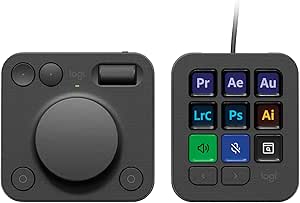 | Best for Creative Professionals | Key Count: 9 customizable LCD display keys | Controls: Low-friction aluminum dial and roller | Keypad Pages: Up to 15 per profile | VIEW LATEST PRICE | See Our Full Breakdown |
| Logitech K400 Plus Wireless Touch TV Keyboard, Black |  | Best for Living Room PCs | Connectivity: Wireless RF via Unifying USB receiver | Wireless Range: Up to 33 ft (10 m) | Battery Life: Up to 18 months | VIEW LATEST PRICE | See Our Full Breakdown |
| Logitech computer accessorie | Connectivity |
|---|---|
| Logitech MK540 Advanced Wirele | USB wireless receiver |
| Logitech MX Keys S Combo Wirel | Bluetooth Low Energy or included Logi Bolt USB receiver |
| Logitech MK270 Full-Size Wirel | 2.4 GHz wireless via USB-A nano receiver |
| Logitech Mobi Fold Foldable Wi | Bluetooth |
| Logitech MX Master 2S Wireless | Bluetooth |
| Logitech M196 Compact Ambidext | Bluetooth |
| Logitech Litra Glow Premium LE | — |
| Logitech G305 LIGHTSPEED Wirel | USB wireless receiver |
| Logitech Studio Series Desk Ma | — |
| Logitech Brio 101 Full HD 1080 | USB-A |
| Logitech MX Creative Console w | USB-C |
| Logitech K400 Plus Wireless To | Wireless RF via Unifying USB receiver |
More Details on Our Top Picks
Logitech MK540 Advanced Wireless Keyboard and Mouse Combo
The MK540 Advanced is the strongest fit here for someone who wants a familiar, full-size desktop setup without juggling separate purchases. Its 104-key layout, numeric keypad, palm rest, and adjustable tilt make it more supportive for long stretches of typing than the compact keyboard options elsewhere in this roundup. The ambidextrous mouse also suits shared desks better than the right-handed MX Master 2S.
Compared with the more feature-rich MX Keys S Combo, the MK540 gives up rechargeable power, multi-device switching, and app-based customization in exchange for a simpler receiver-based setup and long stated battery life. Its keyboard resists limited spills, but that is not protection against immersion, and the full-size footprint takes up substantial desk space. I’d choose it for everyday office work, not for a minimalist desk or premium multi-device workflow.
Pros:- Full-size 104-key keyboard includes a number pad, palm rest, and three tilt positions.
- Ambidextrous mouse makes the combo suitable for left- and right-handed users.
- Keyboard and mouse have stated battery lives of up to 36 and 18 months.
- Spill-resistant keyboard and wireless range of up to 33 feet suit everyday desk use.
Cons:- Full-size keyboard occupies more desk space than compact alternatives.
- Uses disposable batteries rather than rechargeable devices.
- Spill resistance covers limited spills only; the keyboard should not be immersed.
Best for: Home-office users who want a full-size keyboard with a number pad, wrist support, and a mouse that works for either hand.
Not ideal for: Desk-space-conscious users or people who regularly switch between computers and want rechargeable devices or advanced customization.
- Connectivity:USB wireless receiver
- Keyboard layout:QWERTY, 104 keys
- Keyboard dimensions:7.62 x 18 x 0.94 in
- Keyboard battery:2 AAA batteries; up to 36 months
- Mouse:3 buttons; ambidextrous
- Mouse battery:1 AA battery; up to 18 months
- Wireless range:Up to 33 ft
- Compatibility:Windows 7, 8, 10 or later; Chrome OS
Our verdict“Choose the MK540 if you want a comfortable, full-size wireless setup with a mouse that can be shared by either hand.”
Logitech MX Keys S Combo Wireless Keyboard and Mouse, Graphite
The MX Keys S Combo earns its premium role by bringing together a quiet, laptop-like keyboard and a capable mouse for people whose work spans multiple devices. Three-device connectivity across Bluetooth Low Energy or the included Logi Bolt receiver makes it more adaptable than the receiver-only MK540 Advanced, while the keyboard’s proximity-responsive backlighting helps when working in dimmer rooms. The mouse adds MagSpeed scrolling and an 8K DPI sensor that can track on glass at least 4 mm thick.
This is the most versatile keyboard-and-mouse pairing in this batch, but it also asks for more setup than the straightforward MK270. Both devices are rechargeable, so battery management means charging rather than swapping cells. Customization through Logi Options+ is limited to Windows and macOS, and the combo does not work with other Logitech USB receivers. I’d pick it for a multi-device desk, but not for someone who wants a basic, low-maintenance bundle.
Pros:- Keyboard and mouse can connect to up to three devices.
- Quiet, laptop-like keyboard has proximity-responsive backlighting.
- MagSpeed scrolling and an 8K DPI sensor support precise mouse control.
- Broad compatibility includes Windows, macOS, Linux, Chrome OS, iPadOS, and Android.
Cons:- Logi Options+ customization is available only on Windows and macOS.
- The combo is not compatible with other Logitech USB receivers.
- Rechargeable batteries require charging rather than quick replacement.
Best for: Professionals who move between several computers or operating systems and want a quiet, backlit keyboard with advanced scrolling.
Not ideal for: Buyers who want a simple receiver-based combo, avoid rechargeable devices, or need app customization on an operating system outside Windows and macOS.
- Connectivity:Bluetooth Low Energy or included Logi Bolt USB receiver
- Keyboard layout:QWERTY, 104 keys
- Keyboard dimensions:20.5 × 430.2 × 131.63 mm
- Keyboard battery:Rechargeable Li-Po, 1500 mAh
- Mouse sensor:Darkfield high precision, 8K DPI
- Mouse buttons:7
- Mouse battery:Rechargeable Li-Po, 500 mAh
- Compatible operating systems:Windows, macOS, Linux, Chrome OS, iPadOS, Android
Our verdict“Choose the MX Keys S Combo if you want a polished, rechargeable setup that can move between several devices and operating systems.”
Logitech MK270 Full-Size Wireless Keyboard and Mouse Combo, Black
The MK270 is a practical choice for buyers who want the basics handled: a full-size keyboard, a number pad, eight multimedia hotkeys, and an ambidextrous mouse. Its USB-A nano receiver and stated range of up to 33 feet suit a standard laptop or PC desk, while the spill-resistant keyboard and long stated battery life reduce routine upkeep. Compared with the more supportive MK540 Advanced, it skips the palm rest and offers a compact mouse; compared with the MX Keys S Combo, it forgoes multi-device pairing and rechargeable power.
That simpler feature set is the point, but it narrows who will enjoy it. The compact mouse may feel cramped to people who prefer a larger shape, and the keyboard relies on disposable batteries. Its listed compatibility is Windows, so I would not choose it for a mixed-device setup that includes Macs or tablets. For a straightforward Windows workstation, the dedicated media keys are a useful extra without adding a more involved workflow.
Pros:- Full-size 104-key layout includes a number pad and eight multimedia hotkeys.
- Ambidextrous compact mouse works for left- or right-handed users.
- Keyboard and mouse have stated battery lives of up to 36 and 12 months.
- Spill-resistant keyboard and adjustable tilt legs suit everyday desk use.
Cons:- Compact mouse may not suit users who prefer a larger hand-filling shape.
- Requires batteries rather than rechargeable power.
- Listed compatibility is limited to Windows.
Best for: Windows laptop and desktop users who want a full-size keyboard, dedicated media controls, and a basic ambidextrous mouse.
Not ideal for: Mac or tablet users, people who switch between several devices, and anyone who prefers a larger mouse or palm rest.
- Connectivity:2.4 GHz wireless via USB-A nano receiver
- Wireless range:Up to 33 ft (10 m)
- Keyboard layout:QWERTY, 104 keys
- Keyboard features:Full-size layout, number pad, arrow keys, 8 multimedia hotkeys, spill-resistant design
- Keyboard battery life:Up to 36 months
- Mouse battery life:Up to 12 months
- Mouse design:Compact and ambidextrous
- Compatible operating system:Windows
Our verdict“Choose the MK270 for a straightforward Windows desk where a full-size keyboard and media hotkeys matter more than premium ergonomics or multi-device features.”
Logitech Mobi Fold Foldable Wireless Mouse, Quiet Click, Graphite
The Mobi Fold is the portability specialist in this group: its foldable, ultra-thin design is built for bags and smaller work surfaces, not as a full-time ergonomic desktop mouse. It connects over Bluetooth to as many as three devices, so it can travel between a laptop and tablet without needing a USB receiver. Quiet clicks and adaptive touch scrolling also make it a more considerate mobile companion than the right-handed MX Master 2S, which prioritizes a fuller hand-resting shape and hyper-fast scrolling.
The tradeoff is a more limited working rhythm. Battery life is stated at up to one month per charge, far shorter than the battery life listed for the MK540 combo, and the right-handed design excludes left-handed users. A one-minute charge can provide up to 22 hours of use, but the USB-C cable is not included. I’d choose it for a light travel kit, not for buyers seeking a large, long-lasting desktop mouse.
Pros:- Foldable, lightweight design is suited to carrying in a bag or pocket.
- Bluetooth connection supports switching among up to three devices.
- Quiet clicks and adaptive touch scrolling fit shared workspaces.
- One-minute quick charge provides up to 22 hours of use.
Cons:- Right-handed design is not suited to left-handed users.
- Battery life is stated at up to one month per charge.
- USB-C charging cable is not included.
Best for: Frequent travelers and tablet users who need a thin, quiet Bluetooth mouse that can switch among several devices.
Not ideal for: Left-handed users or people who want a full-size ergonomic mouse for long desktop sessions and infrequent charging.
- Connectivity:Bluetooth
- Tracking:Optical, up to 4,000 DPI
- Buttons:4
- Hand orientation:Right
- Device switching:Up to 3 devices with Easy-Switch
- Battery life:Up to 1 month per full charge
- Quick charge:Up to 22 hours of use from a 1-minute charge
- Charging port:USB-C
Our verdict“Choose the Mobi Fold if portability and quiet Bluetooth use matter more than a full-size shape or longer battery life.”
Logitech MX Master 2S Wireless Mouse, Graphite
The MX Master 2S is the dedicated desktop mouse for right-handed users who want a more shaped grip and fast scrolling without buying a keyboard bundle. It connects to up to three computers and supports Windows PCs and Macs, giving it a multi-computer advantage over the single-receiver MK270. Its hyper-fast scrolling also suits long documents and spreadsheets better than the portable Mobi Fold, which is designed around a thin, foldable form rather than an ergonomic desktop grip.
That shape is also its main limitation: left-handed users are ruled out, and its 145 g body is less appealing for a travel kit than the Mobi Fold. The listed battery life is 1,680 hours, and an included Micro-USB cable allows recharging, but the charging connection is less current than the USB-C port on the Mobi Fold. This model makes the most sense for a right-handed desk worker who values grip and scrolling over portability.
Pros:- Ergonomic right-handed shape provides a more supportive grip than the compact Mobi Fold.
- Connects to up to three computers.
- Hyper-fast scrolling suits long documents and spreadsheets.
- Rechargeable, with a Micro-USB charging cable included.
Cons:- Right-handed design excludes left-handed users.
- Larger, heavier shape is less convenient for travel than the Mobi Fold.
- Uses Micro-USB charging rather than the Mobi Fold’s USB-C connection.
Best for: Right-handed professionals who use multiple computers and want a shaped desktop mouse with fast scrolling.
Not ideal for: Left-handed users, frequent travelers, or buyers who want a lightweight mouse with USB-C charging.
- Connectivity:Bluetooth
- Buttons:7
- Hand orientation:Right-handed
- Compatible devices:PC and Mac
- Wireless range:10 meters
- Battery life:1,680 hours
- Weight:145 g
- Dimensions:4.9 x 3.37 in
Our verdict“Choose the MX Master 2S if you are right-handed and want a multi-computer desktop mouse with an ergonomic shape and fast scrolling.”
Logitech M196 Compact Ambidextrous Bluetooth Mouse, Rose
This mouse stands out for its receiver-free Bluetooth connection, making it ideal for modern laptops with limited USB ports. Unlike the Logitech MX Master 2S, which offers advanced ergonomics and extra buttons, the M196 prioritizes portability and simplicity. Its ambidextrous shape suits left- and right-handed users, while the lightweight frame fits easily into small bags. However, the lack of customizable buttons limits productivity workflows. It requires an AA battery, which adds maintenance compared to rechargeable models. This option is best for users who value a clean desk setup and basic navigation over advanced features.Pros:- Pairs via Bluetooth without needing a USB receiver
- Ambidextrous design accommodates both hands
- Up to 12 months of battery life from one AA battery
- Lightweight and highly portable form factor
Cons:- Requires replaceable AA batteries rather than USB-C charging
- Fixed buttons offer no customization for shortcuts
- Basic 1000 dpi sensor may lack precision for high-res displays
Best for: Travelers and tablet users who need a compact, receiver-free mouse for occasional use.
Not ideal for: Power users needing customizable buttons or ergonomic support for long work sessions.
- Connectivity:Bluetooth
- Tracking:Optical
- Maximum sensitivity:1000 dpi
- Buttons:2
- Hand orientation:Ambidextrous
- Battery life:Up to 12 months
- Weight:2.65 oz
- Recycled plastic content:66% for Rose
Our verdict“Choose this if you want a simple, eco-friendly mouse that disappears into your laptop bag.”
Logitech Litra Glow Premium LED Streaming Light, Graphite
The Litra Glow addresses a common weakness in computer setups: poor webcam lighting. While the Logitech Brio 101 improves video quality with software, this light physically fixes the issue by providing soft, diffused illumination. Its TrueSoft technology reduces harsh shadows better than standard room lights, and the monitor mount keeps it out of the way. It is not a professional studio light, lacking the power and range of dedicated rig equipment, but it excels at plug-and-play convenience. You must use the G HUB app for advanced presets, which may annoy those who prefer hardware-only controls.Pros:- Frameless diffuser creates soft, balanced light
- Adjustable brightness and color temperature via app
- Three-way monitor mount saves desk space
- USB-powered for easy portability and setup
Cons:- Mounting options are limited to monitor edges
- Requires G HUB software for preset saving and advanced control
- Not bright enough for large rooms or professional production
Best for: Remote workers and casual streamers who need better video call lighting without complex setups.
Not ideal for: Professional content creators who require adjustable intensity beyond monitor mounting constraints.
- Light Type:Full-spectrum LED
- Power:USB-powered
- Mount:Three-way monitor mount
- Adjustments:Brightness and color temperature
- App Control:Logitech G HUB
- Weight:13.6 ounces
- Warranty:1-year limited hardware warranty
Our verdict“This is the most practical upgrade for anyone frustrated by dark or shadowy video calls.”
Logitech G305 LIGHTSPEED Wireless Gaming Mouse, Black
This mouse delivers competitive-grade performance at an accessible entry point. The HERO sensor supports up to 12,000 DPI with a 1ms report rate, matching the responsiveness of much more expensive gaming mice. Compared to the basic M196, the G305 offers six programmable buttons and a sensor designed for precision tracking. However, it relies on a USB receiver rather than Bluetooth, occupying a port, and uses an AA battery instead of a rechargeable cell. The ambidextrous shape is comfortable but may lack the palm support found in ergonomic office mice like the MX Master 2S.Pros:- 1ms LIGHTSPEED wireless for lag-free gaming
- HERO sensor offers up to 12,000 DPI sensitivity
- Six programmable buttons for in-game macros
- Up to 250 hours of battery life on one AA
Cons:- Requires a USB receiver, not Bluetooth
- Uses disposable AA batteries
- Ambidextrous shape may not suit palm-grip users
Best for: Gamers who want high-performance wireless tracking without paying for premium ergonomic designs.
Not ideal for: Users who prefer Bluetooth connectivity or need rechargeable batteries for long sessions.
- Connectivity:USB wireless receiver
- Sensor:HERO optical
- Sensitivity:200–12,000 DPI
- Report Rate:1 ms
- Buttons:6 programmable
- Weight:99 g (3.4 oz)
- Battery Life:Up to 250 hours
Our verdict“A solid choice for gamers prioritizing sensor speed and battery life over luxury ergonomics.”
Logitech Studio Series Desk Mat, Large, Mid Gray
A mouse works best on a good surface, and this mat provides a smooth, quiet glide for devices like the G305 or MX Master 2S. The fine weave reduces friction noise, while the natural rubber base prevents slipping during intense typing or clicking. It is significantly larger than standard mouse pads, covering a substantial portion of the desk to unify the workspace. The spill-resistant surface is easy to clean, but the large footprint requires ample desk space. It lacks the hard plastic base of some gaming mats, so it may not be ideal for users who prefer a firmer tracking surface.Pros:- Spill-resistant surface wipes clean easily
- Anti-slip natural rubber base keeps mat steady
- Fine weave fabric ensures quiet mouse movement
- Large dimensions unify keyboard and mouse area
Cons:- Large size may overwhelm smaller desks
- Rubber base contains latex, which may cause allergies
- Soft surface may wear faster than hard gaming mats
Best for: Users with large desks who want a unified, quiet, and aesthetically clean workspace.
Not ideal for: Those with small desks or users who prefer hard-surface mousepads for gaming speed.
- Dimensions:11.8 x 27.5 in (30 x 70 cm)
- Surface Material:Recycled polyester
- Base Material:Natural rubber (contains latex)
- Features:Spill-resistant, anti-slip, anti-fray edges
- Color:Mid Gray
- Warranty:1-year limited hardware warranty
Our verdict“This mat transforms a cluttered desk into a cohesive, professional-looking station.”
Logitech Brio 101 Full HD 1080p Webcam, Black
The Brio 101 offers a clear step up from laptop-integrated cameras, delivering 1080p resolution with RightLight technology to balance exposure. While it lacks the 4K capability of higher-end Logitech models, it provides a reliable, plug-and-play experience via USB-A. The integrated privacy shutter adds peace of mind, a feature often missing in cheaper webcams. It does not have autofocus, relying on fixed focus which works best when you sit a few feet away. Compared to the Litra Glow, this camera handles the image capture, but you may still need external lighting for the best results in dim rooms.Pros:- Full HD 1080p video quality
- RightLight technology improves brightness in low light
- Integrated sliding privacy cover for security
- Plug-and-play USB-A connection with built-in mic
Cons:- Fixed focus limits close-up sharpness
- Mono microphone audio quality is basic
- No water resistance for outdoor or rugged use
Best for: Remote workers and students needing a simple, privacy-focused upgrade from laptop cameras.
Not ideal for: Content creators requiring 4K resolution or autofocus for close-up shots.
- Resolution:1080p Full HD
- Connectivity:USB-A
- Microphone:Built-in, mono audio
- Focus:Fixed focus
- Viewing angle:60 degrees
- Privacy cover:Integrated sliding cover
- Recycled plastic:At least 34%
Our verdict“This webcam is the sensible choice for anyone wanting better video calls without complex setup.”
Logitech MX Creative Console with 9 Customizable LCD Keys, Graphite
This console stands out for workflow acceleration in creative software. Unlike the Logitech MX Keys S Combo, which focuses on general typing comfort, this device uses 9 customizable LCD keys to display dynamic icons that change based on your active application. This means you see exactly what each button does without opening menus. The low-friction aluminum dial and roller provide tactile precision for tasks like zooming in Photoshop or scrubbing timelines in Premiere Pro, offering a level of control that standard mice cannot match. However, it is a niche tool. If you do not rely on specific shortcuts in creative apps, the Logi Options+ app dependency might feel like unnecessary overhead compared to simpler input devices.
Pros:- LCD keys provide visual feedback that changes with app context
- Physical dial and roller offer precise tactile control for zooming and scrubbing
- Supports up to 15 keypad pages per profile for extensive customization
- Constructed with 72% post-consumer recycled plastic
Cons:- Requires Logi Options+ software for full functionality
- Battery powered design adds maintenance compared to wired alternatives
- Includes only a 3-month Adobe Creative Cloud trial
Best for: Video editors, graphic designers, and content creators who rely on complex shortcuts in Adobe or similar suites.
Not ideal for: General office workers or writers who do not use specialized creative software; the learning curve and cost outweigh the benefits for basic typing.
- Key Count:9 customizable LCD display keys
- Controls:Low-friction aluminum dial and roller
- Keypad Pages:Up to 15 per profile
- Connectivity:USB-C
- Compatible OS:Windows 10 or later; recent macOS
- Power Source:Battery powered
- Material:Plastic (72% recycled)
Our verdict“A powerful productivity booster for creative professionals, but overkill for general computer users.”
Logitech K400 Plus Wireless Touch TV Keyboard, Black
This keyboard solves the clutter problem of connecting a PC to a television. By integrating a built-in touchpad, it eliminates the need for a separate mouse, unlike the Logitech MK540 Advanced Wireless Keyboard and Mouse Combo which requires managing two devices. The 33-foot wireless range ensures reliable control from across the room, while quiet keys prevent noise disturbance during movie nights or casual browsing. It is spill-resistant, adding durability for living room use. However, the typing experience is not on par with the Logitech MX Keys S Combo; the keys are flatter and less comfortable for long-form writing. This is strictly a convenience device for casual use, not a productivity workstation tool.
Pros:- Integrated touchpad removes the need for a separate mouse
- Long 33-foot wireless range suitable for living rooms
- Up to 18 months of battery life with quiet key switches
- Spill-resistant design increases durability in casual settings
Cons:- Requires two AAA batteries for operation
- Depends on a USB Unifying receiver rather than Bluetooth
- Typing comfort is inferior to full-size ergonomic keyboards
Best for: Users who connect a laptop or mini-PC to their TV for streaming, light gaming, or casual web browsing.
Not ideal for: Writers, coders, or anyone needing ergonomic typing for extended periods; the compact layout and touchpad are inadequate for heavy text input.
- Connectivity:Wireless RF via Unifying USB receiver
- Wireless Range:Up to 33 ft (10 m)
- Battery Life:Up to 18 months
- Key Count:84 keys
- Touchpad Size:2.99 × 1.85 in
- Compatible OS:Windows, Android, Chrome OS
- Durability:Spill-resistant design
Our verdict“The ideal choice for turning a TV into a casual computer interface, prioritizing convenience over typing comfort.”
How We Picked
I evaluated these accessories based on three core pillars: ergonomic design, connectivity stability, and build quality. For keyboards and mice, I looked at switch feel, palm support, and the reliability of Logitech’s Unifying Receiver versus Bluetooth pairing. Accessories were ranked higher if they demonstrated long-term durability and compatibility across operating systems like Windows, macOS, and ChromeOS.
I also considered the specific use case each product targets. A gaming mouse is not judged by the same standards as a streaming light. By segmenting the lineup into productivity, gaming, and creative categories, I ensured that each recommendation serves a distinct buyer need rather than offering a one-size-fits-all solution that fails at specific tasks.
Factors to Consider When Choosing Best Logitech Computer Accessories
Selecting the right Logitech accessory goes beyond brand loyalty. You need to match the technology to your daily habits and physical needs.Connectivity Standards: Bluetooth vs. Unifying Receiver
Logitech offers two main wireless technologies: Bluetooth and the Unifying Receiver. Bluetooth is ideal for laptops without USB-A ports and for switching between multiple devices quickly. However, the Unifying Receiver is often more stable in environments with heavy wireless interference and uses less battery power. If you use a desktop PC with limited USB ports, a combo kit like the MK540 that shares a single receiver is far more convenient than managing two separate dongles. Always check if your device supports Bluetooth 5.0 or later for the most stable connection.
Ergonomics and Form Factor
Comfort is subjective, but form factor is measurable. Full-size keyboards offer number pads and function rows that accountants and data analysts require, but they consume desk space. Compact or tenkeyless designs free up room for mouse movement, which is critical for gamers and designers. For mice, pay attention to whether the shape supports your grip style—palm, claw, or fingertip. The MX Master series is sculpted for palm grip, while the G305 is symmetrical and lighter, favoring claw grip. Ignoring your grip style leads to wrist fatigue regardless of how expensive the mouse is.
Battery Life and Charging Methods
Wireless accessories require power, and the method matters for your workflow. Models using standard AA or AAA batteries, like the MK270, can last months but require you to keep spare batteries on hand. Rechargeable models, such as the MX Keys S, eliminate waste and offer consistent power levels until they die. Some rechargeable devices support USB-C fast charging, allowing you to top up during a short break. If you work long hours without a desk outlet, the long-life battery of a non-rechargeable model might be the more practical choice.
Software Integration and Customization
Hardware is only half the equation; Logi Options+ software unlocks the full potential of premium devices. This software allows you to remap keys, adjust scroll speeds, and configure Flow to copy-paste between computers. Budget options often lack software support, meaning their buttons function exactly as they come out of the box. If you rely on specific shortcuts for editing or coding, investing in a device with robust software customization like the MX Creative Console can save you hours of repetitive manual input. Without software, you are paying for hardware features you cannot access.
Durability and Build Materials
Premium models use aluminum alloys and high-grade plastics that resist shine and wear from skin oils. Budget models often use thin plastic that can crack under pressure or feel hollow. Check the build quality of the feet on mice, as poor glides can scratch your desk surface or cause uneven tracking. The Studio Series Desk Mat protects your desk and provides a consistent surface for optical sensors, which is vital for precision. A cheaper mouse on a bad surface will perform worse than a premium mouse on a proper pad.
Frequently Asked Questions
Do I really need a combo kit or should I buy separate keyboard and mouse?
Combo kits like the MK540 are generally more cost-effective and simplify connectivity by using a single USB receiver for both devices. This reduces port clutter and ensures both accessories share the same battery life cycle, which is convenient for maintenance. However, buying separately allows you to choose a specific keyboard layout or mouse shape that fits your hands perfectly, which combo kits often compromise on for the sake of a unified design. If you have specific ergonomic needs, separate purchases are better; otherwise, a combo is the practical choice for most users.
Is the Logitech Flow feature worth the extra cost on premium keyboards?
Flow is a powerful feature for users who operate multiple computers, such as a desktop for heavy processing and a laptop for meetings. It allows you to move the cursor seamlessly between screens and copy-paste files across devices. For a single-computer user, this feature adds no value and does not justify the higher price tag of the MX Keys S over the MK540. However, if your workflow involves constant context switching between a Mac and a PC, Flow eliminates the frustration of physical file transfers and separate input devices.
Can I use a Logitech gaming mouse for regular office work?
Yes, but it may not be comfortable for long periods. Gaming mice like the G305 are designed for quick, precise movements and often have a lighter, symmetrical shape that lacks the thumb rest and palm support of productivity mice. Over an eight-hour workday, this can lead to hand fatigue. Additionally, gaming mice often lack the high-speed scroll wheel needed for navigating long documents or spreadsheets efficiently. While functional, a dedicated productivity mouse will provide a more ergonomic and efficient experience for office tasks.
How important is the Logitech Capture software for webcams like the Brio 101?
For the Brio 101, software is less critical because it is a basic 1080p camera with fixed settings. You do not need to adjust field of view or zoom as extensively as you would with higher-end models like the Brio 4K. However, using the software can still help adjust exposure and white balance to compensate for poor room lighting. Without software, you are reliant on your video conferencing app’s default settings, which often produce washed-out or grainy images in less-than-ideal lighting conditions.
Are touch keyboards like the K400 Plus suitable for typing long emails?
The K400 Plus is designed for living room use, such as controlling a media center or browsing on a TV. The keys are shallow and the integrated touchpad is small, making it inefficient for typing long documents or emails. You will likely find the typing experience cramped and the cursor control imprecise compared to a standard desktop mouse. This device excels at navigating media interfaces and short inputs but should not be your primary typing tool for professional work.
Conclusion
Selecting the best Logitech computer accessories depends entirely on your daily workflow and budget. For most professionals, the Logitech MX Keys S Combo is the best overall choice, offering a premium typing experience and seamless multi-device control that justifies its higher price point. If you are on a tight budget or need a simple backup for a home office, the Logitech MK270 provides reliable basic functionality without unnecessary bells and whistles.
Gamers should look toward the Logitech G305 for its lightweight design and long battery life, while creative professionals who rely on software shortcuts will find the MX Creative Console a transformative addition to their desk. For those starting out or needing a simple solution for casual use, the M196 mouse offers a compact, ambidextrous design that works with almost any laptop. Ultimately, match the connectivity type and ergonomic shape to your physical needs, and you will find the right tool to enhance your productivity.