
🔍 Read the full analysis: Can A High Refresh Gaming Monitor Make Play Feel Smoother? on ThorstenMeyerAI.com

Get the latest gadgets delivered free with Prime
- Fast, free delivery on millions of items
- Prime Video, Amazon Music and more included
- Member-only deals all year
TL;DR
A buyer’s comparison from ThorstenMeyerAI.com highlights eight high-refresh gaming monitors, from MSI’s 4K, 320Hz model to more accessible 1080p options. The comparison argues that smoother play depends not just on refresh rate, but on whether a PC can deliver matching frame rates and whether the display’s resolution, size and panel suit the player.
ThorstenMeyerAI.com has compared eight high-refresh gaming monitors, ranging from a 4K display rated at 320Hz to compact 1080p models aimed at high frame rates. The comparison’s central point, as detailed in the original analysis, is that a monitor’s refresh-rate figure alone does not guarantee smoother play: the PC must produce enough frames, and the resolution and screen format must fit the games and viewing setup.
The MSI MAG 272URDFA E16 is the source’s overall pick, pairing 4K resolution with a stated 320Hz refresh rate. That combination offers both fine image detail and substantial refresh headroom, but the source says 4K gaming at high frame rates requires a capable graphics card. The article does not provide independent test results or explain how the monitor performs across specific games.
The AOC Q27G41ZE is presented as a QHD alternative with a native 240Hz rate and an overclocked 260Hz mode. The Samsung Odyssey OLED G6 is the comparison’s premium panel choice because it uses QD-OLED. For lower GPU demands, the source points to the ASUS VG259QM5A and Dell SE2426HG, both described as 24-inch-class, 1080p, 240Hz options.
The remaining recommendations focus on larger formats: Sceptre’s 34-inch ultrawide, a 32-inch SANSUI model and the curved 27-inch AOC C27G4ZH. The source cautions that large 1080p displays may look less sharp at close viewing distances, and that ultrawide support varies between games. It says its ranking considers resolution, refresh rate, panel type, adaptive-sync support where specified, connectivity and adjustment features; it does not assume features absent from the supplied product details.
The 8 picks
- 1
 Samsung 27" Odyssey OLED G6 (G61SH) QD-OLED Gaming MonitorView on Amazon →
- 2
 msi MAG 272URDFA E16 27-inch 3840 x 2160 (UHD) Gaming Office Monitor, 320Hz,…View on Amazon →
- 3
 Sceptre C345B-QU240T 34-inch Curved Ultrawide Gaming MonitorView on Amazon →
- 4
 SANSUI 32 Inch Curved 240Hz Gaming Monitor High Refresh Rate, FHD 1080PView on Amazon →
- 5
 AOC 27" Gaming Monitor QHD 240Hz Overclocked IPS NVIDIA G‑Sync Q27G41ZEView on Amazon →
- 6
 AOC C27G4ZH 27-Inch Curved FHD Gaming MonitorView on Amazon →
- 7
 ASUS TUF Gaming VG259QM5A 24.5-Inch 1080p 240Hz Gaming MonitorView on Amazon →
- 8
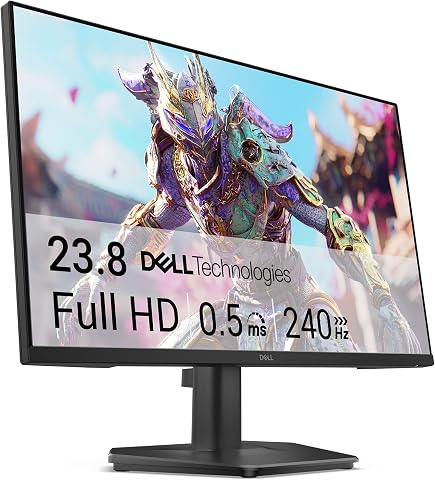 Dell 24 240Hz Gaming Monitor – SE2426HG – 23.8-inch FHD (1920×1080) 240Hz Dis…View on Amazon →
Matching Refresh Rates to Real Gameplay
A high refresh rating describes display capacity, not the frame rate a gaming PC will actually deliver. A system that cannot render close to the monitor’s refresh rate will not use all of its headroom, especially in demanding games at 4K. Buyers may be better served by QHD or 1080p if that lets their current graphics card produce more consistent frame rates.
The comparison also underscores that screen size and pixel density affect the experience. A large display can feel more immersive, but a 1080p image may appear less crisp on a 27- or 32-inch screen at a typical desk distance. Panel type matters too: the Samsung’s QD-OLED distinguishes it from the IPS-focused options, though the source does not provide measurements or a direct image-quality test. These tradeoffs make the list useful as a set of use cases, not proof that one specification is best for every player.
Products Worth Considering

Jackery Explorer 1000 v2 Portable Power Station

Sonos Roam Portable Bluetooth and Wi-Fi Speaker, Black
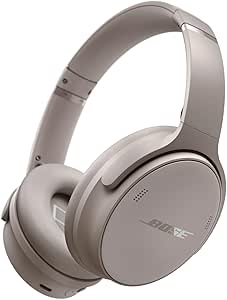
Bose QuietComfort Wireless Noise-Cancelling Headphones, Sandstone
As an affiliate, we earn on qualifying purchases.
Eight Displays, Different Tradeoffs
The source frames the recommendations around how resolution, refresh rate and screen format work together, rather than ranking monitors solely by the largest refresh number. Its stated approach weighs panel technology, specified adaptive-sync support, connectivity and adjustment details, alongside whether a monitor’s size and pixel density suit common desks and viewing distances.
In its comparison, 4K is the detail-first, GPU-demanding option; QHD offers a middle ground; and 1080p makes high frame rates easier to reach on less powerful systems. The source says 240Hz can make motion feel smoother than a standard display, particularly in competitive games, while the difference between 240Hz, 260Hz and 320Hz is more specialized and depends on the PC sustaining very high frame rates. Curved and ultrawide designs, it adds, are preferences and compatibility choices rather than performance upgrades.
“The MSI combines 4K resolution and 320Hz refresh.”
— ThorstenMeyerAI.com, describing the MSI MAG 272URDFA E16
Testing and Pricing Details Missing
The supplied material does not include prices, availability, hands-on testing methods or benchmark results, so readers cannot use it to compare value or verify performance independently. It also does not specify all product features, such as adaptive-sync support for every model, and the source says it does not infer features that are not listed.
Actual smoothness will vary by game, graphics card, settings and achievable frame rate. The source does not provide model-by-model measurements of response time, input lag, brightness, color performance or motion clarity. Nor does it identify which games support the Sceptre’s ultrawide format. The recommendations should be read as a buying framework based on listed specifications, not as a complete laboratory review.
Check Your PC and Game Library
Before buying, compare the monitor’s resolution and refresh rate with frame rates your PC reaches in the games you actually play. Check whether adaptive sync is specified, what connection and settings are required for the advertised refresh rate, and whether your games support ultrawide resolutions. For a larger screen, consider desk depth and viewing distance as well as pixel density.
Pricing, stock and further testing are not supplied, so prospective buyers will need current retailer listings and full product specifications before making a purchase. A more definitive comparison would require comparable testing across the eight models; no such results or follow-up timetable are provided.
Key Questions
Does a 320Hz monitor automatically make games smoother?
No. The monitor can refresh up to its rated rate, but the PC must produce enough frames to take full advantage. Game settings, graphics hardware and the particular game affect the result.
Why choose QHD instead of 4K?
QHD is a middle ground: it shows more detail than 1080p while generally placing less rendering demand on a graphics card than 4K. The AOC Q27G41ZE in this comparison has a stated 240Hz native mode and an overclocked 260Hz mode.
Which monitors in the comparison target 1080p high-frame-rate gaming?
The source identifies the ASUS VG259QM5A and Dell SE2426HG as 24-inch-class 1080p models rated at 240Hz. It also lists the curved 27-inch AOC C27G4ZH as a larger 1080p option, with a potential sharpness tradeoff at close range.
Is an ultrawide monitor suitable for every game?
No. Game support varies, and some titles may show borders or stretch interface elements. The source recommends checking compatibility with the games a buyer plays before choosing the 34-inch Sceptre.
Source: ThorstenMeyerAI.com