
🔍 Read the full analysis: How To Find A Graphics Card For Gaming And Professional Use In 2027 on ThorstenMeyerAI.com

Get the latest gadgets delivered free with Prime
- Fast, free delivery on millions of items
- Prime Video, Amazon Music and more included
- Member-only deals all year
TL;DR
The source lists 10 graphics cards across high-end gaming, mid-range use, professional display needs and tight budgets. Its recommendations are a buyer’s guide, not a report of a new product launch; performance, prices and 2027 availability are not independently verified in the supplied material.
ThorstenMeyerAI.com’s graphics-card guide compares 10 GPUs for gaming and professional workloads, naming the ASUS ROG Astral GeForce RTX 5080 as its premium choice and the ASUS Dual RTX 5060 Ti as a mid-range option. The guide also includes older cards such as the RX 550 and GT 730. Its performance and suitability claims are not independently verified in the supplied source material.
The guide says its choices were judged on GPU generation, memory bandwidth and cooling, as well as connectivity and physical size. It favors newer architectures, including NVIDIA’s RTX 50-series and AMD’s RX 9000-series, for features such as ray tracing and AI-assisted upscaling. Those descriptions reflect the guide’s stated criteria, not a separately documented benchmark test.
Its 10 options span several distinct needs: ASUS ROG Astral RTX 5080 and PNY RTX 5080 for high-end use; ASUS Dual RTX 5060 Ti and an RTX 3060 for less demanding budgets; AMD’s RX 9070 XT as a higher-midrange alternative; and RX 580, VisionTek RX 580, RX 550 and GT 730 for older systems, display output or constrained budgets. For other gaming-focused recommendations, see graphics cards for gaming. The guide also names an RX 9070 model in its discussion of memory, but does not clearly identify it as a separate pick.
The source says the RTX 5060 Ti series offers 16GB of GDDR7 memory and describes the RX 9070 XT as an alternative for rasterization-heavy workloads. It characterizes the RX 550 and GT 730 as suitable mainly for display output and light tasks, not modern gaming. These are the guide’s assessments; it supplies no test results, prices or purchase-date availability to support direct comparisons.
The 10 picks
- 1
 ASUS ROG Astral GeForce RTX 5080 OC Edition 16GB GDDR7 Graphics CardView on Amazon →
- 2
 PNY NVIDIA GeForce RTX 5080 OC Triple-Fan Graphics CardView on Amazon →
- 3
 ASUS Prime Radeon RX 9070 XT 16GB GDDR6 OC Edition Gaming Graphics CardView on Amazon →
- 4
 ASUS Prime Radeon RX 9070 EVO 16GB GDDR6 OC Gaming Graphics CardView on Amazon →
- 5
 ASUS Dual GeForce RTX 5060 Ti 16GB GDDR7 White OC Edition Graphics CardView on Amazon →
- 6
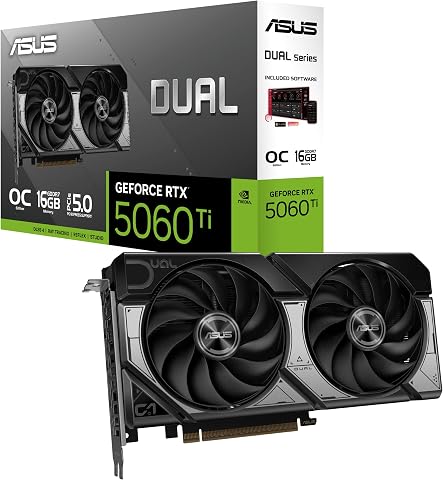 ASUS Dual GeForce RTX 5060 Ti 16GB GDDR7 OC Edition Gaming Graphics CardView on Amazon →
- 7
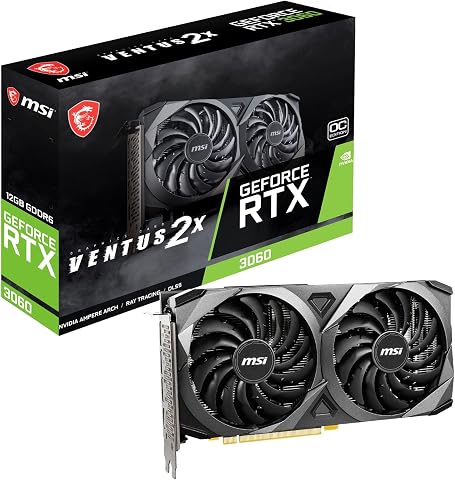 MSI GeForce RTX 3060 Ventus 2X 12G OC V1 Graphics CardView on Amazon →
- 8
 VisionTek AMD Radeon RX 580 8GB Graphics Card with 6 Mini DisplayPort OutputsView on Amazon →
- 9
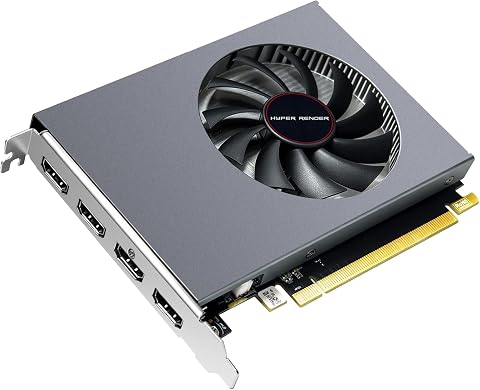 RX 550 4GB GDDR5 Graphics Card 4 HDMI GPU Tarjeta Gráfica 4 Port Video cardView on Amazon →
- 10
 Vandossy GeForce GT 730 4GB GDDR5 Graphics Card with 4 HDMI PortsView on Amazon →
Matching GPUs to Real Workloads
A graphics card’s suitability depends on factors beyond gaming frame rates. VRAM, software support, power needs and case clearance can affect whether a card works for a particular editing, rendering or multi-monitor setup. A legacy GPU may provide display connections while lacking the performance needed for recent games or demanding creative applications.
The guide distinguishes newer cards, which it says may offer newer features and stronger performance, from older, lower-cost options. Buyers may also need to account for power-supply capacity and case space. For professional use, the source advises checking application support—particularly CUDA and NVENC support for some workflows—rather than assuming gaming results predict performance in every program.
Products Worth Considering

Kindle Paperwhite Signature Edition, 32 GB (12th Generation, 2024), Metallic Black

Apple iPad mini (A17 Pro) 128GB Wi-Fi 6E – Starlight

Logitech MX Master 4 for Mac
As an affiliate, we earn on qualifying purchases.
How the Guide Ranks Its Picks
The article’s methodology prioritizes newer architectures and cards with at least 8GB of VRAM for gaming models. It says 16GB can be useful for high-detail 1440p or 4K play, while acknowledging that memory capacity is only one part of performance. The source does not provide a consistent set of benchmark tests, system configurations or prices for its 10 picks.
Cooling and physical fit are also part of the comparison. The guide favors larger multi-fan designs for sustained workloads but warns that they can occupy three or more expansion slots. It contrasts these with smaller dual-fan cards, which may be easier to install. Legacy models such as the VisionTek RX 580 are included for their multiple mini-DisplayPort connections, despite the source’s warning about their limitations for new games.
“The main tradeoff lies between paying for cutting-edge architecture and accepting older technology for cost savings.”
— ThorstenMeyerAI.com guide
Prices and Benchmarks Are Missing
The supplied material does not state when the guide was published, provide current prices, or report benchmark results. It is therefore not possible to establish from this source alone whether the ranking reflects 2027 retail availability or how the cards compare under identical gaming and professional workloads. The source also does not specify exact model variants for every entry, which can affect cooling, clock speeds and power requirements.
Several technical claims require buyer-side checking before purchase. Recommended power-supply capacity can vary by card and system; driver support and application performance can change; and the guide does not identify the games, software versions, resolutions or settings behind its judgments. Its statements about future-proofing and upcoming titles are assessments, not confirmed guarantees.
Verify Fit Before Buying
Readers should check the exact card model’s price, dimensions, power connectors and manufacturer requirements against their PC before buying. They should also confirm that their games and professional applications support the card’s features, and consult independent benchmarks for the resolution and workload they use. The supplied source does not identify a next publication or testing milestone.
Key Questions
Which card does the guide recommend for high-end gaming?
The guide names the ASUS ROG Astral GeForce RTX 5080 as its premium overall pick, citing cooling and ray-tracing capability. It does not provide benchmark data to independently substantiate that ranking.
Does the guide recommend the RX 550 for modern gaming?
No. It describes the RX 550 as a basic display-output and light-task option, rather than a suitable choice for modern games.
Is 16GB of graphics memory required?
The source presents 16GB of VRAM as useful for demanding, high-resolution gaming, but it does not establish it as a requirement for every game or professional task. Needs depend on software, resolution and settings.
What should buyers check before choosing a graphics card?
Check the exact model’s case clearance, power-supply requirements, connectors and software compatibility. The guide does not include prices or controlled benchmarks, so those should be checked separately.
Source: ThorstenMeyerAI.com