
TL;DR
Wireless earbuds for travel work best when they fit comfortably, last through your listening plans with noise cancellation on, and pair easily with your devices. Active noise cancellation can soften steady aircraft or train rumble, but it may not block conversation or announcements, so you should know how to switch to transparency or pause audio.
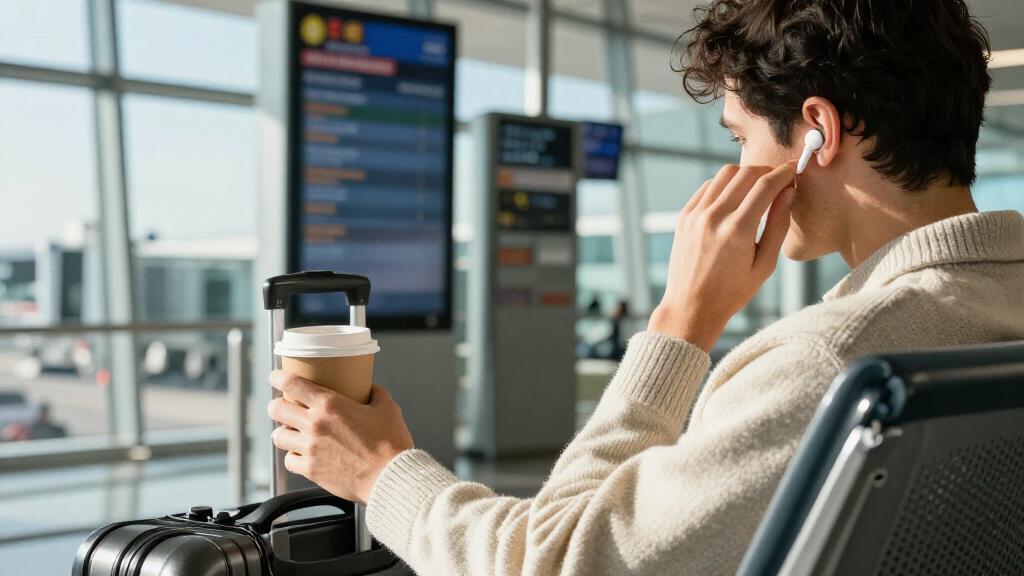
The smallest thing in your travel bag can make the loudest difference. A steady aircraft rumble, a rattling train carriage, or a gate announcement can turn a relaxing playlist into a test of patience; a well-fitting pair of wireless earbuds for travel can make the ride calmer without adding bulky headphones to your bag.

Get the latest gadgets delivered free with Prime
- Fast, free delivery on millions of items
- Prime Video, Amazon Music and more included
- Member-only deals all year
The catch is that a long list of features does not tell you whether earbuds will feel good after three hours, last through a delayed flight, or let you hear your boarding group. The right choice depends on how you travel and which compromises you can live with.
Here, you’ll learn how to weigh noise cancellation, fit, battery, calls, and compatibility against real travel situations. You’ll also get a quick comparison framework and practical habits for using and caring for your earbuds on the move.
Test ear-tip sizes before a long trip; a comfortable seal helps with fit, sound, and passive noise blocking.
Compare battery life with ANC enabled and include the charging case, charging time, and realistic delays in your plan.
Use ANC for steady cabin or rail rumble, then pause audio or switch to transparency when you need announcements.
Test microphone quality and Bluetooth switching with your own devices before relying on earbuds for travel calls.
Clean and dry ear tips before storing earbuds, and check the device and airline policies that apply to your journey.
Choose noise control that fits the journey
For aircraft and train travel, active noise cancellation can soften steady low-frequency rumble, but it does not silence every voice, chime, or sudden sound. A secure ear-tip seal helps block noise passively, while transparency mode lets more outside sound reach you when you need to listen for announcements. These tools address different problems: ANC reduces some continuous background noise electronically, while a good seal limits sound entering around the earbud. Neither guarantees quiet or awareness on its own.
On a cross-country flight, reducing the deep engine drone can make a podcast easier to follow without turning the volume up to compete with it. That can make listening less fatiguing, though nearby conversation may remain audible. The same isolation that helps you hear a film can also make a flight attendant’s question or boarding announcement easier to miss. Pause playback, lower the noise control, or remove an earbud when someone speaks to you.
Wireless earbuds can reduce the strain of competing with cabin noise, but the result depends on the model, the seal, and the sound around you. If an earbud leaves a gap, low hum can leak through; turning up music to cover it may make listening more tiring without fixing the fit. Try different tip sizes and test them before travel. If noise remains intrusive despite a comfortable seal, that model’s ANC may not suit your ears or your route.
ANC reduces some sound; it does not replace attention. Around roads, station platforms, and boarding areas, keep an ear open and follow crew instructions. Stronger isolation can improve listening comfort while making it harder to notice people or changes around you, so choose a setting that matches the situation.
Automatic adaptive audio can adjust ANC or transparency as your surroundings change. That can spare you from changing settings as you walk from a quiet lounge into a noisy concourse, but automatic changes may interrupt a consistent listening experience or let in more sound than you expect. Check whether you can control the feature or turn it off, especially if you prefer to decide for yourself when to hear your surroundings.
Products Worth Considering

Samsung 32 Odyssey G5 QHD Gaming Monitor

DJI Mini 4K Drone Bundle with Strobe Light, Landing Gear, and Propeller Holder Strap

LG 27GS60QC-B Ultragear 27-inch Curved Gaming Monitor (QHD, 180Hz, 1ms, 1000R)
As an affiliate, we earn on qualifying purchases.
Make comfort the first test, not an afterthought
Comfort on a long trip depends on the shape of your ears and a stable seal, not just the earbuds’ weight. A well-fitting tip should stay put without pressing painfully; a poor fit can become sore after an hour, weaken passive noise blocking, and make music sound less full. If the seal is uneven, bass may seem weak, tempting you to raise the volume. Your ears are the final fit test, because a fit that works for someone else may not work for you.
For example, the medium tips might feel fine during a five-minute shop demo but start to ache during the first act of a film. Before you leave, try each included size for a longer listening session and check whether the earbuds stay secure when you turn your head. If one side feels different, your ears may need different tip sizes. A secure fit matters beyond comfort: earbuds that shift can break the seal and require repeated adjustment, which is inconvenient when you are carrying bags or settling into a seat.
Think about how you’ll use them, too. Earbuds let you rest your head against a window and take up less room than over-ear headphones, but some travelers find in-ear pressure uncomfortable over several hours. If your ears feel sore, itchy, or fatigued, take a break and keep listening volume reasonable. A small case is easier to pack, but that space saving is less valuable if you cannot comfortably wear the earbuds for the length of your journey.
Make travel more comfortable by reducing both physical pressure and the urge to turn your audio up over background noise. A good seal can help; forcing an oversized tip into your ear can backfire by causing soreness. Comfort is personal, so a specification sheet cannot settle the question for you. Choose a fit you can tolerate for a realistic stretch of listening, not just one that feels secure at first.
Ear tips also collect wax and moisture, especially after a warm walk through a terminal. Wipe and dry them regularly, and do not put wet earbuds into their case. Moisture and debris can affect the seal and may block the sound openings, while a damp case can leave the earbuds wet between uses. A clean, dry set helps maintain fit and sound over the trip.
Check the battery against your whole travel day
For a long journey, compare listening time with ANC on, the charging case’s extra charges, and how quickly the earbuds recharge. Published maximums may use different settings from your everyday use, and ANC, phone calls, and volume can reduce runtime. This matters because battery life determines whether you can listen through the connection or delay without rationing audio. A case adds flexibility, but only if it still has charge when you need it; its advertised capacity is a backup plan, not a substitute for checking the earbuds’ own listening time.
Suppose your trip includes a three-hour flight, a connection, and an hour of podcasts in a taxi. A pair that lasts only a little longer than the flight under your chosen settings may leave you scrambling during the layover. Add up the time you expect to listen, then leave room for delays rather than planning around a perfect schedule. The extra margin also gives you more freedom to take calls or use higher volume without worrying that the earbuds will run flat before you arrive.
- Check the listening estimate with ANC enabled. This is the more useful figure if you expect to use noise cancellation in the cabin. If the manufacturer lists only a maximum with ANC off, expect less time with it on and look for reviews or product details that explain the difference.
- Compare the case’s extra charges and charging time. A short charge during a layover can help, but speed and total case capacity differ. A case with several extra charges is useful only if you remember to recharge it before the trip.
- Check the charging connection. USB-C, wireless charging, and battery indicators can make a difference when you pack or share outlets. Clear battery status helps you decide when to charge instead of discovering the case is empty when you need it.
For a commuter, a brief charge before the return trip may be enough because the listening window is predictable. For a long-haul traveler, case capacity and opportunities to recharge matter much more, since a delay can stretch a carefully planned listening day. Check whether the buds can work while the case charges, rather than assuming that setup is supported.
Battery specifications and features change with products and firmware. Check current model details before buying, and remember that a large runtime number does not tell you how long your earbuds will last at your preferred volume with ANC on. Plan around the settings you will actually use, and treat the case as a way to extend that plan rather than an exact guarantee.
Compare earbuds with the kind of trip you actually take
The best travel earbuds depend on whether your biggest need is quiet, compact packing, reliable calls, or awareness. A frequent flyer may value ANC and long listening time with ANC enabled; someone commuting by bus may care more about a comfortable fit, quick charging, and a transparency mode that makes it easier to hear a stop announcement. Priorities change with the journey: an extra feature has little value if it adds cost or complexity but does not help with the problem you face most often.
Use the table as a starting point, not a product ranking. Two earbuds with similar feature lists can feel very different in your ears, and advertised capabilities do not guarantee that their controls or battery life will suit your routine. Look for the tradeoff you can accept: more isolation may make announcements harder to hear, while a smaller case may mean fewer backup charges.
| Travel need | What to prioritize | Example tradeoff |
|---|---|---|
| Long flights | Comfortable fit, ANC runtime, case charges | More noise control may mean less runtime |
| Train or bus commute | Secure fit, transparency, simple controls | Stronger isolation can make announcements harder to hear |
| Work on the move | Microphone performance, multipoint, call controls | Microphones may struggle with wind and terminal noise |
| Light packing | Compact case, clear battery status, secure lid | A tiny case may offer less stored charge |
For instance, a traveler who switches between a laptop for work and a phone for music may appreciate Bluetooth multipoint. It can keep earbuds connected to two devices, which avoids repeated pairing, but switching behavior varies. That convenience is worthwhile only if the feature works reliably with your devices; check compatibility and test a call before relying on it while traveling.
Spatial audio and head tracking can make compatible films feel more immersive, but they do not necessarily improve comfort or noise reduction. Decide whether you will use the feature before letting it outrank battery, fit, and controls. The choice depends on your trip, not the length of the product’s feature list. A useful comparison starts with the situation you want to improve and checks whether each feature actually helps in that situation.
Test calls, controls, and announcements before departure
Travel earbuds should let you manage audio and hear what matters without a wrestling match with the controls. Physical buttons or reliable touch controls can help when you are handling luggage, wearing gloves, or boarding in a hurry. Try the actions you will use most, such as pausing, changing volume, and switching to transparency. If a control requires several taps or is easy to trigger accidentally, that friction is more noticeable when you are moving through a station than when you are sitting at home.
Microphones that sound crisp in a quiet room may struggle with wind, train noise, or the wash of voices in a terminal. Before an important work trip, make a test call from a realistic setting, such as a busy street or station entrance. Ask the person on the other end whether your voice stays clear when a bus passes. A microphone that works well indoors may still force you to find a quieter place for calls, so judge it against the environments where you expect to use it.
Bluetooth earbuds usually pair with many phones and laptops, but features may depend on your device or its operating system. Companion apps, multipoint, audio codecs, and lost-earbud tracking can vary. Confirm the features you care about work with your actual phone, rather than assuming the same experience across iPhone and Android. Basic audio may work on both while a convenient app setting or automatic device switch does not.
Do not assume a plane’s seat screen will send audio to your earbuds over Bluetooth. Some screens do; others need a compatible Bluetooth transmitter plugged into the headphone jack, and device compatibility and audio delay can vary. If in-flight entertainment matters to you, check the airline or screen setup before you board. Testing the transmitter and earbuds together beforehand can prevent a connection problem from taking up part of the flight.
Rules for using Bluetooth devices during takeoff and landing differ by airline and can change. Follow crew instructions and the airline’s current policy. ANC can also reduce announcements, so pause audio, use transparency, or take an earbud out when you need to hear the cabin. Knowing how to do that quickly is part of a travel setup that works, not just a feature to check on a product page.
Frequently Asked Questions
Are wireless earbuds good for airplane travel?
They can make flights more comfortable, especially if they fit securely and offer ANC for steady cabin rumble. They will not necessarily block nearby conversation or every sound in the cabin, so pause audio or use transparency when you need to listen.
Do Bluetooth earbuds connect directly to airplane seat screens?
Some seat screens support Bluetooth audio, but many do not. A compatible Bluetooth transmitter may connect earbuds to a traditional headphone jack; check compatibility and possible audio delay before you rely on one.
Should I buy earbuds or over-ear headphones for a long flight?
Earbuds take up less space and work well for travelers who find in-ear fit comfortable. Over-ear headphones may feel better or reduce more noise for some people, but they take up more room; try both styles if comfort is your deciding factor.
How much battery life do I need for a long flight?
Compare continuous listening time with ANC on, then account for your case’s extra charges and charging time. Include the connection and possible delays, since your total listening day may last longer than the flight itself.
Will noise cancellation block airport or airplane announcements?
ANC may reduce announcements along with other background sound, especially while audio is playing. Pause playback, switch to transparency, or remove an earbud when you need to hear staff or boarding information.
Can wireless earbuds work with both iPhone and Android?
Most Bluetooth earbuds can pair with both types of phone, but companion apps and advanced features may differ by operating system. Check support for your actual devices before buying if multipoint, tracking, or app settings matter to you.
Are wireless earbuds waterproof?
Water resistance varies, and a rating may cover sweat or splashes without making earbuds suitable for swimming. The case may have a different rating or no water resistance, so check the model’s details and dry earbuds before storing them.
Conclusion
Choose travel earbuds by testing the parts you will live with: how they feel after an hour, how long they last with your preferred settings, and how easily you can hear a person or announcement. Comfort, dependable battery, and simple control can matter more than a feature you rarely use.
Try your setup before leaving home, then keep the case charged and an ear open when the journey calls for it. A quieter ride is useful; arriving rested and still hearing your stop is better.