Choosing a smart home device bundle is a choice between starting with a few useful automations and building a more connected home in one purchase. A starter bundle usually centers on a hub or voice assistant, a few smart lights, and perhaps a plug or sensor. A premium bundle may add cameras, locks, thermostats, more sensors, and stronger automation features. That broader package can reduce the effort of buying compatible devices one by one, but it also costs more and may tie more of the home to a single brand or platform.

Get the latest gadgets delivered free with Prime
- Fast, free delivery on millions of items
- Prime Video, Amazon Music and more included
- Member-only deals all year

Smart Home Starter Kit – Echo Hub, Amazon Smart Plug, and 4 Amazon Basics Smart Bulbs (Alexa+)
- ✔ Included devices: Echo Hub, Amazon Smart Plug, 4 Amazon Basics Smart Bulbs
- ✔ Display: 8-inch touchscreen, 1280 × 800
- ✔ Connectivity: Dual-band Wi-Fi, Bluetooth, Zigbee, Thread, Matter, BLE Mesh

Ring Alarm 14-Piece Kit – Wireless Smart Home Security System with Expandable Sensors, Mobile App Control, 24/7 Professional Moni…
- ✔ Kit size: 14 pieces
- ✔ Connectivity: Ethernet, Wi-Fi, Z-Wave, Bluetooth; cellular backup with subscription
- ✔ Security modes: Disarmed, Away, Home
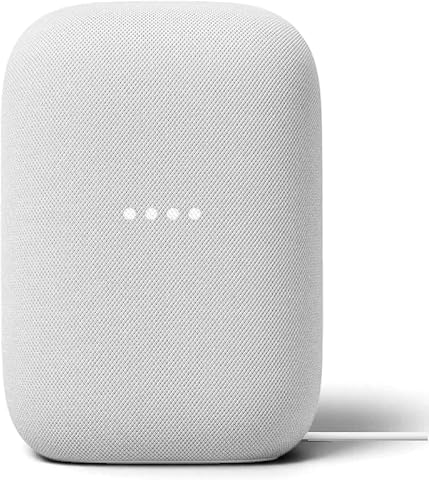
Google Nest Audio (3-Pack) Smart Speakers – Multi-Room Wireless Home Speaker Bundle with Bluetooth, Wi‑Fi, Assistant, Stereo Soun…
- ✔ Included speakers: 3
- ✔ Audio configuration: Stereo output; stereo pairing supported
- ✔ Assistant: Google Assistant
The right choice depends less on the number of devices in the box than on what you want them to do together. Choose a starter bundle if you want low-cost control of lights and simple routines, or if you are still learning which features you will use. Choose a premium bundle if its extra devices cover specific needs across several rooms, such as entry monitoring, climate control, and lighting. Bundle contents and platform support vary by retailer and model, so check compatibility and subscriptions before buying.
At a Glance
| Criteria | Starter smart home bundle | Premium smart home bundle | Winner |
|---|---|---|---|
| Upfront cost | Lower; typically includes a smaller set of core devices. | Higher; the larger device set and added capabilities raise the purchase cost. | A |
| Device coverage | A few essentials, often lights and a plug or sensor. | Broader coverage may include cameras, locks, thermostats, and extra sensors. | B |
| Setup effort | Fewer devices make initial setup and troubleshooting simpler. | More devices and integrations can take longer to configure and maintain. | A |
| Automation capability | Suitable for basic schedules, voice control, and room routines. | More scope for routines across rooms and security, lighting, and climate devices. | B |
| Compatibility and expansion | Can be expanded gradually, subject to the hub and platform’s supported devices. | Can provide a broader system, but may increase dependence on one platform or brand. | Depends |
| Privacy and security | Fewer connected devices mean fewer settings and accounts to manage, though security still depends on the products. | More devices and possible cloud features require more account, permission, and update management. | A |
| Long-term value | Good value when the included devices solve immediate needs and unused features are avoided. | Worth the premium when several included features will be used regularly and replace separate purchases. | Depends |
Smart Home Starter Kit – Echo Hub, Amazon Smart Plug, and 4 Amazon Basics Smart Bulbs (Alexa+)
The Echo Hub Starter Kit earns our top spot because it connects a visible control point with devices we can act on immediately: a smart plug and four bulbs. That makes it more useful as a general smart-home starting bundle than the Ring kit, which is focused on security, or the Nest Audio package, which emphasizes sound and voice access. Its 8-inch touchscreen gives us a way to manage compatible devices without relying on a spoken command, while the listed support for Zigbee, Thread, Matter, and BLE Mesh broadens the types of devices we can add over time.Guided setup and routines can help new owners move from individual lights and plugs to coordinated actions. The built-in motion and ambient-light sensors also give the hub potential to support more contextual control. That breadth is the bundle’s main advantage: instead of dedicating the package to one job, it provides an entry point for daily automation and device management. The touchscreen is also a useful distinction from the Nest Audio speakers, which offer voice control but no comparable central display.There are real boundaries to that flexibility. The hub needs continuous power and a Wi-Fi or Ethernet internet connection, so it is a fixed control point rather than a portable device. The specs list Bluetooth but say hands-free profile is unsupported, which may limit some speaker interactions. Buyers should also check that the Alexa ecosystem and the included bulbs and plug fit their preferred setup. We recommend this bundle for a home starting with lighting, plug control, and routines; choose Ring instead when alarm coverage is the priority, or Nest Audio when multi-room listening comes first.
Pros:
- Includes an Echo Hub, smart plug, and four smart bulbs to begin controlling real devices.
- 8-inch touchscreen provides a dedicated visual control surface.
- Supports Zigbee, Thread, Matter, BLE Mesh, and compatible Alexa devices.
- PIR and ambient-light sensors can support more context-aware routines.
Cons:
- The hub needs continuous power and an internet connection over Wi-Fi or Ethernet.
- Bluetooth hands-free profile is not supported, limiting some speaker interactions.
- The bundle does not include the alarm sensors offered by Ring or three room speakers like Nest Audio.
Best for: We recommend it to Alexa users who want a touchscreen control point plus starter devices for lighting and plug-based routines.
Not ideal for: We would skip it if we need a portable hub, want a security-first bundle, or prefer to build around Google Assistant instead of Alexa.
Bottom line: For an Alexa household seeking the broadest mix of smart-home control and starter devices in one package, this is our most balanced pick.
“For an Alexa household seeking the broadest mix of smart-home control and starter devices in one package, this is our most balanced pick.”
Ring Alarm 14-Piece Kit – Wireless Smart Home Security System with Expandable Sensors, Mobile App Control, 24/7 Professional Moni…
For households whose first smart-home goal is an alarm system, the Ring Alarm 14-Piece Kit is the most purpose-built choice in this group. The package is described for two-to-four-bedroom homes and brings together a base station, keypads, contact sensors, motion detectors, and a range extender. That hardware gives it a more coherent security role than the Echo bundle, whose plug and bulbs support everyday automation, or the Nest three-pack, which centers on audio and voice commands.App setup, three security modes, and Alexa compatibility offer familiar ways to manage the system. A rechargeable backup battery can keep the alarm operational during a power outage, and the system can be expanded with separately sold sensors and accessories. Optional professional monitoring is a meaningful distinction from the other picks: it can connect a security setup to emergency response, whereas neither the Echo Hub nor Nest Audio is presented as an alarm system.The tradeoff is that this bundle is narrower in purpose and some advertised capabilities depend on a paid Ring Protect subscription. The supplied information ties monitoring, cellular backup, and Alexa voice control to a subscription, so buyers should account for those dependencies when comparing it with the Echo kit’s included control hardware. It also lacks smoke and carbon monoxide detection, leaving a gap for anyone expecting one package to cover multiple household hazards. We put Ring second overall because its security kit is strong within its lane, but it is a less versatile starting point for general lighting, automation, or whole-home audio.
Pros:
- Includes a base station, keypads, contact sensors, motion detectors, and range extender.
- Rechargeable battery backup helps maintain operation during power outages.
- Expandable with additional Ring sensors and accessories.
- App control and three security modes support everyday arming and disarming.
Cons:
- Monitoring, cellular backup, and Alexa voice control require a paid subscription, according to the supplied details.
- Does not include smoke or carbon monoxide detection.
- Focused on security rather than the lighting, plug control, or multi-room audio of the other bundles.
Best for: We recommend it to households seeking a dedicated wireless alarm setup with sensors for doors, windows, and motion, plus the option of professional monitoring.
Not ideal for: We would skip it if we want a general-purpose smart-home hub, multi-room music, or smoke and carbon monoxide detection included in the bundle.
Bottom line: Choose Ring when alarm coverage is the main job, and accept the subscription dependencies and separate purchases needed to extend beyond the included security setup.
“Choose Ring when alarm coverage is the main job, and accept the subscription dependencies and separate purchases needed to extend beyond the included security setup.”
Google Nest Audio (3-Pack) Smart Speakers – Multi-Room Wireless Home Speaker Bundle with Bluetooth, Wi‑Fi, Assistant, Stereo Soun…
The Google Nest Audio 3-Pack is the most focused audio bundle in our comparison. Three speakers can be grouped across rooms or arranged as a stereo pair with a third speaker used separately, offering a listening setup that neither the Echo Hub kit nor Ring Alarm provides. Built-in Google Assistant also makes the speakers smart-home voice endpoints, so this package can help us control compatible devices while moving around the home. For buyers who prioritize sound and Google’s assistant, that room-to-room presence gives Nest Audio a distinct role.Compared with the Echo Hub Starter Kit, Nest Audio gives up a touchscreen, included bulbs, and a smart plug in exchange for three dedicated speaker units. It is therefore better suited to people who already have compatible devices and want to extend voice access and audio coverage, rather than those assembling their first collection of controllable lights. Against Ring, it is not a security alternative: it has no alarm sensors, keypad, or monitoring. Those differences explain why we rank it third as a broad smart-home starter, even though it is the most coherent choice for a multi-room listening goal.We should plan for setup work when creating multi-room groups, especially if we are new to smart audio. The speakers are corded and not water resistant, so they belong indoors and away from humid spaces or outdoor use. The listed Bluetooth range is about 10 meters, which can constrain direct streaming from a phone outside that distance. The package’s three-speaker flexibility is valuable, but it does not replace the dedicated hub or security equipment found in the other picks.
Pros:
- Three speakers can be grouped across rooms or split into a stereo pair plus a separate unit.
- Built-in Google Assistant supports voice access to music and compatible smart-home controls.
- Compact freestanding speakers can extend audio and voice access across indoor spaces.
- Construction uses sustainable plastic and wood materials, according to the product details.
Cons:
- Multi-room grouping may take extra setup for first-time smart-audio users.
- Speakers are not water resistant, limiting placement to dry indoor areas.
- Bluetooth range is listed at about 10 meters, and the bundle lacks a dedicated hub or alarm sensors.
Best for: We recommend it to Google Assistant households that want speakers in several rooms, stereo pairing, and voice access to compatible smart-home devices.
Not ideal for: We would skip it if we need included smart bulbs, a touchscreen control hub, alarm sensors, outdoor speakers, or a security monitoring option.
Bottom line: Pick this bundle when multi-room audio and Google Assistant matter more to us than included automation devices or security coverage.
“Pick this bundle when multi-room audio and Google Assistant matter more to us than included automation devices or security coverage.”
As an Amazon Associate we earn from qualifying purchases.
Key Differences
The largest difference is coverage. A starter bundle can make a few common tasks easier, such as turning lamps off on a schedule or controlling lights by voice. A premium bundle can connect more parts of daily life, but only pays off when its extra devices address needs the household actually has. Cameras, locks, and thermostats add useful functions; they also bring installation, settings, and ongoing maintenance.
Cost is not just the checkout price. A modest starter kit leaves room to add devices after learning what works in the home. A premium kit may cost less than buying all of its included devices separately, but that saving matters only if those devices are compatible and will be used. Check whether cameras or other features require a subscription, and whether the platform supports the phones, voice assistants, and devices already in the home.
For most first-time buyers with a narrow goal, the starter bundle is the safer value. For a household with several clear needs and a preference for one coordinated system, premium can save shopping and integration effort. Neither package is automatically better: the useful comparison is between the devices and functions included, not the bundle label.
Detailed Comparison
Upfront cost (Starter smart home bundle wins — major)
The starter bundle wins by asking for less money upfront, a major advantage for someone testing smart home features or solving one small problem. Premium costs more because it includes more equipment. That price is justified only when multiple included devices will be used; otherwise, the buyer pays for capacity that sits idle.
Premium wins by covering more rooms or functions from day one, a major gap for buyers who want lighting, entry, climate, and monitoring in one setup. Starter covers fewer jobs but can be enough for a focused use, such as automating a living room. More devices do not automatically mean more value if the household has no need for them.
Setup effort (Starter smart home bundle wins — moderate)
Starter wins, usually by a moderate margin, because there are fewer devices to pair, name, place, and troubleshoot. Premium may take longer to configure, particularly when it includes cameras, locks, or a thermostat with specific installation requirements. Buyers comfortable with device setup may find the work worthwhile; others may prefer to add equipment gradually.
Premium wins when its extra sensors and controls enable routines across more than one type of device. The difference is moderate for someone who wants, for example, lights to react to a door sensor or temperature changes to control heating. For simple schedules and voice commands, the starter bundle may perform just as well in practice.
Compatibility and expansion (moderate difference)
This depends on the specific products. A starter bundle may be easier to extend over time, while a premium package may offer more compatible devices immediately. Either can become restrictive if it relies on a platform that does not work with the buyer’s existing products. Check supported protocols, voice assistants, phone requirements, and whether devices can operate locally before choosing.
Privacy and security (Starter smart home bundle wins — minor)
Starter has a modest practical advantage because a smaller system means fewer connected devices, permissions, and accounts to manage. That does not make it secure by default: passwords, software updates, and account protections still matter. Premium may add cameras and remote access, making careful configuration more important. Buyers should review data storage and subscription terms for either option.
Long-term value (major difference)
Neither bundle wins for everyone. Starter offers better value when its core devices cover the buyer’s needs and later additions remain optional. Premium can be better value if the household will use several included devices and the bundle costs less than buying them separately. Compare actual contents and recurring fees, not just the advertised discount.
Starter smart home bundle: Pros and Cons
Pros:
- Lower initial cost and an easier way to test smart home routines.
- Fewer devices make setup and day-to-day management more straightforward.
- Lets buyers add equipment gradually as needs become clearer.
Cons:
- May not cover multiple rooms or functions without later purchases.
- Basic device sets can limit more advanced cross-device routines.
- Compatibility with future additions depends on the bundle’s platform.
Pros:
- Covers more tasks and rooms from the start.
- Can support richer routines across lighting, sensors, security, and climate.
- May offer a better combined price than buying several compatible devices separately.
Cons:
- Higher upfront cost, especially if some devices go unused.
- More setup and ongoing device management.
- Extra cameras or cloud features may bring privacy considerations or subscription costs.
Who Should Choose What
Choose Starter smart home bundle if:
- You want to automate a few lights or appliances and keep the first purchase affordable.
- You are new to smart home devices and want to learn which features matter before expanding.
- You prefer to manage fewer devices, accounts, and settings.
Choose Premium smart home bundle if:
- You already know you need several functions, such as lighting, entry monitoring, and climate control.
- You want coordinated routines across multiple rooms and will use the included devices regularly.
- The bundle’s devices match your home and existing platform, and the combined price beats buying them separately.
Skip both if: Skip both if the bundles rely on a platform that does not support your existing devices, or if you only need one specific product that you can buy on its own for less.
Value for Money
Paying more for premium is worthwhile when the bundle replaces several purchases you already planned to make. Price the included devices individually, check whether they work with your current phone and smart home platform, and account for any required subscriptions. If the premium kit includes a camera, lock, or thermostat you do not need, its bundle discount can still leave you spending more for no practical benefit. The starter option is usually the better value for one or two simple tasks; premium earns its cost when several included functions solve real household needs.
Final Verdict
For most first-time buyers, choose the starter smart home bundle. It keeps the initial commitment small, handles common lighting and plug routines, and gives you room to learn what you will actually use. Choose premium when you have specific needs across multiple functions and have confirmed that every important device works with your home and platform. The deciding factor is expected use: pay more only when the extra coverage and routines will matter regularly. If you need just one device or cannot confirm compatibility, skip both bundles and buy the suitable product on its own.
Frequently Asked Questions
Is a premium smart home bundle worth the extra cost?
It is worth the extra cost when you will use several included devices and the total bundle price compares favorably with buying them separately. If the extra cameras, sensors, or controls would sit unused, a starter bundle is better value.
Can I expand a starter smart home bundle later?
Often, yes, but expansion depends on the hub or platform and the devices it supports. Check compatibility and connection requirements before buying, especially if you already own products from another brand.
Which bundle is easier for a beginner to set up?
The starter bundle is generally easier because it has fewer devices to connect and configure. Setup still varies by product, and locks, cameras, or thermostats may involve extra steps regardless of the bundle.
Do premium smart home bundles require a subscription?
Some do for features such as cloud video storage or extended camera history; others provide core controls without a recurring fee. Check the terms for each included device, since subscription costs can change the long-term value.