

The best Razer gaming accessories in 2026 range from budget mouse pads to wireless charging docks, and the lineup I compared shows how wide that spectrum really is. The Razer Barracuda X Chroma stands out as the best overall pick because it combines wireless freedom, solid audio, and everyday versatility at a sensible level of investment. If your priority is value, the Razer DeathAdder Essential delivers the brand’s signature ergonomics without premium pricing, while the Razer Mouse Dock Pro makes the most sense for wireless mouse owners tired of cable clutter. The main tradeoff you’ll face in this category is between RGB-enabled desk gear that looks impressive and plain, performance-focused accessories that often work better for competitive play. Below, I break down all 15 picks by role, budget, and use case so you can build your setup piece by piece.

Get the latest gadgets delivered free — and shop member deals
- Fast, free delivery on millions of items
- Access to Prime Big Deal Days deals on October 6–7
- Prime Video, Amazon Music and more included
Complete the kit



Key Takeaways
- Razer‘s mouse pad lineup is the most decision-heavy category here: the Goliathus Extended Chroma, Firefly V2 Pro, Firefly Hard V2, Strider Chroma, and Gigantus V2 all serve different glide preferences, so the surface type matters more than any other spec.
- The Barracuda X Chroma beat the BlackShark V2 X as the top headset because of its wireless connectivity, while the BlackShark V2 X remains the stronger pick if you only play at a desk and want a lighter, cheaper wired option.
- Razer‘s charging and hub accessories (Mouse Dock Pro, Base Station V3, Monitor Stand Chroma) overlap in function — buyers should pick based on whether they need mouse charging, headset storage, or port expansion, not buy all three.
- The Tartarus V2 keypad is the most polarizing product in the lineup: a genuine upgrade for MMO and macro-heavy players, but an awkward expense for anyone who mainly plays shooters.
- The DeathAdder Essential proves Razer‘s entry-level gear holds up well, but its wired design and lack of RGB make it a deliberate tradeoff rather than a watered-down flagship.
| Razer Tartarus V2 Gaming Keypad, 32 Programmable Keys, Black |  | Best for MMO and Macro Players | Key Count: 32 | Key Type: Mecha-membrane | Directional Thumbpad: 8-way | VIEW LATEST PRICE | See Our Full Breakdown |
| Razer Gaming Mouse Bungee V3 Chroma |  | Best Desk Upgrade for Wired Mouse Users | Color: Black | Base Weight: 240g (8.5oz) | Lighting: RGB underglow, 16.8 million colors | VIEW LATEST PRICE | See Our Full Breakdown |
| Razer Base Station V2 Chroma Headphone Stand, Black |  | Best Multi-Function Headset Stand | Color: Black | Lighting: Chroma RGB, 16.8 million colors, customizable effects | Ports: Two USB 3.1 charging ports, one 3.5mm audio jack | VIEW LATEST PRICE | See Our Full Breakdown |
| Razer Goliathus Extended Chroma Gaming Mousepad |  | Best Full-Desk RGB Mousepad | Surface Material: Soft, micro-textured cloth | Base: Natural-foam rubber, nonslip | Lighting: Razer Chroma RGB, 16.8 million colors | VIEW LATEST PRICE | See Our Full Breakdown |
| Razer DeathAdder Essential Ergonomic Wired Gaming Mouse, Black |  | Best Budget Entry Mouse | Sensor: 6,400 DPI optical | Connectivity: Wired | Programmable Buttons: 5 | VIEW LATEST PRICE | See Our Full Breakdown |
| Razer Barracuda X Chroma Wireless Gaming Headset | 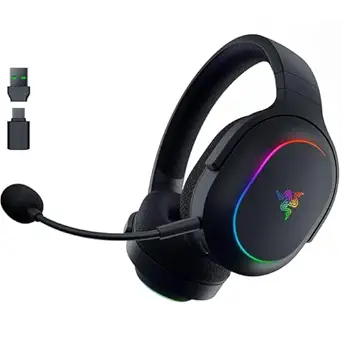 | Best Wireless Headset | Drivers: 40 mm TriForce | Weight: 285 g | Connectivity: Razer HyperSpeed Wireless (2.4 GHz) and Bluetooth 5.3 | VIEW LATEST PRICE | See Our Full Breakdown |
| Razer Firefly V2 Pro RGB Gaming Mouse Mat (Black) |  | Best RGB Mouse Mat | Lighting zones: 15-zone Chroma RGB | Connectivity: Detachable USB Type-C cable | USB port: Integrated USB 2.0 | VIEW LATEST PRICE | See Our Full Breakdown |
| Razer BlackShark V2 X Gaming Headset |  | Best Budget Headset | Drivers: 50 mm custom-tuned | Weight: 240 g | Audio connection: 3.5 mm jack | VIEW LATEST PRICE | See Our Full Breakdown |
| Razer Gigantus V2 Cloth Gaming Mouse Pad (Large) – Classic Black |  | Best Value Mouse Pad | Size: Large | Dimensions: 15.75″ L x 17.72″ W | Thickness: 3 mm | VIEW LATEST PRICE | See Our Full Breakdown |
| Razer Mouse Dock Pro with Wireless Charging Puck – Black |  | Best Premium Mouse Accessory | Compatible devices: Basilisk V3 Pro, Cobra Pro, Naga V2 Pro | Wireless charging: Qi magnetic | Polling rate: 8K Hz (with compatible mouse) | VIEW LATEST PRICE | See Our Full Breakdown |
| Razer Strider Chroma Hybrid Gaming Mouse Mat |  | Best Hybrid Surface | Product Type: Hybrid gaming mouse mat | Lighting: 19 Razer Chroma RGB zones | Surface: Hybrid soft/hard | VIEW LATEST PRICE | See Our Full Breakdown |
| Razer Base Station V3 Chroma RGB Headset Stand with USB Hub, Black |  | Best Headset Stand for Automation | Color: Black | USB Ports: 2 USB 3.1 ports | Lighting: 12-zone Chroma RGB, 16.8 million colors | VIEW LATEST PRICE | See Our Full Breakdown |
| Razer Leviathan V2 X PC Gaming Soundbar with Full-Range Drivers, Black |  | Best Compact Desk Audio | Speaker Type: Soundbar | Audio Output: Stereo, Dolby Digital 2.0 | Connectivity: USB Type-C, Bluetooth 5.0 | VIEW LATEST PRICE | See Our Full Breakdown |
| Razer Firefly Hard V2 RGB Gaming Mouse Pad |  | Best Value RGB Mouse Pad | Surface: Micro-textured hard surface | Lighting: Razer Chroma RGB, 16.8 million colors | Compatibility: Games, Razer hardware, Philips Hue, 30+ partners | VIEW LATEST PRICE | See Our Full Breakdown |
| Razer Monitor Stand Chroma with 4-Port USB-C Hub, USB-A, USB-C & HDMI |  | Best Desk Upgrade | Dimensions: 19.7 in L x 8.27 in W | Weight: 5.5 lbs | Load Capacity: 44 lbs | VIEW LATEST PRICE | See Our Full Breakdown |
| Razer gaming accessorie | Lighting |
|---|---|
| Razer Tartarus V2 Gaming Keypa | — |
| Razer Gaming Mouse Bungee V3 C | RGB underglow, 16.8 million colors |
| Razer Base Station V2 Chroma H | Chroma RGB, 16.8 million colors, customizable effects |
| Razer Goliathus Extended Chrom | Razer Chroma RGB, 16.8 million colors |
| Razer DeathAdder Essential Erg | — |
| Razer Barracuda X Chroma Wirel | 6-zone Razer Chroma RGB |
| Razer Firefly V2 Pro RGB Gamin | — |
| Razer BlackShark V2 X Gaming H | — |
| Razer Gigantus V2 Cloth Gaming | — |
| Razer Mouse Dock Pro with Wire | — |
| Razer Strider Chroma Hybrid Ga | 19 Razer Chroma RGB zones |
| Razer Base Station V3 Chroma R | 12-zone Chroma RGB, 16.8 million colors |
| Razer Leviathan V2 X PC Gaming | Razer Chroma RGB, 14 zones |
| Razer Firefly Hard V2 RGB Gami | Razer Chroma RGB, 16.8 million colors |
| Razer Monitor Stand Chroma wit | — |
More Details on Our Top Picks
Razer Tartarus V2 Gaming Keypad, 32 Programmable Keys, Black
Most accessories in this roundup refine how you play; the Tartarus V2 changes how you input commands entirely. With 32 programmable mecha-membrane keys plus an 8-way thumbpad, this keypad consolidates entire skill bars, hotkeys, or editing shortcuts under one hand. The mecha-membrane construction splits the difference between clicky mechanical switches and soft membrane keys, which suits marathon sessions where fatigue matters. Compared with the DeathAdder Essential elsewhere in this guide, which offers only five programmable buttons, the Tartarus V2 is the clear pick for ability-heavy games — but that specialization is also its limitation. Buyers expecting true mechanical actuation may find the cushioned feel less crisp, and the ergonomic benefits only materialize after a genuine learning period.
Pros:- 32 programmable keys handle complex ability rotations and macro chains
- 8-way thumbpad replaces WASD movement with natural thumb control
- Mecha-membrane switches balance tactile feedback with a cushioned feel for long sessions
- Individually backlit keys sync with the wider Razer Chroma ecosystem
Cons:- Steep learning curve before the layout feels faster than a full keyboard
- Mecha-membrane feel won’t satisfy players who prefer crisp mechanical switches
- Single-handed design makes it a supplement to, not a replacement for, a keyboard
Best for: MMO, MOBA, and simulation players who juggle dozens of abilities, macros, or creative-software hotkeys
Not ideal for: FPS-focused players or casual gamers who mostly need a standard keyboard — the extra keys would sit unused
- Key Count:32
- Key Type:Mecha-membrane
- Directional Thumbpad:8-way
- Programmable Macros:Yes, with Razer Hypershift
- Backlighting:Individually backlit keys
- Color Support:16.8 million colors
- Color:Black
Our verdict“A specialized tool that earns its place only if your games or workflow genuinely demand dozens of commands at your fingertips.”
Razer Gaming Mouse Bungee V3 Chroma
The Bungee V3 Chroma solves one narrow problem extremely well: cable drag. Its adjustable spring arm lifts your mouse cable off the pad so swipes feel closer to wireless, and the 240g weighted base with anti-slip feet keeps it planted during frantic flicks. It pairs naturally with wired picks in this guide like the DeathAdder Essential, turning a budget wired mouse into something that handles like a pricier cable-free model. The RGB underglow also lets it blend visually with the Goliathus Extended Chroma pad for a unified desk aesthetic. The obvious catch: this is a wired-only accessory. If you already own or plan to buy the Mouse Dock Pro and a wireless mouse, this bungee becomes a paperweight with lights.
Pros:- Spring arm eliminates cable drag and tangles for a wireless-like feel
- Weighted 240g base with anti-slip feet stays planted during aggressive movements
- Compact frame takes up minimal desk space next to your mousepad
- Works with rubber, braided, and paracord cables
Cons:- Useless without a wired mouse
- Adds another cable and device to your desk setup
- RGB underglow is decorative rather than functional
Best for: Competitive wired-mouse players who feel cable drag during fast flicks and low-sensitivity swipes
Not ideal for: Wireless mouse owners — including anyone using the Mouse Dock Pro — since there is no cable to manage
- Color:Black
- Base Weight:240g (8.5oz)
- Lighting:RGB underglow, 16.8 million colors
- Compatibility:Rubber, braided, and paracord mouse cables
- Base Stability:Weighted with anti-slip feet
- Spring Arm:Adjustable
Our verdict“A cheap-feeling-simple fix for cable drag that only makes sense while you’re committed to wired mice.”
Razer Base Station V2 Chroma Headphone Stand, Black
A headphone stand that also works as a hub — that’s the pitch of the Base Station V2 Chroma. Beyond giving headsets like the Barracuda X Chroma or BlackShark V2 X a proper home, it adds two USB 3.1 charging ports and a 3.5mm jack with a built-in 7.1 surround DAC, effectively upgrading a basic motherboard audio connection. The aluminum build feels more premium than typical plastic stands. Compared with the Base Station V3 also featured in this roundup, the V2 trades the newer model’s expanded USB hub for the integrated DAC — so buyers who prioritize audio processing over port count should lean this way. The tradeoff is footprint: the 4.72-inch base plus cabling claims real desk territory, and the audio benefits vanish if your motherboard already handles surround sound well.
Pros:- Built-in 7.1 surround DAC improves audio over basic motherboard jacks
- Two USB 3.1 ports double as a charging hub
- Aluminum construction with a stable, non-slip rubber base
- Detachable base makes it easier to move or transport
Cons:- 4.72-inch base demands meaningful desk space
- DAC is redundant if your existing audio solution is already capable
- Newer Base Station V3 offers a more versatile hub for similar desk footprint
Best for: Desk setup builders who want headset storage plus USB charging ports and better onboard audio in one accessory
Not ideal for: Owners of tight desks or motherboards with already-strong audio, where the DAC adds nothing but the base still eats space
- Color:Black
- Lighting:Chroma RGB, 16.8 million colors, customizable effects
- Ports:Two USB 3.1 charging ports, one 3.5mm audio jack
- Audio:Built-in 7.1 surround sound DAC
- Construction:Aluminum
- Base:Detachable, non-slip high-friction rubber, 4.72 in (120 mm) diameter
- Dimensions:10.94 in (278 mm) height, 1 lb (460 g)
Our verdict“The right stand for buyers who want headset storage and an audio upgrade together rather than as separate purchases.”
Razer Goliathus Extended Chroma Gaming Mousepad
If you want your entire desk surface to glow in sync with your gear, the Goliathus Extended Chroma is the most direct route there. Its micro-textured cloth surface balances speed and control so both flick shots and precise tracking work without swapping pads, and the nonslip foam-rubber base keeps a pad this large from drifting. Unlike the Gigantus V2 in this roundup — a similar size but with zero lighting — the Goliathus Extended adds edge RGB that syncs with other Chroma gear like the Bungee V3 or Base Station V2. Compared with the Strider Chroma hybrid mat, the all-cloth build is softer on the wrist but less water-resistant. The catch: the lighting needs a powered USB connection, so you sacrifice a port and gain a cable on an otherwise wireless-feeling desk.
Pros:- Extended size fits keyboard and mouse together for a uniform desk surface
- Micro-textured cloth supports both fast swipes and controlled tracking
- RGB edge lighting syncs with games and other Chroma devices
- Nonslip rubber base keeps the large surface anchored
Cons:- Lighting requires a powered USB connection, adding a cable to your desk
- All-cloth surface is harder to clean than hybrid mats like the Strider Chroma
Best for: Players building a Chroma-synced battlestation who want one oversized pad covering mouse and keyboard
Not ideal for: Minimalists who dislike cables and lighting — the non-illuminated Gigantus V2 delivers a similar surface with zero fuss
- Surface Material:Soft, micro-textured cloth
- Base:Natural-foam rubber, nonslip
- Lighting:Razer Chroma RGB, 16.8 million colors
- Size:Extended (desk-sized)
- Power:USB powered for lighting
- Model Number:RZ02-02500300-R3U1
- Warranty:1 year
Our verdict“The pick for full-desk RGB coverage with a versatile surface, provided you accept one more USB cable.”
Razer DeathAdder Essential Ergonomic Wired Gaming Mouse, Black
The DeathAdder Essential is the least assuming item here, and that’s its strength. A 6,400 DPI optical sensor with on-the-fly sensitivity buttons and five programmable inputs cover everything a newer or budget-conscious player needs, while the ergonomic right-handed shell keeps long sessions comfortable. Compared with feature-heavy picks in this roundup like the Tartarus V2 keypad, this mouse does less but asks far less of the buyer — no macro maps to learn, no software mastery required. It also pairs logically with the Bungee V3 Chroma if drag becomes an annoyance later. The compromises are real, though: 6,400 DPI trails modern gaming sensors by a wide margin, there’s no wireless option, and the 10-million-click switch rating is modest compared with Razer’s higher-tier mice. Serious competitive players will outgrow it.
Pros:- Dedicated DPI buttons let you shift sensitivity mid-game without software
- Five programmable buttons handle remapping and basic macros
- Ergonomic right-handed shape comfortable for long sessions
- Rubberized, ridged scroll wheel gives a tactile, controlled grip
Cons:- 6,400 DPI sensor lags well behind current gaming-mouse standards
- Wired-only design means cable drag unless paired with a bungee
- 10-million-click switch lifespan is modest for heavy daily use
Best for: Budget-conscious or newer PC gamers who want a reliable, comfortable wired mouse without paying for pro-tier features
Not ideal for: Competitive low-sensitivity or high-DPI players who need a modern high-end sensor and wireless freedom
- Sensor:6,400 DPI optical
- Connectivity:Wired
- Programmable Buttons:5
- Switch Lifespan:Up to 10 million clicks
- Sensitivity Adjustment:On-the-fly DPI buttons
- Scroll Wheel:Ridged rubberized grip
- Color:Black
Our verdict“A sensible, comfortable starter mouse that covers the basics well but will be outgrown by demanding players.”
Razer Barracuda X Chroma Wireless Gaming Headset
This option stands out for buyers who want to cut the cord without sacrificing battery headroom — up to 70 hours per charge means most players will top up weekly rather than nightly. The dual 2.4 GHz and Bluetooth 5.3 connectivity lets the same headset serve a desk setup and a phone commute, which the wired BlackShark V2 X simply cannot do. At 285 g with memory foam cushions, it also stays comfortable through long sessions. The tradeoff is platform coverage: unlike the BlackShark V2 X, it skips Xbox entirely, and its 40 mm TriForce drivers are smaller than the 50 mm units in Razer’s flagship headsets, so bass response is a step behind wired options in this price class. The detachable mic and 6-zone Chroma lighting soften the deal for streamers who care about aesthetics.
Pros:- Up to 70 hours of battery life means rare charging
- Dual 2.4 GHz and Bluetooth connectivity for multi-device use
- Lightweight 285 g build with memory foam cushions
- Detachable mic plus 6-zone Chroma RGB customization
Cons:- No Xbox compatibility
- 40 mm drivers deliver less low-end punch than larger-driver wired headsets
Best for: Multi-device gamers who switch between PC, PlayStation, Switch, and mobile and want one wireless headset for all of them
Not ideal for: Xbox owners — the headset has no Xbox compatibility at all, so console-locked players should look elsewhere
- Drivers:40 mm TriForce
- Weight:285 g
- Connectivity:Razer HyperSpeed Wireless (2.4 GHz) and Bluetooth 5.3
- Battery life:Up to 70 hours
- Microphone:Detachable Razer HyperClear Cardioid
- Lighting:6-zone Razer Chroma RGB
- Compatibility:PC, Mac, PlayStation, Nintendo Switch, mobile (no Xbox)
- Warranty:2 years
Our verdict“This is the pick for platform-hopping gamers who prioritize wireless freedom and battery life over absolute audio fidelity.”
Razer Firefly V2 Pro RGB Gaming Mouse Mat (Black)
Where the Gigantus V2 is the no-frills cloth workhorse, the Firefly V2 Pro plays a different game entirely: it is a lighting showcase with a practical trick up its sleeve. The 15-zone Chroma RGB wraps edge-to-edge illumination around the desk, syncing with other Razer gear for a unified setup. The genuinely useful feature is the integrated USB 2.0 port, which lets a wireless mouse dongle sit inches from the pad — reducing interference and latency in a way passive pads like the Goliathus Extended Chroma can’t match. The micro-textured surface strikes a middle ground between speed and control, though serious competitive players may prefer a dedicated hard pad like the Firefly Hard V2. The real tradeoff: it needs constant power via its USB-C cable, and the lighting adds cost without improving tracking at all.
Pros:- 15-zone edge-to-edge Chroma RGB with 16.8 million colors
- Integrated USB 2.0 port keeps wireless dongles close for better performance
- Detachable USB-C cable doubles as a charger for other devices
- Micro-textured surface balances speed and control for optical sensors
Cons:- RGB adds cost without any tracking performance benefit
- Requires constant power via cable, unlike passive mouse pads
Best for: RGB-focused builders who want desk-wide lighting sync and own a wireless Razer mouse that benefits from the built-in dongle port
Not ideal for: Lan-party goers and minimalists — it requires power via cable, so it is less portable and more cluttered than a passive pad
- Lighting zones:15-zone Chroma RGB
- Connectivity:Detachable USB Type-C cable
- USB port:Integrated USB 2.0
- Surface:Micro-textured, low friction
- Base:Anti-slip rubber
- Color:Black
- Warranty:1 year manufacturer
Our verdict“This pad makes the most sense for gamers building a Chroma-synced battlestation who also want smarter wireless dongle placement.”
Razer BlackShark V2 X Gaming Headset
Compared with the Barracuda X Chroma, this model trades wireless freedom for a lower price and broader console reach — including Xbox One support, which the Barracuda X Chroma lacks entirely. At just 240 g, it is the lighter of the two, and the closed-back earcups with breathable foam do respectable work isolating game audio from a noisy room. The 50 mm drivers outsize the Barracuda’s 40 mm units, giving it an edge in bass depth despite the budget positioning. The catches are real, though: the software 7.1 surround sound only works on Windows 10 64-bit, rendering it a plain stereo headset on Mac and consoles, and Xbox One owners may need a separately sold stereo adapter. The 3.5 mm jack also means no mic monitoring or per-game EQ on most platforms.
Pros:- Featherlight 240 g build for long sessions
- Closed earcups and foam cushions isolate sound well
- Cardioid mic rejects noise from sides and rear
- Works across PC, Mac, PS4, Xbox One, and Switch via 3.5 mm
Cons:- 7.1 surround sound is Windows 10 64-bit only
- Xbox One may require a separately sold stereo adapter
- Wired 3.5 mm connection limits desk flexibility
Best for: Budget-conscious gamers who want lightweight wired comfort and the widest possible console compatibility, including Xbox
Not ideal for: Players who want surround sound on console or Mac — the 7.1 feature is locked to Windows 10 64-bit only
- Drivers:50 mm custom-tuned
- Weight:240 g
- Audio connection:3.5 mm jack
- Surround sound:Software-enabled 7.1 (Windows 10 64-bit only)
- Microphone:Razer HyperClear cardioid
- Compatibility:PC, Mac, PS4, Xbox One, Nintendo Switch
- Ear cushions:Breathable foam
Our verdict“This is the value pick for multi-console households that want dependable wired audio without paying for wireless or RGB extras.”
Razer Gigantus V2 Cloth Gaming Mouse Pad (Large) – Classic Black
While the Firefly V2 Pro spends its budget on lighting and a dongle port, the Gigantus V2 puts every cent into the surface itself — and for most players, that is the smarter allocation. The micro-weave cloth is calibrated for pixel-precise tracking with any mouse sensor, not just Razer’s, and the high-density rubber foam stays flat even on desks with imperfections. No cables, no power requirements, no software: it simply works the moment it lands on the desk. The Large size covers 15.75 by 17.72 inches, enough room for low-DPI sweeping arm movements. Tradeoffs exist — cloth wears faster than hard pads under heavy daily use, and the 3 mm thickness offers less wrist cushioning than the thicker XXL and 3XL variants in the same line. If RGB is non-negotiable, the Firefly V2 Pro or Goliathus Extended Chroma are the alternatives.
Pros:- Micro-weave surface calibrated for precise tracking with all mouse sensors
- Anti-slip rubber base stays put during fast play
- High-density foam lies flat even on uneven desks
- Four available sizes fit different desk layouts and DPI styles
Cons:- Cloth surface wears down faster than hard pads with heavy use
- 3 mm thickness provides minimal wrist cushioning compared to XXL/3XL options
Best for: Competitive and value-focused players who want a large, sensor-friendly tracking surface with zero setup hassle
Not ideal for: Gamers building an RGB-synced desk aesthetic — this pad has no lighting of any kind
- Size:Large
- Dimensions:15.75″ L x 17.72″ W
- Thickness:3 mm
- Surface material:Textured MicroWeave cloth
- Base material:Rubber
- Color:Classic Black
- Warranty:1 year manufacturer
Our verdict“This pad is the sensible default for anyone who cares more about aim consistency than desk lighting.”
Razer Mouse Dock Pro with Wireless Charging Puck – Black
This is the luxury add-on of the mouse category, and it earns that place through one feature no other item in this roundup offers: an integrated 8K Hz HyperPolling transceiver that unlocks ultra-responsive tracking on supported mice. Compared with the Firefly V2 Pro’s dongle passthrough, this goes further — it doesn’t just host a receiver, it becomes a high-performance one. The magnetic Qi charging holds the mouse securely while docked, and the red/yellow/green status lighting removes the guesswork from battery management. Eight Chroma zones tie it into a synced setup. The limitation is blunt: it only works with the Basilisk V3 Pro, Cobra Pro, and Naga V2 Pro, uses a proprietary connector, and delivers just 10W of charging power. Anyone with an older or third-party mouse gets nothing from it.
Pros:- Magnetic wireless charging keeps the mouse secure while docked
- Integrated 8K Hz transceiver unlocks ultra-responsive competitive performance
- Battery status lighting in red/yellow/green
- 8 Chroma RGB zones with game sync
Cons:- Only compatible with Basilisk V3 Pro, Cobra Pro, and Naga V2 Pro
- Proprietary connector limits future flexibility
- 10W output charges slower than dedicated Qi fast chargers
Best for: Owners of the Basilisk V3 Pro, Cobra Pro, or Naga V2 Pro who want hands-free charging and competitive 8K Hz polling
Not ideal for: Owners of older or non-Razer mice — compatibility is limited to three specific models, making this an expensive paperweight otherwise
- Compatible devices:Basilisk V3 Pro, Cobra Pro, Naga V2 Pro
- Wireless charging:Qi magnetic
- Polling rate:8K Hz (with compatible mouse)
- Wattage:10W
- Input voltage:5V DC
- RGB zones:8
- Connectivity:USB
- Mounting type:Tabletop
Our verdict“This dock is a targeted upgrade for owners of three specific Razer flagship mice — everyone else should skip it.”
Razer Strider Chroma Hybrid Gaming Mouse Mat
Most desk mats force a choice: the stopping power of cloth or the speed of a hard pad. The Strider Chroma splits the difference with a hybrid surface that handles both flick shots and controlled tracking, which is something neither the cloth-based Razer Goliathus Extended Chroma nor the hard-surfaced Firefly Hard V2 can claim on their own. Its 19 Chroma RGB zones out-light the Firefly Hard V2’s underglow and pair well with an all-Razer battlestation. The water- and warp-resistant build also means spills and curled edges are far less of a concern than with traditional cloth mats. The tradeoff is footprint: this extended mat eats desk real estate, so anyone running a compact setup alongside a bungee or dock should measure first.
Pros:- Hybrid surface delivers both soft-pad stopping power and hard-pad glide
- 19 customizable Chroma RGB zones light up a full desk area
- Water- and warp-resistant construction resists spills and curling
- Anti-slip base and seamless edges keep the mat flat and stable
Cons:- Extended size demands considerable desk space
- Hybrid feel won’t fully satisfy purists who prefer a pure cloth or pure hard surface
Best for: Players who switch between fast flick and slow controlled aiming styles and want RGB coverage across their whole keyboard-and-mouse area
Not ideal for: Small-desk owners or minimalist setups — the extended dimensions leave little room for speakers, stands, or a bungee
- Product Type:Hybrid gaming mouse mat
- Lighting:19 Razer Chroma RGB zones
- Surface:Hybrid soft/hard
- Resistance:Water- and warp-resistant
- Base:Anti-slip
- Edges:Seamless
- Warranty:1 year manufacturer
Our verdict“This mat makes the most sense for gamers who refuse to compromise between speed and control — as long as their desk can fit it.”
Razer Base Station V3 Chroma RGB Headset Stand with USB Hub, Black
What separates the Base Station V3 from the Razer Base Station V2 Chroma is automation: lift your headset off the stand and Synapse can trigger profile switches for audio, games, and lighting automatically. That turns a passive desk accessory into a genuine workflow tool for streamers and multitaskers. The 12-zone Chroma RGB syncs with supported titles and hardware, while the two USB 3.1 ports double as a modest hub — handy next to the Razer Mouse Dock Pro for keeping peripherals charged and cables tidy. The curved anti-slip ledge with a felt base protects headband cushions better than flat-post stands. The catch is that every smart feature lives behind Synapse on Windows 11; on a Mac or a barebones install, this is just a pretty — and pricier — headset holder.
Pros:- Headset detection automates audio, game, and lighting profiles via Synapse
- 12-zone Chroma RGB syncs with supported games and devices
- Two USB 3.1 ports reduce desktop cable clutter
- Curved support and felt base protect and stabilize headsets
Cons:- Software features require Synapse running on Windows 11
- Only two USB ports — less connectivity than a dedicated hub like the Razer Monitor Stand Chroma
Best for: Windows 11 gamers and streamers who want their setup to react automatically when they pick up or set down their headset
Not ideal for: Mac users or anyone who avoids background software — without Synapse, the standout features simply don’t exist
- Color:Black
- USB Ports:2 USB 3.1 ports
- Lighting:12-zone Chroma RGB, 16.8 million colors
- Audio:7.1 surround sound enhancement
- Compatibility:Virtually any headset; Windows 11 PC with Synapse
- Headset Detection:Synapse profile automation on lift
Our verdict“Worth it for Synapse users who want automation; skip it if you just need somewhere to hang headphones.”
Razer Leviathan V2 X PC Gaming Soundbar with Full-Range Drivers, Black
Not every desk has room for the full Leviathan V2 experience with a subwoofer, and that’s exactly the gap this model fills. Its single USB-C cable handles power and audio, which means no wall adapter and no tangle behind the monitor — a cleaner setup than nearly anything else in Razer’s audio lineup. Two full-range drivers and passive radiators deliver stereo sound that comfortably beats monitor speakers, though bass response obviously can’t match a dedicated sub. Bluetooth 5.0 adds low-latency pairing for phones or a Nintendo Switch, and 14 Chroma zones keep it visually in sync with a Strider Chroma mat or Base Station V3. The tradeoffs: it lacks water resistance of any kind, and full control requires the Razer Audio App or Synapse rather than onboard buttons for everything.
Pros:- Compact bar fits neatly beneath a monitor
- Single USB-C cable handles power and audio for minimal setup
- Bluetooth 5.0 for low-latency wireless connection to mobile devices
- 14 Chroma RGB lighting zones with deep customization
Cons:- No water resistance and no physical protection for desk spills
- Full control requires the Razer Audio App or Synapse software
Best for: Desktop gamers with limited space who want cleaner audio than monitor speakers without a subwoofer or speaker stands
Not ideal for: Bass-heavy audiophiles or anyone who wants hardware-only controls without installing Razer software
- Speaker Type:Soundbar
- Audio Output:Stereo, Dolby Digital 2.0
- Connectivity:USB Type-C, Bluetooth 5.0
- Bluetooth Range:10 meters
- Max Volume:90 dB
- Lighting:Razer Chroma RGB, 14 zones
- Control:Razer Audio App / Razer Synapse
Our verdict“The most sensible pick for space-constrained desks where one cable, clean sound, and synced lighting matter more than booming bass.”
Razer Firefly Hard V2 RGB Gaming Mouse Pad
Compared with the hybrid Razer Strider Chroma, the Firefly Hard V2 takes a simpler bet: a micro-textured hard surface calibrated for optical sensors, favoring low-friction speed and precise tracking. It’s a standard-size pad rather than an extended mat, so it slots into tighter desks where the Strider simply won’t fit. Its Chroma ecosystem reach is the real hook — syncing with games, Philips Hue, and 30+ partner devices, matching what you’d get from the pricier Firefly V2 Pro. The built-in cable manager is a thoughtful touch that pairs well with the Razer Gaming Mouse Bungee V3 for drag-free wired play. The honest tradeoff is surface feel: hard pads feel slick and unforgiving, so cloth loyalists — the Gigantus V2 crowd — should stick with what they know.
Pros:- Customizable Chroma RGB with broad game, Hue, and 30+ partner integration
- Micro-textured surface supports precise tracking and multiple playstyles
- Nonslip rubber base keeps the pad planted
- Built-in cable manager keeps wired mice tidy
Cons:- Hard surface won’t suit players who prefer soft cloth pads
- No adjustable size or thickness options available
Best for: Speed-oriented FPS players who want hard-surface glide and RGB game integration without paying for the Firefly V2 Pro
Not ideal for: Players who prefer the cushioned friction of a soft cloth pad like the Gigantus V2, or anyone wanting size options
- Surface:Micro-textured hard surface
- Lighting:Razer Chroma RGB, 16.8 million colors
- Compatibility:Games, Razer hardware, Philips Hue, 30+ partners
- Base:Nonslip natural-foam rubber
- Cable Management:Built-in cable manager
- Dimensions:10.84 x 13.99 x 0.14 inches
Our verdict“A smart mid-range choice for hard-surface fans who want full Chroma integration at a standard footprint.”
Razer Monitor Stand Chroma with 4-Port USB-C Hub, USB-A, USB-C & HDMI
This is the accessory that quietly organizes everything else on this list. Where the Base Station V3 offers two USB ports, the Monitor Stand Chroma delivers a 4-port hub including HDMI 2.0, letting a single USB-C host cable run your monitor and peripherals — a genuine productivity win for laptop gamers docking at a desk. The anodized aluminum build holds up to 44 lbs, so ultrawide monitors are no problem, and the riser improves posture by lifting the screen to eye level. Its remappable RGB button can cycle lighting, launch apps, or mute audio — a small feature with real daily utility. Two honest limits: the height is fixed at one level, so ergonomics are take-it-or-leave-it, and at 5.5 lbs it’s awkward to reposition once set up.
Pros:- Built-in 4-port hub with USB-A, USB-C, and HDMI 2.0 centralizes connectivity
- Anodized aluminum construction supports monitors up to 44 lbs
- Ergonomic riser elevates the monitor to eye level
- Remappable RGB button plus organizer shelf add daily utility
Cons:- Only one fixed height level — no adjustability
- At 5.5 lbs, it’s heavy to move or reposition
Best for: Laptop-docking gamers and home-office hybrid setups who want monitor riser ergonomics plus a full connectivity hub in one purchase
Not ideal for: Anyone needing adjustable monitor height, or small desks where a 19.7-inch stand plus mouse mat won’t fit
- Dimensions:19.7 in L x 8.27 in W
- Weight:5.5 lbs
- Load Capacity:44 lbs
- Material:Anodized aluminum, matte black finish
- Ports:2x USB 3.2 Type-A, 1x USB 3.2 Type-C, 1x HDMI 2.0
- Connectivity:Single USB-C host cable
- Special Features:Chroma RGB (16.8M colors), remappable button, organizer shelf
- Warranty:2 year manufacturer
Our verdict“The best single purchase for consolidating cables, ergonomics, and Chroma lighting under one sturdy riser — if its fixed height suits you.”

How We Picked
My ranking logic starts with how well each accessory solves a real desk or gameplay problem, because Razer’s catalog is full of gear that looks great but serves narrow audiences. I weighted performance factors first — sensor consistency for the mouse, audio clarity and comfort for the headsets, and surface glide characteristics for the five mouse pads. From there, I judged build quality and daily usability: whether the Chroma lighting feels integrated or gimmicky, how much desk space each item consumes, and whether extras like USB hubs justify their footprint.
Value played a large role in ordering, and not just in the obvious way. A cheap accessory that does one job well (like the Gigantus V2) ranks above a flashier one with overlapping features you may already own. I also considered compatibility and ecosystem fit — several picks, like the Mouse Dock Pro and Base Station V3, only make sense alongside other Razer hardware. Finally, I filtered out redundancy: this list is built so that buying two or three items together doesn’t leave you paying twice for the same function.
Factors to Consider When Choosing Best Razer Gaming Accessories
Choosing between these 15 accessories comes down to understanding your setup’s actual gaps rather than chasing the most feature-packed option. These are the factors that separated smart purchases from redundant ones during my comparison.Mouse Pad Surface Type Should Drive Your Decision First
Before looking at lighting or branding, decide between cloth, hard plastic, and hybrid surfaces, because this single choice affects aim more than any other factor in this roundup. Cloth pads like the Gigantus V2 and Goliathus offer controlled, friction-heavy glide suited to lower sensitivities and precise tracking. Hard pads like the Firefly Hard V2 produce faster, slicker movement that favors high-sensitivity players but can feel unforgiving if your aim is still developing. The Strider Chroma sits in between with a hybrid weave that sacrifices a little of each extreme. A common mistake is buying an RGB hard pad for the lighting and then fighting the glide for months — pick the surface your aim style needs, and treat lighting as a bonus.
Wired Versus Wireless Changes the Whole Setup Math
Several picks here exist specifically because of connectivity choices, so plan your whole desk around them. The Barracuda X Chroma only makes sense if you’ll actually use wireless freedom; if your PC and chair never move, the BlackShark V2 X does the same job with one less thing to charge. The same logic applies to the Mouse Dock Pro, which solves a problem that doesn’t exist for wired mouse owners. Wireless gear also introduces battery management — docks and stands with charging functions are convenience purchases, not necessities. My advice: go wireless only where the cable genuinely bothers you, and put the savings toward a better mouse or headset.
Don’t Buy Overlapping Hub and Stand Accessories
This is the easiest place to waste money in Razer’s ecosystem. The Base Station V3, Monitor Stand Chroma, and Mouse Dock Pro all add USB ports or charging, and stacking them means paying three times for overlapping function. Count your actual port needs first: if you just want a headset stand with a couple of extras, the Base Station V3 covers it. If your monitor is too low and you need HDMI passthrough, the Monitor Stand Chroma solves two problems at once. Buyers who skip this audit often end up with a desk full of hubs and nothing plugged into half of them.
RGB Looks Better in Photos Than on a DeskChroma lighting is Razer’s signature, but it’s worth being honest about where it adds value. Lighting on a mouse pad creates ambient underglow that genuinely changes a room’s feel; lighting on a bungee or headphone stand is a small accent you’ll stop noticing within a week. The premium for RGB versions is real, and the non-lit alternatives (Gigantus V2, plain headset stands) often deliver identical performance. If you’re building a full Chroma-synchronized battlestation, the lit versions make sense. If you just want your games to look good, spend the difference on audio or input hardware.
Ergonomics and Desk Space Are Long-Term Decisions
The accessories you touch every session — the DeathAdder Essential’s shape, the BlackShark V2 X’s weight, the Tartarus V2’s keypad angle — matter more over a year than any spec sheet suggests. A heavy headset causes fatigue long before you notice poor audio, and a mouse that’s slightly too small creates wrist strain that no DPI setting fixes. Desk real estate is the other constraint: extended mouse pads, monitor stands, and soundbars all eat space, and oversized setups on small desks become annoying quickly. Measure your desk before buying any large-format item, and prioritize comfort on anything you’ll grip or wear for hours.
Match Specialty Gear to Your Actual Game Library
Some picks in this lineup are genre-specific tools disguised as general accessories. The Tartarus V2 keypad shines in MMOs, MOBAs, and productivity macro use, but adds nothing for shooters or single-player games. The Leviathan V2 X soundbar suits desk-based players who lack speaker space but is the wrong call if you already own a headset you love. Before buying specialty gear, look at your last hundred hours of playtime — that’s a better predictor of value than any feature list. The most common regret I see in this category is gear bought for the player someone wants to be rather than the games they actually play.
Frequently Asked Questions
Should I buy the Razer Goliathus Extended Chroma or the Firefly V2 Pro?
These two pads target different players, and the surface is the deciding factor rather than the lighting. The Goliathus Extended Chroma is a cloth pad stretched across your entire desk, giving you controlled glide, keyboard stability, and a single continuous RGB strip along the edge. The Firefly V2 Pro is a smaller, denser cloth pad with more elaborate lighting zones and a built-in cable management channel. If you play at low sensitivity and sweep your arm across the desk, the extended format wins outright. If your desk space is limited or you want the most customizable lighting, the Firefly V2 Pro is the better fit. Competitive players who prefer raw tracking control might honestly prefer the plain Gigantus V2 over both.
Is the Razer Mouse Dock Pro worth it without a compatible wireless mouse?
No — this is one of the clearest conditional purchases in the entire lineup. The Mouse Dock Pro exists to charge and pair Razer’s high-end wireless mice while adding RGB and a stable parking spot to your desk. Without a compatible mouse, it becomes an expensive USB hub with lighting, and the Base Station V3 does the hub-plus-RGB job for less commitment while also holding your headset. If you already own or plan to buy one of Razer’s premium wireless mice, the dock genuinely improves daily convenience by eliminating battery anxiety. Everyone else should redirect that budget toward the mouse itself or a better headset.
Barracuda X Chroma or BlackShark V2 X — which headset should I choose?
The core difference is connectivity, and it should map directly to how you play. The Barracuda X Chroma connects wirelessly and doubles as a lifestyle headset you can pair with phones and handhelds, which makes it the more versatile daily device. The BlackShark V2 X is wired, lighter, and built around the classic esports formula — a tight, focused sound signature and a low clamping weight that suits long competitive sessions. If you move between devices or hate cables, the Barracuda is worth the extra investment. If you’re planted at a desk and play ranked matches for hours, the BlackShark’s simplicity is an advantage, since there’s no battery to manage and no wireless interference to worry about.
Do I need both a Base Station and a Monitor Stand Chroma?
Almost certainly not, because they overlap in the one function that matters most: USB port expansion. The Base Station V3 is a headset stand with a hub, solving headset storage and a few port needs in a small footprint. The Monitor Stand Chroma raises your screen to a healthier viewing height while adding USB-A, USB-C, and HDMI passthrough — a bigger, more capable hub that also fixes posture. Buying both means duplicating the hub function and consuming desk space twice. Choose the Base Station if your monitor height is already comfortable and you mainly need somewhere to park your headset. Choose the Monitor Stand if neck strain or limited ports are your real problems.
Is the Razer Tartarus V2 worth it for a beginner?
For most beginners, no — and that’s not a knock on the hardware. The Tartarus V2 offers 32 programmable keys, an adjustable thumbpad, and a scroll wheel, which is genuinely powerful for MMO players, streamers running macros, or anyone with limited hand mobility. But it demands weeks of muscle-memory rebuilding, and during that period your performance drops before it improves. A beginner is better served putting the same budget toward a solid mouse and headset combination like the DeathAdder Essential and BlackShark V2 X, which improve every game immediately. The keypad makes sense once you know you play macro-heavy games regularly and can commit to the adjustment period. Treat it as a specialist tool, not an upgrade path.
Conclusion
After comparing all 15 accessories, the right pick depends less on which product is objectively best and more on what your desk is missing. For the best overall choice, the Razer Barracuda X Chroma delivers the widest daily benefit — wireless audio that works across gaming and everyday use. For best value, the Razer DeathAdder Essential and Gigantus V2 combo covers the fundamentals for less than most single premium accessories. For the best premium setup, the Mouse Dock Pro paired with the Firefly V2 Pro creates the polished wireless battlestation Razer’s ecosystem is built around. Beginners should start with the BlackShark V2 X and a plain cloth pad, then upgrade once they know their preferences. For specific needs: MMO players get real value from the Tartarus V2, soundbar seekers should look at the Leviathan V2 X, and anyone with neck strain or port shortages will find the Monitor Stand Chroma solves two problems at once. Buy for the games you actually play, and this lineup has a clear answer for every setup.
Fall Picks
fall essentials
As an affiliate, we earn on qualifying purchases.