
The best Surface laptop for most buyers in this roundup is the 2026 13.8-inch model with Snapdragon X2 Elite: it pairs a portable size with 16GB of memory and a 512GB SSD. For a larger screen and more storage, the 15-inch 2026 X2 Elite is a strong alternative, while the Surface Laptop for Business 2025 is better suited to managed work environments that need Intel, Windows 11 Pro, and a smart card reader. The main tradeoffs are portability versus screen space, newer Snapdragon efficiency versus Intel software compatibility, and current hardware versus lower-cost renewed models. Older renewed Surface Laptops can still fit basic workloads, but their age and lower memory configurations call for careful selection. Read on for the full comparison and buying advice tailored to different needs.

Get the latest gadgets delivered free with Prime
- Fast, free delivery on millions of items
- Prime Video, Amazon Music and more included
- Member-only deals all year
Complete the kit



Key Takeaways
- The 2026 13.8-inch Snapdragon X2 Elite is the roundup’s most balanced pick, combining a compact format with 16GB RAM and 512GB storage.
- The 15-inch 2026 X2 Elite adds a larger workspace and doubles storage to 1TB; choose it for screen comfort, not portability.
- The 2025 15-inch Business model stands apart with Intel Core Ultra 7, 32GB RAM, Windows 11 Pro, and a smart card reader for managed or security-focused work.
- The Snapdragon X2 Plus 15-inch model gives buyers a larger display without the X2 Elite configuration, while the 2024 X Elite remains a useful prior-generation alternative.
- Renewed Laptop 3 and Laptop 4 options are the most limited choices here: their older processors and, on some configurations, 8GB RAM make them better for light everyday tasks than long-term demanding use.
| Microsoft Surface Laptop 4 13.5-Inch Touchscreen Laptop, Intel Core i5-1145G7, 16GB RAM, 256GB SSD, Windows 11 Pro (Renewed) |  | Best Older-Generation Surface for Windows 11 Pro | Display: 13.5-inch touchscreen, 2256 × 1504 | Processor: Intel Core i5-1145G7, 11th generation | Memory: 16GB DDR4 RAM | VIEW LATEST PRICE | See Our Full Breakdown |
| Microsoft Surface Laptop 5 13.5-Inch Touchscreen, Intel Core i7, 16GB RAM, 256GB SSD, Windows 11 Pro, Matte Black (Renewed) |  | Best Renewed Surface Laptop 5 for Core i7 Performance | Display: 13.5-inch PixelSense touchscreen, 2256 × 1504, 60Hz | Processor: 12th-generation Intel Core i7; listing gives conflicting model numbers | Memory: 16GB DDR SDRAM | VIEW LATEST PRICE | See Our Full Breakdown |
| Microsoft Surface Laptop 5 13.5-Inch Touchscreen Laptop, Intel Core i7-1265U, 16GB RAM, 512GB SSD, Platinum (Renewed) |  | Best Renewed Surface Laptop 5 for Extra Storage | Display: 13.5-inch touchscreen LCD, 2256 × 1504 | Processor: Intel Core i7-1265U, 12th generation | Memory: 16GB LPDDR5, 4800 MHz | VIEW LATEST PRICE | See Our Full Breakdown |
| Surface Laptop Ultra 15-inch, NVIDIA N1X 20-Core, 48GB RAM, 1TB SSD, Nightfall |  | Best Large-Screen, High-Memory Pick on Paper | Display: 15-inch glossy LED touchscreen | Processor: NVIDIA N1X, 20 cores, as stated in the title | Graphics: Conflicting details: NVIDIA in the description; integrated in the specifications | VIEW LATEST PRICE | See Our Full Breakdown |
| Microsoft Surface Laptop (2026), 13.8-Inch, Snapdragon X2 Elite, 16GB RAM, 512GB SSD, Platinum |  | Best Modern 13.8-Inch Surface for Battery Life | Display: 13.8-inch PixelSense LCD touchscreen, 2304 × 1536 | Processor: 12-core Qualcomm Snapdragon X2 Elite | Memory: 16GB | VIEW LATEST PRICE | See Our Full Breakdown |
| Microsoft Surface Laptop (2026), 15-inch, Snapdragon X2 Elite, 16GB RAM, 1TB SSD, Platinum |  | Best for a Large Screen and Long Battery Life | Display: 15-inch PixelSense LCD touchscreen | Display brightness: Up to 600 nits | Processor: Qualcomm Snapdragon X2 Elite, 12-core | VIEW LATEST PRICE | See Our Full Breakdown |
| Microsoft Surface Laptop (2024), 13.8-Inch Touchscreen, Snapdragon X Elite, 16GB RAM, 1TB SSD, Black | 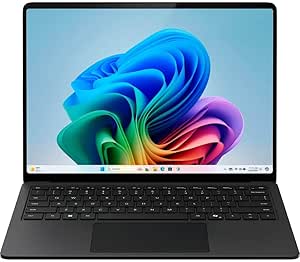 | Best Previous-Generation Pick | Model: Microsoft Surface Laptop (2024) | Display: 13.8-inch touchscreen with HDR | Processor: Snapdragon X Elite, 12 cores | VIEW LATEST PRICE | See Our Full Breakdown |
| Microsoft Surface Laptop 3 13.5-Inch Touchscreen Laptop, Core i5-1035G7, 8GB RAM, 256GB SSD, Windows 11 Pro (Renewed) |  | Best for Basic Windows 11 Tasks on a Renewed Surface | Model: Surface Laptop 3 | Display: 13.5-inch touchscreen, 2256 × 1504 | Processor: Intel Core i5-1035G7, 1.2 GHz up to 3.7 GHz | VIEW LATEST PRICE | See Our Full Breakdown |
| Microsoft Surface Laptop for Business (2025), 15-inch, Intel Core Ultra 7 Series 2, 32GB RAM, 1TB SSD, Windows 11 Pro, Black, TAA-Compliant with Smart Card Reader |  | Best for Secure Business Workloads | Display: 15-inch LCD touchscreen, 2496 × 1664 native resolution | Processor: Intel Core Ultra 7, Series 2 | Memory: 32GB RAM | VIEW LATEST PRICE | See Our Full Breakdown |
| Microsoft Surface Laptop (2026), 13.8-Inch, Snapdragon X2 Elite, 16GB RAM, 512GB SSD, Black |  | Best Compact Surface for Everyday Carry | Display: 13.8-inch LCD touchscreen, 2304 × 1536, 120Hz | Processor: Qualcomm Snapdragon X2 Elite, 12-core | Memory: 16GB RAM | VIEW LATEST PRICE | See Our Full Breakdown |
| Microsoft Surface Laptop (2026), 15-Inch, Snapdragon X2 Plus, 16GB RAM, 512GB SSD, Platinum | | Best for a Bright, Spacious Screen | Display: 15-inch PixelSense LCD touchscreen, 3270 x 2180 | Maximum brightness: 600 nits | Processor: Qualcomm Snapdragon X2 Plus, 10-core | VIEW LATEST PRICE | See Our Full Breakdown |
| Microsoft Surface Laptop (2026), 13.8-inch, Snapdragon X2 Elite, 16GB RAM, 512GB SSD, Jade |  | Best Compact Performance Pick | Display: 13.8-inch PixelSense LCD touchscreen, 2304 x 1536 | Processor: Qualcomm Snapdragon X2 Elite, 12-core | Memory: 16GB LPDDR5X | VIEW LATEST PRICE | See Our Full Breakdown |
| Microsoft Surface Laptop 4 13.5-inch Touchscreen, AMD Ryzen 5, 8GB RAM, 256GB SSD, Platinum (Renewed) |  | Best for Basic Tasks on a Renewed Laptop | Display: 13.5-inch PixelSense touchscreen; listing resolution details conflict | Processor: AMD Ryzen 5 | Memory: 8GB | VIEW LATEST PRICE | See Our Full Breakdown |
| Microsoft Surface Laptop 6 for Business, 13.5-inch Touchscreen, Intel Core Ultra 5 135H, 16GB RAM, 512GB SSD |  | Best for Windows Pro and Port Flexibility | Display: 13.5-inch touchscreen, 2256 x 1504, 400 nits | Processor: Intel Core Ultra 5 135H | Memory: 16GB DDR5 | VIEW LATEST PRICE | See Our Full Breakdown |
| Surface laptop | Display | Processor | Memory | Storage |
|---|---|---|---|---|
| Microsoft Surface Laptop 4 13. | 13.5-inch touchscreen, 2256 × 1504 | Intel Core i5-1145G7, 11th generation | 16GB DDR4 RAM | 256GB SSD |
| Microsoft Surface Laptop 5 13. | 13.5-inch PixelSense touchscreen, 2256 × 1504, 60Hz | 12th-generation Intel Core i7; listing gives conflicting model numbers | 16GB DDR SDRAM | 256GB SSD |
| Microsoft Surface Laptop 5 13. | 13.5-inch touchscreen LCD, 2256 × 1504 | Intel Core i7-1265U, 12th generation | 16GB LPDDR5, 4800 MHz | 512GB SSD |
| Surface Laptop Ultra 15-inch | 15-inch glossy LED touchscreen | NVIDIA N1X, 20 cores, as stated in the title | 48GB LPDDR5X | 1TB SSD, as stated in the title |
| Microsoft Surface Laptop | 13.8-inch PixelSense LCD touchscreen, 2304 × 1536 | 12-core Qualcomm Snapdragon X2 Elite | 16GB | 512GB SSD |
| Microsoft Surface Laptop | 15-inch PixelSense LCD touchscreen | Qualcomm Snapdragon X2 Elite, 12-core | 16GB LPDDR5X | 1TB SSD |
| Microsoft Surface Laptop | 13.8-inch touchscreen with HDR | Snapdragon X Elite, 12 cores | 16GB RAM | 1TB SSD |
| Microsoft Surface Laptop 3 13. | 13.5-inch touchscreen, 2256 × 1504 | Intel Core i5-1035G7, 1.2 GHz up to 3.7 GHz | 8GB DDR4 SDRAM | 256GB SSD |
| Microsoft Surface Laptop for B | 15-inch LCD touchscreen, 2496 × 1664 native resolution | Intel Core Ultra 7, Series 2 | 32GB RAM | 1TB SSD |
| Microsoft Surface Laptop | 13.8-inch LCD touchscreen, 2304 × 1536, 120Hz | Qualcomm Snapdragon X2 Elite, 12-core | 16GB RAM | 512GB SSD |
| Microsoft Surface Laptop | 15-inch PixelSense LCD touchscreen, 3270 x 2180 | Qualcomm Snapdragon X2 Plus, 10-core | 16GB | 512GB SSD |
| Microsoft Surface Laptop | 13.8-inch PixelSense LCD touchscreen, 2304 x 1536 | Qualcomm Snapdragon X2 Elite, 12-core | 16GB LPDDR5X | 512GB SSD |
| Microsoft Surface Laptop 4 13. | 13.5-inch PixelSense touchscreen; listing resolution details conflict | AMD Ryzen 5 | 8GB | 256GB SSD |
| Microsoft Surface Laptop 6 for | 13.5-inch touchscreen, 2256 x 1504, 400 nits | Intel Core Ultra 5 135H | 16GB DDR5 | 512GB SSD |
More Details on Our Top Picks
Microsoft Surface Laptop 4 13.5-Inch Touchscreen Laptop, Intel Core i5-1145G7, 16GB RAM, 256GB SSD, Windows 11 Pro (Renewed)
This renewed Surface Laptop 4 is a sensible fit for buyers who want a conventional Surface laptop with a sharp touchscreen, 16GB of RAM, and Windows 11 Pro. That memory gives it more breathing room for everyday multitasking than the renewed Surface Laptop 3 with 8GB, while its Core i5 processor is a step below the newer Core i7 in the Surface Laptop 5. The 13.5-inch, 2256 × 1504 display keeps text and documents crisp, and USB-A alongside USB-C makes it easier to connect older accessories without an adapter. The main compromises are its older processor generation, renewed condition, and 256GB SSD, which can fill quickly if you keep large projects or media locally. Choose it for routine work, not demanding creative workloads.
Pros:- 2256 × 1504 touchscreen provides a crisp workspace for documents and browsing.
- 16GB of RAM is better suited to multitasking than the 8GB Surface Laptop 3 in this roundup.
- USB-A and USB-C support a mix of older and newer accessories.
- Windows 11 Pro and a backlit keyboard suit work in varied settings.
Cons:- The 11th-generation Core i5 is older than the 12th-generation Core i7 in the Surface Laptop 5.
- The 256GB SSD leaves limited room for large local files.
- Renewed condition means buyers should expect a previously owned device.
Best for: Windows 11 Pro users who want a sharp 13.5-inch touchscreen, 16GB RAM, and USB-A connectivity for everyday office and study tasks.
Not ideal for: Buyers who need ample local storage, a current-generation processor, or the assurance of a new device rather than a renewed one.
- Display:13.5-inch touchscreen, 2256 × 1504
- Processor:Intel Core i5-1145G7, 11th generation
- Memory:16GB DDR4 RAM
- Storage:256GB SSD
- Operating system:Windows 11 Pro
- Graphics:Integrated graphics
- Ports:USB-A, USB-C, Surface Connect
- Condition:Renewed
Our verdict“Pick this renewed Surface Laptop 4 for everyday Windows 11 Pro work and a sharp touchscreen, but choose the Surface Laptop 5 for a newer processor or a 512GB drive.”
Microsoft Surface Laptop 5 13.5-Inch Touchscreen, Intel Core i7, 16GB RAM, 256GB SSD, Windows 11 Pro, Matte Black (Renewed)
The strongest case for this renewed Surface Laptop 5 is its 12th-generation Core i7 paired with 16GB of RAM and a compact 13.5-inch touchscreen. Compared with the Core i5-powered Surface Laptop 4, its newer processor is the more appealing choice for workloads that benefit from extra CPU capability. The 2256 × 1504 PixelSense display and Windows 11 Pro keep it suited to office work, while its USB-A and USB-C ports cover common peripherals. The central tradeoff is storage: this configuration has a 256GB SSD, half the capacity of the Platinum Surface Laptop 5 elsewhere in this roundup. The listing also gives conflicting processor model numbers, so buyers should confirm the exact configuration. A minimum 90-day warranty offers some coverage, but renewed condition and possible generic packaging remain part of the deal.
Pros:- 12th-generation Core i7 is a newer processor option than the Core i5 in the Surface Laptop 4.
- 16GB of RAM supports multiple applications and browser tabs.
- High-resolution 13.5-inch PixelSense touchscreen suits mobile productivity.
- Minimum 90-day warranty and Windows 11 Pro are listed.
Cons:- The 256GB SSD offers less headroom than the 512GB Surface Laptop 5 in this roundup.
- The listing has conflicting processor model numbers, making the exact CPU unclear.
- Renewed condition may include generic packaging.
Best for: Professionals who want a compact renewed Surface Laptop 5 with a Core i7, 16GB RAM, and Windows 11 Pro for office multitasking.
Not ideal for: Users who store large video, photo, or project libraries locally, or buyers who need unambiguous processor details and a new device.
- Display:13.5-inch PixelSense touchscreen, 2256 × 1504, 60Hz
- Processor:12th-generation Intel Core i7; listing gives conflicting model numbers
- Memory:16GB DDR SDRAM
- Storage:256GB SSD
- Operating system:Windows 11 Pro
- Connectivity:Wi-Fi 6, Bluetooth 5.0
- Ports:USB-C, USB-A, 3.5mm headphone jack, Surface Connect
- Condition and warranty:Renewed; minimum 90-day warranty
Our verdict“Choose this renewed Surface Laptop 5 if you prioritize a Core i7 and Windows 11 Pro in a compact laptop, but favor the 512GB Platinum model if storage matters more.”
Microsoft Surface Laptop 5 13.5-Inch Touchscreen Laptop, Intel Core i7-1265U, 16GB RAM, 512GB SSD, Platinum (Renewed)
This Platinum Surface Laptop 5 earns its place by pairing the 12th-generation Core i7 with a 512GB SSD, solving the biggest limitation of the 256GB Surface Laptop 5 configuration in this roundup. That extra capacity is useful for people who keep work files, apps, or media on the laptop instead of relying on cloud storage. Its 13.5-inch, 2256 × 1504 touchscreen and 16GB of LPDDR5 memory make it a well-balanced option for everyday productivity, and Intel Iris Xe graphics are listed for lighter graphics tasks. Compared with the newer Snapdragon-based 2026 Surface Laptop, this model is a renewed, older-generation Intel machine rather than a current platform. The listing also provides limited port details and a 90-day warranty, so buyers seeking a new laptop or clear connectivity information should look elsewhere.
Pros:- 512GB SSD provides twice the listed capacity of the other renewed Surface Laptop 5 in this batch.
- 12th-generation Core i7 and 16GB LPDDR5 memory suit everyday multitasking.
- 2256 × 1504 touchscreen offers a crisp 13.5-inch workspace.
- Intel Iris Xe integrated graphics are listed for lighter graphics workloads.
Cons:- Renewed condition and a limited 90-day warranty may not suit buyers seeking a new laptop.
- The product data lists only USB without a clear port count or full selection.
- It uses an older Intel platform than the 2026 Snapdragon Surface Laptop option.
Best for: Buyers who want a compact Surface Laptop 5 with a Core i7 and enough SSD capacity for a substantial local work or media library.
Not ideal for: People who need a new device, detailed confirmation of its port selection, or the latest Snapdragon-based Surface platform.
- Display:13.5-inch touchscreen LCD, 2256 × 1504
- Processor:Intel Core i7-1265U, 12th generation
- Memory:16GB LPDDR5, 4800 MHz
- Storage:512GB SSD
- Graphics:Intel Iris Xe integrated graphics
- Operating system:Windows 11 Pro
- Weight:2.8 pounds
- Condition and warranty:Renewed; 90-day limited warranty
Our verdict“Choose this renewed Surface Laptop 5 when 512GB of storage matters more than having a new device or the newer Snapdragon platform.”
Surface Laptop Ultra 15-inch, NVIDIA N1X 20-Core, 48GB RAM, 1TB SSD, Nightfall
The listed configuration makes this 15-inch Surface Laptop Ultra the capacity-focused outlier in this batch: it claims 48GB of memory, a 1TB SSD, and a 92Wh battery. That combination may appeal to buyers who keep many large files or run memory-heavy creative and development tools. It is a more expansive proposition than the compact Surface Laptop 5, with a larger touchscreen and substantially more listed memory and storage. But the product details are inconsistent where they matter most: the title names a 20-core NVIDIA N1X processor, the description refers to NVIDIA graphics, and the specifications list integrated graphics. I would not choose it on graphics performance without clarification. The glossy display may also reflect bright surroundings, and the claimed battery life is not a guarantee of real-world runtime.
Pros:- 15-inch touchscreen gives more room for timelines, documents, and side-by-side windows than the 13.5-inch Surface Laptop 5.
- 48GB of listed LPDDR5X memory exceeds the 16GB configurations elsewhere in this batch.
- 1TB SSD offers ample listed local capacity.
- 92Wh battery is a substantial stated capacity.
Cons:- Processor and graphics details conflict across the title, description, and specifications.
- Glossy screen finish can show reflections in bright rooms.
- The listed up-to-15-hour battery claim does not establish runtime under demanding workloads.
Best for: Buyers considering a large-screen laptop with high listed memory and storage for sizeable project files, provided they first verify the processor and graphics configuration.
Not ideal for: Anyone who needs confirmed discrete graphics for creative or AI workloads, a matte display, or a clearly specified Surface configuration.
- Display:15-inch glossy LED touchscreen
- Processor:NVIDIA N1X, 20 cores, as stated in the title
- Graphics:Conflicting details: NVIDIA in the description; integrated in the specifications
- Memory:48GB LPDDR5X
- Storage:1TB SSD, as stated in the title
- Operating system:Windows 11 Pro
- Battery:92Wh lithium-ion
- Color:Nightfall
Our verdict“Consider this 15-inch model only if its unusually high listed memory and storage fit your needs and the seller confirms the processor and graphics details.”
Microsoft Surface Laptop (2026), 13.8-Inch, Snapdragon X2 Elite, 16GB RAM, 512GB SSD, Platinum
This 2026 Surface Laptop is the most current, balanced portable choice in this batch, pairing a 12-core Snapdragon X2 Elite with 16GB of RAM and a 512GB SSD. Its 13.8-inch, 2304 × 1536 PixelSense touchscreen gives more workspace than the 13.5-inch Surface Laptop 5, while the stated battery life of up to 20 hours makes it a better fit for long days away from an outlet. The two USB-C/USB4 ports support modern peripherals, but there is no USB-A listed, so older accessories may need an adapter. Unlike the renewed Intel Surface Laptop 5 models, this one is listed as a 2026 model with Windows 11 Home rather than Pro. Its LCD panel also gives up the richer display technology some buyers may want, so the appeal is portability and battery claims, not a premium screen.
Pros:- 13.8-inch, 2304 × 1536 touchscreen offers more workspace than the 13.5-inch Surface Laptop 5.
- Up to 20 hours of stated battery life suits extended mobile work.
- Snapdragon X2 Elite has 12 cores for multitasking and Copilot features.
- 512GB SSD and recycled-aluminum chassis combine useful storage with listed recycled material.
Cons:- Windows 11 Home may not meet buyers’ Windows 11 Pro requirements.
- Only two USB-C/USB4 ports are listed, with no USB-A connection.
- The PixelSense display is LCD rather than OLED.
Best for: Students and mobile professionals who want a current compact Surface with a high-resolution touchscreen, 512GB storage, and a long stated battery-life target.
Not ideal for: Buyers who require Windows 11 Pro, built-in USB-A, or an OLED display rather than an LCD panel.
- Display:13.8-inch PixelSense LCD touchscreen, 2304 × 1536
- Processor:12-core Qualcomm Snapdragon X2 Elite
- Memory:16GB
- Storage:512GB SSD
- Operating system:Windows 11 Home
- Battery life:Up to 20 hours, as stated
- Ports:Two USB-C/USB4
- Chassis:Aluminum alloy made with 100% recycled aluminum
Our verdict“Choose this 2026 Surface Laptop for a modern, portable 13.8-inch setup and long stated battery life, but look to a Pro-configured model if your work requires Windows 11 Pro.”
Microsoft Surface Laptop (2026), 15-inch, Snapdragon X2 Elite, 16GB RAM, 1TB SSD, Platinum
The 15-inch model pairs a roomy touchscreen with a 12-core Snapdragon X2 Elite, making it a strong fit for multitasking, office work, and long stretches away from an outlet. Its listed up-to-19-hour battery life and 1TB SSD suit people who want a larger-screen Surface without giving up portability altogether. Compared with the 13.8-inch 2026 Snapdragon X2 Elite, this version gives you more screen space and twice the listed storage, but it is less compact. The main compromise is memory: 16GB is the listed maximum, so buyers running demanding creative workloads may prefer the Surface Laptop for Business with 32GB. I’d also verify the display resolution before buying, since the listing provides conflicting figures.
Pros:- 15-inch PixelSense touchscreen reaches a listed 600 nits
- 12-core Snapdragon X2 Elite and 16GB LPDDR5X memory
- 1TB SSD provides generous room for files and applications
- Up to 19 hours of listed battery life and recycled-aluminum chassis
Cons:- Memory is limited to 16GB according to the listing
- Two different display resolution figures are provided
- Larger 15-inch size is less compact than the 13.8-inch 2026 model
Best for: People who want a large touchscreen, ample local storage, and long advertised battery life for travel or everyday productivity.
Not ideal for: Power users who need more than 16GB of memory, or buyers who want a smaller laptop and a clearly specified display resolution.
- Display:15-inch PixelSense LCD touchscreen
- Display brightness:Up to 600 nits
- Processor:Qualcomm Snapdragon X2 Elite, 12-core
- Memory:16GB LPDDR5X
- Storage:1TB SSD
- Operating system:Windows 11 Home
- Ports:Two USB-C/USB4 ports
- Battery life:Up to 19 hours
- Chassis:Aluminum alloy made with 100% recycled aluminum
Our verdict“Choose this Surface if screen space and 1TB of storage matter more than a compact footprint or memory headroom.”
Microsoft Surface Laptop (2024), 13.8-Inch Touchscreen, Snapdragon X Elite, 16GB RAM, 1TB SSD, Black
This 2024 Surface Laptop offers a practical middle ground for buyers who want a compact touchscreen and generous storage without needing the newest generation. Its 12-core Snapdragon X Elite, 16GB of memory, and 1TB SSD make it better equipped for keeping many work files and applications on hand than the 2026 13.8-inch X2 Elite model listed here, which has 512GB of storage. The newer model, by contrast, offers a 120Hz display, Wi-Fi 7, and a newer processor, so it is the more forward-looking choice. Microsoft advertises up to 20 hours of battery life for this version, though actual runtime depends on use. Copilot+ features may depend on software updates and availability, and fast charging requires a compatible charger sold separately.
Pros:- 13.8-inch touchscreen with HDR
- 12-core Snapdragon X Elite processor
- 1TB SSD paired with 16GB RAM
- Advertised battery life of up to 20 hours
Cons:- Copilot+ features may depend on updates and availability
- Fast charging requires a compatible charger sold separately
- Older platform than the 2026 Snapdragon X2 Elite options
Best for: Students and mobile professionals who want a 13.8-inch Surface with 1TB of storage and do not need the newest processor generation.
Not ideal for: Buyers seeking a 120Hz screen, Wi-Fi 7, or the newer Snapdragon X2 Elite platform.
- Model:Microsoft Surface Laptop (2024)
- Display:13.8-inch touchscreen with HDR
- Processor:Snapdragon X Elite, 12 cores
- Memory:16GB RAM
- Storage:1TB SSD
- Operating system:Windows 11
- AI platform:Copilot+ PC
- Battery life:Up to 20 hours
- Color:Black
Our verdict“Pick this model if you value its 1TB SSD and compact format more than the newer screen and connectivity features of the 2026 version.”
Microsoft Surface Laptop 3 13.5-Inch Touchscreen Laptop, Core i5-1035G7, 8GB RAM, 256GB SSD, Windows 11 Pro (Renewed)
This renewed Surface Laptop 3 is the straightforward pick for basic tasks such as web browsing, document editing, and video calls, with a 13.5-inch touchscreen, backlit keyboard, and Windows 11 Pro. Its age and modest configuration set it apart from the newer Surface Laptop options: the 2024 model has a 12-core Snapdragon processor, 16GB RAM, and four times the listed SSD capacity. Here, 8GB of memory and a 256GB SSD leave less room for heavy multitasking or large local libraries, and the Intel Core i5-1035G7 is an older processor. The professionally inspected renewed condition and Renewed Guarantee may appeal to buyers open to pre-owned hardware, but condition history and long-term performance are less predictable than with a new Surface.
Pros:- 13.5-inch touchscreen with 2256 × 1504 resolution
- Windows 11 Pro and a backlit keyboard
- SSD storage and integrated webcam for everyday use
- Professionally inspected and backed by the Amazon Renewed Guarantee
Cons:- Renewed, pre-owned condition may mean cosmetic wear or a shorter remaining service life
- 8GB RAM limits demanding multitasking
- 256GB SSD and older processor are less capable than newer Surface Laptop options
Best for: Careful buyers who need a basic Windows 11 Pro laptop for browsing, writing, and video calls and are comfortable choosing renewed hardware.
Not ideal for: People who multitask heavily, store large project files locally, or want the newer processors and larger memory configurations in current Surface models.
- Model:Surface Laptop 3
- Display:13.5-inch touchscreen, 2256 × 1504
- Processor:Intel Core i5-1035G7, 1.2 GHz up to 3.7 GHz
- Memory:8GB DDR4 SDRAM
- Storage:256GB SSD
- Operating system:Windows 11 Pro 64-bit
- Keyboard:Backlit QWERTY
- Connectivity:Wi-Fi 802.11ac and Bluetooth 4
- Condition:Renewed, professionally inspected and tested
Our verdict“Choose this renewed Laptop 3 for basic work if its older hardware and limited memory fit your needs.”
Microsoft Surface Laptop for Business (2025), 15-inch, Intel Core Ultra 7 Series 2, 32GB RAM, 1TB SSD, Windows 11 Pro, Black, TAA-Compliant with Smart Card Reader
This 15-inch business Surface is the most work-focused option in this group. Its 32GB of RAM gives demanding multitaskers more headroom than the 16GB consumer models, while Windows 11 Pro, a smart card reader, and TAA compliance address managed and security-conscious environments. The Intel Core Ultra 7 Series 2 and NPU rated up to 48 TOPS add local AI-processing capability, though integrated graphics still make this a weaker fit for graphics-heavy production than a system with a dedicated GPU. Compared with the 15-inch 2026 Snapdragon X2 Elite model, it offers double the memory and business security features, but its listing says only one USB port and gives a 5.4-pound weight. Its battery claim is based on local video playback, not every work pattern.
Pros:- 32GB RAM and 1TB SSD support heavier multitasking and local file storage
- Windows 11 Pro with smart card reader and secured-core PC features
- TAA-compliant configuration for applicable procurement needs
- Intel AI Boost NPU rated up to 48 TOPS
Cons:- Only one USB port is listed
- Listed weight is 5.4 pounds, making it less convenient to carry
- Up-to-22-hour battery figure is a local video playback result and may vary with use
Best for: Business users and IT-managed teams that need Windows 11 Pro, a smart card reader, TAA compliance, and 32GB of memory.
Not ideal for: Frequent travelers prioritizing a light laptop, buyers needing multiple USB connections, or creators who rely on dedicated graphics.
- Display:15-inch LCD touchscreen, 2496 × 1664 native resolution
- Processor:Intel Core Ultra 7, Series 2
- Memory:32GB RAM
- Storage:1TB SSD
- Operating system:Windows 11 Pro
- AI processing:Intel AI Boost NPU, up to 48 TOPS
- Security:Secured-core PC and smart card reader
- Battery life:Up to 22 hours in a local video playback test
- Compliance:TAA-compliant
Our verdict“Choose this Surface for managed business work that benefits from 32GB RAM and added security, not for graphics-heavy or highly mobile work.”
Microsoft Surface Laptop (2026), 13.8-Inch, Snapdragon X2 Elite, 16GB RAM, 512GB SSD, Black
At 3 pounds, this 13.8-inch Surface is the easier daily carry than the 15-inch X2 Elite model, while retaining the same listed processor family and a sharp touchscreen. The 120Hz display can make scrolling and supported motion look smoother than on the 2024 13.8-inch Snapdragon X Elite, and Wi-Fi 7 adds a newer wireless standard. Its 512GB SSD is the main practical compromise: the 2024 model doubles that capacity, and the 15-inch 2026 version also offers 1TB. The advertised up-to-20-hour video playback figure is useful context, but real runtime varies with workload and settings. Integrated Adreno graphics suit everyday productivity better than graphics-intensive work, and Microsoft 365 is sold separately.
Pros:- Lightweight listed build at 3 pounds
- 13.8-inch 120Hz touchscreen with 2304 × 1536 resolution
- Snapdragon X2 Elite processor and integrated AI processor for Copilot+ features
- Wi-Fi 7, USB-C/USB4, and up to 20 hours of video playback
Cons:- 512GB SSD is smaller than the 1TB configurations in this roundup
- Integrated graphics are less suited to graphics-intensive workloads
- Microsoft 365 is sold separately
Best for: Students and mobile professionals who want a lightweight 13.8-inch touchscreen Surface for productivity, browsing, and video playback.
Not ideal for: Buyers who need 1TB of storage, more than 16GB RAM, or stronger graphics performance for demanding creative applications.
- Display:13.8-inch LCD touchscreen, 2304 × 1536, 120Hz
- Processor:Qualcomm Snapdragon X2 Elite, 12-core
- Memory:16GB RAM
- Storage:512GB SSD
- Operating system:Windows 11 Home
- Weight:3 pounds (1.36 kg)
- Battery life:Up to 20 hours of video playback
- Connectivity:Wi-Fi 7, Bluetooth 5.4, USB-C/USB4
- Battery capacity:54.12Wh
Our verdict“Pick this model for a light, current-generation Surface with a smooth 120Hz screen, provided 512GB storage is enough.”
Microsoft Surface Laptop (2026), 15-Inch, Snapdragon X2 Plus, 16GB RAM, 512GB SSD, Platinum
I’d choose this 15-inch Surface Laptop for readers who want roomier viewing without stepping up to the X2 Elite models. Its 600-nit PixelSense touchscreen is the standout: the higher stated brightness can make work easier in bright rooms, while the large canvas suits side-by-side documents and spreadsheets. The Snapdragon X2 Plus 10-core processor, 16GB of memory, and 512GB SSD make it a sensible everyday-work configuration, and the stated battery life reaches up to 19 hours.
Compared with the 13.8-inch Surface Laptop with Snapdragon X2 Elite, this model trades some processor headroom and portability for a bigger, brighter display. Its integrated Adreno graphics are a limit for demanding graphics work, and buyers who regularly travel may find the smaller model easier to carry. I’d shortlist it for screen-focused productivity, not gaming or heavy creative workloads.
Pros:- 15-inch PixelSense touchscreen with stated 600-nit brightness
- Snapdragon X2 Plus 10-core processor with built-in AI acceleration
- Up to 19 hours of stated battery life
- Two USB-C/USB4 ports
Cons:- Integrated graphics are a poor fit for demanding graphics workloads
- Larger 15-inch format is less convenient to carry than the 13.8-inch X2 Elite model
- Only 16GB of memory may constrain heavier multitasking
Best for: Home-office users and students who prioritize a large, bright touchscreen for documents, web research, and video calls.
Not ideal for: Frequent travelers who want a more compact laptop, or creators who need discrete graphics for demanding 3D or video workloads.
- Display:15-inch PixelSense LCD touchscreen, 3270 x 2180
- Maximum brightness:600 nits
- Processor:Qualcomm Snapdragon X2 Plus, 10-core
- Memory:16GB
- Storage:512GB SSD
- Graphics:Integrated Qualcomm Adreno
- Battery life:Up to 19 hours
- Ports:Two USB-C/USB4
- Chassis:Aluminum alloy made with 100% recycled aluminum
Our verdict“Choose this model if a bright, spacious display matters more than compact portability or high-end graphics performance.”
Microsoft Surface Laptop (2026), 13.8-inch, Snapdragon X2 Elite, 16GB RAM, 512GB SSD, Jade
This 13.8-inch model is the most balanced choice here for buyers who want a capable current-generation Surface without carrying a 15-inch laptop. The 12-core Snapdragon X2 Elite gives it a stronger processor position than the 15-inch X2 Plus option, while the 16GB LPDDR5X memory and 512GB SSD provide a practical base for everyday work and multitasking. Its touchscreen is smaller than the 15-inch model’s, but that makes the laptop easier to fit into a commuter bag.
Microsoft states up to 20 hours of battery life, slightly more than the larger X2 Plus configuration. The tradeoff is a less expansive display and integrated Adreno graphics, which still do not make it a graphics workstation. I’d favor this over the X2 Plus if portability and processor tier matter more than screen size; buyers needing Windows 11 Pro or extra ports should look instead at the Surface Laptop 6 for Business.
Pros:- 12-core Snapdragon X2 Elite processor
- Compact 13.8-inch PixelSense touchscreen
- Up to 20 hours of stated battery life
- Two USB-C/USB4 ports and a 3.5mm audio jack
Cons:- 16GB RAM may limit intensive multitasking and specialist workloads
- Integrated graphics are not suited to demanding graphics tasks
- Smaller display offers less workspace than the 15-inch X2 Plus model
Best for: Commuters and mobile professionals who want a compact touchscreen laptop with a higher-tier Snapdragon processor and ample everyday storage.
Not ideal for: Users who need a 15-inch workspace, more than 16GB of RAM, demanding graphics performance, or Windows 11 Pro.
- Display:13.8-inch PixelSense LCD touchscreen, 2304 x 1536
- Processor:Qualcomm Snapdragon X2 Elite, 12-core
- Memory:16GB LPDDR5X
- Storage:512GB SSD
- Graphics:Integrated Qualcomm Adreno
- Operating system:Windows 11 Home
- Battery life:Up to 20 hours
- Ports:Two USB-C/USB4 ports; 3.5mm audio jack
- Color:Jade
Our verdict“Pick this Surface for a portable, current-generation work laptop when processor tier matters more than a larger screen.”
Microsoft Surface Laptop 4 13.5-inch Touchscreen, AMD Ryzen 5, 8GB RAM, 256GB SSD, Platinum (Renewed)
This renewed Surface Laptop 4 is the entry point in this group for buyers focused on basic computing rather than newer hardware. At 2.8 pounds, it is lighter than the 3.1-pound Surface Laptop 6 for Business, and its 13.5-inch PixelSense touchscreen keeps the familiar Surface format. The Ryzen 5 processor and 256GB SSD can suit browsing, writing, and routine schoolwork, but the 8GB of memory is notably less than the 16GB in the newer Snapdragon models and the business-focused Laptop 6.
That difference matters when many browser tabs or larger applications are open, so I’d treat this as a modest-use option, not a long-term multitasking pick. It is also a 2021 renewed model, and the listing gives conflicting display-resolution and Windows-version details. Compared with the newer Surface Laptop 6, it gives up memory, current connectivity details, and configuration clarity in exchange for a lighter, older design.
Pros:- Lightweight 2.8-pound design
- 13.5-inch PixelSense touchscreen
- 256GB SSD for everyday files and applications
- Professionally inspected and tested renewed product
Cons:- 8GB RAM can constrain multitasking
- Renewed 2021 model is older than the 2026 Surface Laptop options
- Listing conflicts on display resolution and Windows version
Best for: Budget-conscious students or household users who need a lightweight renewed Surface for browsing, email, writing, and other routine tasks.
Not ideal for: Buyers who multitask heavily, need a clearly specified Windows version, or want a newer platform with 16GB of memory.
- Display:13.5-inch PixelSense touchscreen; listing resolution details conflict
- Processor:AMD Ryzen 5
- Memory:8GB
- Storage:256GB SSD
- Graphics:Integrated AMD Radeon
- Operating system:Windows Home; listing mentions both Windows 10 Home and Windows 11 Home
- Weight:2.8 pounds
- Model year and condition:2021; renewed
Our verdict“Choose this renewed Laptop 4 only for basic tasks if its lower memory and unclear listing details fit your needs.”
Microsoft Surface Laptop 6 for Business, 13.5-inch Touchscreen, Intel Core Ultra 5 135H, 16GB RAM, 512GB SSD
I’d point business buyers toward this Surface Laptop 6 when Windows 11 Pro and a broader selection of ports matter more than having the newest Snapdragon platform. Its Intel Core Ultra 5 135H, 16GB of DDR5 memory, and 512GB SSD pair with a 13.5-inch, 2256 x 1504 touchscreen, while the port mix includes USB4, USB-A, Surface Connect, and a headphone jack. That is more convenient for connecting older peripherals than the two-USB-C setup on the 2026 Snapdragon models.
The listing states up to 18.5 hours of battery life and includes Wi-Fi 6E, a 1080p camera, and a dedicated Copilot key. Still, this unit was resealed for a system upgrade, so its condition differs from a standard new purchase. It also weighs 3.1 pounds and USB4 supports one external 4K monitor at 60Hz without a dock. I’d choose it over the X2 Elite model for Pro features and port variety, not portability.
Pros:- Windows 11 Pro and dedicated Copilot key
- Useful mix of USB4, USB-A, Surface Connect, and headphone ports
- 13.5-inch 2256 x 1504 touchscreen and 1080p camera
- Wi-Fi 6E and up to 18.5 hours of stated battery life
Cons:- Resealed for a system upgrade rather than listed as a standard new unit
- USB4 supports one external 4K monitor at 60Hz without a docking station
- At 3.1 pounds, it is heavier than the renewed Surface Laptop 4
Best for: Office workers and small-business users who need Windows 11 Pro, USB-A connectivity, and a high-resolution camera for calls.
Not ideal for: Buyers seeking a standard new unit, a lighter travel laptop, or direct USB4 support for multiple high-resolution external displays.
- Display:13.5-inch touchscreen, 2256 x 1504, 400 nits
- Processor:Intel Core Ultra 5 135H
- Memory:16GB DDR5
- Storage:512GB SSD
- Graphics:Integrated Intel Arc Graphics
- Operating system:Windows 11 Pro
- Ports:USB-C (USB4), USB-A, Surface Connect, 3.5mm headphone jack
- Wireless:Wi-Fi 6E, Bluetooth 5.3
- Condition and warranty:Resealed for a system upgrade; one-year warranty from Issaquah Highlands Tech
Our verdict“Choose this business model for Windows 11 Pro and practical port variety, provided the resealed condition suits you.”

How We Picked
I compared these Surface laptops by the factors that shape day-to-day use: processor generation and platform, memory, storage, display size, portability, and business-specific features. I gave newer configurations with 16GB RAM or more stronger standing for buyers who want room for multitasking and a longer useful life, while treating 8GB renewed models as narrower choices for lighter workloads. I also separated Snapdragon systems from Intel models because app compatibility and workplace requirements can matter as much as raw specifications.
The order reflects versatility first, then specialization. The 13.8-inch 2026 X2 Elite leads because its configuration balances mobility, current hardware, and practical storage; the 15-inch X2 Elite follows for buyers who value a larger workspace. Business models rise for their specific security and management needs, while renewed older generations rank lower because their age, memory limits, and unknown prior use introduce more compromises. Configurations that differ only by color are treated as equivalent for performance and assigned distinct positions only to preserve the supplied lineup.
| Surface laptop | Operating system | Graphics | Ports | Battery life |
|---|---|---|---|---|
| Microsoft Surface Laptop 4 13. | Windows 11 Pro | Integrated graphics | USB-A, USB-C, Surface Connect | — |
| Microsoft Surface Laptop 5 13. | Windows 11 Pro | — | USB-C, USB-A, 3.5mm headphone jack, Surface Connect | — |
| Microsoft Surface Laptop 5 13. | Windows 11 Pro | Intel Iris Xe integrated graphics | — | — |
| Surface Laptop Ultra 15-inch | Windows 11 Pro | Conflicting details: NVIDIA in the description; integrated in the specifications | — | — |
| Microsoft Surface Laptop | Windows 11 Home | — | Two USB-C/USB4 | Up to 20 hours, as stated |
| Microsoft Surface Laptop | Windows 11 Home | — | Two USB-C/USB4 ports | Up to 19 hours |
| Microsoft Surface Laptop | Windows 11 | — | — | Up to 20 hours |
| Microsoft Surface Laptop 3 13. | Windows 11 Pro 64-bit | — | — | — |
| Microsoft Surface Laptop for B | Windows 11 Pro | — | — | Up to 22 hours in a local video playback test |
| Microsoft Surface Laptop | Windows 11 Home | — | — | Up to 20 hours of video playback |
| Microsoft Surface Laptop | — | Integrated Qualcomm Adreno | Two USB-C/USB4 | Up to 19 hours |
| Microsoft Surface Laptop | Windows 11 Home | Integrated Qualcomm Adreno | Two USB-C/USB4 ports; 3.5mm audio jack | Up to 20 hours |
| Microsoft Surface Laptop 4 13. | Windows Home; listing mentions both Windows 10 Home and Windows 11 Home | Integrated AMD Radeon | — | — |
| Microsoft Surface Laptop 6 for | Windows 11 Pro | Integrated Intel Arc Graphics | USB-C (USB4), USB-A, Surface Connect, 3.5mm headphone jack | — |
Factors to Consider When Choosing Best Surface Laptops
Before choosing a Surface, match the machine to your apps and routine rather than buying by generation name alone. These five checks help avoid paying for capacity you will not use or picking a configuration that creates friction later.
Match the processor platform to your software
Snapdragon models can be a strong fit for everyday productivity, browsing, and apps that run well on Windows on Arm. A processor label alone does not tell you whether a specialist work app, device driver, or older utility will behave as expected. Check the software publisher’s current compatibility guidance before choosing a Snapdragon laptop for a work-critical setup. Intel-based Surface options are the safer direction when your organization requires specific Windows applications or peripherals, though Intel does not guarantee every legacy tool will work perfectly. Buyers who rely on specialist software should verify compatibility with the exact app and version rather than assume all Windows laptops behave alike. This check matters more than a modest difference in SSD capacity or case color.
Choose screen size around where you work
A 13.5- or 13.8-inch Surface is easier to carry and takes up less room on a small desk, but split-screen work can feel cramped. The 15-inch models offer more space for documents, spreadsheets, and side-by-side windows, which can reduce dependence on an external monitor. That larger panel adds bulk, so frequent commuters may prefer the smaller format even if they work with multiple windows. Think about the amount of time you spend away from a desk, not just how the display looks in a product listing. If you usually dock at home or work, a compact laptop paired with a monitor can be a better balance than carrying a larger device daily. A large display is most valuable when you use the laptop screen on its own.
Buy memory for your workload, not just your first week
Memory affects how comfortably a laptop handles many browser tabs, video calls, creative tools, and background applications at once. The 16GB configurations across much of this lineup are a more flexible starting point than the renewed 8GB Laptop 3 and Laptop 4 models. Buyers with heavier multitasking or business workloads may prefer the 32GB Business model, while casual web and document use may not need that extra capacity. Do not treat memory and storage as interchangeable: a larger SSD holds more files, but it does not make multitasking smoother. Check whether the configuration can be upgraded later before assuming you can add memory after purchase. When a laptop is difficult or impossible to upgrade, choosing enough memory upfront is the safer plan.
Treat renewed status as part of the specification
A renewed Surface can make sense for basic computing, but the original generation and configuration still determine its capabilities. Older models in this list may have fewer performance reserves and less memory than current options, so compare them with the newer 2026 and 2024 machines rather than judging by the Surface name alone. Ask what condition standards, battery checks, warranty coverage, and return terms apply to the specific renewed listing. Battery capacity can decline with age, and the product name does not reveal how much life remains. For a primary work or school laptop, the peace of mind and longer runway of a newer configuration may be worth more than the appeal of an older premium design. Renewed is a better fit when the workload is modest and the seller’s protections are clear.
Pay for business features only when they solve a real need
Business configurations can add value through Windows 11 Pro, stronger memory capacity, security hardware, or compatibility with an organization’s device policies. The 2025 15-inch model’s smart card reader and TAA compliance are meaningful for certain workplace requirements, but irrelevant to many home buyers. Likewise, a business-oriented processor configuration is not automatically a better choice for everyday browsing or schoolwork. Confirm which features your employer, agency, or IT team actually requires before selecting a specialized model. If you do not need smart card authentication or managed deployment, a standard Surface may provide a simpler fit. The right premium is tied to a requirement you can name, not a longer feature list.
Balance storage against how you keep files
Several current configurations offer 512GB SSDs, while some provide 1TB, making storage a practical separator even when memory and processor family are similar. A 1TB drive suits buyers who keep large media libraries, project files, or offline work on the laptop. If most files live in cloud storage and you rarely install large applications, 512GB may be adequate and can leave more room in the decision for screen size or platform fit. Cloud dependence brings its own tradeoff: offline access and upload speeds rely on your connection and storage habits. Check the space used on your current computer before deciding, and leave room for applications, updates, and future projects. Avoid paying for capacity based only on a vague expectation that more is always better.
Frequently Asked Questions
Should I choose the 2026 Snapdragon X2 Elite or an Intel Surface?
Choose the Snapdragon X2 Elite models if your everyday apps are compatible and you want a current Surface configuration with 16GB RAM. An Intel option makes more sense when a workplace or specialist application specifically depends on Intel compatibility, or when a business configuration supplies features your organization requires. Confirm support for essential apps, peripherals, and security tools before buying; processor branding alone cannot settle that question. If you use mostly common productivity and web apps, the Snapdragon models deserve a close look. If any unsupported tool would interrupt work, favor the platform your software provider or IT team endorses.
Is a renewed Surface Laptop 3 or Laptop 4 a sensible choice for school?
It can be suitable for web research, documents, and video calls if the renewed unit is in good condition and the school workload is light. The 8GB configurations have less room for heavy multitasking than the 16GB options elsewhere in this roundup, so many open tabs and demanding apps may feel restrictive sooner. Check the seller’s battery, warranty, and return terms, and confirm the laptop meets any software requirements from the school. For a device expected to last through several years of changing coursework, a newer model with 16GB RAM is the more flexible choice. A renewed older Surface makes more sense when the workload is simple and the buyer accepts the shorter hardware runway.
Is the 15-inch Surface worth choosing over a 13.8-inch model?
The 15-inch format is a better fit if you often work with multiple windows and use the laptop screen without an external display. It also appears in configurations with larger storage, which can help keep projects and media files on the device. The 13.8-inch models are easier to carry and better suited to crowded commutes, small desks, or frequent travel. Consider how many days each week you move the laptop and whether you already use a monitor at your main workspace. If portability is a daily need, the smaller screen may be the better compromise even if the larger model looks more spacious.
Do I need 1TB of storage, or is 512GB enough?
For browser-based work, documents, and a modest application library, 512GB can be enough, especially if you routinely store files in cloud services. A 1TB drive offers more freedom for large creative projects, video, games, or offline files, and reduces the need to manage space as often. Check your current storage use and add room for future projects rather than guessing from the number of files you see. Remember that a larger SSD does not compensate for too little memory when many apps are open. If storage needs are uncertain, your existing laptop’s used capacity is a more useful guide than choosing the largest option by default.
What should I check before buying a renewed Surface online?
Confirm the exact processor, memory, and storage configuration because older Surface models vary substantially even within the same generation. Read the seller’s condition definition and check whether battery health is tested, what warranty applies, and how returns work if the unit arrives with a fault. Make sure the installed Windows version and required security updates suit your needs. Compare the configuration with current 16GB models, especially if you plan to keep many tabs and applications open. A renewed unit is most appealing when its condition protections are clear and its performance is adequate for a defined, light workload.
Conclusion
For most shoppers, I recommend the 2026 13.8-inch Snapdragon X2 Elite as the best overall Surface in this group: it pairs a carry-friendly size with current hardware, 16GB RAM, and 512GB storage. The best value direction is a renewed Laptop 4 with 16GB RAM only when the seller offers clear condition and return protections and your needs are modest; buyers prioritizing a longer runway should favor a newer 16GB configuration instead. For a best premium, large-screen pick, choose the 15-inch 2026 X2 Elite with 1TB storage, while the 2025 Business model is the better specialized premium choice for smart card and managed-work requirements. Beginners who mainly need a straightforward laptop for school, documents, and browsing should start with a current 13.8-inch 16GB model and skip the older 8GB renewals. For specific business needs, select the Intel Business Surface only after confirming your software and security requirements; for a wider workspace, choose a 15-inch model. The deciding question is whether portability, app compatibility, or screen space matters most in your daily routine.
Halloween Picks
halloween
As an affiliate, we earn on qualifying purchases.