

For most PC players, I’d start with the HyperX Cloud III Wired: its straightforward wired setup and comfort-focused design make it a strong all-around pick. The SteelSeries Arctis Nova 5 Wireless stands out for players who want wireless freedom and flexible device support, while the Razer BlackShark V3 Pro suits buyers seeking premium features such as active noise cancellation. The main tradeoffs are wired simplicity versus wireless convenience, lightweight comfort versus extra features, and paying for advanced controls you may not use. I compare all 13 gaming headsets for PC by how well they fit different setups and priorities. Read on for the full breakdown, buying advice, and picks for specific needs.

Get the latest gadgets delivered free with Prime
- Fast, free delivery on millions of items
- Prime Video, Amazon Music and more included
- Member-only deals all year
Complete the kit


Key Takeaways
- The Cloud III Wired is the clearest all-around choice: it avoids wireless setup and battery management, making it a practical fit for a dedicated PC desk.
- Wireless models serve different priorities: the Arctis Nova 5 emphasizes multi-system flexibility, while the G733 and BlackShark V3 X HyperSpeed offer alternatives for buyers focused on wireless play.
- Premium features do not suit every setup: the BlackShark V3 Pro adds active noise cancellation, but players in a quiet room may get more value from a simpler headset.
- Wired value picks trade extras for simplicity: the BlackShark V2 X and Logitech G432 suit shoppers who want a basic PC headset without paying for wireless features.
- Compatibility needs a closer check than the product name: wireless modes, platform support, and included connection options vary, so match the headset to your PC ports and other devices before choosing.
| HyperX Cloud III Wired Gaming Headset, Black | 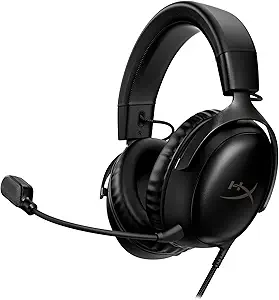 | Best Overall Wired Pick | Connectivity: USB-C, USB-A, 3.5 mm | Driver size: 53 mm | Microphone: Detachable 10 mm noise-cancelling microphone | VIEW LATEST PRICE | See Our Full Breakdown |
| Ozeino OW810 Wireless Gaming Headset |  | Best for Multi-Mode Wireless | Wireless connection: 2.4 GHz USB and USB-C transmitter | Bluetooth compatibility: Phones, laptops, and Switch; not direct Bluetooth support for PC, Mac, PS5, or PS4 | Wired connection: 3.5 mm; supports music and calls | VIEW LATEST PRICE | See Our Full Breakdown |
| HyperX Cloud II Gaming Headset – 7.1 Surround Sound, Memory Foam Ear Pads, Aluminum Frame – Red (KHX-HSCP-RD) | 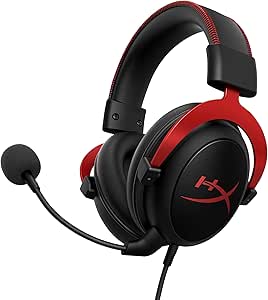 | Best for PC Virtual Surround | Frequency response: 15–25 kHz | Driver size: 53 mm | Connectivity: USB sound card on PC, Mac, and PS4; stereo on other listed platforms | VIEW LATEST PRICE | See Our Full Breakdown |
| Logitech G432 Wired Gaming Headset – Black |  | Best for PC Positional Audio | Driver size: 50 mm | Surround sound: DTS Headphone:X 2.0 | Connectivity: USB and 3.5 mm | VIEW LATEST PRICE | See Our Full Breakdown |
| Razer BlackShark V2 X Gaming Headset with 7.1 Surround Sound |  | Best Lightweight Pick | Driver size: 50 mm | Connectivity: 3.5 mm audio jack | Weight: 240 g | VIEW LATEST PRICE | See Our Full Breakdown |
| Razer BlackShark V3 X HyperSpeed Wireless Gaming Headset, Black | 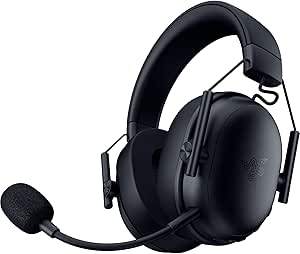 | Best for Lightweight Multi-Device Use | Driver size: 50 mm Gen-2 | Connectivity: 2.4 GHz wireless, Bluetooth, and USB | Microphone: Detachable 9.9 mm HyperClear cardioid | VIEW LATEST PRICE | See Our Full Breakdown |
| Logitech G733 LIGHTSPEED Wireless Gaming Headset, Black |  | Best for a Lightweight, Customizable PC Setup | Driver size: 40 mm PRO-G | Connectivity: 2.4 GHz LIGHTSPEED wireless | Wireless range: Up to 20 meters | VIEW LATEST PRICE | See Our Full Breakdown |
| Turtle Beach Stealth 700 Gen 3 Wireless Gaming Headset | 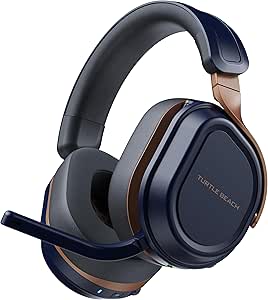 | Best for PC and Console Switching | Drivers: 60 mm Eclipse dual drivers | Connectivity: 2.4 GHz wireless and Bluetooth 5.2 | Transmitters: Two USB wireless transmitters | VIEW LATEST PRICE | See Our Full Breakdown |
| Valorise UG-08S Wireless Gaming Headset with 7.1 Surround Sound |  | Best for Flexible Wired and Wireless Connections | Wireless connectivity: 2.4 GHz and Bluetooth 5.4 | Wired connection: 3.5 mm | Audio: 7.1 surround sound | VIEW LATEST PRICE | See Our Full Breakdown |
| Turtle Beach Stealth 600 Wireless Gaming Headset |  | Best for Straightforward PC and Bluetooth Switching | Drivers: 50 mm Nanoclear | Wireless connectivity: 2.4 GHz wireless and Bluetooth | Bluetooth version: 5.2 listed; product information also reports conflicting version details | VIEW LATEST PRICE | See Our Full Breakdown |
| SteelSeries Arctis Nova 5 Wireless Multi-System Gaming Headset – Black |  | Best for Long Battery Life | Wireless options: 2.4 GHz and Bluetooth 5.3 | Battery life: 60 hours | Fast charging: Up to 6 hours of battery life from a 15-minute charge | VIEW LATEST PRICE | See Our Full Breakdown |
| Razer BlackShark V3 Pro Wireless ANC Gaming Headset |  | Best for Noise-Cancelling PC Gaming | Driver size: 50 mm TriForce Bio-Cellulose | Connectivity: 2.4 GHz wireless, Bluetooth 5.3, USB, and 3.5 mm | Wireless latency: As low as 10 ms | VIEW LATEST PRICE | See Our Full Breakdown |
| Haymaker Noise Cancelling Bluetooth Gaming Headphones – Dirac 3D Surround, 30+ Hr Battery, Touch Controls & RGB – Compatible with PS5, Xbox, PC, Switch & Mobile |  | Best for Bluetooth-First Multi-Device Play | Model: HM100 | Connectivity: Bluetooth with Qualcomm aptX Adaptive | Battery life: 30+ hours | VIEW LATEST PRICE | See Our Full Breakdown |
| gaming headsets for PC | Microphone | Compatibility | Connectivity | Driver size |
|---|---|---|---|---|
| HyperX Cloud III Wired Gaming | Detachable 10 mm noise-cancelling microphone | PC, PS5, Xbox Series X|S, Xbox One, Nintendo Switch, Mac, mobile | USB-C, USB-A, 3.5 mm | 53 mm |
| Ozeino OW810 Wireless Gaming H | Flip mic | PC, Mac, laptop, PS5, PS4, and Switch via 2.4 GHz; not Xbox | — | 50 mm |
| HyperX Cloud II Gaming Headset | Detachable noise-cancelling mic | PC, Mac, PS4, Xbox One, Nintendo Switch, mobile | USB sound card on PC, Mac, and PS4; stereo on other listed platforms | 53 mm |
| Logitech G432 Wired Gaming Hea | 6 mm flip-to-mute | PC, Mac, PlayStation 4/5, Nintendo Switch | USB and 3.5 mm | 50 mm |
| Razer BlackShark V2 X Gaming H | Cardioid microphone | PC, Mac, PS4, Xbox One, Nintendo Switch | 3.5 mm audio jack | 50 mm |
| Razer BlackShark V3 X HyperSpe | Detachable 9.9 mm HyperClear cardioid | Mac, PS5, Nintendo Switch, and smartphones | 2.4 GHz wireless, Bluetooth, and USB | 50 mm Gen-2 |
| Logitech G733 LIGHTSPEED Wirel | Blue VO!CE microphone with filters | PC, PS5, PS4, and Nintendo Switch | 2.4 GHz LIGHTSPEED wireless | 40 mm PRO-G |
| Turtle Beach Stealth 700 Gen 3 | Flip-to-mute, unidirectional, AI noise reduction | Xbox Series X|S, Xbox One, PS5, PS4, Windows PC, Steam Deck, and mobile devices | 2.4 GHz wireless and Bluetooth 5.2 | — |
| Valorise UG-08S Wireless Gamin | Retractable omnidirectional noise-canceling microphone | PS5, PS4, PC, Mac, phones, tablets, and Nintendo Switch; wireless not compatible with Xbox Series | — | — |
| Turtle Beach Stealth 600 Wirel | Unidirectional flip-to-mute with AI-based noise reduction | Xbox, PlayStation, PC, Steam Deck, and mobile devices | — | — |
| SteelSeries Arctis Nova 5 Wire | Retractable ClearCast Gen 2.X with AI-powered noise cancellation | — | — | — |
| Razer BlackShark V3 Pro Wirele | Detachable 12 mm HyperClear Full Band | — | 2.4 GHz wireless, Bluetooth 5.3, USB, and 3.5 mm | 50 mm TriForce Bio-Cellulose |
| Haymaker Noise Cancelling Blue | — | PS5, Xbox, Nintendo Switch, PC, and mobile | Bluetooth with Qualcomm aptX Adaptive | — |
More Details on Our Top Picks
HyperX Cloud III Wired Gaming Headset, Black
For PC players who prefer a dependable wired setup, the HyperX Cloud III offers the strongest balance in this group. Its angled 53 mm drivers are tuned for gaming, while memory foam cushions and a padded headband suit long sessions. The detachable microphone has noise cancellation and an LED mute indicator, so it is easy to check your chat status without digging through software. Compared with the older HyperX Cloud II, the Cloud III connects through USB-C, USB-A, or 3.5 mm and has broad device compatibility. The aluminum frame adds reassurance for daily use, but the cable still limits movement, and buyers seeking wireless convenience should look at the Ozeino OW810 instead. I’d choose this for a comfortable, straightforward PC headset rather than for cable-free play.
Pros:- Memory foam cushions and headband support long gaming sessions
- Angled 53 mm drivers are tuned for gaming audio
- Detachable noise-cancelling microphone has an LED mute indicator
- Aluminum frame and USB-C, USB-A, and 3.5 mm connectivity
Cons:- Wired connection restricts movement compared with the Ozeino OW810
- At 308 g, it is heavier than the 240 g Razer BlackShark V2 X
Best for: PC gamers who want a comfortable wired headset with a detachable mic and flexible USB or 3.5 mm connections.
Not ideal for: Players who want wireless freedom, Bluetooth, or a lightweight headset for extended wear.
- Connectivity:USB-C, USB-A, 3.5 mm
- Driver size:53 mm
- Microphone:Detachable 10 mm noise-cancelling microphone
- Frame:Aluminum
- Weight:308 g
- Compatibility:PC, PS5, Xbox Series X|S, Xbox One, Nintendo Switch, Mac, mobile
- Warranty:2 years
Our verdict“Choose the Cloud III for a comfortable, durable wired PC headset; skip it if you need wireless freedom.”
Ozeino OW810 Wireless Gaming Headset
The Ozeino OW810 is the most connection-flexible option among these five: it offers a 2.4 GHz transmitter, Bluetooth, and a 3.5 mm wired mode. For PC gaming, the 2.4 GHz connection is the relevant wireless mode, with latency advertised below 30 ms; Bluetooth compatibility is limited and should not be mistaken for a universal PC gaming connection. The flip mic and stated battery life of up to 40 hours make it a practical alternative to wired picks such as the HyperX Cloud III. Its tradeoffs are substantial, though: at 490 g it is the heaviest headset here, it does not support Xbox, and the wired mode is specified for music and calls rather than gaming. I’d pick it for PC players who want several connection options, not for those seeking a light, uncomplicated headset.
Pros:- 2.4 GHz wireless connection is advertised with latency below 30 ms
- Offers 2.4 GHz, Bluetooth, and 3.5 mm modes
- Flip microphone is simple to move out of the way
- Up to 40 hours of battery life is stated in the product title
Cons:- At 490 g, it is considerably heavier than the other wired options here
- Not compatible with Xbox consoles
- Bluetooth does not directly support PC, and 3.5 mm mode is limited to music and calls
Best for: PC gamers who want 2.4 GHz wireless play plus Bluetooth and wired options for compatible devices.
Not ideal for: Xbox owners, buyers prioritizing a lightweight headset, or PC users expecting Bluetooth to provide a direct gaming connection.
- Wireless connection:2.4 GHz USB and USB-C transmitter
- Bluetooth compatibility:Phones, laptops, and Switch; not direct Bluetooth support for PC, Mac, PS5, or PS4
- Wired connection:3.5 mm; supports music and calls
- Wireless latency:Less than 30 ms advertised
- Driver size:50 mm
- Microphone:Flip mic
- Weight:490 g
- Compatibility:PC, Mac, laptop, PS5, PS4, and Switch via 2.4 GHz; not Xbox
Our verdict“Choose the OW810 for multi-mode wireless use on a compatible PC, but skip it if you need Xbox support or a lighter fit.”
HyperX Cloud II Gaming Headset – 7.1 Surround Sound, Memory Foam Ear Pads, Aluminum Frame – Red (KHX-HSCP-RD)
The HyperX Cloud II makes its case to PC players who want a bundled USB sound card and virtual 7.1 surround sound. That USB processing is the main distinction from the Cloud III: it can provide a more feature-focused PC setup, while the newer sibling offers USB-C connectivity and a detachable mic with an LED mute indicator. Both share 53 mm drivers, memory foam padding, and an aluminum frame, so the Cloud II remains a comfortable wired choice for extended sessions. Its surround feature depends on the USB sound card, however, and other platforms may use stereo or need an adapter. It also lacks wireless and Bluetooth connections. I’d favor this model when its PC surround processing is a priority; for simpler cross-device wired use, the Cloud III is the more flexible pick.
Pros:- USB sound card provides virtual 7.1 surround sound on PC
- 53 mm drivers support detailed game audio
- Memory foam cushions and padded headband suit long sessions
- Aluminum frame and detachable noise-cancelling microphone
Cons:- USB sound card surround feature is limited to PC, Mac, and PS4
- No wireless or Bluetooth connectivity
- Other platforms may require an adapter or use stereo
Best for: PC gamers who want virtual 7.1 processing through a USB sound card and value padded comfort for long sessions.
Not ideal for: Players who want wireless or Bluetooth audio, USB-C flexibility, or the same surround processing across all platforms.
- Frequency response:15–25 kHz
- Driver size:53 mm
- Connectivity:USB sound card on PC, Mac, and PS4; stereo on other listed platforms
- Microphone:Detachable noise-cancelling mic
- Weight:11.29 ounces
- Frame:Aluminum
- Compatibility:PC, Mac, PS4, Xbox One, Nintendo Switch, mobile
- Warranty:2 years
Our verdict“Pick the Cloud II for PC-focused virtual surround and comfort, but choose the Cloud III for more flexible wired connections.”
Logitech G432 Wired Gaming Headset – Black
The Logitech G432 is the pick for PC players who want to make positional audio a central part of their setup. Its DTS Headphone:X 2.0 surround processing and 50 mm drivers target a wider sense of placement than a basic stereo connection, but the DTS feature requires Logitech G HUB software. That makes it less plug-and-play than the Razer BlackShark V2 X, which keeps its connection simple with a 3.5 mm jack, and less versatile than the HyperX Cloud III, which includes USB-C as well as USB-A and analog options. The G432’s flip-to-mute boom mic is easy to operate, and its USB and 3.5 mm connections help with device flexibility. It remains wired, and its surround benefit is most relevant to software-supported PC use.
Pros:- DTS Headphone:X 2.0 targets positional audio on PC
- 50 mm drivers provide an immersive sound presentation
- Flip-to-mute 6 mm boom microphone is easy to control
- USB and 3.5 mm connections support several listed devices
Cons:- DTS surround sound requires Logitech G HUB software
- Wired only, with no wireless option
- Surround processing is tied to the supported software setup
Best for: PC players who want software-enabled virtual surround for positional cues and a physical flip-to-mute microphone.
Not ideal for: Buyers who dislike companion software, want wireless play, or need surround features to work without a PC setup.
- Driver size:50 mm
- Surround sound:DTS Headphone:X 2.0
- Connectivity:USB and 3.5 mm
- Microphone:6 mm flip-to-mute
- Weight:0.3 kg
- Compatibility:PC, Mac, PlayStation 4/5, Nintendo Switch
- Model number:981-000769
Our verdict“Choose the G432 if PC positional audio and a flip-to-mute mic matter more than wireless convenience or software-free setup.”
Razer BlackShark V2 X Gaming Headset with 7.1 Surround Sound
At 240 g, the Razer BlackShark V2 X is the lightest listed headset here, making it the clearest choice for PC players who want to reduce headset weight during long sessions. Its closed earcups provide passive noise isolation, while the cardioid mic is designed to focus on the speaker’s voice. The 3.5 mm connection is simpler than the Logitech G432’s USB-plus-analog setup, but that simplicity comes with fewer PC features: the advertised 7.1 surround software is limited to Windows 10 64-bit. Unlike the HyperX Cloud III, it has no USB connection or detachable mic. It also stays wired, and Xbox One users may need a separately sold stereo adapter. I’d choose it for a lightweight, straightforward analog headset, not for software flexibility or wireless play.
Pros:- 240 g weight is the lightest among these five headsets
- Closed earcups provide passive noise isolation
- Cardioid microphone is designed to focus on voice
- 3.5 mm connection supports multiple listed platforms
Cons:- 7.1 surround software is limited to Windows 10 64-bit
- No wireless or USB connectivity
- Xbox One may require a separately sold stereo adapter
Best for: PC gamers who prioritize low headset weight, a 3.5 mm connection, and passive isolation from closed earcups.
Not ideal for: Buyers who want wireless audio, USB connectivity, a detachable mic, or surround software support beyond Windows 10 64-bit.
- Driver size:50 mm
- Connectivity:3.5 mm audio jack
- Weight:240 g
- Microphone:Cardioid microphone
- Surround sound:Software-enabled 7.1 on Windows 10 64-bit
- Ear placement:Over-ear
- Compatibility:PC, Mac, PS4, Xbox One, Nintendo Switch
- Warranty:2 years
Our verdict“Choose the BlackShark V2 X for a lightweight wired PC headset, but look elsewhere for USB features or broad software-based surround support.”
Razer BlackShark V3 X HyperSpeed Wireless Gaming Headset, Black
The BlackShark V3 X HyperSpeed suits PC players who want a light headset that can also move between a computer, phone, and other supported devices. At 270 g, it is slightly lighter than the Logitech G733, and its 2.4 GHz, Bluetooth, and USB connections give it more connection options than that wireless-only competitor. The detachable cardioid microphone is handy if you want a less obtrusive headset away from your PC, while the listed 70-hour battery life reduces charging interruptions.
Its tradeoff is less clarity about how 7.1 surround sound works across platforms; the product details do not specify platform support. The Turtle Beach Stealth 700 Gen 3 offers more explicit app-based audio controls and longer listed battery life, so I’d favor that model for extensive tuning. Choose the Razer for its lighter fit and flexible connections, not for documented surround-sound support on every device.
Pros:- Three connection options: 2.4 GHz wireless, Bluetooth, and USB
- Light 270 g over-ear design with plush earcups
- Detachable cardioid microphone can be removed when not needed
- Listed battery life of up to 70 hours
Cons:- Platform support for 7.1 surround sound is not specified
- Battery-life conditions beyond the up-to-70-hour figure are not provided
Best for: PC players who want a lightweight wireless headset that can also connect to a phone or other supported devices
Not ideal for: Buyers who need clearly specified surround-sound support for their exact PC setup or detailed battery-use conditions
- Driver size:50 mm Gen-2
- Connectivity:2.4 GHz wireless, Bluetooth, and USB
- Microphone:Detachable 9.9 mm HyperClear cardioid
- Surround sound:7.1
- Weight:270 g
- Battery life:Up to 70 hours
- Fit:Over-ear
- Compatibility:Mac, PS5, Nintendo Switch, and smartphones
Our verdict“Choose the BlackShark V3 X HyperSpeed if a light fit and flexible device connections matter more than detailed surround-sound support information.”
Logitech G733 LIGHTSPEED Wireless Gaming Headset, Black
The Logitech G733 is a good fit for PC players who want a lightweight wireless headset with a distinctive look. Its reversible suspension headband sets it apart from the more conventional padded designs of the Turtle Beach Stealth 600 and Stealth 700 Gen 3, while dual-zone RGB lighting lets you coordinate the headset with a gaming setup. The Blue VO!CE microphone filters and 40 mm PRO-G drivers add PC-focused features for voice chat and game audio.
The main tradeoff is that the advertised customization depends on Logitech G HUB; buyers who prefer a headset that works without companion software may find the setup less appealing. Its battery life is listed at up to 29 hours, well below the 80 hours listed for both Turtle Beach models. I’d pick the G733 for its light fit and customizable appearance, but not for long stretches between charges or multi-device Bluetooth use.
Pros:- Light 278 g design with a reversible suspension headband
- Blue VO!CE microphone filters support voice customization
- Customizable dual-zone RGB lighting
- LIGHTSPEED wireless range listed up to 20 meters
Cons:- Battery life is listed at up to 29 hours, less than the Turtle Beach Stealth 600 and Stealth 700 Gen 3
- RGB and audio customization require Logitech G HUB
- Connectivity is listed as 2.4 GHz wireless, with no Bluetooth option specified
Best for: PC gamers who want a lightweight wireless headset, software-based mic filters, and customizable RGB to match a desktop setup
Not ideal for: Players who want Bluetooth or multi-device wireless connections, longer listed battery life, or customization without desktop software
- Driver size:40 mm PRO-G
- Connectivity:2.4 GHz LIGHTSPEED wireless
- Wireless range:Up to 20 meters
- Battery life:Up to 29 hours
- Weight:278 g
- Microphone:Blue VO!CE microphone with filters
- Fit:Over-ear, reversible suspension headband
- Compatibility:PC, PS5, PS4, and Nintendo Switch
Our verdict“Pick the G733 if you want a lightweight PC headset with software-tuned voice features and RGB, and can accept shorter battery life and G HUB dependence.”
Turtle Beach Stealth 700 Gen 3 Wireless Gaming Headset
The Stealth 700 Gen 3 is the most flexible pick here for PC players who regularly switch between a computer and a compatible console. Its two USB transmitters make that change more direct than relying on a single receiver, and simultaneous 2.4 GHz wireless and Bluetooth lets a mobile device stay connected as well. The Turtle Beach Stealth 600 also pairs 2.4 GHz and Bluetooth, but the 700 Gen 3 adds the two-transmitter setup and larger 60 mm drivers.
Its up-to-80-hour battery life, quick charging, glasses-relief cushions, and Swarm II EQ controls make it well equipped for long sessions. The tradeoff is added setup dependence: switching between PC and console requires the transmitters, and deeper tuning relies on the companion app. Compared with the Logitech G733, it is better suited to multi-device use, but it is less focused on lightweight styling and RGB customization.
Pros:- Two USB transmitters support switching between compatible PC and console setups
- Simultaneous 2.4 GHz wireless and Bluetooth connectivity
- Up to 80 hours of battery life, with a 15-minute charge providing up to 3 hours
- Memory foam cushions include glasses-relief technology
Cons:- Switching between PC and console requires USB transmitters
- Full audio customization depends on the Swarm II app
- Its feature set is more involved than a straightforward single-PC wireless headset
Best for: PC gamers who alternate between a compatible console and computer and want a phone connected at the same time
Not ideal for: Players seeking a simple single-device setup or those who do not want to use an app for advanced audio customization
- Drivers:60 mm Eclipse dual drivers
- Connectivity:2.4 GHz wireless and Bluetooth 5.2
- Transmitters:Two USB wireless transmitters
- Microphone:Flip-to-mute, unidirectional, AI noise reduction
- Battery life:Up to 80 hours
- Quick charge:15 minutes provides up to 3 hours
- Audio customization:Swarm II app, 10-band EQ, presets, customizable wheel and mode button
- Compatibility:Xbox Series X|S, Xbox One, PS5, PS4, Windows PC, Steam Deck, and mobile devices
- Cushions and frame:Memory foam with glasses relief; steel-reinforced lay-flat design
Our verdict“Choose the Stealth 700 Gen 3 if you want a PC headset that can also handle compatible console and mobile connections without giving up long battery life.”
Valorise UG-08S Wireless Gaming Headset with 7.1 Surround Sound
The Valorise UG-08S stands out for PC buyers who want several ways to connect rather than a single wireless mode. It offers 2.4 GHz, Bluetooth 5.4, and 3.5 mm, giving it a wired fallback that the Logitech G733 does not list. Its retractable microphone can be tucked away, and the product lists up to 45 hours in 2.4 GHz mode or up to 100 hours in Bluetooth mode. That Bluetooth figure is useful for general listening, though PC gaming buyers should not treat it as the wireless gaming runtime.
Compatibility limits make this a more conditional choice than the Turtle Beach Stealth 600: wireless is not supported on Xbox Series, PS5 wireless is limited to dongle mode, and the microphone does not work on Nintendo Switch. The 7.1 feature is listed, but its platform support details are not. I’d shortlist it for a PC setup that benefits from connection flexibility, not for an all-platform household.
Pros:- Offers 2.4 GHz, Bluetooth 5.4, and 3.5 mm connections
- Battery life is listed up to 45 hours in 2.4 GHz mode
- Retractable microphone includes one-touch mute
- Memory foam cushions and breathable fabric support extended wear
Cons:- Wireless function is not compatible with Xbox Series
- PS5 wireless connection is limited to 2.4 GHz dongle mode
- Microphone is not supported on Nintendo Switch
Best for: PC players who want 2.4 GHz gaming wireless plus Bluetooth and a 3.5 mm wired fallback for other devices
Not ideal for: Xbox Series owners who need wireless, Nintendo Switch players who need voice chat, or buyers who expect the same connection features on every platform
- Wireless connectivity:2.4 GHz and Bluetooth 5.4
- Wired connection:3.5 mm
- Audio:7.1 surround sound
- Battery life:Up to 45 hours in 2.4 GHz mode; up to 100 hours in Bluetooth mode
- Microphone:Retractable omnidirectional noise-canceling microphone
- Wireless range:Up to 40 feet
- Compatibility:PS5, PS4, PC, Mac, phones, tablets, and Nintendo Switch; wireless not compatible with Xbox Series
- Charging time:2–3 hours
Our verdict“The UG-08S makes sense for PC buyers who value multiple connection options, provided its platform-specific wireless and microphone limits fit their setup.”
Turtle Beach Stealth 600 Wireless Gaming Headset
The Stealth 600 is the more straightforward Turtle Beach option for PC players who want wireless game audio and a phone connection without the Stealth 700 Gen 3’s two-transmitter switching setup. Its QuickSwitch button changes between 2.4 GHz wireless and Bluetooth, while the flip-to-mute microphone and AI-based noise reduction suit everyday team chat. The 50 mm Nanoclear drivers are smaller than the 700 Gen 3’s 60 mm drivers, but the 600 keeps a useful mix of PC, console, Steam Deck, and mobile compatibility.
Battery life is listed at up to 80 hours, with quick charging, and the glasses-friendly memory foam cushions support longer sessions. Built-in EQ modes and a customizable 10-band EQ give it more tuning options than the Logitech G733, though advanced adjustments require the Swarm II app. I’d choose the 600 for simpler connection switching; the 700 Gen 3 is the stronger fit if you specifically need two USB transmitters for PC and console.
Pros:- QuickSwitch button changes between 2.4 GHz wireless and Bluetooth
- Up to 80 hours of battery life with quick charge
- Flip-to-mute microphone uses AI-based noise reduction
- Glasses-friendly memory foam cushions and adjustable lay-flat design
Cons:- Advanced EQ customization requires the Swarm II app
- Unlike the Stealth 700 Gen 3, it does not list two USB transmitters for PC-console switching
- The product information gives conflicting Bluetooth version details
Best for: PC gamers who want a single headset for gaming wireless and Bluetooth audio, with a quick way to switch between them
Not ideal for: Players who need two USB transmitters for frequent PC-console changes or want advanced EQ controls without a companion app
- Drivers:50 mm Nanoclear
- Wireless connectivity:2.4 GHz wireless and Bluetooth
- Bluetooth version:5.2 listed; product information also reports conflicting version details
- Microphone:Unidirectional flip-to-mute with AI-based noise reduction
- Battery life:Up to 80 hours
- Audio customization:Built-in EQ modes, customizable 10-band EQ, and Superhuman Hearing
- Compatibility:Xbox, PlayStation, PC, Steam Deck, and mobile devices
- Comfort and design:Glasses-friendly memory foam cushions; adjustable, lay-flat construction
Our verdict“Pick the Stealth 600 if you want long battery life and simple PC-to-Bluetooth switching, but choose the Stealth 700 Gen 3 for its two-transmitter setup.”
SteelSeries Arctis Nova 5 Wireless Multi-System Gaming Headset – Black
The Arctis Nova 5 is a strong fit for PC players who want wireless freedom without frequent charging. Its 60-hour battery life outlasts many gaming sessions, while USB-C fast charging can add up to six hours after a 15-minute charge. Quick-Switch makes it easy to move between 2.4 GHz gaming audio and Bluetooth for calls or mobile listening. Compared with the Razer BlackShark V3 Pro, it gives up active noise cancellation and wired connectivity, but offers a simpler setup focused on quick device switching and battery endurance. The retractable microphone with AI-powered noise cancellation is useful for voice chat, though the USB-C dongle is another item to carry. Choose it for flexible wireless play; skip it if you want noise-cancelling isolation or a headset that connects without a dongle.
Pros:- 60-hour battery life supports extended use between charges
- USB-C fast charging adds up to six hours in 15 minutes
- Quick-Switch toggles between 2.4 GHz wireless and Bluetooth 5.3
- Retractable microphone includes AI-powered noise cancellation
Cons:- USB-C dongle is required for multi-platform wireless connectivity and adds another item to carry
- No active noise cancellation is specified
- No wired connection option is listed
Best for: PC players who switch between low-latency gaming and Bluetooth devices and want long stretches between charges
Not ideal for: Players seeking active noise cancellation or a dongle-free connection to their PC
- Wireless options:2.4 GHz and Bluetooth 5.3
- Battery life:60 hours
- Fast charging:Up to 6 hours of battery life from a 15-minute charge
- Drivers:Neodymium magnetic drivers
- Microphone:Retractable ClearCast Gen 2.X with AI-powered noise cancellation
- Dongle:USB-C multi-platform dongle
- Model number:61670
- Warranty:1 year
Our verdict“Pick the Arctis Nova 5 if long battery life and easy switching between PC gaming and Bluetooth devices matter more than active noise cancellation.”
Razer BlackShark V3 Pro Wireless ANC Gaming Headset
The BlackShark V3 Pro is the most feature-rich pick here for PC players who want to block distractions as well as hear game audio clearly. Its hybrid active noise cancellation and memory foam cushions suit busy rooms, while 2.4 GHz wireless with latency as low as 10 ms is designed to keep sound responsive during play. On supported Windows systems, THX Spatial Audio adds 7.1.4 surround options; that PC-focused feature gives it an advantage over the SteelSeries Arctis Nova 5, which instead emphasizes quick Bluetooth switching and long battery life. The Razer also offers Bluetooth, USB, and 3.5 mm connections, plus up to 70 hours of battery life. The tradeoff is weight: at about 367 g, it may be less comfortable for long sessions, and some spatial features depend on Windows support.
Pros:- Hybrid active noise cancellation helps reduce surrounding distractions
- 2.4 GHz wireless latency is specified as low as 10 ms
- Supports 2.4 GHz, Bluetooth 5.3, USB, and 3.5 mm connections
- Up to 70 hours of battery life
Cons:- Approximately 367 g may feel heavy during extended sessions
- THX Spatial Audio features are limited to supported Windows systems
- The detachable microphone may be less convenient for players who prefer a retractable boom
Best for: PC gamers in noisy spaces who want active noise cancellation, low-latency wireless audio, and several connection options
Not ideal for: Players who prioritize a lightweight headset for long sessions or need spatial audio features across every platform
- Driver size:50 mm TriForce Bio-Cellulose
- Connectivity:2.4 GHz wireless, Bluetooth 5.3, USB, and 3.5 mm
- Wireless latency:As low as 10 ms
- Battery life:Up to 70 hours
- Microphone:Detachable 12 mm HyperClear Full Band
- Noise cancellation:Hybrid active noise cancellation
- Spatial audio:THX Spatial Audio with 7.1.4 surround on supported Windows systems
- Weight:Approximately 367 g
- Warranty:2 years
Our verdict“Choose the BlackShark V3 Pro if noise cancellation and versatile connections outweigh its heavier fit and Windows-dependent spatial audio.”
Haymaker Noise Cancelling Bluetooth Gaming Headphones – Dirac 3D Surround, 30+ Hr Battery, Touch Controls & RGB – Compatible with PS5, Xbox, PC, Switch & Mobile
The Haymaker HM100 takes a Bluetooth-first approach, pairing aptX Adaptive with Dirac 3D surround for players who want spatial audio across gaming and everyday listening. Its 30-plus-hour battery is shorter than the SteelSeries Arctis Nova 5’s 60 hours and the Razer BlackShark V3 Pro’s 70, so it is the less compelling choice for people who hate charging. In return, the headset includes dual-mode noise cancellation, touch controls, and customizable RGB lighting, with compatibility listed for PC, consoles, and mobile devices. The provided connection details specify Bluetooth rather than a separate 2.4 GHz gaming link, so PC players should check whether their Bluetooth setup suits latency-sensitive play. Touch controls can be overly sensitive, and battery life may vary with loud or intensive use. This makes more sense for flexible cross-device listening than for a PC-only competitive setup.
Pros:- Qualcomm aptX Adaptive is specified for low-latency Bluetooth audio
- Dirac 3D 7.1 spatial audio adds a surround-sound option
- 30-plus-hour battery life supports extended use between charges
- Dual-mode noise cancellation, touch controls, and eight RGB color options
Cons:- Bluetooth is the only connection type specified, with no dedicated 2.4 GHz link listed
- Touch controls may respond too easily to accidental contact
- Battery performance may vary with high volume or intensive use
Best for: Players who want one Bluetooth headset for PC, console, and mobile listening, with spatial audio and customizable lighting
Not ideal for: Competitive PC players who need a clearly specified dedicated 2.4 GHz connection or buyers seeking the longest battery life
- Model:HM100
- Connectivity:Bluetooth with Qualcomm aptX Adaptive
- Battery life:30+ hours
- Noise cancellation:Dual-mode with dual microphones
- Audio technology:Dirac 3D ultra-high-resolution surround with 7.1 spatial audio
- Controls:Touch controls for volume and track navigation
- RGB lighting:8 customizable colors
- Compatibility:PS5, Xbox, Nintendo Switch, PC, and mobile
Our verdict“Choose the Haymaker for Bluetooth-based cross-device listening and spatial audio, but favor the Arctis Nova 5 or BlackShark V3 Pro for a more clearly specified PC gaming connection.”

How We Picked
I compared these 13 headsets around the needs that shape everyday PC gaming: connection reliability and setup, comfort for longer sessions, microphone practicality, useful sound and control features, build design, and compatibility. I gave more weight to features that improve regular use than to headline extras; for example, a wireless headset needs to make its connection and charging tradeoffs worthwhile, while a wired model should offer a sensible, low-fuss PC experience.
The ranking reflects how broadly each headset fits PC players, not a claim that one model suits everyone. The Cloud III Wired leads as a straightforward all-around option; flexible wireless and premium-feature models follow for buyers with more specific needs. Simpler wired picks and less clearly differentiated options rank lower because they make the most sense for narrower budgets, preferences, or setups. Check each model’s exact PC connection method and software requirements before buying, since features can vary by version.
Factors to Consider When Choosing Gaming Headsets For PC
Before choosing a headset, I’d match it to the way your PC is set up and the way you play. A feature list can hide the practical costs: a wireless model needs charging and a suitable receiver or connection, while a wired model ties you to your desk. These five checks can help you avoid paying for features that will go unused.
Choose the Connection Around Your PC Setup
A wired headset is usually the simplest route for a stationary PC: it does not need charging, and you can avoid wireless pairing steps. The tradeoff is cable reach and less freedom to move away from your desk. Wireless can feel tidier, but check whether the headset uses a USB receiver, Bluetooth, or both; those connections can behave differently on a desktop. Do not assume that a headset labeled multi-system supports every feature on every device. Check the connection method, available ports, and platform notes for the exact model before ordering.
Prioritize Fit Before Surround-Sound Claims
Comfort depends on pressure, earcup space, clamping force, and how warm the cushions feel over time—not just the headset’s listed weight. If you wear glasses or play for long sessions, fit can matter more than simulated surround modes. Virtual surround processing may change how games sound, but it is not a substitute for a comfortable seal or well-balanced audio. If possible, check return terms and fit guidance, especially if you know that headbands or earcups often bother you. Choose a design you can wear comfortably rather than assuming a feature label guarantees a better experience.
Treat the Microphone as a Separate Need
For team chat, think about where you play and how clearly others need to hear you. A boom microphone can be positioned near your mouth, while a less prominent mic may suit casual calls but offer fewer placement adjustments. Noise handling and microphone controls can matter more than extra audio modes if you spend most sessions communicating. Also check whether the mic can be muted quickly and whether it detaches or folds away if you use the headset for other tasks. Avoid paying for features aimed at streaming unless you actually need them; a headset mic may not replace a dedicated microphone for recording.
Compare Battery Routines, Not Just Wireless Freedom
Wireless convenience has a daily cost: you need to charge the headset and keep track of battery state. A long advertised runtime can reduce charging frequency, but actual use depends on settings such as lighting, volume, and connection mode. Ask whether you can keep playing while charging and whether the headset has a wired fallback if the battery runs low. RGB lighting and extra wireless features may also affect how often you need to recharge. If you regularly forget to charge devices, a wired headset may be the better fit even if wireless seems more appealing at first.
Spend on Features You Will Use
Active noise cancellation, app-based sound adjustments, multi-device support, and advanced wireless modes can be useful, but each adds complexity and may matter only in particular environments. ANC is most relevant when steady outside noise distracts you; it offers less value in a quiet room. Multi-device support helps if you switch between a PC and other systems, but confirm how switching works rather than assuming it is seamless. For a first headset, clear controls, dependable compatibility, and comfortable fit are often better priorities than a long feature list. Pay more when a specific feature solves a recurring problem, not simply because the model has more settings.
Frequently Asked Questions
Should I choose a wired or wireless headset for PC gaming?
Choose wired if your PC stays in one place and you want a simple setup without charging or wireless pairing. Wireless is a better fit if you value moving around or want a less cluttered desk, provided the headset’s connection works with your PC. Check whether it relies on a USB receiver or Bluetooth and whether your computer has the needed ports. Also think about how often you will remember to charge it. If battery management sounds like a nuisance, a wired option is likely the more comfortable long-term choice.
Can I use one of these headsets with both my PC and console?
Some models are designed for more than one platform, but that does not mean every connection method or feature works everywhere. A USB receiver, Bluetooth, and a wired connection each have different compatibility limits, and console support can vary by model. Check the manufacturer’s compatibility details for your exact PC and console before buying. If switching between devices is a priority, look for a clear explanation of how to change connections and whether simultaneous audio is supported. Do not rely on a broad “multi-system” label alone.
Is virtual 7.1 surround sound worth prioritizing for PC games?
Virtual surround processing may help some players distinguish directional cues, but it is not a guaranteed improvement for every game or listener. Many games also provide their own spatial audio settings, and running multiple processing effects at once can make sound less natural. I’d prioritize a comfortable fit and clear audio before treating a surround label as a deciding factor. If you play competitive games, check whether the headset’s sound profile and software controls suit the games you actually play. Features should support your listening preferences, not replace them.
What should I check before buying a wireless PC headset?
Confirm the connection type, receiver requirements, PC compatibility, and whether the headset has a wired backup. Then check the battery routine: expected runtime, charging method, and whether you can use it while charging. Consider whether lighting or other settings affect how often you will need to recharge. If you use voice chat, check how the microphone is muted and whether its controls are easy to reach. These practical details can matter more than a long list of wireless features.
Is a premium headset with active noise cancellation a good choice for a quiet room?
It can still suit you if you also want its other features, but ANC may not add much when outside noise is already low. Think about what problem the premium model solves in your setup: background noise, wireless flexibility, controls, or another specific need. If none of those matter, a simpler headset may deliver a more sensible balance. Compare comfort and connection options alongside noise cancellation rather than letting one feature decide the purchase. For a noisy shared space, ANC is easier to justify than for a quiet private room.
Conclusion
For a single PC headset that keeps setup straightforward, I’d choose the HyperX Cloud III Wired as the best overall pick. The Razer BlackShark V2 X is a sensible best-value direction for buyers who want a simple wired option, while the Razer BlackShark V3 Pro is the best premium fit for players who will use active noise cancellation and its added features. Beginners who want fewer battery and pairing decisions can start with the Cloud III Wired or compare it with the Logitech G432. For wireless and multi-system flexibility, consider the SteelSeries Arctis Nova 5; for a setup where outside noise is a persistent distraction, look to the V3 Pro. Match the connection and features to your actual PC routine, and you can narrow this list without paying for extras you will not use.
Halloween Picks

Halloween Inflatable Haunted House Maze – 20×20 ft with Removable Roof and Blower

Gemmy 5.4 ft The Nun Animatronic Halloween Decoration

Spirit Halloween Scary Sitting Scarecrow Animatronic, 4 ft 6 in
As an affiliate, we earn on qualifying purchases.