
Finding the best matte 4K monitor for office work involves balancing screen clarity with glare reduction to prevent eye strain during long hours. The SAMSUNG ViewFinity S8 stands out as the overall top choice thanks to its superb color accuracy and adjustable stand, ideal for versatile office setups. The ASUS ProArt Display PA279CRV offers professional-grade color precision for creative or detailed tasks, while the LG 32UR500K-B provides a larger screen with HDR support for multimedia use. These options highlight key tradeoffs: higher-end models often come with better color and ergonomics but at a higher price, while more affordable options focus on essential glare reduction. Continue reading for a detailed breakdown of each model and help narrowing down your perfect fit.
Key Takeaways
- Top picks balance glare reduction with color accuracy, making them suitable for long work sessions.
- Larger screens and adjustable stands are common among the best options, improving comfort and productivity.
- Higher-priced models typically offer better ergonomics, color calibration, and connectivity options.
- Not all matte screens are equal—look for those with anti-glare coatings that don’t significantly dull colors.
- Choosing the right size and features depends heavily on your specific office tasks and space constraints.




More Details on Our Top Picks
SAMSUNG ViewFinity S8 27″ 4K UHD Computer Monitor with HDR10 and Adjustable Stand
This Samsung ViewFinity S8 stands out for its excellent 4K UHD resolution combined with HDR10 support, delivering vibrant images that boost productivity and visual clarity. Its tool-free Easy Setup Stand offers extensive ergonomic adjustments—height, swivel, tilt, and 90° pivot—making it highly adaptable for long work sessions. Unlike the ASUS ProArt, it lacks built-in color calibration tools but compensates with broad connectivity options, including HDMI, DisplayPort, and USB-A/B, ensuring compatibility with various peripherals. The absence of built-in speakers might be a downside for users who prefer an all-in-one setup, and the USB-B port’s declining relevance could be a concern for some. Overall, this monitor is a balanced choice for office workers needing flexible ergonomics and solid image quality without the premium price of professional-grade displays.
Pros:- Vivid 4K UHD resolution with HDR10 for enhanced color and contrast
- Adjustable ergonomic stand for comfort during extended use
- Multiple ports including HDMI, DisplayPort, and USB-A/B for flexible connectivity
Cons:- No integrated speakers for audio needs
- USB-B port may be outdated for some users
Best for: Office professionals who prioritize ergonomic comfort and versatile connectivity in a 4K display
Not ideal for: Creative professionals needing precise color calibration and the highest color accuracy
- Resolution:4K UHD (3840×2160)
- HDR Support:HDR10
- Ports:HDMI, DisplayPort, USB-A, USB-B
- Adjustable Stand Features:Height-adjustable, swivel, tilt, 90° pivot
- Warranty:3 years
Bottom line: This monitor offers a well-rounded package of image quality and ergonomic flexibility ideal for general office tasks.
ASUS ProArt Display PA279CRV 27” 4K HDR Professional Monitor
This ASUS ProArt offers exceptional color fidelity, making it the top choice for professionals who do detailed visual work or require precise color matching. Its 99% DCI-P3 and Adobe RGB coverage, combined with factory calibration to ΔE < 2, surpass the Samsung in color accuracy, though at a higher price point. The inclusion of USB-C PD 96W charging adds convenience for modern setups, and the wide-view IPS panel ensures consistent colors across angles. Compared to the LG 32UR500K, it trades off a slightly larger size for refined color precision, but external calibration may still be necessary for critical work. Its premium features come with a premium price, so casual users might find it unnecessary.
Pros:- Exceptional color accuracy (ΔE < 2) for professional-grade work
- Versatile connectivity including USB-C with 96W power delivery
- Wide-view IPS panel for consistent colors from multiple angles
Cons:- Premium pricing may be restrictive for some budgets
- External calibration tools might be needed for absolute color precision
Best for: Creative professionals and designers needing top-tier color accuracy and reliable calibration
Not ideal for: Budget-conscious office workers or casual users who do not require high-end color fidelity
- Screen Size:27-inch
- Resolution:3840 x 2160 (UHD)
- Panel Type:IPS
- Color Gamut:99% DCI-P3 / 99% Adobe RGB
- Color Accuracy:ΔE < 2
- Connectivity:USB-C PD 96W, DisplayPort, HDMI, USB hub
Bottom line: This monitor is best suited for professional users who need precise, factory-calibrated colors and versatile connectivity.
LG 32UR500K-B Ultrafine 32-inch 4K UHD (3840×2160) Computer Monitor HDR10 Built-in Speaker x2 OnScreen Control Reader Mode Flicker Safe Borderless Design HDMIx2 DisplayPort Black
This LG 32-inch display offers a larger viewing area with 4K UHD resolution and HDR10 support, making it suitable for both work and entertainment. Its 90% DCI-P3 coverage enhances color vibrancy, which is beneficial for multimedia tasks, though it doesn’t match the more precise color gamut of professional models like ASUS ProArt. Its built-in stereo speakers and features like Flicker Safe and Reader Mode improve user comfort, especially during long sessions. The borderless design and multiple HDMI and DisplayPort options promote a clean, versatile workspace. However, the 60Hz refresh rate limits its appeal for fast-paced gaming or high-frame-rate tasks, and the absence of built-in speakers could be a drawback for some users.
Pros:- Large 32-inch 4K UHD display for immersive workspace
- HDR10 support enhances contrast and color vibrancy
- Built-in speakers and ergonomic features improve user comfort
Cons:- Limited to 60Hz refresh rate, not ideal for fast gaming
- No built-in speakers for audio needs
Best for: Users seeking a larger, immersive 4K monitor for multitasking and media consumption in an office setting
Not ideal for: Competitive gamers or those requiring high refresh rates for fast-paced tasks
- Size:32 inches
- Resolution:3840 x 2160
- Panel Type:MVA
- HDR Support:HDR10
- Viewing Modes:Game, Movie, Web, Text, Mono
- Connectivity:HDMI, DisplayPort, Mini DisplayPort
Bottom line: This display suits users wanting a spacious, vibrant monitor with multimedia features for general office use.
ViewSonic VX3276-4K-MHD 32″ 4K UHD Monitor with HDR10 and Thin Bezels
This ViewSonic offers a sleek 32-inch 4K UHD experience with HDR10 support, making it a solid choice for those who want sharp visuals without the premium price tag. Its MVA panel provides good contrast and vibrant colors, suitable for general productivity and media consumption. The ultra-thin bezels contribute to a modern aesthetic, and the Flicker-Free and Blue Light Filter tech help reduce eye strain during extended use. However, the 60Hz refresh rate limits its appeal for fast-paced tasks or gaming, and the lack of built-in speakers could be a shortcoming for users preferring an all-in-one solution. Compared to the LG 32UR500K, it offers a more affordable design but less advanced features.
Pros:- Large 32-inch 4K UHD resolution for sharp visuals
- HDR10 support for enhanced contrast
- Modern design with thin bezels
Cons:- Limited to 60Hz, not suited for fast gaming
- No built-in speakers for audio
Best for: Budget-conscious office workers who want a stylish, large 4K display for everyday tasks
Not ideal for: Gamers or professionals needing high refresh rates or professional-grade color accuracy
- Size:32 inches
- Resolution:4K UHD (3840×2160)
- Panel Type:MVA
- HDR Support:HDR10
- Viewing Modes:Various presets
- Connectivity:HDMI, DisplayPort, Mini DisplayPort
Bottom line: This monitor provides a stylish, affordable 4K solution for everyday office work and media consumption.
Dell 27 Plus 4K Monitor (S2725QS) – 27-inch 4K Display with AMD FreeSync Premium and ComfortView Plus
This Dell 27 Plus combines a 27-inch 4K UHD display with a 120Hz refresh rate and AMD FreeSync Premium, making it appealing for users who want smooth motion during multitasking or light gaming. Its 99% sRGB coverage and Contrast Ratio of 1500:1 deliver vibrant images suitable for general office use, with added eye protection through ComfortView Plus reducing blue light emissions by up to 35%. Compared with the ASUS ProArt, it sacrifices some professional calibration features but offers a higher refresh rate, which helps with motion clarity. Its heavier weight and limited USB port info might be drawbacks for some. Overall, it balances visual fluidity with eye care for everyday office tasks.
Pros:- High 120Hz refresh rate for smooth motion
- Blue light reduction with ComfortView Plus
- Good color coverage with 99% sRGB
Cons:- Relatively heavy at over 14 pounds
- Limited USB port information
Best for: Office workers who value smooth motion and eye comfort for long hours
Not ideal for: Professional color grading or tasks requiring ultra-high color accuracy
- Display Type:LED
- Resolution:3840 x 2160 (4K)
- Screen Size:27 inches
- Refresh Rate:120 Hz
- Response Time:0.03 ms
- Contrast Ratio:1500:1
Bottom line: This monitor is ideal for users needing fluid visuals and eye comfort during extended work sessions.
LG 37U730SA-W 37-inch Smart 4K UHD IPS Monitor with webOS, HDR10, and USB-C PD
This LG 37-inch monitor stands out for its expansive screen size, making it ideal for multitasking and detailed work. Its 4K UHD IPS panel delivers vibrant colors and sharp images, comparable to smaller monitors like the LG 27US500-W but on a grander scale. The inclusion of webOS adds smart streaming capabilities, turning this monitor into a mini entertainment hub—an advantage over standard office displays. However, its size may be impractical for compact workspaces, and the lack of a built-in microphone or webcam limits its use for video conferencing. The 65W USB-C PD simplifies device charging, reducing cable clutter. Compared with the 34″ ViewFinity S50GC, the LG’s larger size can boost productivity but at the expense of desk space.
Pros:- Massive 37-inch screen enhances multitasking and immersion
- Vivid 4K UHD resolution with wide color coverage
- Built-in webOS for streaming and apps, adding versatility
- USB-C PD 65W for charging devices
Cons:- Size may be too large for smaller desks
- No integrated webcam or microphone for conferencing
- Potentially higher power consumption
Best for: Office workers who need a large, versatile display for multitasking, streaming, and occasional meetings
Not ideal for: Small office setups or users with limited desk space who prefer a more compact monitor
- Screen Size:37 inches
- Resolution:4K UHD (3840 x 2160)
- Panel Type:IPS
- Refresh Rate:60Hz
- HDR Support:HDR10
- Connectivity:USB-C PD (65W), HDMI 2.0, USB ports
- Adjustable Stand Features:Tilt, Height, Swivel
Bottom line: This monitor suits users seeking a large, feature-rich display that combines work and entertainment, despite its size drawbacks.
SAMSUNG 34″ ViewFinity S50GC Ultra-WQHD Monitor with HDR10, AMD FreeSync, and Eye Care Features
The SAMSUNG S50GC offers a 34-inch ultra-wide curved display with Ultra WQHD resolution, making it a strong choice for productivity-focused users who need ample horizontal space. Its HDR10 support and over a billion colors deliver vivid visuals that surpass standard 4K monitors like the LG 27US500-W, especially for creative tasks. The 100Hz refresh rate and AMD FreeSync contribute to smooth motion, although this makes it less suitable for fast-paced gaming compared to a dedicated gaming monitor. Its eye care features, including flicker-free tech and blue light reduction, help reduce fatigue during long hours. The minimal bezel design enhances immersion but might lack the connectivity options of other monitors with more ports. Overall, this model is better suited to professionals who prioritize visual comfort and multitasking efficiency over ultra-high resolution or gaming performance.
Pros:- Ultra-wide 21:9 aspect ratio enhances multitasking
- HDR10 and billion-plus colors improve visual fidelity
- High 100Hz refresh rate ensures smooth motion
- Blue light and flicker-free technology reduce eye strain
Cons:- Not ideal for fast-paced competitive gaming
- Limited port options—no USB-C or Thunderbolt
- Potentially higher cost for the size and features
Best for: Productivity-oriented professionals who want a large, immersive display with eye comfort features
Not ideal for: Competitive gamers or users requiring extensive port options or integrated smart features
- Screen Size:34 inches
- Resolution:Ultra WQHD (3440×1440)
- Refresh Rate:100Hz
- Response Time:5ms
- HDR Support:HDR10
- Panel Technology:AMD FreeSync
- Connectivity:HDMI 2.2, DisplayPort 1.2
Bottom line: This monitor excels for users needing spacious, comfortable multitasking with rich visuals, sacrificing some gaming and port flexibility.
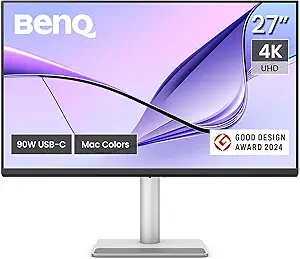
BenQ MA270U 27” 4K 3840×2160 Monitor for MacBook® Pro/Air, Dual USB-C, 90W Power Delivery, Mac Color Match, USB Hub, Brightness & Volume Control on Mac, Height & Tilt Adjustable Stand, P3 Color Gamut
This BenQ model is tailored for MacBook users who need a color-accurate, high-resolution display with seamless connectivity. Its factory-calibrated P3 wide color gamut and Mac-specific controls make it ideal for creative professionals working within the Apple ecosystem. Compared to general-purpose 4K monitors like the LG 32UP83AK-W, this monitor offers superior color matching and a dedicated USB-C hub with 90W power delivery, simplifying desk setup. Its adjustable stand supports ergonomic positioning, but the premium price tag and limited port variety might deter budget-conscious buyers. The focus on Mac color accuracy makes this a compelling choice for designers and photographers who prioritize color fidelity over extra gaming features or large screen sizes.
Pros:- Factory-calibrated for accurate Mac colors
- Dual USB-C with 90W power delivery simplifies connections
- Adjustable ergonomic stand for comfort
- USB hub for additional peripherals
Cons:- Higher price point compared to general monitors
- Limited port options outside USB-C and HDMI
- No integrated speakers or smart features
Best for: Creative professionals using MacBook who need precise color matching and seamless connectivity
Not ideal for: Budget users or those seeking a larger, more versatile display for mixed tasks
- Screen Size:27 inches
- Resolution:3840×2160 (4K UHD)
- Color Gamut:P3
- Connectivity:Dual USB-C, HDMI
- Power Delivery:90W
- Stand Adjustments:Height, Tilt, Swivel, Pivot
Bottom line: This monitor is ideal for Mac users needing professional-grade color accuracy and seamless device integration, at a premium cost.
LG 27US500-W UltraFine Monitor – 27-Inch 4K UHD (3840×2160) HDR10 IPS Borderless Design – White
The LG 27US500-W provides a 27-inch 4K UHD IPS panel with HDR10 support, making it a versatile choice for both office work and creative tasks. Its vivid colors and deep blacks, thanks to a 1000:1 contrast ratio, rival larger displays like the LG 32UP83AK-W but in a more space-efficient package. Its borderless design maximizes screen real estate, ideal for multi-monitor setups. However, its port options are limited to HDMI and DisplayPort, lacking USB-C, which could be a shortcoming for users with newer laptops. The price for a 27-inch 4K monitor can be high, but its compact size makes it suitable for smaller desks or dual monitor configurations, especially for those prioritizing high resolution and color accuracy within a limited space.
Pros:- Compact 27-inch size fits small desks
- Vivid 4K resolution with HDR10 support
- Borderless design enhances multi-monitor setups
- Good color accuracy with IPS panel
Cons:- Lacks USB-C or Thunderbolt ports
- Higher price for its size and features
- Limited connectivity options
Best for: Office workers and creatives needing a high-resolution display that fits into smaller workspaces
Not ideal for: Users requiring extensive connectivity options or a larger screen for detailed editing
- Screen Size:27 inches
- Resolution:3840×2160 (4K UHD)
- Contrast Ratio:1000:1
- HDR Support:HDR10
- Panel Type:IPS
- Ports:HDMI, DisplayPort
Bottom line: This monitor offers a high-resolution display in a smaller footprint, making it suitable for space-constrained offices or creative work in tight setups.
LG 32UP83AK-W 32-inch Ultrafine 4K UHD IPS Monitor with HDR10, USB-C Charging, and Ergonomic Stand
The LG 32UP83AK-W strikes a balance between size, resolution, and features, making it a flexible choice for office environments. Its 32-inch 4K UHD IPS panel provides sharp images and vibrant colors, comparable to the larger 37-inch LG but in a more manageable size. The inclusion of HDR10 enhances dynamic range, and the USB-C port with 60W charging simplifies cable management for modern laptops. Its ergonomic stand supports tilt, height, and pivot adjustments, ensuring comfortable use throughout the day. While the 60Hz refresh rate is typical for office monitors, it limits gaming performance, and the lack of Thunderbolt or multiple USB-C ports might be a consideration for some users. Overall, this model makes sense for those who want a crisp, adjustable display with convenient device charging in a standard-sized monitor.
Pros:- Sharp 4K UHD resolution with vibrant IPS colors
- HDR10 support for dynamic visuals
- USB-C with 60W charging reduces cable clutter
- Ergonomic stand with tilt, height, and pivot adjustments
Cons:- Limited to 60Hz refresh rate, unsuitable for fast gaming
- Absence of Thunderbolt or multiple USB-C ports
- Potential for higher price compared to non-UHD monitors
Best for: Office users seeking a reliable, well-rounded 32-inch monitor with USB-C charging capabilities
Not ideal for: Gamers or users requiring multiple high-speed ports or ultra-high refresh rates
- Screen Size:32 inches
- Resolution:4K UHD (3840 x 2160)
- HDR Support:HDR10
- Ports:USB-C 60W, HDMI, DisplayPort
- Stand Adjustments:Tilt, Height, Pivot
Bottom line: This monitor provides a balanced combination of size, resolution, and connectivity, ideal for office setups prioritizing clarity and device integration.
LG 27UP650K-W 27-inch Ultrafine 4K UHD IPS Monitor with HDR and Adjustable Stand
This 27-inch LG monitor stands out for its vibrant 4K UHD resolution and wide 95% DCI-P3 color gamut, making it ideal for professionals who need color accuracy alongside a sharp display. Its HDR 400 support enhances dynamic contrast, surpassing basic SDR monitors and bringing visuals to life. The adjustable stand offers tilt, height, and pivot options, ensuring ergonomic comfort during long work sessions. While its 60Hz refresh rate is suitable for typical office tasks, it limits gaming or fast-moving content compared to higher-refresh models like the LG 34SR60QC-W. Connectivity options are somewhat limited, with only HDMI and DisplayPort, which could be restrictive for multi-device setups. Compared to the LG 34-inch curved model, this monitor prioritizes color precision over immersive wide screens, making it better suited for detailed work rather than multitasking across many windows. This pick makes the most sense for professionals who need vibrant visuals, accurate colors, and ergonomic flexibility without the need for ultra-wide screens or high refresh rates.
Pros:- Vibrant 4K UHD resolution with excellent color accuracy
- HDR 400 support enhances dynamic range for better visuals
- Ergonomic stand with tilt, height, and pivot adjustments
Cons:- Limited connectivity options may restrict multi-device use
- 60Hz refresh rate is not suitable for fast-paced gaming or video editing
Best for: Creative professionals and office workers who prioritize color accuracy and ergonomic comfort in a standard-sized monitor.
Not ideal for: Gamers or users requiring ultra-wide screens and very high refresh rates, as the 60Hz refresh rate limits smooth motion performance.
- Size:27-inch
- Resolution:4K UHD (3840 x 2160)
- Panel Type:IPS
- HDR Support:DisplayHDR 400
- Color Gamut:95% DCI-P3
- Response Time:5ms
- Refresh Rate:60Hz
- Adjustable Stand Features:Tilt/Height/Pivot
Bottom line: This monitor is best for office workers or creatives who need precise colors and ergonomic flexibility in a reliable 4K display.
LG 34SR60QC-W 34-inch QHD Curved Smart Monitor with webOS, HDR10, and AirPlay 2
This 34-inch LG monitor introduces an immersive 1800R curved ultra-wide display, making it exceptionally suited for multitasking, combining work and entertainment seamlessly. Its QHD resolution (3440×1440) offers a sharper, more expansive workspace compared to standard 16:9 monitors like the LG 27UP650K-W, although it doesn’t match 4K pixel density. The curved design enhances immersion, especially for tasks involving multiple windows or media consumption. Built-in webOS provides easy access to streaming apps like Netflix and Prime Video, a feature not common in traditional office monitors but valuable for relaxed viewing breaks. HDR10 support adds visual punch, though at a lower 100Hz refresh rate, it isn’t aimed at high-speed gaming but suffices for smooth video playback. The inclusion of AirPlay 2 and USB ports supports a modern, connected workspace, albeit with the caveat that the Magic Remote is sold separately if you want full smart features. This monitor makes sense for users who want a large, curved display that balances productivity and entertainment, especially if multitasking and media consumption are priorities.
Pros:- Immersive 34-inch curved ultra-wide screen for multitasking
- Built-in webOS offers easy access to streaming platforms
- AirPlay 2 and HomeKit support for Apple device integration
- HDR10 enhances color and contrast for media
Cons:- Limited to 100Hz refresh rate, not ideal for high-speed gaming
- Magic Remote sold separately, adding extra cost for full smart features
Best for: Office workers who value an expansive, immersive display for multitasking and occasional media streaming, especially those with Apple devices.
Not ideal for: Gamers or users seeking high refresh rates for fast-paced gaming or detailed video editing, as 100Hz is more suited to casual use.
- Size:34 inches
- Resolution:QHD (3440×1440)
- Curvature:1800R
- Color Gamut:99% sRGB
- HDR Support:HDR10
- Refresh Rate:100Hz
- Ports:2 HDMI, 3 USB
- Smart Features:webOS, AirPlay 2
Bottom line: This monitor is perfect for users who want a large, curved display that combines productivity with entertainment and device integration.

How We Picked
The monitors in this roundup were selected based on a combination of performance, usability, and build quality. Priority was given to models featuring high-resolution 4K displays with matte coatings that effectively reduce glare without sacrificing too much color fidelity. We also evaluated ergonomic features like adjustable stands, connection versatility, and overall screen size for productivity. Cost was a factor, but higher-priced options were only included if they offered meaningful enhancements in image quality or comfort. The ranking reflects a balance of value, performance, and suitability for office environments where glare reduction and clarity are paramount.Factors to Consider When Choosing Best Matte 4k Monitor For Office
Choosing the best matte 4K monitor for office work involves considering several key factors beyond just resolution and matte finish. Understanding these aspects can help you avoid common pitfalls and select a monitor that truly enhances your productivity and comfort. Here are the main considerations:Display Size and Resolution
Size matters more than you might think. Larger screens, such as 32 inches or more, can improve multitasking and reduce eye strain, especially when paired with 4K resolution. However, bigger monitors require more desk space and may be overkill for smaller work areas. Balance your workspace constraints with your need for screen real estate to find the right size that promotes efficiency without cluttering your desk.
Matte Coating Quality
Not all matte coatings are equally effective. A good matte finish reduces glare from ambient lighting, but some coatings can dull colors or reduce sharpness. Look for monitors with coatings that strike a balance—minimizing reflections while maintaining accurate color reproduction. Reading reviews or specifications about coating quality can help you avoid models that compromise clarity for glare reduction.
Color Accuracy and Calibration
For tasks requiring detailed visuals or color precision, such as photo editing or design, color accuracy is vital. Monitors like the ASUS ProArt series are calibrated for professional use, but many high-end office monitors also feature factory calibration. Consider whether your work benefits from high color fidelity, and be prepared to invest more for models that support wide color gamuts like DCI-P3 or Adobe RGB.
Ergonomics and Adjustability
An adjustable stand with tilt, height, and swivel options can significantly improve comfort during long work sessions. Some monitors also include pivot features for vertical viewing. If you spend many hours at your desk, prioritizing ergonomic features can prevent discomfort and improve your focus. Be aware that more adjustable models often come at a higher price but can pay off in long-term comfort.
Connectivity and Additional Features
Multiple ports like HDMI, DisplayPort, and USB-C provide flexibility when connecting to different devices. USB-C with Power Delivery can also streamline your workspace by reducing cable clutter. Other features like built-in speakers, hub functionality, or smart integrations may add convenience but are less critical than display quality and ergonomics. Select a monitor with the ports and extras that match your workflow for seamless integration.
Frequently Asked Questions
Is a matte 4K monitor suitable for detailed color work?
Yes, many matte 4K monitors offer excellent color accuracy, especially models like the ASUS ProArt series or BenQ PD series. While matte coatings reduce glare, they can slightly dull the image compared to glossy screens, but high-quality models mitigate this with advanced coatings and calibration. If detailed color work is a priority, look for monitors with wide color gamuts and factory calibration, and consider whether the matte finish affects your specific workflow.
Can I use a matte monitor in a brightly lit office?
Absolutely. Matte screens excel in bright environments because they reduce reflections and glare from ambient light sources. This makes them ideal for offices with large windows or strong overhead lighting. However, be mindful that some matte coatings may slightly diminish color vibrancy, so balancing glare reduction with color fidelity is key if your work involves color-sensitive tasks.
Are larger monitors always better for office use?
Not necessarily. While larger monitors, such as 32 inches or more, can improve productivity by providing more screen space, they also require more desk area and may be overwhelming in small workspaces. If you primarily work with spreadsheets or documents, a 27-inch monitor might be more manageable. Consider your desk size, viewing distance, and specific tasks when choosing size to avoid discomfort or clutter.
Is 4K resolution necessary for office tasks?
4K resolution provides sharper text and more workspace, which can boost productivity, especially on larger screens. However, it also demands more from your hardware and can make scaling necessary for comfortable viewing. For most office tasks like document editing, browsing, or email, a high-quality 1080p or 1440p display might suffice, but 4K is beneficial for multitasking and detailed work if your hardware supports it well.
Should I prioritize price or features when choosing a matte 4K monitor?
Balancing price and features depends on your specific needs. Investing in a well-calibrated, ergonomic, and glare-reducing monitor can significantly enhance your work experience, especially if you spend many hours at your desk. Cheaper models may offer basic glare reduction but could lack color accuracy or ergonomic flexibility. If your budget allows, prioritizing features that improve comfort and productivity will provide longer-term value.
Conclusion
For general office use where glare reduction and clear images are essential, the SAMSUNG ViewFinity S8 offers a balanced mix of performance, adjustability, and image quality, making it the best overall choice. Those working in creative fields or needing precise color calibration should consider the ASUS ProArt Display PA279CRV for its professional-grade accuracy. If budget constraints are tight, models like the LG 32UR500K-B provide a large, glare-minimized display at a reasonable price. For users seeking the ultimate in comfort and versatility, premium options with extensive ergonomic features and extra connectivity will serve well. Ultimately, your choice should align with your workspace, budget, and specific task requirements.