Choosing the best OLED laptops in 2027 means balancing stunning contrast with practical usability. My top overall pick is the Dell XPS 14 Premium, which offers a refined balance of the 3.2K OLED panel and efficient Intel Core Ultra silicon. For gamers prioritizing frame rates over battery life, the Lenovo Legion 5i stands out with its RTX 5070 GPU and high-refresh OLED. Meanwhile, the ASUS Zenbook Duo provides a unique dual-screen workflow that appeals to multitaskers willing to trade traditional laptop ergonomics for screen real estate. The main tradeoff across this category involves battery drain and potential burn-in risks versus the undeniable visual superiority of organic light-emitting diode panels. Continue reading to see how these eleven models stack up against each other in performance, build quality, and specific use cases.

Get the latest gadgets delivered free with Prime
- Fast, free delivery on millions of items
- Prime Video, Amazon Music and more included
- Member-only deals all year
Complete the kit



Key Takeaways
- OLED panels significantly reduce battery life compared to IPS LCDs, making efficiency-focused chips like Intel Core Ultra V-series or AMD Ryzen AI 9 critical for all-day portability.
- Gaming OLEDs in 2027 have largely solved the burn-in anxiety through aggressive pixel shifting and refresh cycles, but static HUD elements still require caution.
- The ASUS Zenbook Duo’s dual-screen design offers unique productivity gains but sacrifices the structural rigidity and keyboard comfort found in traditional clamshell designs like the Dell XPS.
- Lenovo’s Legion series demonstrates that 165Hz+ OLED panels are now standard for high-end gaming, eliminating the motion blur issues present in earlier OLED generations.
- Value-oriented models like the ASUS Vivobook S16 often use WUXGA (1920×1200) OLED panels, which save battery life while retaining the deep blacks that define the OLED experience.
| Dell XPS 14 Premium 14.5-Inch Touchscreen Laptop, 3.2K OLED, Intel Core Ultra 7 255H, 32GB RAM, 1TB SSD |  | Best Premium All-Rounder | Display: 14.5-inch OLED touchscreen | Resolution: 3200 × 2000 | Refresh rate: Up to 120Hz | VIEW LATEST PRICE | See Our Full Breakdown |
| Lenovo Yoga 7i 14-inch 2-in-1 OLED Touchscreen Laptop, Intel Core Ultra 5 322, 16GB RAM, 512GB SSD with 1TB Docking Station Storage, Windows 11 Pro |  | Best OLED 2-in-1 | Display: 14-inch 2K OLED touchscreen | Resolution: 2560 × 1440 | Processor: Intel Core Ultra 5 322 | VIEW LATEST PRICE | See Our Full Breakdown |
| Lenovo Legion 5a (2026) 15.3-inch OLED Gaming Laptop |  | Best OLED Gaming Value | Display: 15.3-inch OLED | Resolution: 2560 × 1440 | Refresh rate: 165Hz | VIEW LATEST PRICE | See Our Full Breakdown |
| ASUS Zenbook 14 Laptop with 14-inch 3K OLED Touch Display, Intel Core Ultra 9 285H, 32GB RAM, 2TB SSD, 1TB Docking Station, Windows 11 Pro, Foggy Silver |  | Best OLED for Creative Work | Display: 14-inch 3K OLED touchscreen | Resolution and refresh rate: 2880 × 1800, 120Hz | HDR peak brightness: Up to 1100 nits | VIEW LATEST PRICE | See Our Full Breakdown |
| Lenovo Legion 5i 15.3-inch OLED Gaming Laptop, Core Ultra 7 251HX, 16GB RAM, 1TB SSD, RTX 5070 |  | Best OLED Gaming Performance | Display: 15.3-inch OLED | Resolution: 2560 × 1600 | Refresh rate: 165Hz | VIEW LATEST PRICE | See Our Full Breakdown |
| ASUS Vivobook S16 16-Inch WUXGA OLED Copilot+ Laptop, AMD Ryzen AI 9 465, 32 GB RAM, 1 TB SSD, Windows 11 Home |  | Best Large-Screen OLED for Everyday Work | Processor: AMD Ryzen AI 9 465 | Graphics: Integrated Radeon graphics | Display: 16-inch WUXGA OLED, 1920 × 1200, 60Hz | VIEW LATEST PRICE | See Our Full Breakdown |
| ASUS Zenbook Duo Dual-Screen Laptop, 14-Inch 3K 120Hz OLED Touch Displays, Intel Core Ultra 9 285H, 32GB RAM, 1TB SSD | 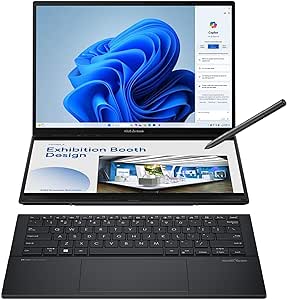 | Best Dual-Screen OLED | Processor: Intel Core Ultra 9 285H | Graphics: Intel Arc integrated graphics | Displays: Dual 14-inch OLED touchscreens, 2880 × 1800 each | VIEW LATEST PRICE | See Our Full Breakdown |
| MSI Stealth 16 AI+ 16-Inch OLED Gaming Laptop |  | Best OLED for High-Refresh Gaming | Processor: Intel Core Ultra 9 386H | Graphics: NVIDIA GeForce RTX 5070 Ti with 16GB GDDR7 | Display: 16-inch QHD+ OLED, 2560 × 1600 | VIEW LATEST PRICE | See Our Full Breakdown |
| Lenovo Slim 7i Aura Edition 14-inch OLED Touchscreen Laptop, Intel Core Ultra 7 258V, 32GB RAM, 1TB SSD |  | Best Compact OLED for Travel | Processor: Intel Core Ultra 7 258V | Graphics: Integrated Intel Arc Graphics 140V | Display: 14-inch WUXGA OLED touchscreen, 1920 × 1200, 60Hz, HDR True Black 500 | VIEW LATEST PRICE | See Our Full Breakdown |
| ASUS Vivobook S16 16-inch OLED Laptop, AMD Ryzen AI 7 445, 32 GB RAM, 1 TB SSD | | Best Value Large-Screen OLED for Productivity | Processor: AMD Ryzen AI 7 445 | Graphics: Integrated AMD Radeon Graphics | Display: 16-inch WUXGA OLED, 1920 × 1200, 16:10 | VIEW LATEST PRICE | See Our Full Breakdown |
| Lenovo Legion 5a 15.3-Inch Gaming Laptop |  | Best Performance-Value OLED | Processor: AMD Ryzen 7 250, 8 cores, 16 threads | Graphics: NVIDIA GeForce RTX 5060 with 8GB GDDR7 | Display: 15.3-inch OLED, 2560 × 1600, 165Hz | VIEW LATEST PRICE | See Our Full Breakdown |
| OLED laptop | Processor | Memory | Storage | Display |
|---|---|---|---|---|
| Dell XPS 14 Premium 14.5-Inch | Intel Core Ultra 7 255H | 32GB | 1TB SSD | 14.5-inch OLED touchscreen |
| Lenovo Yoga 7i 14-inch 2-in-1 | Intel Core Ultra 5 322 | 16GB LPDDR5X | 512GB SSD plus 1TB docking-station storage | 14-inch 2K OLED touchscreen |
| Lenovo Legion 5a | AMD Ryzen 7 250 | 32GB DDR5 | 1TB SSD | 15.3-inch OLED |
| ASUS Zenbook 14 Laptop with 14 | Intel Core Ultra 9 285H | 32GB LPDDR5X | 2TB SSD plus 1TB docking-station storage | 14-inch 3K OLED touchscreen |
| Lenovo Legion 5i 15.3-inch OLE | Intel Core Ultra 7 251HX, 18 cores | 16GB DDR5 | 1TB M.2 SSD | 15.3-inch OLED |
| ASUS Vivobook S16 16-Inch WUXG | AMD Ryzen AI 9 465 | 32GB DDR5 | 1TB SSD | 16-inch WUXGA OLED, 1920 × 1200, 60Hz |
| ASUS Zenbook Duo Dual-Screen L | Intel Core Ultra 9 285H | 32GB LPDDR5x | 1TB PCIe 4.0 SSD | — |
| MSI Stealth 16 AI+ 16-Inch OLE | Intel Core Ultra 9 386H | 32GB DDR5 | 1TB NVMe SSD | 16-inch QHD+ OLED, 2560 × 1600 |
| Lenovo Slim 7i Aura Edition 14 | Intel Core Ultra 7 258V | 32GB LPDDR5X-8533 | 1TB PCIe Gen4 SSD | 14-inch WUXGA OLED touchscreen, 1920 × 1200, 60Hz, HDR True Black 500 |
| ASUS Vivobook S16 16-inch OLED | AMD Ryzen AI 7 445 | 32GB DDR5 | 1TB SSD | 16-inch WUXGA OLED, 1920 × 1200, 16:10 |
| Lenovo Legion 5a 15.3-Inch Gam | AMD Ryzen 7 250, 8 cores, 16 threads | 32GB DDR5 | 1TB SSD | 15.3-inch OLED, 2560 × 1600, 165Hz |
More Details on Our Top Picks
Dell XPS 14 Premium 14.5-Inch Touchscreen Laptop, 3.2K OLED, Intel Core Ultra 7 255H, 32GB RAM, 1TB SSD
The Dell XPS 14 Premium balances a sharper-than-QHD OLED picture with a compact 14.5-inch touchscreen, making it a strong fit for work that spans documents, media, and light creative tasks. Its 3200 × 2000 resolution and up-to-120Hz refresh rate give text and motion extra clarity, while 32GB of memory and a 1TB SSD leave room for demanding multitasking. Compared with the convertible Lenovo Yoga 7i, this XPS has more memory and onboard storage, but the Yoga offers a more flexible 2-in-1 design. The aluminum and Gorilla Glass build, fingerprint reader, and Wi-Fi 7 suit a polished everyday setup. The tradeoff is integrated Intel Arc graphics: this is not the pick for demanding gaming or GPU-heavy production. Its matte finish may also appeal less to buyers seeking the glossy OLED look.
Pros:- High-resolution 3200 × 2000 OLED touchscreen with refresh rates up to 120Hz
- 32GB memory and 1TB SSD support demanding multitasking and local files
- Machined aluminum and Gorilla Glass 3 construction
- Wi-Fi 7, Bluetooth 5.4, and fingerprint-reader security
Cons:- Integrated graphics are a poor fit for demanding games and GPU-intensive workloads
- Matte screen finish does not deliver the glossy appearance some OLED buyers prefer
Best for: Professionals who want a refined, high-resolution OLED touchscreen, substantial memory, and fast onboard storage in a relatively compact laptop.
Not ideal for: Gamers and GPU-heavy creators who need dedicated graphics, or buyers who specifically want a glossy OLED finish.
- Display:14.5-inch OLED touchscreen
- Resolution:3200 × 2000
- Refresh rate:Up to 120Hz
- Processor:Intel Core Ultra 7 255H
- Graphics:Integrated Intel Arc
- Memory:32GB
- Storage:1TB SSD
- Weight:3.8 lbs
Our verdict“Choose the XPS 14 if you want a premium, detailed OLED work laptop with more onboard memory and storage than the Yoga 7i, but not dedicated gaming graphics.”
Lenovo Yoga 7i 14-inch 2-in-1 OLED Touchscreen Laptop, Intel Core Ultra 5 322, 16GB RAM, 512GB SSD with 1TB Docking Station Storage, Windows 11 Pro
The Lenovo Yoga 7i earns its place by making the OLED screen useful beyond laptop mode: its 14-inch touchscreen and convertible hinge suit handwriting, presentations, and casual viewing. Windows 11 Pro, Wi-Fi 7, a fingerprint reader, and a practical mix of USB-C, USB-A, HDMI, and MicroSD make it a flexible option for work and study. Compared with the Dell XPS 14 Premium, the Yoga gives up resolution and memory, but adds the 2-in-1 format and broader listed ports. One unusual bundle detail needs attention: the included 1TB is in the docking station, not built into the laptop, so that extra capacity is not as convenient on the go. The listing also says the package seal is opened for the upgrade, a detail buyers may want to clarify before ordering.
Pros:- Convertible 2-in-1 design with a 14-inch OLED touchscreen
- Windows 11 Pro and Wi-Fi 7
- Useful port selection including HDMI, USB-A, and MicroSD
- Fingerprint reader and backlit keyboard
Cons:- Included 1TB docking-station storage is external rather than onboard
- 16GB memory and 2560 × 1440 resolution are below the XPS 14 Premium’s listed configuration
- Package seal is opened for the RAM and SSD upgrade
Best for: Students, presenters, and mobile professionals who want an OLED laptop that can also serve as a tablet and value Windows 11 Pro and varied ports.
Not ideal for: Buyers who need all storage inside the laptop, want a higher-resolution OLED panel, or prefer a sealed, unmodified package.
- Display:14-inch 2K OLED touchscreen
- Resolution:2560 × 1440
- Processor:Intel Core Ultra 5 322
- Memory:16GB LPDDR5X
- Storage:512GB SSD plus 1TB docking-station storage
- Operating system:Windows 11 Pro
- Connectivity:Wi-Fi 7 and Bluetooth 5.4
- Weight:4.8 lbs
Our verdict“Pick the Yoga 7i if tablet-style flexibility matters more than maximum screen resolution or having all your storage built into the laptop.”
Lenovo Legion 5a (2026) 15.3-inch OLED Gaming Laptop
For buyers who want OLED gaming rather than just an OLED screen for everyday work, the Lenovo Legion 5a pairs a 15.3-inch 2560 × 1440 panel with a 165Hz refresh rate and RTX 5060 graphics. That dedicated GPU is the key difference from the Dell XPS 14 Premium and ASUS Zenbook 14: it makes this a more suitable choice for modern games and GPU-accelerated tasks, while 32GB of DDR5 memory and a 1TB SSD support a substantial game library and multitasking. The screen’s high refresh rate can make fast motion look smoother than on the XPS’s up-to-120Hz panel. In exchange, the Legion is less of an all-purpose portable pick: it weighs 4.1 lbs, its listed port count is only three, and its memory is already at the stated 32GB maximum.
Pros:- 15.3-inch 2560 × 1440 OLED display with a 165Hz refresh rate
- Dedicated NVIDIA GeForce RTX 5060 graphics with GDDR7 memory
- 32GB DDR5 memory and 1TB SSD
- More gaming-focused graphics capability than the integrated-graphics XPS 14 Premium
Cons:- At 4.1 lbs, it is less convenient to carry than compact OLED options
- Only three ports are listed
- The listed 32GB memory is already the stated maximum
Best for: PC gamers who want a dedicated RTX GPU, a fast-refresh OLED display, and enough memory and SSD capacity for games and everyday multitasking.
Not ideal for: Travelers prioritizing a light laptop, buyers needing extensive port selection, or users who expect to expand memory beyond 32GB.
- Display:15.3-inch OLED
- Resolution:2560 × 1440
- Refresh rate:165Hz
- Processor:AMD Ryzen 7 250
- Graphics:NVIDIA GeForce RTX 5060 with GDDR7
- Memory:32GB DDR5
- Storage:1TB SSD
- Weight:4.1 lbs
Our verdict“Choose the Legion 5a if a fast OLED gaming screen and dedicated RTX graphics matter more than light weight, extensive ports, or future memory upgrades.”
ASUS Zenbook 14 Laptop with 14-inch 3K OLED Touch Display, Intel Core Ultra 9 285H, 32GB RAM, 2TB SSD, 1TB Docking Station, Windows 11 Pro, Foggy Silver
The ASUS Zenbook 14 stands out for combining a high-detail OLED with a color-focused specification: its 2880 × 1800, 120Hz touchscreen lists DCI-P3 color and HDR peak brightness up to 1100 nits. That makes it a compelling match for creators who want vivid viewing and a compact Windows 11 Pro machine. It also has a Core Ultra 9 285H, 32GB LPDDR5X, and a 2TB internal SSD—more onboard capacity than the Lenovo Yoga 7i or Dell XPS 14 Premium configurations listed here. The tradeoff is that its Intel Arc graphics are integrated, unlike the RTX-equipped Legion 5a, so gaming and GPU-heavy work are not its strong suit. The bundle’s extra 1TB sits in the docking station, and the listing gives conflicting weights of 2.65 and 6 lbs, so verify portability details before buying.
Pros:- 3K OLED touchscreen with 120Hz refresh rate, DCI-P3 color, and HDR brightness listed up to 1100 nits
- Core Ultra 9 285H and 32GB LPDDR5X
- 2TB SSD provides substantial onboard storage
- Slim all-metal design with Thunderbolt 4 and HDMI 2.1
Cons:- Integrated Intel Arc graphics trail the dedicated RTX GPUs in the Legion 5a and Legion 5i for gaming workloads
- The additional 1TB of storage is in the docking station, not the laptop
- Listing gives conflicting weights of 2.65 lbs and 6 lbs
Best for: Color-conscious creators and professionals who want a high-resolution OLED touchscreen, ample onboard storage, and Windows 11 Pro in a slim design.
Not ideal for: Buyers who need dedicated gaming graphics, want simple weight specifications, or require all bundled storage to be internal.
- Display:14-inch 3K OLED touchscreen
- Resolution and refresh rate:2880 × 1800, 120Hz
- HDR peak brightness:Up to 1100 nits
- Color gamut:DCI-P3
- Processor:Intel Core Ultra 9 285H
- Graphics:Integrated Intel Arc Graphics
- Memory:32GB LPDDR5X
- Storage:2TB SSD plus 1TB docking-station storage
- Battery:75Wh
Our verdict“Choose the Zenbook 14 for a color-focused OLED and generous internal storage, but check the listed weight and do not expect dedicated-GPU gaming performance.”
Lenovo Legion 5i 15.3-inch OLED Gaming Laptop, Core Ultra 7 251HX, 16GB RAM, 1TB SSD, RTX 5070
The Lenovo Legion 5i is the gaming-first choice here for buyers who want stronger listed graphics hardware than the Legion 5a: its RTX 5070 with 12GB GDDR7 is paired with an 18-core Core Ultra 7 251HX. The 15.3-inch, 2560 × 1600 OLED runs at 165Hz and is listed at up to 500 nits, giving games both a fast refresh rate and a bright display specification. Compared with the Legion 5a, this model favors a higher-tier GPU and a taller 1600-pixel resolution, but ships with 16GB rather than 32GB of memory. It also has Thunderbolt 4, Ethernet, HDMI, and Wi-Fi 7 listed. The main drawback is portability: the supplied dimensions are unusually large, and no weight is provided. Buyers should confirm the measurements and memory needs before choosing it over the more balanced Legion 5a.
Pros:- RTX 5070 graphics with 12GB GDDR7 and ray-tracing support
- 15.3-inch OLED with 2560 × 1600 resolution and 165Hz refresh rate
- 18-core Intel Core Ultra 7 251HX processor
- Thunderbolt 4, Wi-Fi 7, HDMI, and Ethernet are listed
Cons:- 16GB DDR5 is half the listed memory of the Legion 5a
- Supplied dimensions of 21.25 × 13.25 × 3.4 inches raise portability questions and should be verified
- Microsoft Office 365 and McAfee LiveSafe are listed as 30-day trials
Best for: Gamers prioritizing an RTX 5070, high-refresh OLED, and broad wired connectivity over a lighter everyday laptop or higher included memory capacity.
Not ideal for: Frequent travelers, buyers who need 32GB of memory out of the box, or anyone relying on the unusually large listed dimensions without confirming them.
- Display:15.3-inch OLED
- Resolution:2560 × 1600
- Refresh rate:165Hz
- Maximum brightness:Up to 500 nits
- Processor:Intel Core Ultra 7 251HX, 18 cores
- Graphics:NVIDIA GeForce RTX 5070, 12GB GDDR7
- Memory:16GB DDR5
- Storage:1TB M.2 SSD
- Wireless:Wi-Fi 7 and Bluetooth 5.4
Our verdict“Pick the Legion 5i if its RTX 5070 gaming focus outweighs the Legion 5a’s higher included memory and the need to verify this model’s unusually large dimensions.”
ASUS Vivobook S16 16-Inch WUXGA OLED Copilot+ Laptop, AMD Ryzen AI 9 465, 32 GB RAM, 1 TB SSD, Windows 11 Home
I rank the ASUS Vivobook S16 with Ryzen AI 9 as a strong fit for buyers who want a roomy OLED workspace without a dedicated gaming GPU. Its 16-inch, 16:10 panel gives documents and split-screen apps more vertical room than the 14-inch Lenovo Slim 7i Aura Edition, while 32GB of memory and a 1TB SSD leave plenty of headroom for multitasking. The processor’s up-to-50-TOPS NPU also supports on-device AI features, though integrated Radeon graphics are not a substitute for the discrete RTX graphics in the MSI Stealth 16 AI+. The tradeoff is the display’s 60Hz refresh rate: it prioritizes everyday viewing over the smoother motion of higher-refresh OLEDs. At 3.75 pounds, it is portable for a 16-inch machine, but less convenient to carry than Lenovo’s compact option.
Pros:- 16-inch WUXGA OLED gives spreadsheets and side-by-side apps a roomy 16:10 workspace.
- 32GB DDR5 memory and a 1TB SSD support heavy multitasking and local file storage.
- Ryzen AI 9 465 includes an NPU rated up to 50 TOPS for supported on-device AI tasks.
- 70Wh battery, fast charging, Windows Hello, and a physical camera privacy shutter.
Cons:- The 60Hz display is less fluid than the 120Hz Zenbook Duo or 240Hz MSI Stealth.
- Integrated Radeon graphics are a poor fit for demanding gaming and GPU-heavy creative work.
- At 3.75 pounds, it is heavier to carry than the 14-inch Lenovo Slim 7i.
Best for: Office users and students who want a large OLED workspace, generous memory, and on-device AI features for everyday productivity.
Not ideal for: Competitive gamers or frequent travelers who need a high-refresh display, dedicated graphics, or a lighter 14-inch laptop.
- Processor:AMD Ryzen AI 9 465
- Graphics:Integrated Radeon graphics
- Display:16-inch WUXGA OLED, 1920 × 1200, 60Hz
- Memory:32GB DDR5
- Storage:1TB SSD
- NPU performance:Up to 50 NPU TOPS
- Battery:70Wh; up to 23 hours, varying by use and configuration
- Weight:3.75 lbs
Our verdict“Choose this Vivobook if you want a large, well-equipped OLED laptop for productivity, not high-refresh gaming or graphics-intensive work.”
ASUS Zenbook Duo Dual-Screen Laptop, 14-Inch 3K 120Hz OLED Touch Displays, Intel Core Ultra 9 285H, 32GB RAM, 1TB SSD
The ASUS Zenbook Duo is the standout when one OLED panel is not enough: its two 14-inch touchscreens can create a portable multi-display setup, with a detachable keyboard and kickstand supporting different layouts. Each screen offers 3K resolution and 120Hz refresh, making this a sharper, smoother display arrangement than the 60Hz WUXGA panel on the ASUS Vivobook S16. The included pen adds a useful option for annotation and drawing, while 32GB of memory and a Core Ultra 9 chip suit demanding productivity. That flexibility has a real cost in endurance: listed playback drops from up to 16 hours in laptop mode to 9 hours in dual-screen mode. At 3.64 pounds, it also weighs more than many single-screen ultraportables, including the Lenovo Slim 7i.
Pros:- Two 14-inch 3K OLED touchscreens support flexible multi-screen work.
- 120Hz refresh rate makes scrolling and on-screen motion smoother than on 60Hz OLED alternatives.
- Detachable Bluetooth keyboard, built-in kickstand, and included ASUS Pen support varied workflows.
- 32GB memory, 1TB PCIe 4.0 SSD, and two Thunderbolt 4 ports.
Cons:- Listed battery playback falls to up to 9 hours in dual-screen mode.
- At 3.64 pounds, it is heavier than single-screen ultraportables such as the Lenovo Slim 7i.
- The two-screen design adds setup and layout complexity compared with a conventional laptop.
Best for: Mobile professionals, researchers, and creators who regularly work across multiple apps and want two OLED touchscreens in one carryable system.
Not ideal for: Buyers who prioritize long unplugged sessions, a simple conventional laptop layout, or the lightest possible 14-inch device.
- Processor:Intel Core Ultra 9 285H
- Graphics:Intel Arc integrated graphics
- Displays:Dual 14-inch OLED touchscreens, 2880 × 1800 each
- Refresh rate:120Hz
- Memory:32GB LPDDR5x
- Storage:1TB PCIe 4.0 SSD
- Battery:75Wh; up to 16 hours in laptop mode or 9 hours in dual-screen mode
- Weight:3.64 lbs
Our verdict“Pick the Zenbook Duo if a flexible second OLED screen is worth the added weight and shorter dual-screen battery runtime.”
MSI Stealth 16 AI+ 16-Inch OLED Gaming Laptop
For gaming, the MSI Stealth 16 AI+ has the clearest performance advantage in this group: its RTX 5070 Ti and 240Hz QHD+ OLED are built for demanding games and fast-moving visuals. That combination goes well beyond the integrated graphics in the ASUS Vivobook S16, while the higher resolution and refresh rate also suit creators who value a smooth, detailed screen. The 16GB of GDDR7 graphics memory gives the GPU dedicated resources for graphics workloads. This capability comes with compromises: the MSI weighs 4.4 pounds, substantially more than the 3.75-pound Vivobook, and a glossy display can reflect bright rooms. Buyers seeking a quiet, light productivity laptop may prefer the Lenovo Slim 7i, but it cannot match the MSI’s dedicated graphics or 240Hz panel.
Pros:- 16-inch QHD+ OLED combines 2560 × 1600 resolution with a 240Hz refresh rate.
- GeForce RTX 5070 Ti with 16GB GDDR7 graphics memory targets demanding gaming and GPU workloads.
- 32GB DDR5 memory and a 1TB NVMe SSD provide capable baseline storage and multitasking.
- Wi-Fi 7 connectivity and a backlit gaming keyboard.
Cons:- At 4.4 pounds, it is heavier than the Vivobook S16 and most compact OLED laptops.
- The glossy display can reflect surrounding light in bright rooms.
- Dedicated high-performance graphics make it a less natural choice for buyers seeking a lightweight productivity machine.
Best for: PC gamers and graphics-focused creators who want a high-refresh OLED display paired with dedicated NVIDIA graphics.
Not ideal for: Frequent travelers and buyers focused on battery-conscious everyday work who do not need discrete GPU performance.
- Processor:Intel Core Ultra 9 386H
- Graphics:NVIDIA GeForce RTX 5070 Ti with 16GB GDDR7
- Display:16-inch QHD+ OLED, 2560 × 1600
- Refresh rate:240Hz
- Memory:32GB DDR5
- Storage:1TB NVMe SSD
- Wireless:Wi-Fi 7 and Bluetooth 6
- Weight:4.4 lbs
Our verdict“Choose the MSI if gaming performance and a 240Hz OLED matter more to you than low carry weight and a glare-resistant screen.”
Lenovo Slim 7i Aura Edition 14-inch OLED Touchscreen Laptop, Intel Core Ultra 7 258V, 32GB RAM, 1TB SSD
The Lenovo Slim 7i Aura Edition puts portability first: at approximately 2.9 pounds and just 0.55 inches thick, it is the easiest option here to carry day to day. Its 14-inch WUXGA OLED touchscreen is smaller and runs at 60Hz, so it lacks the expansive workspace of the ASUS Vivobook S16 and the fluidity of the 120Hz Zenbook Duo. In exchange, buyers get 32GB of fast LPDDR5X memory, a 1TB SSD, Windows 11 Pro, Thunderbolt 4, and a 5MP webcam with a privacy shutter—practical strengths for mobile work and video calls. The integrated Intel Arc graphics keep it suited to everyday tasks rather than demanding gaming. Its compact screen can also feel limiting for users who often juggle several windows.
Pros:- Approximately 2.9-pound aluminum chassis is the lightest option in this batch.
- 14-inch OLED touchscreen supports HDR True Black 500.
- 5MP RGB+IR webcam, dual microphones, and privacy shutter suit frequent video calls.
- Thunderbolt 4, Wi-Fi 7, HDMI 2.1, and a microSD card reader.
Cons:- The 60Hz WUXGA display is less fluid than the Zenbook Duo’s 120Hz screens.
- Integrated Intel Arc graphics are not intended for demanding gaming or GPU-heavy creative tasks.
- The 14-inch screen offers less workspace than the 16-inch Vivobook and MSI models.
Best for: Frequent travelers and hybrid professionals who want a lightweight OLED touchscreen, strong video-call hardware, and business-oriented Windows 11 Pro.
Not ideal for: Gamers, GPU-heavy creators, and buyers who want a large screen or a refresh rate above 60Hz.
- Processor:Intel Core Ultra 7 258V
- Graphics:Integrated Intel Arc Graphics 140V
- Display:14-inch WUXGA OLED touchscreen, 1920 × 1200, 60Hz, HDR True Black 500
- Memory:32GB LPDDR5X-8533
- Storage:1TB PCIe Gen4 SSD
- Operating system:Windows 11 Pro 64-bit
- Battery:70Wh rechargeable Li-ion; Rapid Charge Express
- Weight:Approximately 2.9 lbs
Our verdict“Choose the Slim 7i if low carry weight and work-ready features matter more than a larger, faster-refresh screen or dedicated graphics.”
ASUS Vivobook S16 16-inch OLED Laptop, AMD Ryzen AI 7 445, 32 GB RAM, 1 TB SSD
This Ryzen AI 7 Vivobook S16 keeps the large OLED format and generous memory of its Ryzen AI 9 sibling while taking a more modest processor position. For everyday office work, study, and media, the 16-inch WUXGA panel and 32GB RAM plus 1TB storage are likely to matter more than stepping up to the AI 9 configuration. That makes this the sensible choice for buyers who want a roomy OLED system without paying for more processing headroom than their workload needs. Compared with the more portable Lenovo Slim 7i Aura Edition, it offers a larger display and more built-in ports, but weighs 3.75 pounds and has a 60Hz refresh rate. Integrated Radeon graphics also put it behind the dedicated-GPU MSI Stealth 16 AI+ for gaming and demanding graphics work.
Pros:- 16-inch 16:10 WUXGA OLED provides a spacious screen for documents and multitasking.
- 32GB DDR5 memory and a 1TB SSD support multitasking and local storage.
- 70Wh battery is rated for up to 21 hours of video playback under controlled conditions.
- USB-C, USB-A, HDMI, Windows Hello, and a physical camera privacy shutter.
Cons:- The 60Hz display cannot match the smoother 120Hz Zenbook Duo or 240Hz MSI Stealth.
- Integrated Radeon graphics limit performance in demanding games and graphics workloads.
- At 3.75 pounds, it is less convenient to carry than the 14-inch Lenovo Slim 7i.
Best for: Students and home-office users who want a large OLED screen, substantial memory, and everyday Copilot+ capabilities without prioritizing discrete graphics.
Not ideal for: Buyers who need high-refresh gaming, demanding GPU performance, or a lightweight laptop for frequent travel.
- Processor:AMD Ryzen AI 7 445
- Graphics:Integrated AMD Radeon Graphics
- Display:16-inch WUXGA OLED, 1920 × 1200, 16:10
- Memory:32GB DDR5
- Storage:1TB SSD
- Battery:70Wh; up to 21 hours of video playback under controlled conditions
- Wireless:Wi-Fi 6
- Weight:3.75 lbs
Our verdict“Pick this Vivobook for a large OLED productivity laptop with ample memory, but choose the Ryzen AI 9 model or MSI if your workloads need more processing or graphics power.”
Lenovo Legion 5a 15.3-Inch Gaming Laptop
This model stands out by balancing high-end gaming power with a stunning 15.3-inch OLED display at a price point that undercuts many premium ultrabooks. The RTX 5060 graphics paired with 32GB DDR5 RAM handles modern AAA titles comfortably, while the 165Hz refresh rate ensures smooth visuals during fast-paced gameplay. Compared to the ASUS Zenbook 14, which prioritizes portability and creative workflows, the Legion 5a sacrifices slimness for raw thermal headroom and GPU horsepower. It lacks the sleek, all-metal aesthetic of the Dell XPS 14, but it offers significantly better sustained performance for gamers. The Wi-Fi 7 and USB4 connectivity are future-proof, though the chassis weight makes it less ideal for frequent commuters than the lighter Lenovo Yoga 7i.Pros:- Vibrant 165Hz OLED display with excellent color accuracy
- Powerful RTX 5060 GPU handles high settings in modern games
- Modern connectivity includes Wi-Fi 7 and USB4 ports
- 32GB RAM supports heavy multitasking and creative apps
Cons:- Heavier chassis at approximately 5 lbs reduces portability
- Battery life may struggle under heavy gaming loads
- Plastic-heavy build feels less premium than metal alternatives
Best for: Gamers and content creators who need high refresh rates and strong GPU power without paying premium brand prices.
Not ideal for: Frequent travelers who prioritize ultra-portability and all-day battery life over raw graphical performance.
- Processor:AMD Ryzen 7 250, 8 cores, 16 threads
- Graphics:NVIDIA GeForce RTX 5060 with 8GB GDDR7
- Display:15.3-inch OLED, 2560 × 1600, 165Hz
- Memory:32GB DDR5
- Storage:1TB SSD
- Wireless:Wi-Fi 7, Bluetooth 5.4
- Weight:Approximately 5 lb
- Battery:80Wh lithium-ion with Rapid Charge Pro
Our verdict“Choose this if you want a dedicated gaming machine with a beautiful screen and don’t mind the extra weight.”

How We Picked
I evaluated these eleven laptops based on four primary criteria: panel quality, power efficiency, build durability, and workflow suitability. I prioritized models that offer consistent color accuracy out of the box, as OLED’s main appeal is visual fidelity for creators and media consumers. I also weighed the thermal management of each device, because OLED panels can degrade faster if sustained heat is not dissipated effectively. The ranking logic favors devices that balance these factors; for instance, a high-performance gaming laptop ranks lower for general use if its battery life cannot support basic mobile tasks, while a thin-and-light ultrabook ranks highly if it delivers exceptional battery life without compromising screen brightness.
Factors to Consider When Choosing Best OLED Laptops
Selecting an OLED laptop requires more than just looking at the resolution. The technology behaves differently than traditional LCDs, affecting everything from battery consumption to long-term durability. This guide breaks down the specific factors that determine whether an OLED model is the right fit for your daily routine.
Understanding OLED Burn-In and Longevity
Many buyers hesitate to adopt OLED technology due to fears of permanent image retention, known as burn-in. In 2027, manufacturers have mitigated this risk through software-based pixel shifting and periodic refresh cycles that run when the device is idle. However, users who keep static elements like taskbars or editing timelines visible for hours daily should still enable auto-hide features and vary their desktop wallpaper. This risk is minimal for general consumers but remains a consideration for professionals who rely on static interface elements. Choosing a model with robust thermal management helps further, as heat accelerates the degradation of organic materials within the panel.
Battery Life Tradeoffs with OLED Displays
OLED screens consume power per pixel, meaning darker interfaces use less energy than bright ones, but overall power draw is often higher than comparable IPS panels during full-brightness usage. If you prioritize all-day battery life, look for laptops equipped with efficiency-focused processors like the Intel Core Ultra V-series or AMD Ryzen AI 9. These chips manage power draw more effectively than high-performance H-series variants. Additionally, consider whether the laptop offers variable refresh rate (VRR) technology, which can lower the refresh rate during static viewing to save power. Ignoring this factor may result in needing a charger by mid-afternoon, negating the portability benefits of a thin chassis.
Resolution and Text Clarity for Productivity
While 4K and 3K resolutions offer incredible detail, they can make text appear smaller and require scaling adjustments that sometimes blur fonts. For coding or extensive document editing, a WUXGA (1920×1200) OLED panel like the one in the ASUS Vivobook S16 often provides better readability and battery efficiency than a higher-resolution alternative. High-DPI screens are beneficial for graphic design and video editing, where pixel density matters more than text legibility. You should match the resolution to your primary workload rather than simply choosing the highest number available, as this impacts both performance and user comfort.
Thermal Management in Thin Chassis
OLED panels generate heat, and pairing them with powerful CPUs and GPUs in thin laptops creates thermal challenges. If the chassis cannot dissipate this heat effectively, the device will throttle performance to protect the components. This is particularly relevant for gaming laptops with high-refresh OLEDs, where sustained frame rates generate significant heat. Look for models with larger vapor chambers or multiple fans, such as the Lenovo Legion series, which typically handle sustained loads better than ultra-thin ultrabooks. A hot keyboard deck or noticeable fan noise under moderate load indicates that the system is struggling, which may shorten the lifespan of the screen and internal components.
HDR Performance and Brightness Levels
One of the key advantages of OLED is its ability to produce true blacks, which enhances HDR content. However, not all OLED panels sustain high brightness levels for large areas of the screen, a limitation known as ABL (Automatic Brightness Limiter). This can cause HDR highlights to dim unexpectedly when displaying bright scenes across the entire panel. For users who frequently watch HDR movies or edit HDR video, checking the peak brightness specifications and ABL behavior is important. Some premium models offer higher sustained brightness, but this often comes at a premium price and increased power consumption, making it a specific luxury rather than a standard feature.
Frequently Asked Questions
Is OLED worth it over IPS for general office work?
For most office tasks like email, spreadsheets, and web browsing, OLED is not strictly necessary and can be a liability due to potential burn-in from static UI elements. IPS panels offer better battery life and uniform brightness for text-heavy work. However, if you also consume media or do light creative work, the superior contrast and color gamut of OLED enhance the experience. You should weigh the visual benefits against the shorter battery life and higher cost. If your work is exclusively text-based, a high-quality IPS LCD is often the more practical choice.
Do OLED laptops have worse battery life than LCD models?
Generally, yes, especially when displaying bright, white-heavy content like documents or websites with white backgrounds. OLED pixels emit light individually, so displaying white requires all subpixels to be active, drawing more power than a single backlight in an LCD. Dark mode interfaces can mitigate this, sometimes offering better efficiency than LCDs. However, the efficiency gains from newer processors like Intel Core Ultra are helping to close the gap. If battery life is your primary concern, prioritize models with larger batteries and efficiency-focused chips rather than assuming all OLED laptops drain quickly.
How does OLED affect gaming performance compared to LCD?
OLED provides faster pixel response times than LCD, resulting in less motion blur and sharper movement in fast-paced games. This is a significant advantage for competitive gaming. However, OLED panels can suffer from image retention if static HUD elements are left on screen for extended periods. Modern gaming OLEDs include features to prevent this, but players should still be cautious. The visual clarity and contrast are superior, but you may need to adjust in-game settings to manage brightness and power consumption, which can impact sustained frame rates on thinner laptops.
Are dual-screen OLED laptops practical for daily use?
Dual-screen models like the ASUS Zenbook Duo offer immense productivity for multitaskers but introduce ergonomic challenges. The keyboard is often detachable or placed on the lower screen, which can feel unstable or require a stand for proper ergonomics. These devices are heavier and thicker than traditional laptops due to the second display and additional hinges. They are best suited for professionals who constantly reference multiple applications, such as coders or video editors. For general use, the complexity and weight may outweigh the benefits of extra screen real estate.
Can I use an OLED laptop outdoors effectively?
Outdoor usability depends on the panel’s peak brightness and anti-reflective coating. OLEDs often struggle with sustained high brightness in direct sunlight compared to high-nit LCDs, and their glossy surfaces can create glare. Some models offer matte OLED variants or higher brightness ceilings, but these are less common. If you work outdoors frequently, check specific brightness specs (nits) and consider whether the screen’s reflective nature will hinder visibility. For most users, indoor use is the primary strength of OLED, while outdoor work may require a device with higher luminance and matte finishes.
Conclusion
Choosing the right OLED laptop depends on balancing visual fidelity with practical constraints like battery life and durability. The Dell XPS 14 Premium remains the best overall choice for professionals who want a polished, portable device with excellent color accuracy. For gamers, the Lenovo Legion 5i offers the best blend of high-refresh rates and cooling capacity, making it the superior pick for immersive play. Those prioritizing value should look at the ASUS Vivobook S16, which delivers the core OLED experience without the premium price tag of 4K panels. Creatives needing multitasking power will find the ASUS Zenbook Duo indispensable, provided they can adapt to its unique form factor. Ultimately, match the panel technology to your workflow: choose OLED for media and contrast, but weigh the battery and burn-in risks against your daily habits.