

Holiday homes can put a lot on one router: video calls, streaming, gaming and a house full of connected devices. The GL.iNet GL-BE9300 Flint 3 is a Wi-Fi 7 router built for that kind of busy network, with VPN support and family controls in the mix.

Get the latest gadgets delivered free with Prime
- Fast, free delivery on millions of items
- Prime Video, Amazon Music and more included
- Member-only deals all year
For Black Friday or Cyber Monday shoppers considering a router upgrade, its feature list is appealing. The practical question is whether those features fit your home—and whether you’re comfortable updating firmware and getting into router settings.
Our top pick at a glance
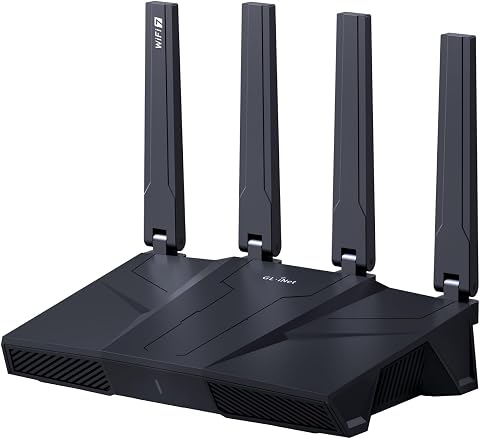
GL.iNet GL-BE9300 Flint 3 Wi-Fi 7 Router
- ✔ Coverage claim: Up to 2,000 sq ft
- ✔ Device capacity claim: Over 100 devices
- ✔ Setup: Video tutorial or Ethernet-connected web admin panel
Built for a busy home network
GL.iNet says the Flint 3 supports Wi-Fi 7 speeds up to 9 Gbps and is designed for coverage across up to 2,000 square feet. Those are stated capabilities, not a guarantee of the speed or coverage you’ll see: results depend on your internet service, home layout, device support and network conditions.
Multi-Link Operation, enhanced OFDMA, 4K QAM and preamble puncturing are among its Wi-Fi 7 features. They’re intended to improve speed, latency or performance in crowded environments, which could help when several people are online during a holiday visit. To benefit, compatible devices and a suitable network environment matter.
VPN and ad-filtering tools add flexibility
The router supports WireGuard and OpenVPN, with both listed at speeds up to 680 Mbps. Actual VPN throughput can vary with the provider, server location, internet connection and network environment, so treat that figure as a stated maximum rather than a typical result.
AdGuard Home support adds DNS-based options for blocking unwanted tracking and filtering selected digital advertisements through a web interface. That extra control will appeal to hands-on users, though configuring network-wide tools may take more effort than a plug-and-play router setup.
Family controls and capacity for connected devices
For families, the Flint 3 supports Bark and offers website filtering, safe-search enforcement and usage limits. That gives parents tools to shape how children use the network, but the product information does not describe the full setup or monitoring experience, so check that Bark’s features match your family’s needs.
GL.iNet describes the router as suitable for over a hundred devices and for DIY users who want storage for additional plugins. It has 1 GB of DDR4 memory and 8 GB of eMMC storage. Those specs point toward room for extra network tools, but the actual experience depends on what you install and how you configure it.
Setup is approachable, with one important first step
Initial setup can be done by following the maker’s video tutorial or connecting the router to a computer by Ethernet to open its web admin panel. That’s a clear route for getting started, though anyone expecting a completely hands-off setup may prefer a simpler consumer interface.
GL.iNet specifically advises updating the firmware during initial setup to improve performance and the user experience. Plan to make that update before relying on the router for holiday guests or work calls.
The holiday verdict
The Flint 3 is a promising fit for a technically curious household that wants Wi-Fi 7, VPN options, ad filtering and family controls in one router. Its stated coverage and device capacity make it worth considering for a busy home, while the listed speed figures should not be mistaken for guaranteed real-world results.
It’s less compelling as a gift for someone who wants to plug in a router and never touch settings. If you’re comparing options during Black Friday or Cyber Monday, weigh the advanced controls against the recipient’s comfort with firmware updates and router administration.
More Details on Our Top Picks
GL.iNet GL-BE9300 Flint 3 Wi-Fi 7 Router
The GL.iNet Flint 3 combines Wi-Fi 7 features with VPN support, AdGuard Home and parental controls. It has plenty to explore, but the best experience depends on your devices, network conditions and willingness to handle setup and firmware updates.
Pros:
- Wi-Fi 7 with MLO support
- WireGuard and OpenVPN support
- AdGuard Home and Bark support
- Designed for over a hundred devices
Cons:
- Real-world speeds and coverage will vary
- Firmware update is advised at setup
- Advanced controls may take configuration
Best for: Tech-curious households wanting Wi-Fi 7, VPN options and network controls.
Not ideal for: People seeking a completely hands-off router with guaranteed performance across every home.
Bottom line: Consider the Flint 3 for a connected, hands-on household that wants Wi-Fi 7 features and network controls, and can accommodate setup and firmware updates.
Affiliate disclosure: As an Amazon Associate we earn from qualifying purchases. Prices and availability are accurate as of the time of publishing.
Fall Picks
fall essentials
As an affiliate, we earn on qualifying purchases.