
Kneeling chairs don’t replace good ergonomics, but they reveal your bad habits. If your workstation isn’t properly adjusted—like monitor height or keyboard placement—the chair can’t fix that alone. Instead, it encourages you to become more aware of your posture and workspace setup. By paying attention and making necessary changes, you support healthier habits. Keep exploring how to optimize your ergonomic environment for a more comfortable, pain-free experience.

Get the latest gadgets delivered free — and shop member deals
- Fast, free delivery on millions of items
- Access to Prime Big Deal Days deals on October 6–7
- Prime Video, Amazon Music and more included
Key Takeaways
- Kneeling chairs highlight improper desk setup and poor posture habits that need correction, rather than fixing them automatically.
- They encourage conscious posture awareness but do not address ergonomic adjustments like monitor and keyboard positioning.
- Relying solely on kneeling chairs can mask underlying ergonomic issues that require workspace modifications.
- Effective use of kneeling chairs depends on ongoing posture correction and proper ergonomic environment setup.
- They serve as tools to reveal bad habits, emphasizing the importance of ergonomic knowledge and workspace adjustments.
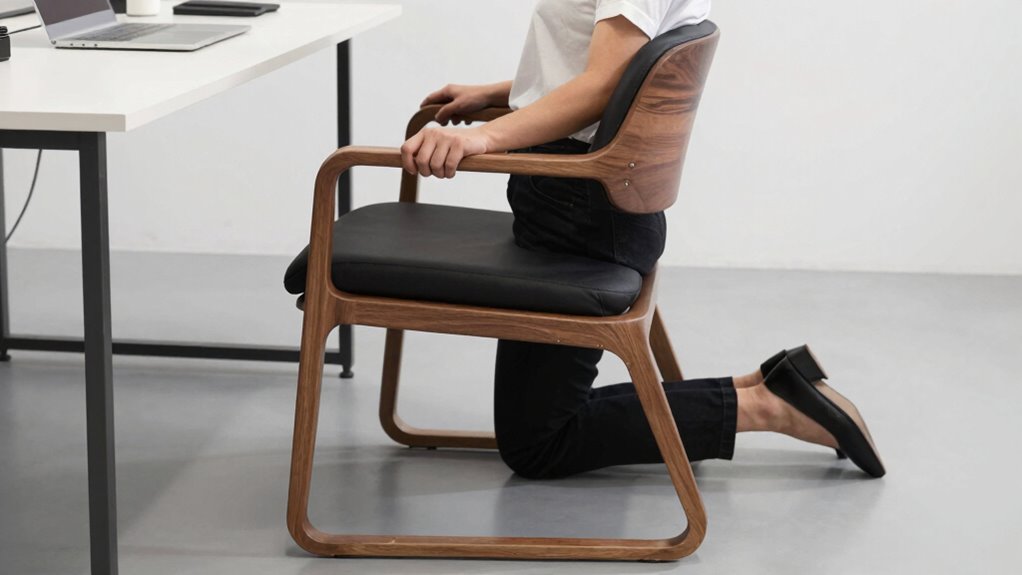
Kneeling chairs have gained popularity as an ergonomic alternative to traditional office chairs, offering a different approach to maintaining proper posture during long work hours. They encourage you to sit upright by shifting some of your body weight forward, which can improve posture correction compared to standard chairs. However, while kneeling chairs can help you avoid slouching, they don’t automatically fix all your bad habits. Instead, they highlight the importance of proper desk adjustments and conscious posture awareness.
When you switch to a kneeling chair, you might notice how your body naturally aligns better, but that doesn’t mean your work setup is ideal. Your desk height, monitor position, and keyboard placement still play vital roles. If your desk isn’t adjusted correctly, you might find yourself leaning forward or craning your neck, which can cause strain despite using a kneeling chair. Proper desk adjustments are essential to fully benefit from this ergonomic alternative. You need to make certain your keyboard and mouse are at a comfortable height, allowing your arms to stay relaxed and your wrists in a neutral position. Your monitor should be at eye level to prevent neck strain, regardless of your seating choice. Ergonomic workspace setup is crucial for maximizing the benefits of a kneeling chair.
Using a kneeling chair doesn’t mean you can ignore your posture outside of the seat. It’s a reminder that posture correction is a continuous process, not a one-time fix. You might feel comfortable initially, but if you revert to poor habits—like slouching at your desk or leaning too close—you’ll undermine the benefits. It’s important to stay mindful of how you sit, even when using a kneeling chair. Regularly adjusting your workspace to promote good ergonomics helps reinforce proper habits. This means checking your desk height often, repositioning your monitor, and maintaining awareness of your posture. Additionally, understanding how biodiversity and sustainable living practices contribute to overall well-being can encourage healthier, more mindful habits both at work and in daily life. Recognizing the importance of ergonomic principles can further support your efforts toward better posture.
Furthermore, staying informed about ergonomic research can help you make better decisions for your workspace and habits, ultimately leading to improved comfort and health. Ultimately, kneeling chairs are tools that can improve your ergonomic setup, but they don’t replace the need for good habits. They expose your weaknesses, like neglecting desk adjustments or falling into slouching patterns. If you want to truly benefit from a kneeling chair, you must actively work on your posture correction and make necessary adjustments to your workspace. By doing so, you’re not just relying on the chair to support your health—you’re creating an environment that encourages better habits and reduces discomfort over time.
As an affiliate, we earn on qualifying purchases.
Frequently Asked Questions
Are Kneeling Chairs Suitable for Long-Term Use?
Kneeling chairs aren’t ideal for long-term use because they can cause discomfort if you don’t prioritize comfort customization. While they might improve your posture temporarily, they often lack the ergonomic support needed for extended periods. Consider their aesthetic appeal and adjust as needed, but always listen to your body. For long-term comfort, combine kneeling chairs with other ergonomic solutions to prevent strain and maintain good habits.
How Do Kneeling Chairs Impact Spinal Health?
Kneeling chairs can positively impact your spinal health by promoting better spinal alignment, reducing slouching, and encouraging an active sitting posture. However, if used improperly, they might cause disc compression or strain on your knees and hips. To protect your spine, alternate between sitting on a kneeling chair and other ergonomic options, listen to your body, and avoid prolonged periods in one position to maintain healthy spinal support.
Can Kneeling Chairs Improve Posture Instantly?
You might feel a quick shift in your posture, but don’t expect instant perfection. While kneeling chairs can encourage better ergonomic adjustment and heighten your posture awareness, true improvement takes time. The change isn’t immediate; it’s a journey. With consistent use, you’ll start noticing your spine aligning more naturally. Stay patient, stay committed—your posture’s transformation is worth the wait.
Are Kneeling Chairs Recommended for People With Back Pain?
Kneeling chairs can help alleviate back pain by promoting better posture correction and offering ergonomic benefits. If you experience back pain, these chairs might provide relief, but they shouldn’t replace proper ergonomics or medical advice. Use them as part of a broader approach to improve your posture. Remember, they expose bad habits rather than fix them, so it’s crucial to address underlying issues for long-term comfort and health.
What Are Common Mistakes When Using Kneeling Chairs?
Think of using a kneeling chair like balancing on a tightrope—you need steady footing. Common mistakes include ignoring adjustable height, which throws off your posture, and settling on a cushion of poor quality that causes discomfort. You might also lean too far forward or backward, straining your back. To avoid these errors, make certain your chair is properly adjusted, and choose a high-quality cushion for better support and comfort.
ergonomic keyboard and mouse set
As an affiliate, we earn on qualifying purchases.
As an affiliate, we earn on qualifying purchases.
Conclusion
Remember, kneeling chairs aren’t magic solutions—they highlight your existing habits. For example, if you tend to slouch at your desk, switching to a kneeling chair might make you more aware of your posture, encouraging better habits. But don’t rely on it alone; complement it with regular breaks and ergonomic setups. By doing so, you’ll not only prevent discomfort but also build healthier, sustainable sitting habits that keep you comfortable and focused all day long.
As an affiliate, we earn on qualifying purchases.
As an affiliate, we earn on qualifying purchases.
Fall Picks
fall essentials
As an affiliate, we earn on qualifying purchases.