
When searching for the best all in one desktop computer, the goal is to find a device that combines sleek design with powerful performance. The HP 24 inch All-in-One Desktop PC stands out as the overall best for its balance of performance and affordability. The Apple 2024 iMac offers unmatched build quality and ecosystem integration, making it ideal for creative professionals. Meanwhile, models like the Dell 27 All-in-One excel for users seeking larger screens and high-end specs. The main challenge in this category is balancing performance, price, and future-proofing—so continue reading to see how these options compare.
Key Takeaways
- The top models balance CPU power, RAM, and storage to meet different user needs, from casual use to professional work.
- Design and display quality are key differentiators, with premium options offering 4K or Retina screens for better visual clarity.
- Pricing varies significantly; the best value models deliver decent specs at lower costs, while premium options focus on high-end features.
- Compatibility with ecosystems (Apple or Windows) influences long-term usability and accessory choices.
- Buyers often overlook upgradeability and port selection, which can impact the device’s longevity and versatility.






More Details on Our Top Picks
HP 24 inch All-in-One Desktop PC, FHD Display, AMD Ryzen 7 7730U, 16 GB RAM, 512 GB SSD, AMD Radeon Graphics, Windows 11 Home, 24-cr0032 (2024)
This HP model stands out for its balanced combination of performance and design, making it a versatile choice for most users. Powered by a AMD Ryzen 7 7730U and 16GB RAM, it handles multitasking with ease, surpassing entry-level options like the Lenovo 24 with its more robust processor. Its 512 GB SSD storage ensures quick boot times and ample space for personal files, yet it still maintains a slim, modern look thanks to the micro-edge display. Compared to the HP 22″ with an Intel Quad-Core, this model offers significantly faster processing and better connectivity features. Its main tradeoff is the limited upgradability inherent to all-in-ones, which might not suit future hardware expansions. This pick makes the most sense for users seeking a reliable, high-performance all-in-one suitable for work, entertainment, and casual use.
Pros:- Powerful AMD Ryzen 7 processor for smooth multitasking
- High 16 GB DDR4 RAM supports heavy workloads
- Fast 512 GB SSD for quick access and storage
Cons:- Limited upgradability due to all-in-one design
- No dedicated graphics card for demanding gaming
Best for: Small business owners or professionals who want a powerful, all-in-one system with excellent multitasking capabilities.
Not ideal for: Gamers or users needing dedicated graphics for intensive gaming or 3D work, as integrated Radeon graphics may fall short.
- Display Size:23.6 inches
- Processor:AMD Ryzen 7 7730U
- RAM:16 GB DDR4
- Storage:512 GB SSD
- Graphics:AMD Radeon Graphics
- Operating System:Windows 11 Home
- Weight:11.61 pounds
Bottom line: Ideal for professionals and small teams who need a high-performance, space-saving desktop with future-proof specs.
Lenovo 24 23.8″ All-in-One Desktop Computer with Intel i3-N305, 16GB RAM, 512GB SSD
This Lenovo model offers a compelling mix of affordability and performance, making it a solid choice for budget-minded buyers. Its Intel Core i3-N305 with 8 cores provides surprisingly efficient multitasking, especially when paired with 16GB DDR4 RAM, which outperforms lower RAM configurations in similar priced systems like the HP 22″. The 512GB PCIe NVMe SSD ensures fast load times, even if the all-in-one design limits hardware upgrades. Its 23.8″ FHD IPS display delivers vibrant colors and wide viewing angles, making it suitable for everyday tasks and media consumption. The tradeoff is the absence of a dedicated GPU, so gaming or intensive graphics work is not ideal. Limited upgradability is another consideration, given the sealed all-in-one chassis. This model is best for students or home users seeking a capable, budget-friendly desktop that can handle multitasking and media without breaking the bank.
Pros:- Efficient 8-core Intel processor for multitasking
- Bright, color-accurate FHD IPS display
- Fast 512GB NVMe SSD for quick responsiveness
Cons:- No dedicated graphics card limits gaming and graphics-intensive tasks
- Limited upgradability due to all-in-one design
Best for: Students or home users looking for a reliable, high-performance all-in-one on a budget.
Not ideal for: Gamers or creative professionals requiring dedicated graphics or hardware expansion options.
- Processor:Intel Core i3-N305 (8-core)
- RAM:16GB DDR4
- Storage:512GB PCIe NVMe SSD
- Display:23.8″ FHD IPS
- Connectivity:Wi-Fi 6, Bluetooth 5.2
- Ports:USB-A, HDMI, Ethernet, audio jack
Bottom line: A smart choice for budget-conscious users who want reliable performance and a vibrant display without sacrificing space.
HP 22″ All-in-One Desktop Computer, 8GB DDR5 RAM, 128GB UFS Storage,13th Gen Intel Quad-Core CPU, FHD VA Display, WiFi 6, Bluetooth 5.3, RJ45, USB-C (10Gbps), UHD Graphics, 720p Cam, Cashmere White
This HP model excels in tight spaces, offering a compact 22-inch design that’s perfect for small offices, dorms, or minimal desks. Its 13th Gen Intel Quad-Core processor combined with 8GB DDR5 RAM provides sufficient power for everyday computing tasks, comparable to basic models like the HP 24 with Ryzen 5 for casual use. The 128GB UFS storage ensures quick responsiveness but can be limiting for larger media libraries or extensive files. The inclusion of WiFi 6 and Bluetooth 5.3 keeps it up to date with connectivity standards. However, the integrated UHD Graphics restricts gaming and graphics-heavy work, and the small SSD may require external storage for larger data. This device is best suited for students, light home use, or as a secondary, space-efficient computer.
Pros:- Compact size fits small spaces easily
- Fast 13th Gen Intel quad-core CPU
- Modern WiFi 6 and Bluetooth 5.3 connectivity
Cons:- Limited storage capacity at 128GB, not ideal for large files
- No dedicated graphics for gaming or design work
Best for: Students or casual users needing a compact, easy-to-use desktop for browsing, video calls, and light productivity.
Not ideal for: Power users or creative professionals needing larger storage or dedicated graphics.
- Display Size:21.5 inches
- Processor:Intel 13th Gen Quad-Core
- RAM:8GB DDR5
- Storage:128GB UFS
- Graphics:UHD Integrated
- Connectivity:WiFi 6, Bluetooth 5.3
Bottom line: A space-saving, straightforward all-in-one perfect for light tasks and small environments.
HP 2025 22″ FHD All-in-One Desktop Computer • The New Version for Everyday Use • Latest 13th Gen Intel Quad-Core CPU • 8GB DDR5 • 128GB Storage • HDMI • Type-C • Wi-Fi • HD Webcam • Win11 Pro • Black
This HP model offers a balanced set of features tailored for everyday productivity, especially for small offices or remote work. Its 13th Gen Intel Quad-Core CPU and 8GB DDR5 RAM deliver responsive performance suitable for office tasks, web browsing, and media consumption, similar to the HP 22″ but with a more polished set of ports including Type-C and HDMI. The Windows 11 Pro pre-installation adds security and remote management options, making it appealing for business users. The full HD 22-inch display with anti-glare coating improves viewing comfort. The main limitations include the modest 128GB SSD for storage, which might necessitate external drives for larger files, and the integrated graphics, which aren’t suited for gaming or heavy graphics work. This model fits well for professionals needing a reliable, stylish, and space-efficient system for daily tasks.
Pros:- Powerful 13th Gen Intel quad-core processor
- Windows 11 Pro for enhanced security and management
- Versatile port selection including Type-C
Cons:- Limited 128GB storage, potential need for external drives
- No dedicated graphics for demanding visual tasks
Best for: Small business users or remote workers seeking a reliable, secure desktop with professional features.
Not ideal for: Gamers or creative professionals requiring high-end graphics or large internal storage.
- Display Size:21.45 inches
- Processor:Intel 13th Gen Quad-Core
- RAM:8GB DDR5
- Storage:128GB SSD
- Graphics:UHD Integrated
- Operating System:Windows 11 Pro
Bottom line: A dependable, stylish all-in-one designed for everyday business and home productivity needs.
HP 27″ All-in-One Desktop with AMD Ryzen 7, 32GB RAM, 1TB SSD
This HP 27-inch model stands out for its impressive specs, making it a prime choice for users who demand high performance and ample memory. Equipped with a AMD Ryzen 7 7730U and an enormous 32GB RAM, it excels in multitasking, content creation, and heavy workloads, outperforming smaller, less powerful systems like the HP 24 with Ryzen 5. Its 1TB SSD offers speedy storage for large files and software, ideal for power users. The large, FHD micro-edge display enhances productivity and multimedia enjoyment. The main tradeoff is its lack of portability, as the larger screen and all-in-one form factor make it a desktop-bound solution. Also, it doesn’t specify a dedicated GPU, which may limit high-end gaming or advanced creative tasks. This is best for professionals, content creators, or power users needing a large, fast, and reliable all-in-one system.
Pros:- Large 27-inch display for immersive viewing
- High 32GB RAM for intensive multitasking
- Fast 1TB SSD storage speeds up workflows
Cons:- No explicit mention of dedicated graphics, limiting high-end gaming
- Limited upgrade options due to all-in-one design
Best for: Creative professionals or power users prioritizing speed, multitasking, and large storage in a space-efficient package.
Not ideal for: Those who need portability or dedicated high-end graphics for gaming or design work.
- Display Size:27 inches
- Processor:AMD Ryzen 7 7730U
- RAM:32 GB
- Storage:1TB SSD
- Graphics:AMD Radeon
- Operating System:Windows 11 Home
Bottom line: A premium all-in-one for demanding users who want a large display and serious processing power in a sleek form.
Dell 24 All-in-One Desktop ec24250-23.8-inch FHD Display, Intel Core 3 Processor 100U, Intel Graphics, 8GB DDR5 RAM, 512GB SSD, Windows 11 Home, Onsite Service+6 Months Retail Migrate – White
This Dell model stands out for offering a balanced mix of performance, vivid visuals, and user-friendly features at a competitive price. Its 23.8-inch FHD IPS display with 99% sRGB delivers vibrant colors ideal for streaming and work tasks, while the 8GB DDR5 RAM and Intel Core i3 processor ensure smooth everyday performance. Compared with the Lenovo ThinkCentre, it’s more straightforward to set up and includes Dell’s onsite service, making it a reliable choice for non-technical users. The tradeoff is that its processor and integrated graphics limit high-end multitasking or gaming capabilities, making it less suitable for demanding creative work. Best for home users seeking a hassle-free, stylish all-in-one with decent performance. Hardware specs: 23.8″ FHD IPS display, Intel Core i3 100U, 8GB DDR5 RAM, 512GB SSD, Windows 11 Home, Intel integrated graphics, dual Bluetooth speakers, HDMI, 2 USB-C, 2 USB 3.2, Ethernet.
Pros:- Vivid 99% sRGB IPS display enhances streaming and work visuals
- Fast DDR5 RAM with 512GB SSD for quick boot and load times
- Includes Dell’s onsite service for peace of mind
Cons:- Processor and integrated graphics limit high-end multitasking
- No dedicated GPU restricts demanding creative applications
Best for: Home users who prioritize reliable performance and vivid display for everyday tasks.
Not ideal for: Power users or gamers needing high processing power or dedicated graphics.
- Display Size:23.8 inches
- Resolution:1920×1080
- Processor:Intel Core i3-100U
- RAM:8GB DDR5
- Storage:512GB SSD
- Graphics:Intel UHD Graphics
- OS:Windows 11 Home
Bottom line: This is a versatile, budget-friendly all-in-one ideal for casual users and small offices.
HP 24 inch All-in-One Desktop PC, FHD Display, AMD Ryzen 5 7520U, 8 GB RAM, 256 GB SSD, AMD Radeon Graphics, Windows 11 Home, 24-cr0002 (2024)
This HP offers a compelling balance of power and style with its AMD Ryzen 5 processor and a sleek, micro-edge 24-inch display. Its 8GB RAM and 256GB SSD make it suitable for multitasking and media consumption, especially for users who prefer a compact setup without sacrificing performance. Compared to the Dell ec24250, it’s more powerful in terms of processor and graphics, making it better suited for semi-creative tasks and multitasking. However, the smaller SSD storage could be limiting for users with large media libraries or software. Its non-touch display and limited expandability mean it’s best for everyday productivity rather than heavy creative work. Best for small spaces and users looking for a stylish, capable all-in-one. Hardware specs: 24-inch FHD display, AMD Ryzen 5 7520U, 8GB RAM, 256GB SSD, AMD Radeon Graphics, Windows 11 Home, tilt-adjustable stand, HDMI, USB-C, dual microphones.
Pros:- Slim, modern design fits well in tight spaces
- Powerful AMD Ryzen 5 processor handles multitasking efficiently
- Good audio and visual quality for streaming and video conferencing
Cons:- Limited SSD storage may require external drives for large files
- Non-touch screen limits direct interaction options
Best for: Small-space dwellers or remote workers needing a powerful yet compact all-in-one.
Not ideal for: Creative professionals requiring large storage or high-end graphics.
- Display Size:24 inches
- Resolution:1920×1080
- Processor:AMD Ryzen 5 7520U
- RAM:8GB
- Storage:256GB SSD
- Graphics:AMD Radeon
- OS:Windows 11 Home
Bottom line: A sleek, space-saving computer that balances power with design, perfect for everyday productivity.
Lenovo ThinkCentre All-in-One Desktop Computer
This Lenovo ThinkCentre excels in performance, with its 27-inch FHD IPS display, powerful Intel Core i5-13420H, and up to 64GB DDR5 RAM. It’s designed for demanding business tasks, multitasking, and even some creative work thanks to its large RAM capacity. Compared with the Dell ec27250, it offers more expandable memory and a larger, high-quality display, making it ideal for professionals who need a dependable workhorse. The non-touch display and lack of optical drive could be drawbacks for some users, but overall, it’s a serious machine for productivity and multitasking. Best suited for professionals who need a large, high-performance all-in-one with room to grow. Hardware specs: 27″ FHD IPS display, Intel Core i5-13420H, up to 64GB DDR5 RAM, 512GB SSD, Windows 11 Pro, HDMI in/out, USB-C, Ethernet, 300 nits brightness.
Pros:- Large 27-inch FHD IPS display with anti-glare and high color accuracy
- Up to 64GB DDR5 RAM supports heavy multitasking and future upgrades
- Multiple ports including USB-C, HDMI, and Ethernet for versatile connectivity
Cons:- Non-touch display may limit direct interaction
- No optical drive included, which could be limiting for certain workflows
Best for: Business professionals and power users requiring large RAM and high-performance multitasking.
Not ideal for: Casual users or those needing a touchscreen or optical drive.
- Display Size:27 inches
- Resolution:1920×1080
- Processor:Intel Core i5-13420H
- RAM:Up to 64GB DDR5
- Storage:512GB SSD
- Graphics:Integrated Intel Graphics
- OS:Windows 11 Pro
Bottom line: A high-performance, large-screen all-in-one designed for demanding work environments and future expandability.
Dell 27 All-in-One Desktop ec27250-27-inch FHD Touch Display, Intel Core 7 Processor 150U, NVIDIA GeForce MX570A 2GB GDDR6 Graphics, 32GB DDR5 RAM, 1TB SSD, Windows 11 Pro, Onsite Service – White
This Dell 27-inch model is a step up in performance and graphics, with a high-end Intel Core i7 processor, dedicated NVIDIA GeForce MX570A GPU, and 32GB DDR5 RAM. Its 4K-capable display with touch support makes it ideal for creative workflows, multimedia editing, and demanding multitasking. Compared to the Lenovo ThinkCentre, it offers better graphics and a larger, more vibrant display, making it well-suited for multimedia professionals. The downside includes higher power consumption and a premium price, which might be overkill for casual users. Its design also focuses on aesthetics and performance, making it a strong choice for power users. Best for creative professionals and those needing serious processing and graphics power. Hardware specs: 27″ FHD Touch display, Intel Core i7-150U, 32GB DDR5 RAM, 1TB SSD, NVIDIA GeForce MX570A, Windows 11 Pro, HDMI, USB-C, dual Bluetooth speakers.
Pros:- Powerful Intel Core i7 processor with dedicated NVIDIA GPU
- Large 27-inch FHD touch display with high contrast and vivid colors
- Massive 32GB DDR5 RAM for intensive multitasking and creative apps
Cons:- Higher power consumption and price point
- Touchscreen and high specs may be more than needed for basic use
Best for: Creative professionals, video editors, and power users demanding high performance and graphics.
Not ideal for: Budget-conscious users or those preferring a non-touch display.
- Display Size:27 inches
- Resolution:1920×1080
- Processor:Intel Core i7-150U
- RAM:32GB DDR5
- Storage:1TB SSD
- Graphics:NVIDIA GeForce MX570A 2GB
- OS:Windows 11 Pro
Bottom line: A premium all-in-one designed for demanding creative workflows and power users who want the best display and performance.
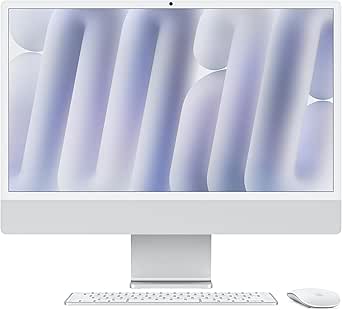
Apple 2024 iMac All-in-One Desktop Computer with M4 chip with 10-core CPU and 10-core GPU: Built for Apple Intelligence, 24-inch Retina Display, 16GB Unified Memory, 512GB SSD Storage; Silver
This Apple iMac redefines all-in-one desktops with its stunning 24-inch 4.5K Retina display, powerful M4 chip, and sleek, vibrant design. Its 16GB unified memory and 512GB SSD deliver fast performance for creative work, media editing, and everyday tasks. Compared with the Windows-based Dell and HP options, it offers superior integration with other Apple devices and a streamlined user experience optimized for macOS. The high price and limited upgradeability are tradeoffs, and it’s less suitable for those who prefer Windows or need specific software not available on Mac. Its lightweight, elegant design makes it perfect for users who want a premium experience and seamless Apple ecosystem integration. Best for Apple enthusiasts and users seeking a premium, beautifully designed all-in-one with macOS. Hardware specs: 24-inch 4.5K Retina display, Apple M4 chip, 16GB unified memory, 512GB SSD, macOS, FaceTime HD camera, six speakers with Spatial Audio, Thunderbolt 4 ports.
Pros:- Vivid 4.5K Retina display with true-to-life colors
- Powerful M4 chip with 10-core CPU and GPU for fast workflows
- Excellent build quality and ecosystem integration
Cons:- Higher price with limited upgrade options
- Less software flexibility outside of macOS ecosystem
Best for: Apple users and creative professionals who value design, seamless ecosystem integration, and macOS performance.
Not ideal for: Budget-conscious buyers or those requiring Windows-specific software.
- Display Size:24 inches
- Resolution:4.5K Retina
- Processor:Apple M4 10-core
- Memory:16GB Unified
- Storage:512GB SSD
- OS:macOS
- Graphics:Integrated Apple GPU
Bottom line: A premium, beautifully designed all-in-one ideal for Apple fans and creative professionals invested in the Apple ecosystem.
Lenovo 24″ FHD All-in-One Desktop with 16GB RAM and 512GB SSD
This Lenovo model makes the top of the list because it combines a vibrant FHD display with eye-friendly low blue light technology, making it ideal for prolonged use. Its quiet performance, powered by an Intel Core N100, is suitable for everyday multitasking, but falls short when handling intensive workloads compared to the Dell or Apple options. Its standout feature is the high degree of upgradability—up to 64GB RAM and 2TB SSD—offering a future-proof setup. However, the entry-level processor can struggle with demanding tasks, and the IR webcam is limited to FHD models only, which may impact video quality in certain scenarios. This pick is best for users who want a customizable, eye-friendly all-in-one that balances performance with flexibility.
Pros:- Vivid FHD display with low blue light for eye comfort
- Quiet, noise-free performance for daily tasks
- Highly upgradable RAM and storage options
Cons:- Processor may underperform with demanding applications
- IR webcam limited to FHD models only
Best for: Home office users or students who prioritize multitasking and display comfort without heavy processing needs
Not ideal for: Power users or creative professionals requiring high-end graphics or processing power
- Display Size:24 inches
- Resolution:FHD (1920×1080)
- RAM:16GB (upgradable to 64GB)
- Storage:512GB SSD (expandable to 2TB)
- Processor:Intel Core N100 (4 cores, 3.40 GHz max turbo)
- Webcam:5MP with IR camera
Bottom line: A flexible, customizable all-in-one suited for everyday multitasking and extended viewing comfort.
Dell 27 All-in-One Desktop ec27250-27-inch FHD (1920 x 1080) Display, Intel Core 7 Processor 150U, Intel Graphics, 16GB DDR5 RAM, 1TB SSD, Windows 11 Home, Onsite Service – White
This Dell model stands out for its stunning 27-inch IPS display with near-perfect sRGB coverage and HDR support, making it ideal for creative work or media consumption. The inclusion of Dell ComfortView Plus reduces blue light, helping extend comfortable viewing during long periods, and the adjustable tilt adds ergonomic flexibility. Its 11th Gen Intel Core i7 processor and DDR5 RAM ensure smooth performance, outpacing the Lenovo N100 and Apple M4 in raw power. The stand design helps keep clutter away, and the 4K camera with privacy shutter enhances video calls. However, it lacks a touchscreen and has only four USB ports, which might limit peripherals for heavy users. This model is perfect for those prioritizing visual quality and ergonomic features.
Pros:- Vivid 27-inch IPS display with HDR and 99% sRGB coverage
- Blue light reduction through Dell ComfortView Plus
- Ergonomic adjustable tilt and clutter-free stand
Cons:- No touchscreen functionality
- Limited USB ports for extensive peripherals
Best for: Creative professionals or remote workers who need a large, color-accurate display and long-lasting comfort
Not ideal for: Users needing a touchscreen or a high number of USB connections for peripherals
- Display Size:27 inches
- Resolution:FHD (1920×1080)
- Processor:Intel Core i7 150U
- RAM:16GB DDR5
- Storage:1TB SSD
- Webcam:5MP+IR with HDR
Bottom line: A premium all-in-one ideal for creative tasks and long work sessions with comfort features.
Apple 2024 iMac All-in-One Desktop Computer with M4 chip with 8-core CPU and 8-core GPU: Built for Apple Intelligence, 24-inch Retina Display, 16GB Unified Memory, 256GB SSD Storage; Silver
This iMac stands out for its stunning 24-inch 4.5K Retina display that supports a billion colors, making it ideal for creative professionals and Apple enthusiasts. The M4 chip delivers impressive speed for multitasking, creative work, and even gaming, outperforming both the Lenovo and Dell in raw power. Its sleek, colorful design elevates any space aesthetically, and the tight integration with other Apple devices offers unmatched convenience. The 12MP camera and Spatial Audio with six speakers provide excellent video conferencing and media experiences. However, the 256GB SSD might feel limiting for users with large media libraries, and the price is significantly higher than other options. This model suits buyers deeply embedded in the Apple ecosystem or seeking a premium, stylish desktop experience.
Pros:- Stunning 24-inch 4.5K Retina display with rich color support
- Powerful M4 chip with fast multitasking performance
- Excellent integrated audio and camera system
Cons:- Limited 256GB SSD for large media storage
- High price point for some budget buyers
Best for: Creative professionals, Apple ecosystem users, or those seeking a premium, stylish desktop that excels in multimedia tasks
Not ideal for: Budget-conscious buyers or users needing extensive local storage or customizable hardware
- Display Size:24 inches
- Resolution:4.5K Retina (2560×1440)
- Processor:Apple M4, 8-core CPU & GPU
- Memory:16GB Unified
- Storage:256GB SSD
- Webcam:12MP Center Stage
Bottom line: A premium all-in-one perfect for creative work and Apple fans willing to invest in quality and ecosystem compatibility.
Lenovo IdeaCentre All-in-One Desktop Computer with AMD Ryzen 5, 24″ FHD Display
This Lenovo offers a balanced mix of power and affordability with its AMD Ryzen 5 7535HS processor and a 24-inch FHD IPS display. The 6-core CPU up to 4.5GHz makes it suitable for multitasking, media consumption, and light creative work, especially compared with the less capable Intel N100 models. The anti-glare display with low blue light technology enhances comfort for extended use, and 16GB DDR5 RAM ensures smooth operation. Its straightforward design includes essential ports like HDMI in/out and Wi-Fi 6, making it a practical choice for users needing reliable performance without overspending. The main tradeoff is the lack of a touchscreen and limited USB ports for heavy peripheral setups. This is a good choice for budget-conscious users who need robust performance in a compact package.
Pros:- Powerful AMD Ryzen 5 7535HS processor with up to 4.5GHz
- Anti-glare, low blue light FHD display for eye comfort
- Includes wireless keyboard and mouse set
Cons:- No touchscreen capability
- Limited to integrated AMD Radeon graphics
Best for: Home users or small business owners seeking a powerful yet affordable all-in-one for daily tasks
Not ideal for: Power users or creative professionals needing dedicated GPUs or advanced connectivity options
- Processor:AMD Ryzen 5 7535HS
- Display:24″ FHD IPS
- RAM:16GB DDR5
- Storage:512GB SSD
- Graphics:Integrated AMD Radeon 660M
- Ports:HDMI in/out, USB, Ethernet
Bottom line: A performance-oriented budget-friendly all-in-one suitable for daily computing and media tasks.

How We Picked
We evaluated each all-in-one desktop based on core performance metrics, build quality, display quality, and value for money. Performance factors included processor speed, RAM capacity, and storage options, ensuring the devices can handle everyday tasks and some demanding applications. Usability and design were also key, with a focus on screen quality, ergonomic features, and overall aesthetics. We prioritized models that balance high performance with reasonable price points while considering future-proofing aspects like upgradeability and connectivity options. The ranking reflects a combination of raw specs, user experience potential, and long-term value, not just brand reputation or raw power alone.Factors to Consider When Choosing Best All In One Desktop Computer
Choosing the best all-in-one desktop involves more than just comparing specs. It’s vital to consider how each feature aligns with your specific needs, whether for work, entertainment, or creative projects. A well-rounded decision balances performance, display quality, and future-proofing to ensure your investment lasts. Below are key factors to keep in mind when selecting your ideal all-in-one computer.Performance and Power
Look beyond the CPU model—consider how much RAM and storage you’ll need for your typical tasks. For casual browsing or streaming, modest specs suffice, but for creative work or multitasking, prioritize higher RAM (16GB or more) and faster SSD storage. Keep in mind that some models offer upgrade options, which can extend their usefulness over time, while others are sealed units that you need to replace once outdated.
Display Quality and Size
The display impacts everything from productivity to entertainment. Opt for at least a Full HD (1080p) screen for general use, but 4K or Retina displays make a noticeable difference for creative work or media consumption. Larger screens (27 inches or more) improve multitasking, though they also increase desk space requirements and price. Consider whether touchscreens or curved displays align with your workflow.
Design and Build
Since all-in-one PCs integrate everything into a single unit, build quality matters for durability and aesthetics. Sleek, modern designs with minimal bezels look better in professional settings. However, some cheaper models may feel flimsy or have poor cable management. Think about how the device fits into your workspace and whether portability or fixed placement is more important.
Connectivity and Ports
Check for enough USB ports, video outputs, and card readers to support your peripherals. A lack of ports can limit future expandability, forcing you to buy external hubs or upgrade devices prematurely. Pay special attention to modern standards like Thunderbolt, USB-C, and Wi-Fi 6 for faster data transfer and better wireless connectivity, especially if you plan to connect multiple devices.
Upgradeability and Long-Term Use
Many all-in-one models are sealed, meaning you can’t upgrade RAM or storage later. If you want a device that can evolve with your needs, look for models with accessible panels or upgrade slots. Otherwise, investing in a slightly higher-end model initially might save money in the long run, preventing costly replacements or upgrades down the road.
Frequently Asked Questions
Is it better to buy an all-in-one desktop or a traditional tower PC?
All-in-one desktops save space and reduce clutter, making them ideal for smaller or cleaner workspaces. However, tower PCs often offer more upgrade options and better cooling, which can lead to longer-term performance. Your choice depends on whether you prioritize aesthetics and simplicity or flexibility and ease of upgrading.
Should I prioritize a 4K display or is Full HD sufficient?
For most everyday tasks, Full HD provides sharp visuals at a lower cost and puts less strain on the GPU. However, if you work with high-resolution media, do graphic design, or want the best media experience, a 4K or Retina display can make a noticeable difference. Consider your workflow and whether the added cost aligns with your needs.
Are Apple iMacs worth the higher price?
Apple iMacs offer exceptional build quality, a seamless ecosystem, and powerful hardware, especially for creative professionals. They tend to hold their value and provide an intuitive user experience. However, their higher cost and limited upgrade options mean they’re best suited for users who actively use Apple services or need the specific software ecosystem.
How important is upgradeability in an all-in-one?
Upgradeability can extend the lifespan of your device and adapt to changing needs, but most all-in-ones are not designed for extensive upgrades. If you value future-proofing, choose models with accessible RAM and storage slots. Otherwise, selecting higher specs upfront is often more practical, especially if you prefer a maintenance-free design.
What should I consider if I want a device for gaming or demanding tasks?
Most all-in-one desktops are not optimized for gaming, but some high-end models come with dedicated graphics cards and fast CPUs. Look for options with NVIDIA or AMD discrete GPUs, high refresh rate displays, and ample RAM. Keep in mind that thermals and space constraints limit upgradeability and cooling, so these models tend to be more expensive.
Conclusion
For general use and a sleek workspace, the HP 24 inch All-in-One Desktop offers a balanced mix of performance and affordability, making it ideal for most users. Creative professionals or those deeply embedded in the Apple ecosystem will find the Apple 2024 iMac to be the best premium choice. Budget-conscious buyers should consider models like the Lenovo IdeaCentre for decent specs at a lower price. Finally, users needing a large, high-performance display with upgrade potential might prefer the Dell 27 All-in-One. Tailor your choice to your specific needs, whether it’s everyday productivity, creative work, or long-term versatility.