
A 5K monitor changes your workflow far beyond sharper images. It gives you more screen space and detail, so you can multitask easily without switching tabs or zooming in. Better color accuracy and image clarity help you work faster and more precisely, especially for design or editing tasks. Plus, ergonomic features keep you comfortable during long hours. If you want to discover how these improvements can boost your productivity even further, keep exploring the benefits.
Key Takeaways
- 5K monitors provide higher resolution for sharper images and more detailed visuals, enhancing overall visual quality.
- They enable better multitasking by offering expanded screen space for multiple windows and data sets.
- Larger, high-resolution displays improve ergonomic comfort, reducing neck and eye strain during extended use.
- Accurate color reproduction supports precise editing and reduces errors in visual projects.
- Enhanced workflow efficiency and confidence through clearer visuals, better organization, and improved user experience.
Switching to a 5K monitor can considerably transform your workflow, offering sharper images and more screen real estate. With a higher resolution, you get more detail in every image, which means fewer zooms and easier multitasking. When you work with high-resolution displays, color accuracy becomes essential. A 5K monitor provides precise color reproduction, ensuring that what you see on screen closely matches the final output, whether you’re editing photos, designing graphics, or reviewing detailed data. This level of accuracy minimizes errors and reduces the need for constant cross-checking on different devices, streamlining your process and boosting productivity.
Beyond visual clarity, ergonomic design plays a crucial role in how effectively you work with a 5K monitor. Many models are built with adjustable stands, allowing you to set the height, tilt, and swivel to your ideal position. This customization helps maintain proper posture, reducing strain on your neck and eyes during long hours. The larger, high-resolution screen encourages better workspace organization, letting you spread out multiple windows and applications without cluttering your desktop. This setup minimizes constant switching between tabs or windows, saving you time and mental energy.
The enhanced workspace afforded by a 5K monitor also influences your workflow by enabling you to see more at once. Instead of toggling between multiple screens or resizing windows, you can keep everything open and visible simultaneously, improving your focus and efficiency. This expanded view is especially beneficial for creative professionals, programmers, or data analysts who rely on detailed visuals or complex data sets. With the added clarity and size, you can catch small details easily, make precise adjustments, and work more intuitively. Additionally, the increased pixel density supports accurate visual representation, which is critical for high-precision tasks. An increased pixel density also contributes to better image quality, enhancing your overall viewing experience.
Furthermore, the combination of color accuracy and ergonomic design supports a healthier, more comfortable working environment. Better posture reduces fatigue and the risk of repetitive strain injuries, while high-resolution displays prevent miscommunication or mistakes in visual projects. Investing in a high-resolution monitor also encourages monitor calibration, ensuring consistent color and brightness over time for critical tasks. Over time, these benefits translate into increased productivity, fewer errors, and a more satisfying work experience. A high-quality 5K monitor isn’t just about sharper images; it’s about creating a workspace that adapts to your needs, promotes health, and elevates your overall efficiency. When you invest in a monitor with both excellent color fidelity and ergonomic features, you’re setting yourself up for a smoother, more precise, and more comfortable workflow.

Apple Studio Display: Standard Glass, Tilt-Adjustable Stand
- Display Size: 27-inch 5K Retina display
- Camera: 12MP Center Stage with Desk View
- Audio: Studio-quality three-mic array
As an affiliate, we earn on qualifying purchases.
As an affiliate, we earn on qualifying purchases.
Frequently Asked Questions
How Does 5K Resolution Impact Software Compatibility?
A 5K resolution can challenge software compatibility, requiring updates for peak performance. You might notice issues with display scaling, where interfaces appear tiny or blurry, making navigation difficult. To guarantee smooth workflow, you need software optimization that supports high pixel densities, allowing applications to adapt correctly to the 5K display. Keep your programs up-to-date to avoid compatibility hiccups and fully leverage your monitor’s impressive resolution.
Are 5K Monitors Suitable for Gaming?
Yes, 5K monitors can be suitable for gaming, but it depends on your priorities. They offer exceptional color accuracy and crisp visuals, enhancing immersive experiences. However, their typically lower refresh rates might result in less smooth gameplay compared to high-refresh-rate gaming monitors. If you prioritize stunning visuals and precise color, a 5K monitor works well, but for fast-paced gaming, consider models that balance resolution with higher refresh rates.
What Are the Energy Consumption Differences With 5K Displays?
Your 5K monitor’s power consumption is particularly higher than lower-resolution screens, but it’s not a power-hungry beast. Thanks to advancements in energy efficiency, modern 5K displays use less power while delivering stunning visuals. While they consume more energy overall, smart features like adaptive brightness help reduce power consumption. Overall, they’re efficient enough for daily use, but you’ll notice a difference if you’re comparing them side by side with lower-res monitors.
How Do 5K Monitors Affect Workspace Ergonomics?
With a 5K monitor, you’ll notice improved workspace ergonomics because of better color accuracy, which reduces eye strain and makes it easier to work for long hours. However, they often require more desk space, so you might need to rearrange your setup for comfort. Ensuring proper monitor height and distance helps prevent neck and eye fatigue, making your workspace more efficient and comfortable overall.
Can 5K Monitors Be Easily Integrated Into Existing Setups?
You can easily integrate a 5K monitor into your existing setup, as most models offer versatile mounting options like VESA compatibility. While they do require more desk space, their high resolution can actually streamline your workflow. Just make certain your desk can handle the size and weight, and consider adjusting your mounting solution for maximum ergonomics. With a little planning, upgrading is straightforward and boosts your productivity.
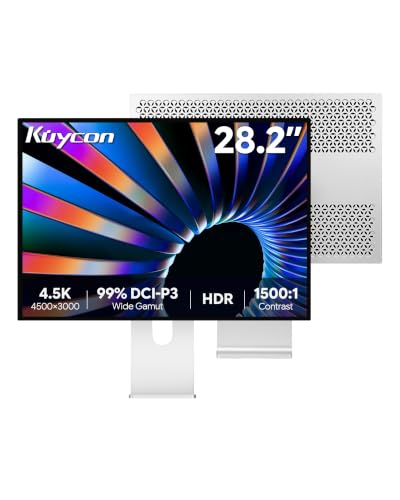
Kuycon P20 28.2’’ UHD 4.5K (4500 x 3000) Glossy Monitor, IPS Panel, 99% sRGB, 99% DCI-P3, 10-Bit Colors, 60Hz, 192PPI, HDR, 1500:1, Eye Care, Low Blue Light (Honeycomb – with Stand)
- High-Resolution Display: 4500×3000 4.5K resolution for productivity
- Vivid Color Gamut: 99% sRGB, 99% DCI-P3, 10-bit color
- HDR and Brightness: 500 nits peak brightness with HDR support
As an affiliate, we earn on qualifying purchases.
As an affiliate, we earn on qualifying purchases.
Conclusion
A 5K monitor isn’t just a tool; it’s a gateway to a new domain of productivity. Think of it as a lighthouse guiding your workflow through the fog—sharpening your focus, expanding your perspective, and illuminating new possibilities. Embrace the change, and you’ll find your workflow transforming into a smooth, continuous flow—more than just pixels, it’s a whole new horizon waiting to be explored. Step into the light and elevate your work today.

KTC 5K Monitor 27 Inch: Dual Mode 5K (5120×2880) @60Hz / 2K@160Hz Computer Monitor, 99% DCI-P3, 100% sRGB, ΔE<2, Type-C 65W, HDMI & DP, HDR400, Compatible with Mac mini, H27P3
- Dual Mode 5K and 2K: Switch between 5K@60Hz and 2K@160Hz
- Vivid Color Accuracy: 99% DCI-P3, 100% sRGB, ΔE<2
- HDR400 Brightness: Supports HDR400 with 500 cd/m²
As an affiliate, we earn on qualifying purchases.
As an affiliate, we earn on qualifying purchases.
color accurate 5K display for professional work
As an affiliate, we earn on qualifying purchases.
As an affiliate, we earn on qualifying purchases.