

Mechanical keyboards vary most in layout, switch feel, and how much flexibility they give you for work or gaming. I’d choose the Keychron V6 Max as the best overall option for its full-size layout, wireless flexibility, and QMK customization; the Logitech MX Mechanical with tactile quiet switches is a strong work-focused alternative, while the AULA F75 makes a compelling compact pick. The main tradeoffs are full-size convenience versus desk space, wireless versatility versus a wired connection, and quieter switches versus more pronounced feedback. Read on for a comparison of all 13 models and the kinds of buyers each one suits.

Get the latest gadgets delivered free with Prime
- Fast, free delivery on millions of items
- Prime Video, Amazon Music and more included
- Member-only deals all year
Complete the kit



Key Takeaways
- The Keychron V6 Max is the most versatile all-rounder: its full-size layout, wireless connection options, and QMK support suit buyers who want room to customize without giving up the number pad.
- The Logitech MX Mechanical is the clearest work-first choice: its quiet tactile switch option favors controlled typing, while the clicky version trades discretion for more audible, pronounced feedback.
- Compact boards make different compromises: the Keychron K3 V2 saves desk space with a low-profile design, while the AULA F75 models retain a more substantial layout and add different feature configurations.
- Hot-swap support matters most to buyers who expect to change switches: the AULA F99 and Redragon K671 offer that flexibility, unlike a board chosen primarily for a fixed, ready-to-use setup.
- Gaming features and everyday versatility are not the same: wired options such as the Logitech G413 SE and Redragon K580 focus on a direct gaming setup, while wireless models better accommodate shared work and home use.
| SteelSeries Apex 5 Hybrid Mechanical Gaming Keyboard with RGB Lighting and OLED Display |  | Best for Display Features | Switch type: Hybrid blue, tactile and clicky | Layout: AZERTY | Keys: 104 | VIEW LATEST PRICE | See Our Full Breakdown |
| Redragon K580 Wired RGB Mechanical Gaming Keyboard |  | Best for Built-In Macros and Switch Swapping | Model: K580 VATA | Layout: 104-key QWERTY | Switch type: Outemu Blue, clicky and hot-swappable | VIEW LATEST PRICE | See Our Full Breakdown |
| Logitech MX Mechanical Wireless Illuminated Keyboard, Tactile Quiet, Graphite |  | Best for Quiet Multi-Device Typing | Switch type: Tactile Quiet, low-profile | Layout: Full-size QWERTY, 104 keys | Connectivity: Bluetooth Low Energy or Logi Bolt USB receiver | VIEW LATEST PRICE | See Our Full Breakdown |
| Keychron V6 Max Wireless QMK Mechanical Keyboard |  | Best for Customization | Layout: Full-size, 100% QWERTY, 108 keys | Switch type: Tactile Gateron Brown | Hot-swappable: Supports most 3-pin and 5-pin MX switches | VIEW LATEST PRICE | See Our Full Breakdown |
| Logitech G413 SE Full-Size Mechanical Gaming Keyboard |  | Best for a Simple, Sturdy Gaming Setup | Layout: Full-size QWERTY, 108 keys | Switch type: Tactile mechanical | Connectivity: Wired USB 2.0 | VIEW LATEST PRICE | See Our Full Breakdown |
| Logitech G316 X 98 Mechanical Gaming Keyboard, Linear Switches, Black |  | Best for Compact Gaming with a Numpad | Layout: 98% QWERTY | Key count: 96 | Switches: Hot-swappable linear | VIEW LATEST PRICE | See Our Full Breakdown |
| Keychron K3 Version 2 75% Wireless Low-Profile Mechanical Keyboard |  | Best Low-Profile Wireless Pick | Layout: 75% QWERTY | Key count: 84 | Switches: Brown tactile | VIEW LATEST PRICE | See Our Full Breakdown |
| AULA F99 Tri-Mode Wireless Mechanical Keyboard, 99-Key, Hot-Swappable, RGB | 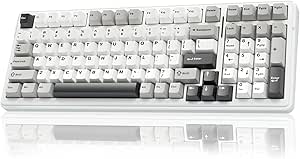 | Best for Multi-Device Wireless Flexibility | Layout: 96%, AZERTY | Key count: 99 | Switches: Pre-lubed linear | VIEW LATEST PRICE | See Our Full Breakdown |
| ProtoArc K310 Pro Backlit Wireless Mechanical Keyboard |  | Best Full-Size Wireless Office Pick | Layout: Full-size QWERTY | Key count: 108 | Switches: Low-profile linear red | VIEW LATEST PRICE | See Our Full Breakdown |
| AULA F75 75% Wireless Mechanical Keyboard, White and Brown |  | Best Value for a Compact Customizable Setup | Layout: 75% QWERTY | Key count: 81 | Switches: Pre-lubricated linear | VIEW LATEST PRICE | See Our Full Breakdown |
| Logitech MX Mechanical Wireless Illuminated Keyboard, Clicky Switches | | Best for Multi-Device Office Setups | Switch type: Clicky mechanical | Layout: Full-size QWERTY, 104 keys | Connectivity: Bluetooth Low Energy, Logi Bolt receiver, USB-C charging | VIEW LATEST PRICE | See Our Full Breakdown |
| AULA F75 Pro 75% Wireless Mechanical Keyboard with Knob |  | Best for Switch Customization | Layout: 75%, 81 keys, QWERTZ | Switches: Pre-lubricated linear LEOBOG Reaper | Hot-swap support: 3-pin and 5-pin switches | VIEW LATEST PRICE | See Our Full Breakdown |
| Redragon K671 Wired Mechanical Gaming Keyboard with Hot-Swappable Red Switches |  | Best Wired Gaming Value | Layout: Full-size QWERTY, 104 keys | Switch type: Hot-swappable linear red | Connectivity: Wired | VIEW LATEST PRICE | See Our Full Breakdown |
| mechanical keyboard | Layout | Connectivity | Backlighting | Switch type |
|---|---|---|---|---|
| SteelSeries Apex 5 Hybrid Mech | AZERTY | USB | Per-key RGB | Hybrid blue, tactile and clicky |
| Redragon K580 Wired RGB Mechan | 104-key QWERTY | Wired USB-C | — | Outemu Blue, clicky and hot-swappable |
| Logitech MX Mechanical Wireles | Full-size QWERTY, 104 keys | Bluetooth Low Energy or Logi Bolt USB receiver | Smart illumination with hand-proximity and ambient-light response | Tactile Quiet, low-profile |
| Keychron V6 Max Wireless QMK M | Full-size, 100% QWERTY, 108 keys | 2.4 GHz wireless, Bluetooth 5.1, USB-C | South-facing RGB | Tactile Gateron Brown |
| Logitech G413 SE Full-Size Mec | Full-size QWERTY, 108 keys | Wired USB 2.0 | Single-color white LED | Tactile mechanical |
| Logitech G316 X 98 Mechanical | 98% QWERTY | USB-A, USB-C | LIGHTSYNC RGB | — |
| Keychron K3 Version 2 75% Wire | 75% QWERTY | Bluetooth 5.1, USB-C wired | Single-color white LED | — |
| AULA F99 Tri-Mode Wireless Mec | 96%, AZERTY | Bluetooth 5.0, 2.4GHz wireless, USB-C | RGB, 16 effects | — |
| ProtoArc K310 Pro Backlit Wire | Full-size QWERTY | Bluetooth, 2.4GHz USB receiver | Single color, 10 effects | — |
| AULA F75 75% Wireless Mechanic | 75% QWERTY | Bluetooth 5.0, 2.4GHz wireless, USB-C | RGB, 16 effects | — |
| Logitech MX Mechanical Wireles | Full-size QWERTY, 104 keys | Bluetooth Low Energy, Logi Bolt receiver, USB-C charging | Single-color smart illumination with automatic adjustment | Clicky mechanical |
| AULA F75 Pro 75% Wireless Mech | 75%, 81 keys, QWERTZ | Bluetooth 5.0, 2.4 GHz wireless, USB-C | RGB, 16.8 million colors | — |
| Redragon K671 Wired Mechanical | Full-size QWERTY, 104 keys | Wired | 11 modes; brightness and speed adjustable; color cannot be changed | Hot-swappable linear red |
More Details on Our Top Picks
SteelSeries Apex 5 Hybrid Mechanical Gaming Keyboard with RGB Lighting and OLED Display
The SteelSeries Apex 5 is the pick for buyers who want their keyboard to show more than lighting effects. Its customizable OLED display can present game information, messages, or GIFs, setting it apart from the more conventional Logitech G413 SE, which has simple white backlighting and no screen. The Apex 5 also pairs per-key RGB with a sturdy aluminum frame and a magnetic wrist rest, so it brings both visual customization and a more supported typing setup.
The tradeoff is its clicky hybrid switches: their audible feedback may be distracting in shared rooms or quiet offices. The listed AZERTY layout is another real limitation for buyers accustomed to QWERTY. Choose this model for its screen and expressive lighting, not for a quiet or layout-neutral setup.
Pros:- Customizable OLED display can show game information, GIFs, or messages.
- Per-key RGB lighting supports individual effects and reactive illumination.
- Aluminum frame and magnetic wrist rest add structure and wrist support.
- Tactile, clicky hybrid switches are rated for 20 million keypresses.
Cons:- Clicky switches can be disruptive in shared or quiet spaces.
- AZERTY layout may not suit buyers who type on QWERTY.
- Wired USB connectivity offers less placement flexibility than wireless options.
Best for: Gaming-focused buyers who want a customizable on-keyboard display, per-key lighting, and an AZERTY layout.
Not ideal for: Quiet-office typists and QWERTY users who do not want to adjust to an AZERTY layout or hear clicky switches.
- Switch type:Hybrid blue, tactile and clicky
- Layout:AZERTY
- Keys:104
- Backlighting:Per-key RGB
- Display:Customizable OLED
- Frame:Aluminum alloy
- Connectivity:USB
- Water resistance:IP32
Our verdict“Choose the Apex 5 if its OLED display and per-key RGB matter more to you than quiet typing or a QWERTY layout.”
Redragon K580 Wired RGB Mechanical Gaming Keyboard
The Redragon K580 VATA suits gamers who want programmable controls and the option to change switches without replacing the whole keyboard. Its five onboard macro keys provide dedicated shortcuts, while hot-swappable sockets make switch changes accessible without soldering. That combination gives it a more hands-on customization path than the Logitech G413 SE, which offers media functions but no listed switch swapping or dedicated macro keys.
The K580 also has a volume roller, full anti-ghosting, and double-shot keycaps, making its full-size layout useful for gaming and everyday typing. Its main compromise is the Outemu Blue click, which can carry across a room. Advanced RGB effects and macro profiles also rely on companion software, so this is not the best fit for someone who wants quiet operation or fully software-free customization.
Pros:- Five onboard programmable macro keys provide dedicated shortcut access.
- Hot-swappable sockets allow compatible switches to be replaced without soldering.
- Full anti-ghosting supports simultaneous key presses during gameplay.
- Double-shot keycaps are designed to resist fading.
Cons:- Outemu Blue switches produce an audible click that may bother nearby people.
- Advanced RGB effects and macro profiles require companion software.
- Wired USB-C connection does not offer wireless placement flexibility.
Best for: PC gamers who want dedicated macro keys, a volume roller, and the ability to replace compatible switches without soldering.
Not ideal for: Quiet-room users or buyers who prefer to avoid clicky switches and companion software for advanced customization.
- Model:K580 VATA
- Layout:104-key QWERTY
- Switch type:Outemu Blue, clicky and hot-swappable
- Connectivity:Wired USB-C
- Programmable keys:5 onboard macro keys
- Media controls:Dedicated controls and volume roller
- Key rollover:Full anti-ghosting
- Keycaps:Double-shot
Our verdict“Pick the K580 if you want onboard macros and switch-swapping flexibility and can live with a loud, wired keyboard.”
Logitech MX Mechanical Wireless Illuminated Keyboard, Tactile Quiet, Graphite
The Logitech MX Mechanical is aimed at people who move between computers and want mechanical feedback without a pronounced click. Its low-profile Tactile Quiet switches offer a more subdued typing character than the clicky SteelSeries Apex 5 or Redragon K580. Smart backlighting that responds to approaching hands and ambient light also favors a work-focused desk over the more gaming-forward RGB effects on those models.
Pairing with up to three devices and broad operating-system support make it especially useful for a mixed-device setup, while USB-C charging avoids disposable batteries. The tradeoff is less switch customization than the hot-swappable Keychron V6 Max, and certain functions may depend on Logi Options+ software. For FileVault startup or reboot password entry, the product data recommends using the Logi Bolt receiver rather than Bluetooth.
Pros:- Tactile Quiet switches reduce the audible impact compared with the clicky Apex 5 and K580.
- Pairs with up to three devices for switching between computers and tablets.
- Approach-activated backlighting adjusts to ambient light.
- Rechargeable USB-C battery offers up to 15 days with backlighting or up to 10 months with it off.
Cons:- Some device functions may require Logi Options+ software.
- Bluetooth may not support startup or reboot password entry with FileVault enabled; Logi Bolt is recommended.
- No hot-swappable switch support is listed, unlike the Keychron V6 Max.
Best for: Multi-device professionals who want a full-size mechanical keyboard with quieter tactile feedback and smart backlighting.
Not ideal for: Enthusiasts seeking hot-swappable switches, highly customizable firmware, or a dependable Bluetooth connection for FileVault startup password entry.
- Switch type:Tactile Quiet, low-profile
- Layout:Full-size QWERTY, 104 keys
- Connectivity:Bluetooth Low Energy or Logi Bolt USB receiver
- Multi-device pairing:Up to 3 devices
- Battery life:Up to 15 days with backlighting; up to 10 months with backlighting off
- Charging:USB-C
- Backlighting:Smart illumination with hand-proximity and ambient-light response
- Compatibility:Windows, macOS, Linux, Chrome OS, iOS, iPadOS, Android
Our verdict“Choose the MX Mechanical for quieter tactile typing across multiple devices, but look to the V6 Max if switch swapping and firmware control matter more.”
Keychron V6 Max Wireless QMK Mechanical Keyboard
The Keychron V6 Max is the strongest fit here for buyers who want to shape how their keyboard works and sounds. QMK programmability supports key and macro remapping, while hot-swap sockets let owners change compatible MX-style switches without soldering. That makes it more adaptable than the Logitech G413 SE, whose tactile switches and fixed white lighting prioritize a simpler, ready-to-use setup.
Connectivity is flexible, too: use 2.4 GHz, Bluetooth 5.1, or USB-C, with a 1000 Hz polling rate over 2.4 GHz and wired connections. Gasket construction, sound-absorbing foam, and double-shot PBT keycaps support a more tailored typing feel. The tradeoff is footprint: its 108-key full-size layout takes desk space. The included Brown switches are tactile, and its keycaps are not shine-through, limiting the effect of backlighting on the legends.
Pros:- QMK firmware supports key remapping and custom macros.
- Hot-swap sockets accept most 3-pin and 5-pin MX switches.
- Three connection modes suit wired desks and multiple wireless devices.
- Gasket construction, sound-absorbing foam, and PBT keycaps support a configurable typing setup.
Cons:- The full-size 108-key layout occupies more desk space than compact options.
- Included Gateron Brown switches are tactile, not linear or clicky.
- Keycaps are not shine-through, so lighting does not illuminate the legends.
Best for: Keyboard enthusiasts who want a full-size layout, QMK remapping, hot-swappable switches, and the choice of wired or wireless connections.
Not ideal for: Small-desk users, buyers who want a compact layout, or typists who require shine-through legends or included linear switches.
- Layout:Full-size, 100% QWERTY, 108 keys
- Switch type:Tactile Gateron Brown
- Hot-swappable:Supports most 3-pin and 5-pin MX switches
- Connectivity:2.4 GHz wireless, Bluetooth 5.1, USB-C
- Polling rate:1000 Hz via 2.4 GHz and wired connections
- Firmware:QMK
- Keycaps:Double-shot PBT, OSA profile
- Backlighting:South-facing RGB
Our verdict“Choose the V6 Max if customization and connection options outweigh its full-size footprint and non-shine-through keycaps.”
Logitech G413 SE Full-Size Mechanical Gaming Keyboard
The Logitech G413 SE keeps its feature set focused: tactile mechanical switches, durable PBT keycaps, a sturdy metal top case, and white LED backlighting. That makes it a straightforward wired option for gaming and everyday typing, especially for buyers who do not need the Redragon K580’s macro keys or switch swapping. Its 12 function-key controls cover common media and system actions without adding a separate control cluster.
Compared with the more customizable Keychron V6 Max, the G413 SE offers fewer ways to tune switches or lighting; its backlight is white only, and no wireless connection is listed. The 6-key rollover anti-ghosting is also less expansive than the K580’s full anti-ghosting. In return, the tactile switches, PBT caps, and brushed aluminum-magnesium top case keep the setup uncomplicated and purposeful.
Pros:- PBT keycaps are designed to resist heat and wear.
- Tactile switches provide noticeable feedback for typing and gameplay.
- Brushed aluminum-magnesium alloy top case gives the keyboard a sturdy structure.
- Twelve function keys provide media and other controls.
Cons:- Wired USB connectivity limits placement flexibility.
- Single-color white backlighting offers no RGB customization.
- Six-key rollover is more limited than the Redragon K580’s full anti-ghosting.
Best for: PC gamers who want a full-size wired mechanical keyboard with tactile switches, durable PBT keycaps, and basic media controls.
Not ideal for: Wireless users, buyers who want RGB color choices, or gamers who need full anti-ghosting or hot-swappable switches.
- Layout:Full-size QWERTY, 108 keys
- Switch type:Tactile mechanical
- Connectivity:Wired USB 2.0
- Keycaps:PBT
- Rollover:6-key rollover anti-ghosting
- Backlighting:Single-color white LED
- Function keys:12 media and control functions
- Top case:Brushed aluminum-magnesium alloy
Our verdict“Pick the G413 SE for a sturdy, no-frills wired gaming keyboard, but choose the K580 or V6 Max for greater rollover or customization.”
Logitech G316 X 98 Mechanical Gaming Keyboard, Linear Switches, Black
The Logitech G316 X 98 keeps a numpad and much of full-size functionality in a shorter footprint, making it a stronger fit for gaming setups that also handle spreadsheets or number entry. Its 8 kHz report rate, hot-swappable linear switches, and onboard dial with a dot-matrix display give it more gaming-focused control than the wireless, low-profile Keychron K3. A gasket mount with silicone and foam layers is designed to soften typing noise, while double-shot PBT caps offer a durable surface. The tradeoff is a wired-only connection, which limits placement flexibility compared with the tri-mode AULA F99. LIGHTSYNC customization and some performance controls also depend on G HUB, so this is less appealing if you want a simple plug-and-play setup without software.
Pros:- 98% layout retains a numpad while using less desk space than a conventional full-size board.
- Hot-swappable linear switches allow switch changes without soldering.
- Dial and dot-matrix display provide direct access to media and other controls.
- Gasket-mounted construction with silicone and foam is designed to soften typing sound.
Cons:- Wired-only connectivity restricts where the keyboard can be placed.
- Some lighting and performance customization requires G HUB.
Best for: PC gamers who want a compact desk footprint but still use a numpad and dedicated onboard controls.
Not ideal for: Wireless-first users or people who want to customize lighting and performance settings without G HUB.
- Layout:98% QWERTY
- Key count:96
- Switches:Hot-swappable linear
- Report rate:8 kHz
- Keycaps:Double-shot PBT
- Connectivity:USB-A, USB-C
- Backlighting:LIGHTSYNC RGB
- Dimensions:15.12 × 5.51 × 1.57 in
Our verdict“Choose the G316 X 98 if you want gaming-oriented controls and a numpad in a compact wired keyboard.”
Keychron K3 Version 2 75% Wireless Low-Profile Mechanical Keyboard
The Keychron K3 Version 2 is the lineup’s low-profile choice for buyers who want a mechanical feel without the taller presence of boards such as the full-size ProtoArc K310 Pro. Its 84-key layout keeps the function row and arrow keys while trimming width, and Bluetooth 5.1 connects to up to three devices, useful for switching between a computer, tablet, or phone. USB-C wired use and included alternate keycaps make it practical for both Mac and Windows setups; QMK remapping adds flexibility that the simpler AULA F75 does not emphasize. The compromises are a single-color white backlight rather than RGB and no water resistance. Its low-profile format also changes the feel from a conventional-height mechanical board, so buyers who prioritize a more traditional typing profile may prefer another option.
Pros:- Compact 75% layout preserves arrow keys and a function row.
- Bluetooth supports up to three devices, with USB-C wired use as an alternative.
- QMK firmware supports key remapping, macros, and shortcuts.
- Alternate keycaps support Mac and Windows setups.
Cons:- Single-color white backlighting offers fewer lighting options than the RGB AULA models.
- The keyboard is not water resistant.
- Bluetooth performance can be affected by distance or signal interference.
Best for: Mac and Windows users who switch among several devices and want a compact, low-profile mechanical keyboard.
Not ideal for: Buyers seeking RGB effects, water resistance, or the taller key profile of a conventional mechanical keyboard.
- Layout:75% QWERTY
- Key count:84
- Switches:Brown tactile
- Connectivity:Bluetooth 5.1, USB-C wired
- Bluetooth device support:Up to 3 devices
- Backlighting:Single-color white LED
- Dimensions:12.05 × 4.57 × 0.87 in
- Weight:500 g
Our verdict“Pick the K3 if multi-device wireless use and a low-profile design matter more than RGB or a standard-height typing feel.”
AULA F99 Tri-Mode Wireless Mechanical Keyboard, 99-Key, Hot-Swappable, RGB
The AULA F99 stands out for combining a near-full layout with three connection options: Bluetooth, 2.4GHz wireless, and USB-C. Support for up to five devices gives it a broader switching range than the three-device Keychron K3 or ProtoArc K310 Pro, while its 99 keys retain more functions than the compact AULA F75. Hot-swap sockets accept both 3-pin and 5-pin switches, and the gasket structure with layered dampening is designed to give typing a softer, less hollow sound. Double-shot PBT keycaps and a large rechargeable battery round out a customization-friendly setup. The main catch is the listed AZERTY layout, which may not suit QWERTY users, and its 96% arrangement can take adjustment if you expect a standard full-size board.
Pros:- Bluetooth, 2.4GHz wireless, and USB-C support varied setups.
- Can connect with up to five devices.
- Hot-swap sockets accept 3-pin and 5-pin switches.
- Gasket construction and layered dampening are designed to soften typing sound.
Cons:- The listed AZERTY arrangement may not fit buyers accustomed to QWERTY.
- The 96% layout differs from a conventional full-size keyboard.
- Its multi-device features may be unnecessary for single-device setups.
Best for: People who move between several computers or mobile devices and want wireless flexibility, a numpad, and switch customization.
Not ideal for: QWERTY users who do not want to adapt to AZERTY, or buyers who want a familiar full-size layout without adjustment.
- Layout:96%, AZERTY
- Key count:99
- Switches:Pre-lubed linear
- Hot-swap support:3-pin and 5-pin switches
- Connectivity:Bluetooth 5.0, 2.4GHz wireless, USB-C
- Multi-device support:Up to 5 devices
- Battery:8000mAh rechargeable
- Backlighting:RGB, 16 effects
Our verdict“Choose the F99 if you need a numpad and broad wireless device support, provided AZERTY matches your typing needs.”
ProtoArc K310 Pro Backlit Wireless Mechanical Keyboard
The ProtoArc K310 Pro suits buyers who want a full-size layout and quiet, smooth linear switches without committing to a cable. Its 108 keys offer more conventional access to the number pad than the compact AULA F75 or Keychron K3, while Bluetooth and a 2.4GHz receiver let it connect to as many as three devices. The low-profile red switches are aimed at quieter everyday typing, and the aluminum top case gives it a more substantial construction than the plastic-bodied F75. Backlighting is adjustable, but it is single-color rather than the RGB found on the AULA F99. Macro setup also has limits: it requires a 2.4GHz USB connection, and the keyboard may not be detected through a multi-port hub. This is a productivity-oriented full-size pick, not the most flexible option for gaming customization.
Pros:- Full-size 108-key layout includes a number pad.
- Bluetooth and 2.4GHz receiver support up to three devices.
- Low-profile linear red switches are designed for smooth, quiet typing.
- Aluminum top case, adjustable tilt legs, and USB-C charging.
Cons:- Single-color backlighting lacks the RGB options available on the AULA F99.
- Macro customization requires a 2.4GHz USB connection.
- It may not be detected through a multi-port hub.
Best for: Office and home users who want a full-size wireless keyboard for quieter typing and switching among a few devices.
Not ideal for: Buyers who want RGB lighting, dependable macro setup through a hub, or a compact board that frees up desk space.
- Layout:Full-size QWERTY
- Key count:108
- Switches:Low-profile linear red
- Connectivity:Bluetooth, 2.4GHz USB receiver
- Multi-device support:Up to 3 devices
- Backlighting:Single color, 10 effects
- Battery:USB-C rechargeable
- Dimensions:17.64 × 6.1 × 1.77 in
Our verdict“Choose the K310 Pro if you want full-size wireless productivity and quiet linear typing more than RGB or compact dimensions.”
AULA F75 75% Wireless Mechanical Keyboard, White and Brown
The AULA F75 packs the features many compact-keyboard buyers ask for into an 81-key 75% layout: Bluetooth, 2.4GHz wireless, USB-C, hot-swap switches, RGB, and a multifunction knob. Its arrow keys stay in the layout, making it easier to navigate documents than on smaller boards, while the knob can control media or lighting. Compared with the near-full-size AULA F99, it gives up the numpad and some device capacity but takes less desk space; compared with the Keychron K3, it adds tri-mode connections and RGB while using a more conventional layout. The tradeoff is a plastic enclosure that may feel less substantial than the ProtoArc K310 Pro’s aluminum top case. Its compact key count also means it is a poor fit for frequent number-pad work.
Pros:- Tri-mode connectivity includes Bluetooth, 2.4GHz wireless, and USB-C.
- Hot-swap sockets support 3-pin and 5-pin switches.
- 75% layout retains arrow keys while reducing desk footprint.
- Multifunction knob controls lighting or media.
Cons:- Plastic enclosure may feel less substantial than the aluminum ProtoArc K310 Pro.
- The 81-key layout omits a numpad and other full-size keys.
Best for: Desk-conscious users who want a compact mechanical keyboard with wireless options, switch swapping, RGB, and dedicated arrow keys.
Not ideal for: People who regularly enter numbers on a numpad or prefer a metal-bodied keyboard.
- Layout:75% QWERTY
- Key count:81
- Switches:Pre-lubricated linear
- Hot-swap support:3-pin and 5-pin switches
- Connectivity:Bluetooth 5.0, 2.4GHz wireless, USB-C
- Backlighting:RGB, 16 effects
- Battery capacity:4000mAh
- Enclosure material:Plastic
Our verdict“Pick the F75 if you want a compact, customizable board with three connection modes and do not need a numpad.”
Logitech MX Mechanical Wireless Illuminated Keyboard, Clicky Switches
The MX Mechanical Clicky suits buyers who want a full-size layout and audible mechanical feedback without the taller profile of many traditional keyboards. Its smart backlighting responds to nearby hands and room brightness, which can make late work sessions easier without leaving illumination on constantly. Pairing with up to three devices over Bluetooth or Logi Bolt also makes it more flexible than the wired Redragon K671 for switching among a computer, tablet, and phone. The tradeoff is the clicky sound: shared offices and quiet rooms may be a poor fit. It also takes up more desk space than the compact AULA F75 Pro, and its single-color lighting offers less customization than that model’s RGB effects. Choose it for wireless convenience and a complete key set, not quiet typing or gaming-style lighting control.
Pros:- Full-size 104-key layout paired with low-profile mechanical switches
- Connects to up to three devices through Bluetooth or the Logi Bolt receiver
- Smart backlighting adjusts to ambient light and activates when hands approach
- USB-C charging and up to 15 days of battery life with typical backlighting use
Cons:- Clicky switches make audible keystroke noise
- Full-size footprint uses more desk space than compact options such as the AULA F75 Pro
- Single-color backlighting has less visual customization than the AULA F75 Pro’s RGB lighting
Best for: Desk-based workers who need a full-size keyboard and regularly switch between several computers or mobile devices
Not ideal for: People in shared or quiet workspaces, or anyone who wants a compact layout or customizable multicolor lighting
- Switch type:Clicky mechanical
- Layout:Full-size QWERTY, 104 keys
- Connectivity:Bluetooth Low Energy, Logi Bolt receiver, USB-C charging
- Device pairing:Up to 3 devices
- Backlighting:Single-color smart illumination with automatic adjustment
- Battery life:Up to 15 days per charge; up to 10 months with backlighting off
- Weight:29.2 oz (828 g)
- Operating systems:Windows, macOS, Linux, Chrome OS, iOS, iPadOS, Android
Our verdict“Choose this Logitech for low-profile, full-size wireless typing across devices, but skip it if you need quiet switches or a compact footprint.”
AULA F75 Pro 75% Wireless Mechanical Keyboard with Knob
The AULA F75 Pro is the most adaptable pick here for buyers who want to change the feel of their keyboard over time. Its hot-swap sockets accept 3-pin and 5-pin switches, so experimenting does not require soldering; the pre-lubricated linear switches and layered dampening provide a softer typing character out of the box. Compared with the full-size Logitech MX Mechanical Clicky, its 75% layout saves desk space while keeping arrow keys, though it drops other full-size keys. Tri-mode connections and pairing for up to five devices add flexibility, while the knob handles volume, media, or lighting. The main caveat is the listed QWERTZ layout, which may frustrate users accustomed to QWERTY. Its lighting and programmable features also offer more customization than a plug-and-type simplicity seeker may need.
Pros:- Hot-swappable sockets support both 3-pin and 5-pin switches
- 75% layout retains arrow keys while reducing desk footprint
- Bluetooth, 2.4 GHz wireless, and USB-C connections with up to five paired devices
- Layered dampening, pre-lubricated stabilizers, and PBT keycaps are designed for a softer typing sound
Cons:- QWERTZ layout may not match buyers’ usual key arrangement
- Compact layout omits keys available on full-size boards such as the Logitech MX Mechanical Clicky
- Windows-focused operating system compatibility may limit fit for some non-Windows setups
Best for: Keyboard hobbyists and compact-desk users who want wireless options, arrow keys, and the ability to change switches without soldering
Not ideal for: QWERTY users who do not want to adapt to QWERTZ, or anyone who relies on a full-size number pad and dedicated keys
- Layout:75%, 81 keys, QWERTZ
- Switches:Pre-lubricated linear LEOBOG Reaper
- Hot-swap support:3-pin and 5-pin switches
- Connectivity:Bluetooth 5.0, 2.4 GHz wireless, USB-C
- Device connections:Up to 5 devices
- Keycaps:Side-printed PBT
- Backlighting:RGB, 16.8 million colors
- Battery capacity:4000 mAh
- Controls:Multifunction knob for lighting, volume, and media
Our verdict“Pick the F75 Pro if switch swapping and a compact wireless layout matter more than a full-size key set or familiar QWERTY arrangement.”
Redragon K671 Wired Mechanical Gaming Keyboard with Hot-Swappable Red Switches
The Redragon K671 is a straightforward wired choice for gamers who want linear switches, macro controls, and a full-size layout without adding wireless features they may not use. Full-key anti-ghosting helps register simultaneous inputs, while software macro remapping gives it more gaming control than the wireless Logitech MX Mechanical Clicky, which is better suited to multi-device work than customizable game commands. The K671 also includes spare switches and replacement keycaps, and its hot-swap design makes switch replacement easier than on a board without that feature. Its limits are clear: the connection is wired only, and the 11 backlight modes vary effects rather than color, which cannot be changed. Compared with the compact, tri-mode AULA F75 Pro, this Redragon trades wireless flexibility and switch-selection breadth for a familiar 104-key QWERTY layout.
Pros:- Linear red switches are hot-swappable
- Full-key anti-ghosting supports simultaneous key presses
- Software macro remapping and 12 multimedia shortcuts add control options
- Includes four spare switches and two replacement keycaps
Cons:- Wired connection only, unlike the wireless Logitech MX Mechanical Clicky and AULA F75 Pro
- Backlight color cannot be changed
- ABS enclosure offers a less premium material choice than a board with a more substantial case
Best for: PC gamers who want a full-size wired keyboard with linear switches, macro remapping, and anti-ghosting
Not ideal for: People who need Bluetooth or wireless connectivity, or buyers who want to customize backlight color
- Layout:Full-size QWERTY, 104 keys
- Switch type:Hot-swappable linear red
- Connectivity:Wired
- Backlighting:11 modes; brightness and speed adjustable; color cannot be changed
- Key rollover:Full-key anti-ghosting
- Multimedia shortcuts:12
- Enclosure material:ABS
- Dimensions:17.13 × 4.88 × 1.42 in
- Included extras:4 spare switches and 2 replacement keycaps
Our verdict“Choose the K671 for a full-size wired gaming setup with hot-swappable linear switches, but skip it if wireless use or customizable lighting color is a priority.”

How We Picked
I compared these keyboards by how well their layouts, connection options, switch styles, and extra controls fit distinct buyer needs. I gave priority to practical usability: whether a full-size layout or compact form saves more hassle, whether wireless options support a flexible desk, and whether switch feel fits shared workspaces, gaming, or long typing sessions. Build and maintenance also mattered, including hot-swap support and the ability to customize the keyboard rather than keep its original configuration.
The ranking favors useful versatility for a broad range of buyers, then gives specialized models credit when their tradeoffs match a clear use case. That puts the Keychron V6 Max first as a flexible full-size pick, with the MX Mechanical close behind for office typing and compact AULA and Keychron options serving buyers who value desk space. Wired gaming models and simpler boards remain worthwhile when their focused setup is an advantage, but they rank lower for buyers seeking one keyboard for several roles.
Factors to Consider When Choosing Mechanical Keyboards
Before choosing a model, decide which compromises you can live with day to day. A keyboard’s layout and switch sound can affect your routine more than lighting or a long feature list, while wireless modes and hot-swap support are useful only when they match how you plan to use the board.
Choose a layout around your actual shortcuts
A full-size keyboard keeps the number pad and navigation keys close at hand, which helps with spreadsheets, data entry, and applications that rely on dedicated keys. A 75% layout cuts width while retaining much of the familiar navigation cluster, so it can be a practical compromise rather than an unfamiliar miniature board. Low-profile compact models save more vertical space and can feel different under the fingers, so check key height before choosing one for long sessions. Think about where your mouse sits and whether you often use the number pad; those habits matter more than a layout’s popularity. Buyers sometimes focus on footprint alone and later miss keys they use every day. If you switch between several computers, also check whether your preferred shortcuts and device controls remain easy to reach.
Match switch sound and feel to your setting
Switch labels describe a general feel, not a guarantee that two keyboards will sound or type alike. Tactile switches add a noticeable bump, linear switches move more smoothly, and clicky switches add a distinct sound that may be unwelcome in a shared room. A quieter tactile option can suit office work, but it is not silent: keycaps, desk surfaces, and typing style also affect noise. If you share calls or work near other people, prioritize sound and test the board’s noise in your intended setting when possible. For gaming, choose a feel you can use comfortably during long sessions rather than assuming one switch type is universally faster. Avoid selecting by color alone, since manufacturers do not always use color names consistently across product lines.
Pay for wireless features only when they solve a real problem
Wireless keyboards reduce cable clutter and make it easier to move a board between a work setup and another device. Tri-mode connections can offer more ways to connect, but they add little value if the keyboard will stay plugged into one computer. A wired model avoids battery upkeep and can be the simpler fit for a stationary gaming desk. Before choosing wireless, check the connection types your devices support and whether you need to pair with more than one machine. Battery life, charging method, and whether lighting affects runtime are practical details that can change the convenience equation. If you rely on consistent access during work or play, ask whether keeping a cable connected is an acceptable fallback.
Decide whether customization is part of the plan
Hot-swappable switches let owners replace compatible switches without soldering, which can extend a keyboard’s useful life or help tune its feel. That feature is most valuable when you expect to experiment, repair a faulty switch, or personalize a board after purchase. It is less meaningful if you already know which switch feel you want and prefer a ready-to-use setup. QMK support, where offered, can also enable key remapping and custom behavior, but it rewards buyers willing to spend time configuring software. Check switch compatibility before buying replacement parts, since hot-swap sockets do not accept every switch type. A feature list can make customization sound effortless, yet setup and experimentation are still part of the commitment.
Treat lighting and displays as secondary features
RGB lighting can help distinguish gaming profiles or make keys easier to see in a dim room, but it rarely improves the typing feel itself. An OLED display or a control knob can add convenient access to status information and adjustments, though those features are useful only if they fit your routine. Backlighting should not be confused with clear legends: keycap design and lighting behavior affect how readable a keyboard is. If you mostly work in bright conditions, a less elaborate board may serve just as well. Consider whether lighting can be dimmed or turned off if you share a room or want fewer distractions. Put layout, switch feel, and connection needs ahead of visual extras when comparing otherwise similar models.
Check compatibility and desk fit before committing
Confirm that the keyboard supports your computer and preferred connection method, especially if you move between operating systems or devices. Some function keys and software controls may behave differently across platforms, so check the manufacturer’s compatibility details rather than assuming every feature works everywhere. Measure the available desk area with your mouse space in mind; keyboard width alone does not show how far your hand will need to reach. A wrist rest, keycap profile, and board height can also affect comfort, even when the layout is familiar. Buyers often overlook whether a compact board’s missing keys are available through layers, then find those shortcuts inconvenient. Think through your normal tasks and hand positions before treating a smaller footprint as an automatic upgrade.
Frequently Asked Questions
Should I choose a full-size keyboard or a 75% model?
Choose full-size if you regularly use a number pad for spreadsheets, calculations, or data entry. A 75% board saves desk width while keeping a useful set of navigation keys, making it a strong middle ground for mixed work and gaming. You can often reach missing functions through key combinations, but that takes practice and may slow down tasks you do often. In this roundup, the Keychron V6 Max represents the full-size flexibility option, while the AULA F75 and Keychron K3 V2 suit different compact preferences. List the keys you use every day before deciding that a smaller board is worth the space savings.
Is a wireless mechanical keyboard a good choice for gaming?
It can be, but the right choice depends on your connection needs and setup rather than wireless status alone. A wired keyboard is straightforward for a fixed gaming station and does not require battery management. Wireless models are more flexible if you also use the keyboard for work or move it between devices. Check which connection modes a model supports and whether they suit your computer before buying. For a board that will stay at one desk, do not pay for wireless features you are unlikely to use; for a shared or multi-device setup, that flexibility may be worth prioritizing.
Are hot-swappable switches worth seeking out?
Hot-swap support is useful if you want to try different switch feels, replace a faulty switch, or customize the board later without soldering. It is not a requirement for a good typing experience, and it may not matter if you already prefer the keyboard’s included switches. Confirm which switch types the keyboard accepts before purchasing replacements, since socket compatibility can vary. In this lineup, the AULA F99 and Redragon K671 make switch replacement a more explicit part of their appeal. Buyers who want a fixed, simple setup can put more weight on layout, sound, and connection options instead.
Which switch type is least disruptive in a shared office?
A quieter tactile switch is often a more considerate starting point than a clicky switch, but no mechanical keyboard is guaranteed to be silent. The keycaps, desk surface, typing force, and room acoustics all contribute to the sound. The Logitech MX Mechanical with tactile quiet switches is the work-oriented choice among these models, while its clicky counterpart emphasizes audible feedback instead. If calls or close seating are common, use a headset microphone and consider how much sound carries through your workspace. When noise is a strict concern, compare the keyboard with quieter non-mechanical options before deciding.
What should I prioritize if I type and game on the same keyboard?
Start with a layout and switch feel that remain comfortable across long work and play sessions. A versatile full-size model keeps number-pad access, while a 75% board can free mouse space without removing as many familiar keys as smaller formats. Next, decide whether wireless flexibility or a direct wired setup better matches your desk and devices. Gaming lighting and extra controls are useful only if you will use them; they should not outweigh a poor fit in layout or sound. The Keychron V6 Max is the broad-use pick in this comparison, while the Logitech G413 SE is more focused on a straightforward wired gaming setup.
Conclusion
For most buyers, I recommend the Keychron V6 Max because its full-size layout and wireless flexibility make it the most adaptable choice in this lineup. For value, consider the Redragon K671 if you want a straightforward wired board with hot-swappable red switches and do not need wireless modes. For a premium work-focused setup, choose the Logitech MX Mechanical with tactile quiet switches; select the clicky version only if audible feedback matters more than discretion. For beginners, the Logitech G413 SE offers a simpler wired gaming direction without asking you to make wireless or switch-customization decisions. For a compact desk, compare the AULA F75 models and the low-profile Keychron K3 V2; for switch experimentation, look at the hot-swappable AULA F99 or Redragon K671. Your best choice comes down to the layout and sound you can live with every day.