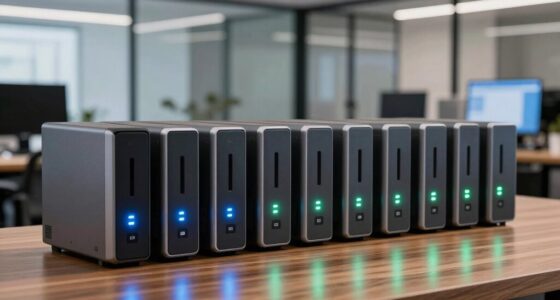
Portable external hard drives give you extra room for backups, photos, games, and large files without relying on cloud storage. My best overall pick is the WD 4TB My Passport, which balances useful capacity with a portable design; the SanDisk 2TB Extreme Portable SSD is a better fit for buyers who prioritize speed and a rugged build, while the Seagate Portable 4TB offers a straightforward high-capacity HDD option. The main tradeoff is between HDD capacity and SSD speed, with size, durability, and device compatibility also shaping the choice. Smaller drives suit lighter storage needs, while larger models can reduce the need to juggle multiple devices. Read on for the full comparison and recommendations by buyer type.

Get the latest gadgets delivered free — and shop member deals
- Fast, free delivery on millions of items
- Access to Prime Big Deal Days deals on October 6–7
- Prime Video, Amazon Music and more included
Complete the kit



Key Takeaways
- WD My Passport 4TB is my best overall balance for portable everyday storage, while the 5TB version favors buyers who need more room.
- SanDisk Extreme Portable SSD 2TB stands apart from the HDD lineup for speed and ruggedness, but it offers less capacity than the largest hard drives.
- WD Elements 6TB and Seagate Portable 4TB show the appeal of HDDs: substantial storage in a portable format, with slower transfers than SSDs.
- The 500GB UnionSine and generic drives have limited headroom for large photo libraries, game collections, or long-term backups.
- Seagate One Touch 8TB has the highest listed capacity, but its desktop designation makes it less aligned with buyers who need a drive to carry every day.





| portable external hard drife | Capacity | Interface | Form factor |
|---|---|---|---|
| 500 GB External Hard Drive | 500 GB | USB 3.0 | 2.5 inches |
| Seagate Portable 4TB External | 4TB | — | — |
| SanDisk 2TB Extreme Portable S | 2TB | — | — |
| WD 6TB Elements Portable Exter | 6 TB | — | 2.5 inches |
| UnionSine 500GB Ultra Slim Por | 500 GB | USB 3.0 | 2.5 inches |
| Seagate Portable 1TB External | 1 TB | USB 3.0 | Portable |
| Seagate 2TB Portable Hard Driv | 2 TB | USB 3.0 | Portable |
| WD 4TB My Passport Portable Ex | 4 TB | — | — |
| UnionSine 1TB Ultra Slim Porta | 1 TB | USB 3.0 | 2.5 in |
| Toshiba Canvio Basics 1TB Port | 1 TB | USB 3.0 | 2.5 in |
| Western Digital 5TB Elements P | 5 TB | USB 3.0/2.0 | 2.5 inches |
| Seagate One Touch 8TB External | 8 TB | — | — |
| WD 2TB Elements Portable Exter | 2 TB | USB 3.2 Gen 1 / USB 3.0 | — |
| SanDisk 1TB Portable Drive | 1 TB | — | — |
| WD 5TB My Passport Portable Ex | 5 TB | — | — |
More Details on Our Top Picks
500 GB External Hard Drive – Portable USB 3.0 Slim HDD for Windows, Mac, PS4, Xbox One, Xbox 360
This compact HDD is a practical pick for someone moving a modest game library or a set of everyday files between a computer and a console. Its USB 3.0 connection and listed compatibility with PS4, Xbox One, and Xbox 360 make it more console-focused than the Seagate Portable 4TB, which is the better fit when sheer backup capacity matters. At 0.35 lb, it is easy to carry, though its 500GB capacity fills quickly if you keep multiple large games or video files on hand. The plastic enclosure and 5,400 rpm drive also mean it lacks the toughness and speed of the SanDisk Extreme Portable SSD. Mac users should plan to format it before use, and the one-year warranty is relatively short.
Pros:- Listed compatibility covers several popular consoles and computers
- Light 0.35 lb design is easy to pack
- USB 3.0 supports straightforward plug-and-play transfers
- 2.5-inch form factor suits portable use
Cons:- 500GB capacity is limited for large game libraries or backups
- Mac use requires formatting
- Plastic enclosure and one-year warranty offer modest reassurance for frequent travel
Best for: Console owners who want a lightweight drive for a small selection of games and occasional file transfers
Not ideal for: People building a large photo or video archive, or Mac users who want a ready-to-use drive without reformatting
- Capacity:500 GB
- Interface:USB 3.0
- Form factor:2.5 inches
- Weight:0.35 lb
- Read speed:133 MB/s
- Write speed:103 MB/s
- Rotational speed:5,400 rpm
- Warranty:1 year
Our verdict“Choose this drive for a compact, console-compatible way to carry a smaller set of files or games.”
Seagate Portable 4TB External Hard Drive HDD – USB 3.0, 1-Year Rescue
The Seagate Portable 4TB is the straightforward choice when capacity per carried drive matters more than ruggedness or SSD speed. Four terabytes gives laptop users room for broad photo, video, and document backups, while the USB 3.0 plug-and-play setup keeps installation simple on Windows and Mac. Compared with the 500GB portable HDDs in this roundup, it leaves far more room before you need to prune files; against the WD 6TB Elements, it trades two terabytes of space for a more modest capacity to carry. The supplied 18-inch cable is convenient, but this is still a conventional HDD: it needs a computer connection and is less suited to rough travel than the SanDisk Extreme Portable SSD. No backup software is included, so buyers must choose their own backup routine.
Pros:- 4TB capacity accommodates substantial file collections
- USB 3.0 connection supports common computer setups
- Plug-and-play use avoids a complicated setup
- Includes an 18-inch USB 3.0 cable
Cons:- No backup software is included
- Requires a computer connection to use
- Conventional HDD construction is less suited to rough handling than the SanDisk SSD
Best for: Windows or Mac laptop owners who want one portable drive for regular multi-device backups and media storage
Not ideal for: Travelers who need drop and water protection, or buyers who want built-in backup software
- Capacity:4TB
- Connection:USB 3.0
- Compatibility:Windows and Mac
- Included cable:18-inch USB 3.0 cable
- Warranty:1 Year Rescue
- Drive type:Portable external HDD
Our verdict“Pick the Seagate when you want ample portable backup space with simple USB setup.”
SanDisk 2TB Extreme Portable SSD
For frequent travel or moving large working files, the SanDisk Extreme is the standout for speed and physical protection. Its listed read and write speeds reach 1,050MB/s and 1,000MB/s, far beyond the mechanical drives here, including the Seagate Portable 4TB. That difference can shorten large transfers, while the SSD design avoids the spinning mechanism of a 5,400 rpm HDD. The IP65 rating, drop protection up to 3 meters, and hardware encryption make it better suited to a camera bag or field kit than the plastic-enclosed WD Elements. The tradeoff is capacity: at 2TB, it holds less than the 4TB Seagate or 6TB WD. Its performance also depends on the host device, and the product data does not list an included cable or accessories.
Pros:- High listed read and write speeds suit large transfers
- IP65 water and dust resistance supports outdoor use
- Drop protection is specified up to 3 meters
- 256-bit AES hardware encryption adds a security layer
Cons:- 2TB capacity is below the 4TB Seagate and 6TB WD HDD options
- Maximum performance depends on the host device
- Included cable or accessory details are not provided
Best for: Photographers, video editors, and mobile professionals who transfer large files and carry storage in the field
Not ideal for: Budget-conscious archivers who prioritize maximum capacity over speed, or owners without compatible USB-C/USB 3.2 Gen 2 connections
- Capacity:2TB
- Maximum read speed:1,050 MB/s
- Maximum write speed:1,000 MB/s
- Connectivity:USB-C, USB 3.2 Gen 2
- Water and dust resistance:IP65
- Drop protection:Up to 3 meters
- Encryption:256-bit AES hardware encryption
- Non-operating temperature:-20°C to 85°C
Our verdict“Choose this SSD if transfer speed, protection, and hardware encryption matter more than maximum capacity.”
WD 6TB Elements Portable External Hard Drive for Windows, USB 3.2 Gen 1/USB 3.0
The WD Elements is the capacity leader among the portable HDDs in this batch, with 6TB in a 2.5-inch drive. That makes it appealing for carrying a large archive or consolidating backups that would otherwise occupy several smaller drives. Compared with the Seagate Portable 4TB, it provides more space, while the SanDisk Extreme 2TB SSD is a better match for quick transfers and travel protection. USB 3.2 Gen 1 offers broad USB compatibility, but the listing’s performance figures are inconsistent: it reports 1,050 MB/s read speed alongside a 50–150 MB/s media speed and a 1 MB/s transfer rate. I would not rely on those figures to predict real-world speed. The plastic enclosure and lack of listed encryption or backup software also keep this focused on capacity over protection and extras.
Pros:- 6TB capacity leads the portable HDDs in this batch
- 2.5-inch form factor keeps the large archive in a portable format
- USB 3.2 Gen 1 connection is broadly compatible with USB setups
- Listed for desktop, laptop, and tablet use
Cons:- Published speed figures conflict, making performance hard to judge
- Plastic enclosure offers limited reassurance for rough travel
- No backup software or encryption features are listed
Best for: Laptop and desktop owners carrying large photo, video, or document archives who value capacity over ruggedness
Not ideal for: People who need dependable speed claims, built-in encryption, or a drive designed for rough travel
- Capacity:6 TB
- Hard disk interface:USB 3.2
- Form factor:2.5 inches
- Compatible devices:Desktop, laptop, tablet
- Media speed:50–150 MB/s
- Cache memory:6 MB
- Enclosure material:Plastic
Our verdict“Choose this WD when fitting the largest possible archive on a portable HDD is your main priority.”
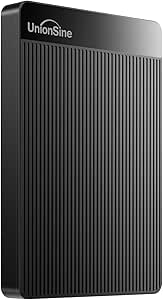
UnionSine 500GB Ultra Slim Portable External Hard Drive HDD-USB 3.0
The UnionSine’s strongest case is its ultra-slim 2.5-inch design and a listed three-year warranty. For a modest set of documents, media, or console files, it is an easy-to-carry alternative to higher-capacity drives such as the Seagate Portable 4TB or WD 6TB Elements. Its USB 3.0 connection and plug-and-play setup keep routine transfers simple, and the listing names computers, consoles, and televisions among compatible devices. The 500GB limit is the main constraint: it suits a small collection, not a broad backup library. Its 5,400 rpm HDD also cannot match the SanDisk Extreme Portable SSD for speed or rugged protection, and there is no encryption listed. The longer warranty helps, but it does not change the limited capacity.
Pros:- Ultra-slim 2.5-inch design is easy to carry
- USB 3.0 and plug-and-play setup simplify everyday use
- Listed compatibility includes computers, gaming consoles, and televisions
- Three-year warranty is longer than the one-year coverage listed for several HDD alternatives
Cons:- 500GB capacity limits use to smaller file collections
- 5,400 rpm HDD cannot match the SanDisk SSD’s listed transfer speeds
- No encryption or advanced security features are listed
Best for: People who want a slim drive for carrying a small collection of files between a computer, TV, or console
Not ideal for: Users backing up large media libraries or seeking SSD speed, rugged protection, or built-in encryption
- Capacity:500 GB
- Interface:USB 3.0
- Form factor:2.5 inches
- Rotational speed:5,400 RPM
- Read speed:125 MB/s
- Write speed:103 MB/s
- Compatible devices:Desktop, gaming console, laptop, television
- Warranty:3 years
Our verdict“Pick the UnionSine for slim everyday carry and a longer listed warranty when 500GB is enough.”
Seagate Portable 1TB External Hard Drive HDD – USB 3.0 for PC, Mac, PlayStation, & Xbox, Black
Broad device compatibility gives this Seagate a useful role for buyers who move files between a computer and a game console. Its 1TB capacity suits a focused library of documents, photos, or console files, while the 190 g body is easy to carry in a laptop bag. Compared with the Seagate 2TB Portable Hard Drive, this model takes up the same kind of portable-drive role with less room for a growing collection; the smaller capacity makes sense when keeping the drive light and the storage need modest matters more than headroom. USB 3.0 and plug-and-play setup keep everyday transfers straightforward. Mac owners may need to reformat it, and there is no included backup or encryption software, so buyers who want built-in protection should look at the WD My Passport instead.
Pros:- Compact 190 g design is convenient to carry
- USB 3.0 plug-and-play setup supports straightforward transfers
- Compatible with desktop computers, laptops, and gaming consoles
Cons:- 1TB leaves less room than the Seagate 2TB model for growing libraries
- Mac users may need to reformat the drive
- No included backup or encryption software
Best for: Console owners and laptop users who need a lightweight drive for a modest collection of files or game data.
Not ideal for: Mac users who want setup without reformatting, or anyone needing several terabytes or built-in encryption.
- Capacity:1 TB
- Interface:USB 3.0
- Form factor:Portable
- Compatible devices:Desktop, laptop, gaming console
- Rotational speed:7200 RPM
- Read speed:120 MB/s
- Weight:190 g
- Dimensions:4.61 × 3.15 × 0.58 in
Our verdict“Choose this Seagate for portable console and computer storage when 1TB is enough and basic setup is all you need.”
Seagate 2TB Portable Hard Drive USB 3.0
2TB capacity in a portable format makes this Seagate a practical step up for people whose files no longer fit comfortably on a 1TB drive. Like the Seagate Portable 1TB, it offers USB 3.0 and plug-and-play simplicity, but the extra space gives photo libraries, backups, and everyday files more room to grow. The tradeoff is a basic storage experience: the listing does not include advanced backup tools or encryption, so buyers seeking protection features may prefer the WD 4TB My Passport. Its reported 120 MB/s read speed is suited to routine file access, while the drive remains a mechanical HDD rather than an SSD. This pick is best for straightforward storage; its listing also describes the design as potentially bulkier than smaller drives.
Pros:- 2TB capacity provides more room than the Seagate 1TB model
- USB 3.0 supports common computer connections
- Plug-and-play setup keeps routine storage simple
- Compatible with Windows and Mac systems
Cons:- No included advanced backup or encryption software
- The listing notes a bulkier design than smaller drives
- Mechanical HDD performance is less suited to frequent large transfers than an SSD
Best for: Students and home users who want a portable place for growing files and backups without needing bundled security tools.
Not ideal for: Travelers prioritizing the smallest possible drive, or buyers who need encryption, automated backup software, or SSD performance.
- Capacity:2 TB
- Interface:USB 3.0
- Connectivity:USB
- Form factor:Portable
- Compatible devices:Laptop, PC, Mac
- Rotational speed:7200 RPM
- Read speed:120 MB/s
- Features:Plug and play
Our verdict“Pick the Seagate 2TB when you want more portable storage than a 1TB drive offers and can do without built-in security features.”
WD 4TB My Passport Portable External Hard Drive
For portable storage that also addresses data protection, the WD 4TB My Passport has a clearer advantage than the basic Seagate drives in this group. Its hardware encryption and password protection help protect files if the drive is lost, while included backup software with ransomware defense adds a layer of support for backup routines. Four terabytes also offer substantially more room than the 1TB and 2TB Seagate options, making this a better fit for larger photo and video collections. The compromise is that security features bring a more involved setup than a simple plug-and-play drive, and its USB 3.1/3.0 connection depends on a compatible port for expected performance. Buyers who only need uncomplicated extra space can save effort by choosing a simpler drive such as the Toshiba Canvio Basics.
Pros:- Hardware encryption and password protection add a layer of file security
- Backup software includes ransomware protection
- 4TB offers more room than the 1TB and 2TB drives in this batch
- Slim, durable design supports portable use
Cons:- Setup and security features may be unnecessary overhead for basic storage
- USB port compatibility affects access to the listed interface performance
- This model is limited to 4TB
Best for: Photographers, remote workers, and families carrying sensitive files who want portable capacity with encryption and backup tools.
Not ideal for: Buyers who want the simplest possible plug-in storage, or those who need more than 4TB in this model.
- Capacity:4 TB
- Connectivity:USB 3.1 / USB 3.0
- Warranty:3 years
- Password protection:Included
- Hardware encryption:Included
- Backup software:Includes ransomware protection
- Color:Black
Our verdict“Choose the WD My Passport if you carry sensitive files and want encryption and backup tools alongside 4TB of portable storage.”
UnionSine 1TB Ultra Slim Portable External Hard Drive HDD-USB 3.0
The UnionSine 1TB emphasizes a slim, lightweight carry profile and broad device compatibility, including TVs and gaming consoles. Its listed read speed of 120 MB/s and USB 3.0 connection suit everyday file transfers, while the 5400 rpm mechanical drive keeps it in the standard HDD category. Compared with the Seagate Portable 1TB, the UnionSine lists TV compatibility and heat-dissipation strips, but Seagate specifies a 7200 rpm rotational speed. Neither offers included encryption, so the UnionSine is a simpler choice for moving ordinary files rather than securing sensitive backups. The 1TB limit can fill quickly with video, and its performance is not comparable to the SanDisk Extreme Portable SSD for demanding transfer workloads.
Pros:- Ultra-slim design is easy to carry
- USB 3.0 and plug-and-play support everyday transfers
- Compatibility includes desktop computers, laptops, consoles, and televisions
- Listing includes warranty and technical support
Cons:- 1TB capacity may be limiting for large video collections
- 5400 rpm HDD is less suited to demanding transfer workloads than an SSD
- No included encryption or advanced security features
Best for: Travelers and entertainment users who want a slim 1TB drive for everyday files across computers, TVs, and consoles.
Not ideal for: People managing large media archives, needing encryption, or seeking SSD-class transfer performance.
- Capacity:1 TB
- Interface:USB 3.0
- Form factor:2.5 in
- Rotational speed:5400 rpm
- Read speed:120 MB/s
- Color:Black
- Controller:JMicron 578
Our verdict“Choose the UnionSine for slim, general-purpose 1TB storage across several device types, provided you do not need encryption or SSD speed.”
Toshiba Canvio Basics 1TB Portable External Hard Drive USB 3.0, Black
Windows-ready simplicity is the Canvio Basics’ main reason to make this list: it arrives pre-formatted for Windows and uses USB 3.0 for familiar plug-and-play storage. Its 1TB capacity is a fit for a smaller backup or a working set of files, while the 2.5-inch form factor and polycarbonate enclosure suit carrying alongside a laptop. Compared with the UnionSine 1TB, the Toshiba does not list the same broad console and TV compatibility, but its Windows-first setup makes the intended use clear. Mac owners should expect to reformat it, and the provided speed data is inconsistent, listing a read speed of one byte per second; I would not use that figure to predict real-world performance. For added security, the WD My Passport is the stronger alternative, though more feature-rich.
Pros:- Pre-formatted for Windows with plug-and-play setup
- USB 3.0 connection works with compatible devices
- Portable 2.5-inch design with a polycarbonate enclosure
- Mac and PC compatibility is listed
Cons:- Mac users may need to reformat the drive
- Listed read speed of 1 byte per second is not useful for judging performance
- No included encryption or advanced backup tools
Best for: Windows laptop owners who want a straightforward, portable 1TB drive for file storage or a basic backup.
Not ideal for: Mac users who want ready-to-use formatting, or buyers who need verified speed figures, encryption, or more than 1TB.
- Capacity:1 TB
- Interface:USB 3.0
- Form factor:2.5 in
- Rotational speed:5400 rpm
- Read speed:1 byte per second (as listed)
- Data transfer rate:5 gigabits per second
- Enclosure material:Polycarbonate
- Compatibility:Mac, PC
Our verdict“Choose the Canvio Basics for uncomplicated Windows storage if you can accept 1TB capacity and Mac reformatting.”
Western Digital 5TB Elements Portable External Hard Drive for Windows and Mac
The 5TB Elements Portable suits people who want a large backup library in a drive-sized-to-carry format. Its USB connection and Windows and Mac compatibility make it a straightforward choice for moving photo, video, and work archives between computers. Compared with the WD 2TB Elements, it leaves more room for growing collections; the tradeoff is a larger capacity than many casual users need to keep in a travel bag. The supplied data lists a 50 MB/s transfer rate, so I would not choose it for frequent transfers where speed is the main priority. It also lacks the security features listed for the WD 5TB My Passport, making the Elements a better fit for general storage than sensitive files.
Pros:- 5TB capacity accommodates sizable photo and video archives
- Portable 2.5-inch form factor
- Works with Windows and Mac systems
- USB connectivity supports broad device compatibility
Cons:- Listed transfer rate is modest for frequent large-file transfers
- No password protection or hardware encryption is specified
- Enclosure material durability is unclear from the supplied data
Best for: Windows and Mac users who want several terabytes for backups and media files in a compact drive.
Not ideal for: Travelers who prioritize rugged protection, fast repeated transfers, or built-in file security.
- Capacity:5 TB
- Interface:USB 3.0/2.0
- Form factor:2.5 inches
- Compatibility:Windows and Mac
- Listed read speed:50 MB/s
- Rotational speed:7200 RPM
- Color:Black
Our verdict“Choose the 5TB Elements if you want a portable, high-capacity backup drive and can prioritize storage space over speed and security features.”
Seagate One Touch 8TB External Hard Drive Desktop HDD – USB-C Compatible with Windows and macOS
Among these five picks, the Seagate One Touch 8TB offers the most stated storage, which makes it suited to consolidating large media libraries or keeping extensive backups together. Its bus-powered USB-C connection avoids a separate power supply, a practical advantage when desk space and cables are limited. The 8TB capacity exceeds the 5TB offered by the WD Elements and WD My Passport, though the product is described as a desktop HDD, so I would check its size and portability needs before choosing it for regular travel. The supplied data does not specify transfer speeds, encryption, or included backup software. A two-year warranty and data recovery services add support, but buyers seeking built-in file protection may prefer the My Passport.
Pros:- 8TB capacity is the largest in this batch
- Bus-powered design needs no wall outlet
- USB-C connection offers a simple single-cable setup
- Includes stated data recovery services and a two-year warranty
Cons:- Listed as a desktop HDD, so portability may be less convenient than compact portable models
- No transfer speed is provided in the supplied specifications
- No encryption or backup software is specified
Best for: People with large video, photo, or project archives who want one USB-C drive for backups at home or in the office.
Not ideal for: Frequent travelers who need a clearly compact drive, or users who require stated encryption and transfer-speed details.
- Capacity:8 TB
- Connection:USB-C
- Compatibility:Windows and macOS
- Power:Bus-powered
- Warranty:2 years
- Data recovery:Rescue Data Recovery Services
- Drive type:Desktop HDD
Our verdict“Pick the One Touch if maximum capacity and a bus-powered USB-C setup matter more than compact travel dimensions or stated security features.”
WD 2TB Elements Portable External Hard Drive for Windows and Mac
The WD 2TB Elements is a sensible middle ground for buyers who want room for everyday files without carrying the 5TB capacity of its larger Elements sibling. Its compact, lightweight design and plug-and-play setup suit a laptop bag or a simple home backup routine, while USB 3.2 Gen 1 gives it a familiar connection for compatible computers. The SanDisk 1TB Portable Drive lists much faster read speeds and shock resistance, so it is the stronger match for speed and rougher travel. The WD offers twice the stated capacity, but the supplied details do not give a numeric transfer rate or describe rugged protection. Its best case is uncomplicated storage rather than secure or high-performance work.
Pros:- 2TB capacity balances everyday storage with portability
- Compact, lightweight design suits travel with a laptop
- Plug-and-play setup keeps routine backups simple
- USB 3.2 Gen 1 interface is compatible with USB 3.0
Cons:- Less storage than the 5TB WD Elements and 8TB Seagate One Touch
- No numeric transfer speed is provided
- No ruggedness or data-security features are specified
Best for: Students and laptop owners who need a lightweight drive for documents, photos, and routine backups across Windows and Mac.
Not ideal for: Buyers with very large video archives, frequent high-speed transfer needs, or a requirement for stated drop protection.
- Capacity:2 TB
- Interface:USB 3.2 Gen 1 / USB 3.0
- Compatibility:Windows and Mac
- Design:Portable and lightweight
- Setup:Plug and play
- Power:USB connection
Our verdict“Choose the 2TB Elements for straightforward portable backups when you want more room than a 1TB drive but do not need a large archive disk.”
SanDisk 1TB Portable Drive, Up to 600MB/s Read Speeds – Black
The SanDisk Portable Drive stands apart from the HDD options here by listing read speeds up to 600 MB/s and a shock-resistant design. That combination can make moving active files between compatible devices more convenient, and it gives the drive a travel-friendly edge over the capacity-focused WD 5TB Elements. The tradeoff is its 1TB capacity: buyers with large photo or video libraries will fill it sooner and may prefer one of the larger WD or Seagate drives. The supplied data gives a maximum read speed, not write speed, so I would not assume transfers run at that rate in both directions. USB connectivity and host-device performance also shape the results.
Pros:- Listed read speeds reach up to 600 MB/s
- Shock-resistant design suits portable use
- Compact form is easy to carry
- Compatible devices include desktops, laptops, smartphones, and tablets
Cons:- 1TB capacity is limited beside the 2TB and 5TB WD options
- Write speeds are not specified and may be lower than read speeds
- Actual performance depends on the host device
Best for: Photographers, students, and mobile workers who move a moderate set of files between compatible devices and value a shock-resistant design.
Not ideal for: People backing up multi-terabyte media collections or buyers who need confirmed high write speeds.
- Capacity:1 TB
- Connectivity:USB
- Listed maximum read speed:Up to 600 MB/s
- Additional feature:Shock resistant
- Compatible devices:Desktop, laptop, smartphone, tablet
- Color:Black
Our verdict“Choose the SanDisk if transfer speed and shock resistance matter more to you than the larger storage capacity of the HDD picks.”
WD 5TB My Passport Portable External Hard Drive
The WD 5TB My Passport pairs a portable, slim design with file-protection features that the WD 5TB Elements does not list. Password protection, hardware encryption, and backup software with ransomware protection make it a more fitting choice for carrying sensitive work or personal files. It also matches the Elements model’s stated 5TB capacity, so the choice rests on security features and software versus a simpler storage setup. The tradeoff is that the supplied connection is limited to USB 3.1/3.0, and no transfer-speed figure or included accessories are specified. For buyers who only need a large backup destination, the WD Elements is simpler; for portable files that need an added layer of protection, My Passport has a clearer purpose.
Pros:- 5TB capacity in a slim portable design
- Password protection and hardware encryption
- Backup software includes ransomware protection
- Three-year warranty
Cons:- USB 3.1/3.0 connection may not suit users seeking a stated USB-C interface
- No transfer-speed figure is provided
- Included cables and other accessories are not specified
Best for: Remote workers and frequent travelers who carry sensitive documents alongside large personal or work backups.
Not ideal for: Buyers who want the fastest stated transfer speeds or need a drive with a specified USB-C connection.
- Capacity:5 TB
- Connectivity:USB 3.1/USB 3.0
- Security:Password protection and hardware encryption
- Backup features:Backup software with ransomware protection
- Design:Slim and portable
- Warranty:3 years
- Color:Black
Our verdict“Choose My Passport if you want 5TB of portable storage with stated encryption and backup protection for files you carry.”
How We Picked
I compared these drives around the needs implied by portable external storage: carrying convenience, useful capacity, connection and device fit, transfer speed, and the tradeoff between HDD and SSD designs. I gave weight to whether the stated capacity seems practical for the likely job, from moving documents to maintaining a large media archive. I also considered the product’s stated compatibility and any standout build or utility features, while treating model names and advertised specifications as claims rather than independent test results.
The ranking favors options that combine portable form with broadly useful capacity. The WD My Passport 4TB leads as a balanced everyday choice; the SanDisk SSD ranks highly for buyers who value speed and a tougher portable design. Larger HDDs remain compelling for capacity, but receive less emphasis for frequent file transfers, and the 8TB desktop drive ranks lower for a roundup focused on portability. Entry-level 500GB models can suit basic use, though they provide less room to grow.
| portable external hard drife | Interface |
|---|---|
| 500 GB External Hard Drive | USB 3.0 |
| Seagate Portable 4TB External | — |
| SanDisk 2TB Extreme Portable S | — |
| WD 6TB Elements Portable Exter | — |
| UnionSine 500GB Ultra Slim Por | USB 3.0 |
| Seagate Portable 1TB External | USB 3.0 |
| Seagate 2TB Portable Hard Driv | USB 3.0 |
| WD 4TB My Passport Portable Ex | — |
| UnionSine 1TB Ultra Slim Porta | USB 3.0 |
| Toshiba Canvio Basics 1TB Port | USB 3.0 |
| Western Digital 5TB Elements P | USB 3.0/2.0 |
| Seagate One Touch 8TB External | — |
| WD 2TB Elements Portable Exter | USB 3.2 Gen 1 / USB 3.0 |
| SanDisk 1TB Portable Drive | — |
| WD 5TB My Passport Portable Ex | — |
Factors to Consider When Choosing Portable External Hard Drives
Start with the job the drive needs to do, then weigh how often you will carry it and move files. A bigger capacity is useful only if the device fits your routine and can connect to the computers or consoles you use.
Choose Capacity Around Your Backup Plan
Capacity needs depend on whether you are moving a few folders or keeping a second copy of an expanding library. A drive used for a full computer backup may need substantially more room than one reserved for documents and occasional transfers. Leave headroom for new files, temporary exports, and versioned backups, which can quietly multiply storage use. A near-full drive can complicate updates and file organization even before it runs out of space. If you are uncertain, estimate the size of the data you plan to copy and allow room for growth. This roundup ranges from 500GB models to an 8TB desktop drive, but the largest listed capacity is not automatically the best travel choice.
Decide Whether Speed or Storage Matters More
Portable HDDs generally make the most sense when capacity per device matters more than fast repeated transfers. SSDs are usually the better fit for working directly with large files, moving footage, or keeping a responsive portable project drive. The SanDisk 2TB Extreme Portable SSD represents that speed-focused option in this group, while the larger WD and Seagate HDDs emphasize space. A fast interface label alone does not make an HDD behave like an SSD, since the drive mechanism remains a major part of transfer performance. Think about how long waits affect your actual workflow before paying extra for speed. For a drive that mostly holds files you rarely open, capacity may matter more.
Check the Full Portability Picture
A drive can be marketed as portable yet still be a poor everyday carry if its size, cable, or power needs do not suit your bag and setup. Check the exact model dimensions and whether it draws power through its connection or needs a separate adapter. The 8TB Seagate One Touch is identified as a desktop HDD, which makes it a less natural match for frequent travel than the compact portable models. For commuting or field work, weight and resistance to bumps matter alongside the headline capacity. A rugged shell can help with ordinary handling, but it does not replace a backup. If the drive will stay on a desk, carrying convenience should count less in your decision.
Match Compatibility to Your Devices
Compatibility involves more than whether a connector fits. A drive may arrive formatted for one operating system, and using it across Windows and macOS can require reformatting or a file system that both can read and write. Reformatting can erase existing contents, so check the setup before copying files. Console support also varies by console generation, game type, and whether the drive stores or runs games. Product titles that mention a platform are a useful starting point, but verify the manufacturer’s instructions for your specific device. If you move between several systems, plan the file system and backup routine before choosing capacity.
Treat One Drive as One Copy
A portable drive can make backups easier, but a single external copy still leaves files exposed to loss, damage, theft, or drive failure. For irreplaceable photos and work, keep another copy on a separate drive or in a trusted cloud service. Disconnecting the backup after it finishes can reduce exposure to accidental deletion or malware that reaches connected storage. Consider how often you need to update the backup; a drive that is inconvenient to connect may fall out of the routine. Larger HDDs can consolidate more data, while smaller drives may encourage separate copies for different projects. Choose a backup schedule you can maintain, rather than relying on capacity alone.
Pay for Features You Will Actually Use
Extra capacity, a rugged design, bundled software, and faster SSD performance each solve different problems. Paying for a large drive makes sense when it replaces several smaller ones or holds a growing archive, but it adds little value if most of the space stays empty. A rugged SSD can suit frequent travel and active workflows, while a basic portable HDD may be a more practical choice for a stationary backup rotation. Check whether included software is compatible with your devices and whether the features require a subscription or setup. Do not assume that a familiar brand name guarantees the same utilities across every model. Compare the specific model’s features with your routine before making them part of the decision.
Frequently Asked Questions
Should I choose the SanDisk 2TB SSD or a 4TB portable HDD?
Choose the SanDisk SSD if faster transfers, a rugged portable design, or working from the drive matter more than maximum capacity. A 4TB HDD is a stronger fit when you need more room for backups and media and can accept slower transfers. The SSD’s 2TB capacity may be plenty for active projects, but large archives can fill it sooner. The HDD can hold more, though repeated large transfers may take longer. Match the choice to how often you move files, not just the capacity printed on the product.
Is a 500GB portable drive enough for a computer backup?
It can be enough for selected folders or a small set of documents, but a full computer backup may exceed 500GB depending on your files and backup method. Check the used storage on your computer and whether the backup software keeps older versions. Photos, video, and game installations can use space quickly. A backup drive also benefits from spare capacity as your data grows. If you need a complete backup with room to maintain older copies, a larger model is often more practical.
Can I use one portable drive with both a Mac and a Windows PC?
Often, yes, but the drive’s file system determines whether both computers can read and write files conveniently. Some drives ship formatted for a particular platform, and reformatting can erase stored data. A shared file system may have limitations compared with a format tailored to one operating system. Check the drive maker’s setup guidance and your computers’ requirements before loading files. If you need to move between machines regularly, test the arrangement with nonessential files first.
Is the Seagate One Touch 8TB suitable for travel?
The product is described as a desktop HDD, so I would not choose it as a default everyday carry drive. Its listed capacity is useful for a large archive or a stationary backup setup where carrying size matters less. Before buying, check its physical dimensions, power requirements, and connection details against your travel setup. A portable 4TB HDD or compact SSD may be easier to carry frequently. The right choice depends on whether your priority is consolidating files or taking the drive with you.
Will an external hard drive let me play games on a PlayStation or Xbox?
That depends on the console generation and the game. Some consoles allow an external USB drive to store games or run older titles, while newer games may need to be installed on internal or approved high-speed storage to play. A product title that lists PlayStation or Xbox does not establish support for every console feature. Check the console maker’s current storage rules and the drive’s compatibility notes for your exact model. If you mainly want more room for a game library, confirm whether you need storage, direct play, or both.
Conclusion
For most buyers who want one portable drive for everyday files and backups, I recommend the WD 4TB My Passport as the best overall balance. The Seagate Portable 4TB is my best value style of pick for buyers who want straightforward HDD capacity, while the SanDisk 2TB Extreme Portable SSD is the premium choice for speed and a more rugged portable build. Beginners with modest storage needs can start with the Toshiba Canvio Basics 1TB or a 1TB Seagate Portable drive, after checking compatibility with their devices. For a large archive that mostly stays put, consider the WD Elements 6TB; the Seagate One Touch 8TB is aimed at still higher capacity when desktop placement suits your setup. Choose by the work the drive must do: everyday carrying, faster active files, or keeping a large collection in one place.
Fall Picks
fall essentials
As an affiliate, we earn on qualifying purchases.